Daily Coping 4 Dec 2020

I started to add a daily coping tip to the SQLServerCentral newsletter and to the Community Circle, which is helping me deal with the issues in the world. I’m adding my responses for each day here. All my coping tips are under this tag. 

Today’s tip is to enjoy new music today. Play, sing, dance, or listen.

I enjoy lots of types of music, and I often look to grab something new from Spotify while I’m working, letting a particular album play through, or even going through the works of an artist, familiar or brand new.

Recently I was re-watching The Chappelle Show online, and in the 2nd or 3rd episode of the show, he has Mos Def on as a guest. I do enjoy rap, and I realized that I had never really heard much from Mos. The next day I pulled up his catalog and let us play through while working.

I love a smooth, continuous rap artist that brings a melody and a rhythm to the words. Mos Def does this, and I enjoyed hearing him entertain me for a few hours. If you like rap, and haven’t gone through his stuff, give him a listen.

Posted in Blog | Tagged , , | Comments Off on Daily Coping 4 Dec 2020

Catching Minor Issues

This seems like something out of a thriller that Hollywood made for a spy. Someone switches two cables in a rocket and then it crashes. However, it’s what happened recently, not from a spy, but an employee somewhere connected two cables to the wrong connectors, resulting in reverse commands being sent to the rocket.

That sounds crazy. Who would plug cables in backwards, and how is this not caught? Surely we wouldn’t run into this in software would we? With all the unit testing? Well, we did once have an English->metric error.

Actually, I’ve seen this in software. I’ve seen someone pass parameters in backwards to a method or stored procedure. I think I’ve done this before as well. While I hate typing out named parameters, I do appreciate SQL Prompt for ensuring I connect the right value to the right parameter by spelling them out.

Do you type out parameter names, as in EXEC myProc @Param1 = @value1, @param2 = @value2? It’s a good habit to get into to prevent simple mistakes. In fact, this is where some simple, quick tests can catch errors. Not only will this catch some weird changes, this can ensure that your procedures are backwards compatible. That’s often a concern in refactoring, where someone might not think a parameter is being used, or wants to replace it and then breaks other code.

Testing is something that has improved in software dramatically over the years, though not as much in databases as I’d like. I urge you to use more procedures, but also add more tests and ensure that you don’t make simple errors that should be caught.

Steve Jones

Listen to the podcast at Libsyn, Stitcher or iTunes.

Posted in Editorial | Tagged | 1 Comment

Daily Coping 3 Dec 2020

I started to add a daily coping tip to the SQLServerCentral newsletter and to the Community Circle, which is helping me deal with the issues in the world. I’m adding my responses for each day here.

Today’s tip is to join a friend doing their hobby and find out why they love it.

Joining someone else isn’t really a good idea or very possible during this time. Colorado is slightly locked down, so it’s not necessarily legal, and likely not a good idea to join someone else.

However, my daughter picked up some supplies and started knitting recently. I decided to sit with her a bit and see how the new hobby is progressing. It’s something I’ve been lightly interested in, and it looks somewhat zen to sit and allow your hands to move along, building something while you sit quietly. I remember reading about Rosey Grier picking up the hobby years ago.

I have done some minor paracord crafts, usually making some bag pulls for the kids I coach. This was similar, and while I don’t need another hobby now, I enjoyed watching her work.

Posted in Blog | Tagged , , | Comments Off on Daily Coping 3 Dec 2020

Ignoring Comments in SQL Compare

Recently I had a client that wanted to know how they could use SQL Compare to catch actual changes in their code, but not have comments show up as changes. This is fairly easy to do, and this post looks at how this works.

Setting up a Scenario

Let’s say I have two databases that are empty. I’ll name them Compare1 and Compare2. I’ll run this code in Compare1:

CREATE TABLE MyTable
(   MyKey INT NOT NULL IDENTITY(1, 1) CONSTRAINT MyTablePk PRIMARY KEY
   , MyVal VARCHAR(100));
GO

CREATE PROCEDURE GetMyTable @MyKey INT = NULL
AS
IF @MyKey IS NOT NULL
     SELECT
           @MyKey AS MyKey, mt.MyVal
     FROM  dbo.MyTable AS mt
     WHERE mt.MyKey = @MyKey;
ELSE
     SELECT mt.MyKey, mt.MyVal
     FROM dbo.MyTable AS mt;
SELECT 1 AS One;
RETURN;
GO

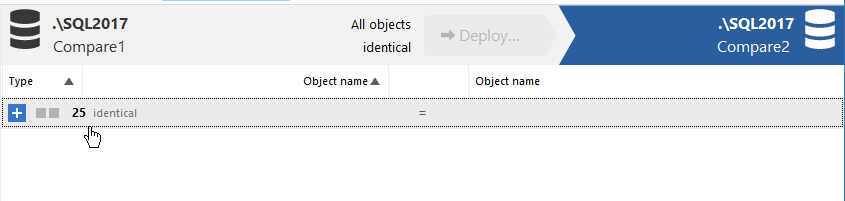
I’ll run the same code in Compare2 and then run SQL Compare 14 against these two databases. As expected, I find no differences.
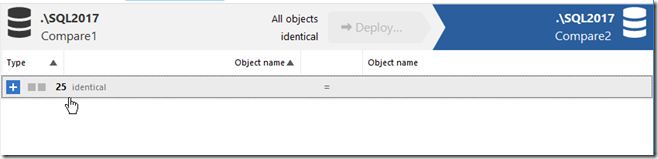
2020-11-30 14_59_33-

I used the default options here, just picking the databases and running the comparison. Let’s now change some code. In Compare2, I’ll adjust the procedure code to look like this:

CREATE OR ALTER PROCEDURE GetMyTable @MyKey INT = NULL
AS
/*
Check for a parameter not passed in. If it is missing, then
get all data.
*/
IF @MyKey IS NOT NULL
     SELECT
           @MyKey AS MyKey, mt.MyVal
     FROM  dbo.MyTable AS mt
     WHERE mt.MyKey = @MyKey;
ELSE
     SELECT mt.MyKey, mt.MyVal
     FROM dbo.MyTable AS mt;
SELECT 1 AS One;
RETURN;
GO

I can refresh my project, and now I see there is a difference. This procedure is flagged as having 4 different lines, as you see in the image below.
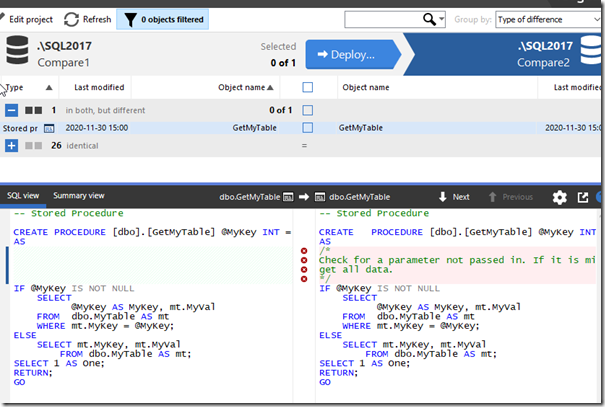
2020-11-30 15_01_59-SQL Compare - E__Documents_SQL Compare_SharedProjects_(local)_SQL2017.SimpleTalk

However, the procedure isn’t different. I’ve just added comments to one of the procs. You might view this as different, in terms of how you run software development, but to the SQL Server engine, these procs are the same. How can I avoid flagging this as a difference and causing a deployment of this code?

Changing Project Options

Redgate has thought of this. In the SQL Compare toolbar, there is an “Edit Project” button.
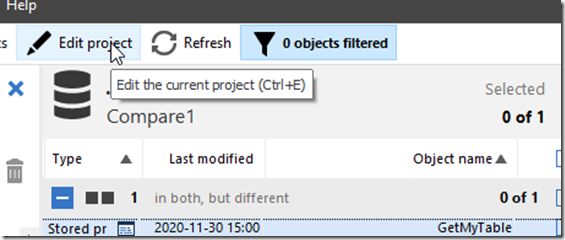
2020-11-30 15_06_34-SQL Compare - E__Documents_SQL Compare_SharedProjects_(local)_SQL2017.SimpleTalk

If I click this, I get the dialog that normally starts SQL Compare, with my project and the databases selected. Notice that there are actually four choices at the top of this dialog, with the rightmost one being “Options”.
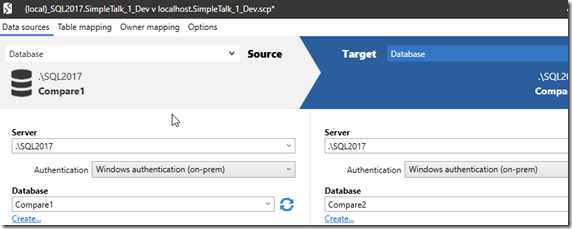
2020-11-30 15_06_40-(local)_SQL2017.SimpleTalk_1_Dev v localhost.SimpleTalk_1_Dev.scp_

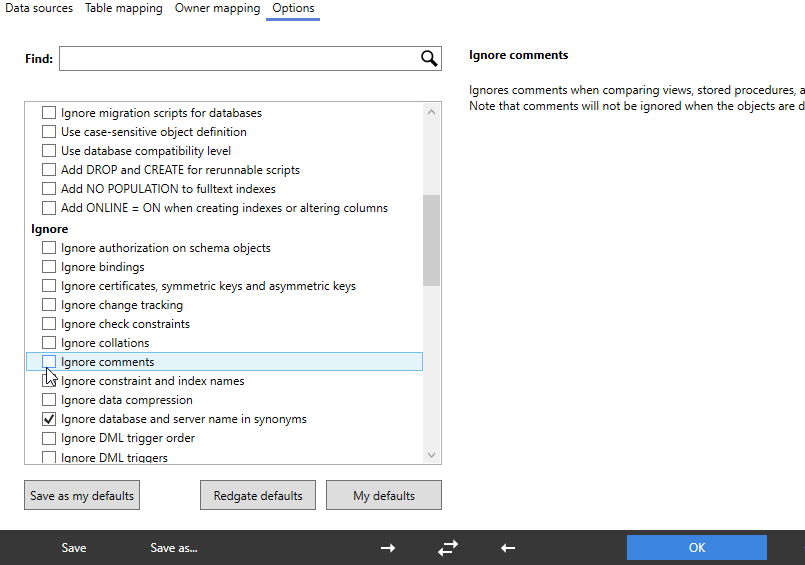
If I click this, there are lots of options. I’ve scrolled down a bit, to the Ignore section. In here, you can see my mouse on the “Ignore comments” option.
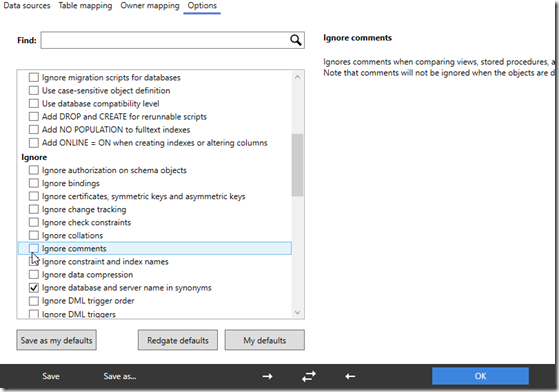
2020-11-30 15_08_06-(local)_SQL2017.SimpleTalk_1_Dev v localhost.SimpleTalk_1_Dev.scp_

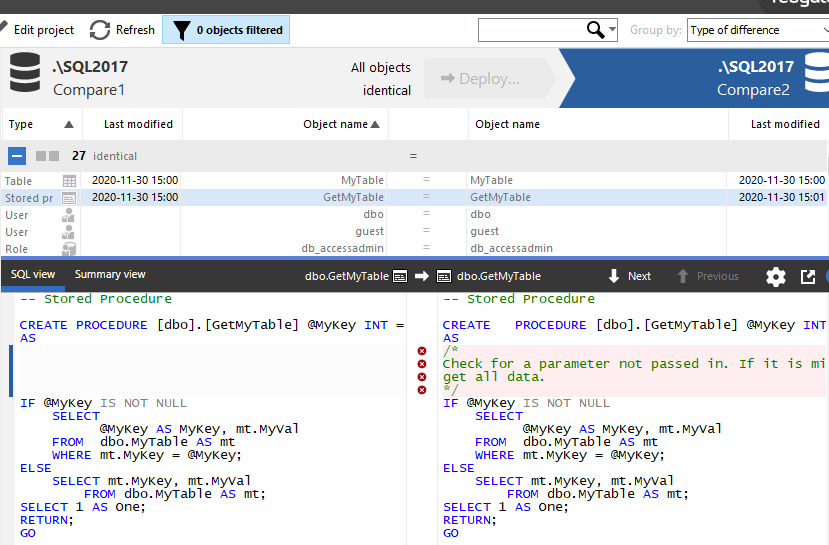
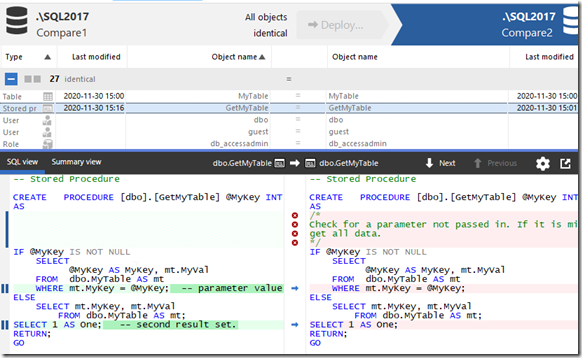
I’ll click that, click Compare Now, which then refreshes my project. Now I all objects shown as identical. However, if I expand the stored procedure object, I can still see the difference. The difference is just ignored by SQL Compare.
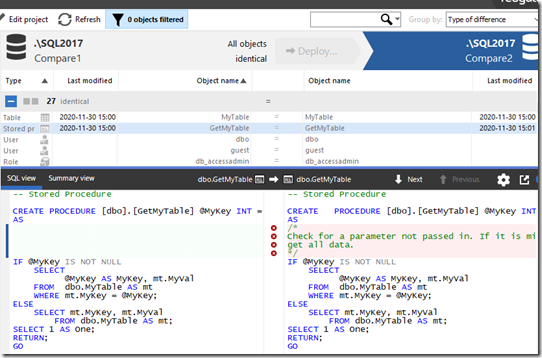
2020-11-30 15_09_36-SQL Compare - E__Documents_SQL Compare_SharedProjects_(local)_SQL2017.SimpleTalk

This lets me track the differences, see them, but not have the project flag them for deployment. If I’m using any of the Redgate automation tools, the command line option for this is IgnoreComments, or icm. You can pass this into any of the tools to prevent comments from causing a deployment by themselves.

This also works with inline comments. I’ll alter the procedure in Compare1 with this code:


CREATE OR ALTER PROCEDURE GetMyTable @MyKey INT = NULL
AS
IF @MyKey IS NOT NULL
     SELECT
           @MyKey AS MyKey, mt.MyVal
     FROM  dbo.MyTable AS mt
     WHERE mt.MyKey = @MyKey;  -- parameter value filter
ELSE
     SELECT mt.MyKey, mt.MyVal
     FROM dbo.MyTable AS mt;
SELECT 1 AS One;   -- second result set.
RETURN;
GO

The refreshed project sees the differences, but this is still seen as an identical object for the purposes of deployment.
2020-11-30 15_17_15-SQL Compare - E__Documents_SQL Compare_SharedProjects_(local)_SQL2017.SimpleTalk

If you are refactoring code, perhaps by just adding comments or clarifying something, you often may not want a deployment triggered just from changing the notes you leave for other developers. SQL Compare can help here, as can all the Redgate tools.

I would recommend this option always be set, unless you have a good reason to allow comments to trigger a deployment.

Give SQL Compare a try today if you’ve never used it, and if you have it, enable this in your projects.

Posted in Blog | Tagged , , | 1 Comment