Day: November 3, 2023

  • Friday Flyway Tips–Seeing Pending Migrations

    I find that quite a few people using Flyway will end up with a lot of migration scripts over time. While you can certainly re-baseline and split scripts into separate folders, visualizing these over time can be hard.

    The Flyway Desktop team added a nice little option that makes it easier to see new work as opposed to old work.We’ll look at that in this post.

    I’ve been working with Flyway Desktop for work more and more as we transition from older SSMS plugins to the standalone tool. This series looks at some tips I’ve gotten along the way.

    Lots of Migration Scripts

    We might see a lot of migration scripts over time in a folder. Certainly I can see this in the file system for one of my projects.
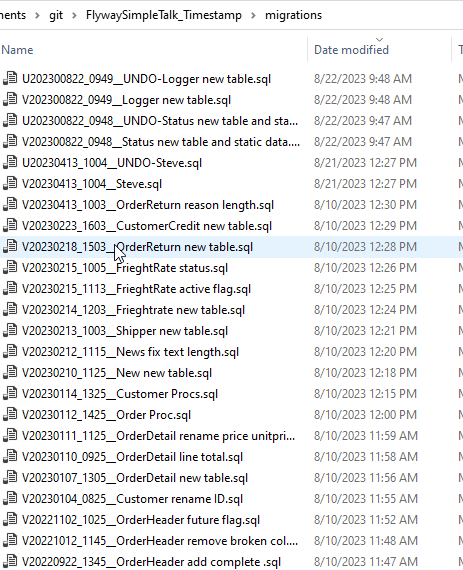
    2023-10-19 15_06_07-migrations

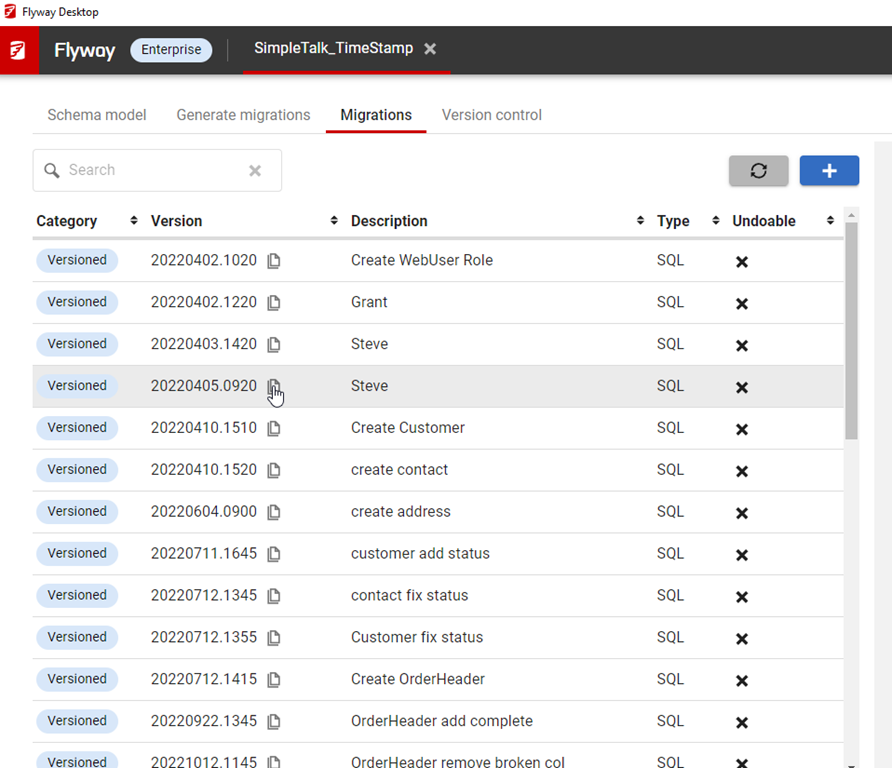
    In Flyway Desktop,  here is my view.

    2023-10-19 15_40_08-Flyway Desktop

    That is a lot of scripts. Since these are ordered as they would apply, it can be a lot of scrolling to find the ones that haven’t been applied.

    However, if I click an environment on the right, I get a different view. Now I see a checkbox above the migrations that says “Only show pending migrations”.
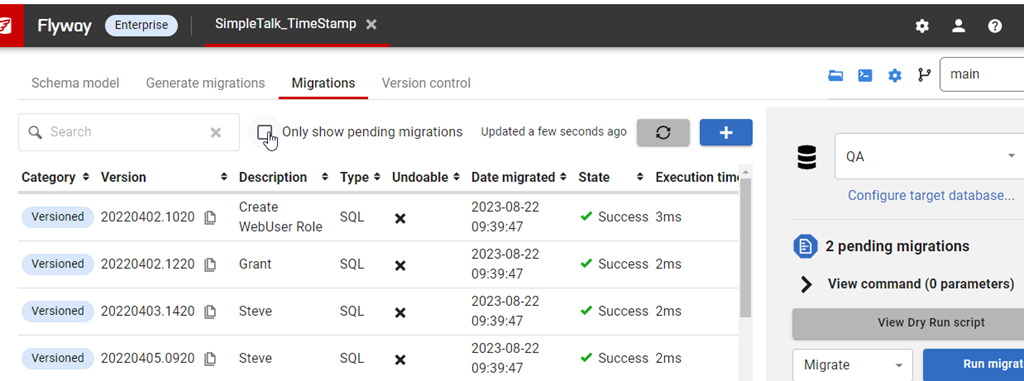
    2023-10-19 15_40_29-Flyway Desktop

    If I click that, I see a view of the few that haven’t been applied to this environment.
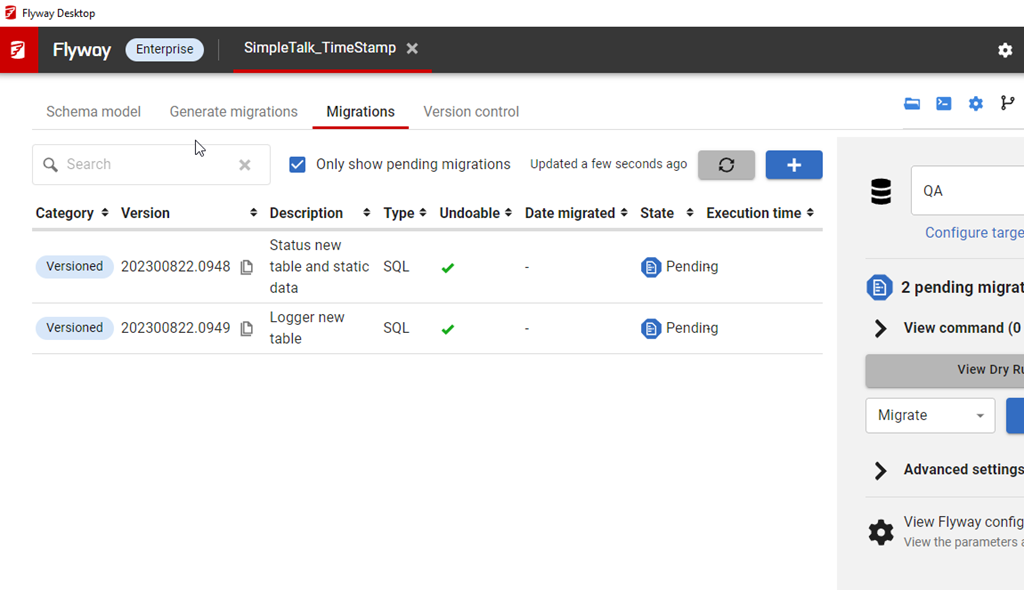
    2023-10-19 15_42_13-Flyway Desktop

    A quick way to see what work has been added to the project, but not applied to other environments.

    Try it out today. If you haven’t worked with Flyway Desktop, download it today. There is a free version that organizes migrations and paid versions with many more features.

    Video Walkthrough

    I made a quick video showing this as well. You can watch it below, or check out all the Flyway videos I’ve added:

  • When Work Isn’t Done

    Software development can be a challenge for each of us with lots of demands and the need to ensure your code solves a problem correctly, efficiently, and completely. Juggling the workload by yourself is one thing, but add in a team of developers, and the complexity quickly grows.

    The real world is chaotic and despite the best efforts of project managers and scrum masters, our software development life cycle doesn’t always proceed smoothly. I wonder how many of you run into this situation and how you deal with it.

    Developer 1 gets a piece of work, let’s call this A. They complete this and send it to the QA team. Somewhere during this process, Developer 2 get’s a different piece of work (B) and writes code. They send this to QA before A is completely tested.

    Now, Developer 1 finds a mistake. Something doesn’t work or they realize their solution is incomplete. QA is A + B, but A doesn’t work and needs revision. B passes testing and needs to be deployed. If your codebase and QA have both A and B in them, how do you strip out A or B and ensure B is deployed to production but A isn’t?

    If this is C# or Java, you might have one solution, even if both changes are in the same class. If this is database code, you might have a different set of issues to deal with.

    Really, the question is can you reorder work in your deployment process? I find many customers don’t consider this when they are evaluating their software pipeline. They somehow assume if code gets to QA that it’s good, which is nicely optimistic but not realistic. At some point, we’ll deploy code to QA that doesn’t work. The more developers we have, the more likely this is, and the more demands on our time, the more likely we need to reorder work and release one thing but not another.

    As a DB developer and DBA in a company 20 years ago, I built a process and forced us to reset the QA environment and redeploy B only (using a branch of code that stripped out A) for re-testing. This ensured that we tested what was going to be deployed. However, I find a lot of organizations can’t do this or don’t want to. They want to hope that a human and either extract all of B or strip out all of A and release partially tested code without issues.

    I find that to be a poor idea. In this era of regular staff changes, staff of varying quality, and the high complexity of software, this is asking for mistakes. With cheap hardware, virtualization, and the ability to provision copies of environments, we ought to do better.

    How do you handle this today? Depend on humans to not make mistakes? Hope for the best? Or follow a repeatable, reliable process that accounts for inexperience and human error?

    Steve Jones

    Listen to the podcast at Libsyn, Spotify, or iTunes.

  • A New Word: Zielschmerz

    zielschmerz – n.  the dread of pursuing a lifelong dream, which requires you to put your true abilities out there to be tested on the open savannah, no longer protected inside the terrerium of hopes and delusions that you started up in kindergarten and kept selaed as long as you could.

    I don’t know I have any lifelong dreams, much less zielschmerz. I used to want to play professional sports, but that lifelong dream died a long time ago when I realized pursuing it wasn’t realistic.

    I have enjoyed life and worked to grow my career, skills, and enjoyment in different ways. However, I am more a take things are they come and constantly re-evaluate what I want and need more than having a dream.

    However, you can pursue a lifelong dream, which might not include being tested on the savannahs, but it might be tested in the real world. My wife changed careers to work with horses, taking a leap that she could actually earn enough to have that be a viable career. It’s been nearly 12 years now and she’s made it a success, though I know she had a lot of trepidation and anxiety in making the leap and growing her business.

    Hopefully there is no more zielschmerz these days for her.

    From the Dictionary of Obscure Sorrows