One of the things that I do a lot is demo changes to databases with CI/CD in a DevOps fashion. However, I also want to make some application changes to my sample app without breaking things. As a result, I’ve built a few ideas that work well for both situations. I found recently these ideas can help me when I need to actually upgrade or change my CI/CD pipeline.
Note: DevOps isn’t a thing, it’s a set of principles, ideas, and culture that produces results. I will endeavor to ensure I call out the specific principles I use to adhere to DevOps ideas. In this case, automation and CD.
Release On Your Schedule
One of the principles of DevOps is that we use feedback loops to ensure information moves from right (operations) to left (development). One way of doing this is to release more often, though this isn’t required. What we really mean is release on your schedule, when you want, and allow developers to get feedback on their work quickly.
If a developer takes a month to build a feature, they don’t need hourly or daily releases. They need a release after the month is over (assuming testing, review, etc. has taken place). If releases occur on the 5th of the month, and the developer finishes on the 6th, they must wait a month before they get feedback. What I want to ensure is that we can release on the 5th, and also on the 6th if I need to.
Upgrading my VSTS Pipeline
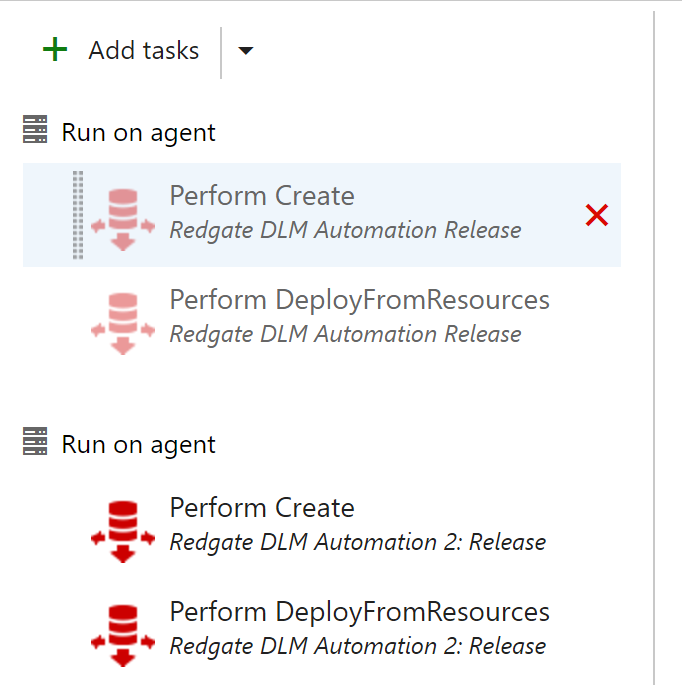
I wrote in another post that I planned on upgrading my Redgate DLM Automation tasks in VSTS. I was doing this on a trip to a conference, and I didn’t want to start making the demo changes I’d make as I’d have to undo them, and it’s possible that I’d forget to clean something up. I hate making that silly mistakes, so I needed a way of testing my build and release without breaking demos.
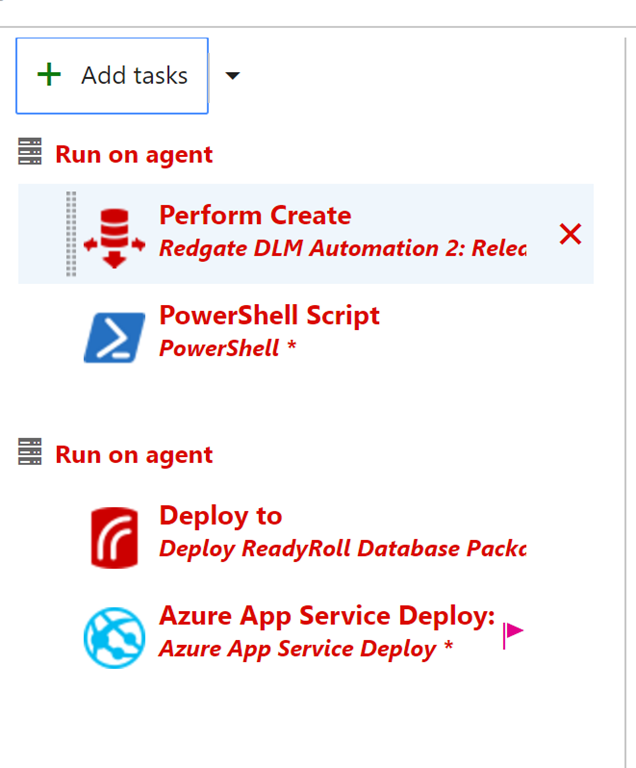
I decided to use a technique that I use in presentations when I’m talking process and not code. In those cases, what I deploy doesn’t matter, but if I change random objects, sometimes I break the application using the database. As you can see here, I needed to do a bunch of tests, and repeat some.

Deploy Often
When I talk with Redgate clients, and they are starting to get comfortable with the idea of deploying on their own schedule, they will sometimes make innocuous changes that trigger a deployment they can test, without breaking things. For example, a user might take this stored procedure (partially shown):
ALTER PROCEDURE [dbo].[GetEmailErrorsByDay]
@date DATE = null
/*
Description:
Changes:
Date Who Notes
———- — —————————————————
2/14/2017 WAY0UTWESTVAIO\way0u
*/
AS
BEGIN
IF @date IS NULL
SELECT @date = DATEADD(DAY, -1, GETDATE())
SELECT Errcount = COUNT(*)
FROM dbo.EmailErrorLog
WHERE EmailDate = @date
and make a small change. Perhaps they add SET NOCOUNT ON, or maybe they’ll add a comment. I’ve even see someone add this code:
…
AS
BEGIN
SELECT 2 = 2
…
These aren’t big changes, and certainly choose which stored procedure to change (one that isn’t used a lot or is critical). These are changes to test your process, gates, approvals, deployments, etc.
I decided to try something else. I tend to write this code when I want to test changes, since I can be additive with a procedure like this:
CREATE PROCEDURE Get7
as
SELECT 7
Or I can modify things with this:
ALTER PROCEDURE Get7
@plus int
as
SELECT 7 + @plus
In either case, I can see if my changes go through. Since I often deploy to multiple environments (QA, Staging, UAT, production, etc.), and I don’t always have deployments go all the way through (see my image above), I will usually end up creating Get7, Get8, Get9 as subsequent procedures. This way I can continue to commit new changes to the VCS, get new builds, and get new releases.
I can also do this with tables. My favorite is MyTable, MyTable2, etc. I usually just have an integer MyID column, but I can add other ones to test the ALTER process. I can even use this to test data movement, static (reference/lookup) data, or anything else to do with tables.
Eventually (hopefully) I get clean deployments all the way through to all environments.
Cleanup
I sometimes get collissions, where a test will return the error that “Get10 exists”, and I’ll move on to Get11. However, I don’t want to leave those objects in all environments. After all, likely I’ll find a way to improve things in the future and I’ll want to repeat this testing.
This usually is one last deployment for me. I’ll delete these objects in dev, and then deploy the changes all the way through to production. This allows me to test my checks to prevent data loss, if I have any. Including if approvers actually read scripts