
Category: Blog

  • T-SQL Tuesday #40– File and Filegroups

    tsqltuesdayIt’s the second Tuesday of the month and time for T-SQL Tuesday again. This is a monthly blog party, where the participants write on a particular theme. This month Jen McCown, of Midnight DBA fame, invites us to talk about files and filegroups in SQL Server.

    If you’re like to participate, write a post and drop a comment (or pingback) on Jen’s blog. Watch the #tsql2sday hashtag on twitter for next month’s invitation.

    Filestream and Filegroups

    I have a couple talks that deal with Filestream related topics, so I decided on a quick introductory lesson on how this works.

    Filestream was built into the AdventureWorks 2008 sample database. Requiring administrators to turn on Filestream caused some confusion and complaints, despite the fact that it’s easy to do.

    What does Filestream have to do with filegroups? In a database that is enabled for Filestream data, you need to add a filegroup specifically for the Filestream data. This is actually a folder on your file system, which you can access through T-SQL, or through the Win32 API. If you are using SQL Server 2012 or later, you can also access this data with a Filetable, which is built on Filestream.

    Let’s create a database, and add a filegroup for Filestream. We start with the “New Database” dialog in SSMS.

    fs_a

    With the normal defaults, we see a data file (FS_Test) and a log file (FS_test_log). For Filestream data, we need a new place to store it. Let’s add a file:


    fs_b

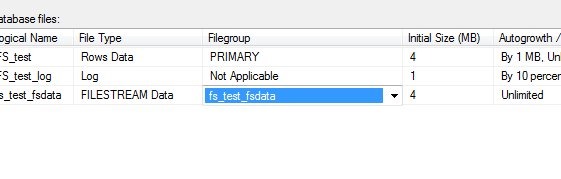
    Once I add the file, I mark it as storing Filestream data. The other options are rows (data files) or log files. However this presents a problem. When I scroll right, I see that there is no filegroup for Filestream data. I can’t put this in an existing filegroup.

    fs_c

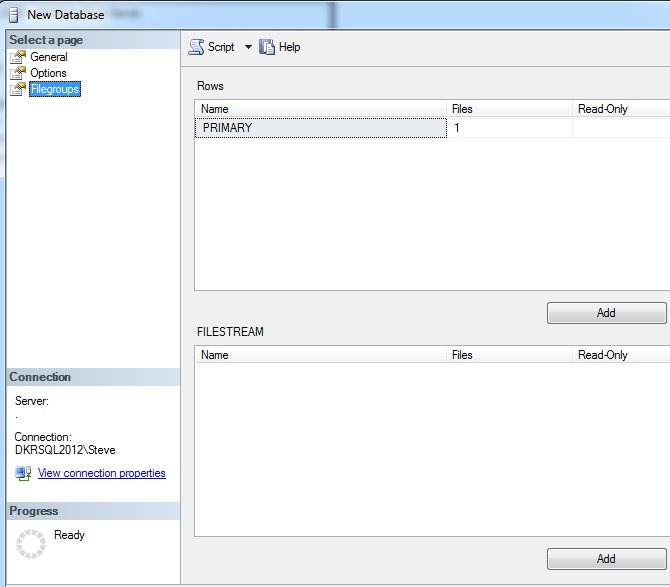
    Let’s add one of those. Here’s the default filegroup dialog.
    fs_d

    I can click add, and put in a filestream filegroup. The name doesn’t matter, it’s just for administrative purposes. Once I do that, I can go back to the files dialog, and if I select the dropdown, my new filegroup appears.
    fs_e

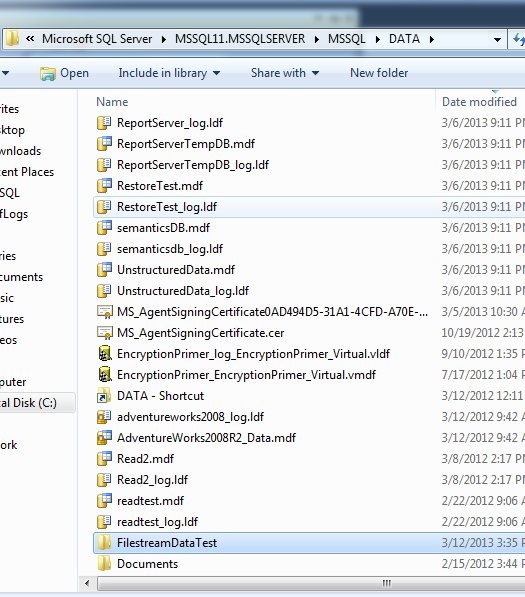
    Now I need a location. Outside of SQL Server, I created a folder in my data directory. This can be anywhere, but I did it in the default location. It’s called FilestreamDataTest.
    fs_g

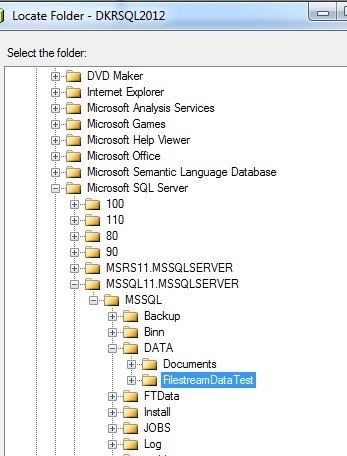
    I then select this in the files dialog, using the ellipsis to the right of the Path column.

    fs_f

    I see my folder in the file picker and choose it.
    fs_h

    Once I’ve selected it, I don’t click OK. I click “Script” and get the script below:

    CREATE DATABASE [FS_test]
     CONTAINMENT = NONE
     ON  PRIMARY 
    ( NAME = N'FS_test', FILENAME = N'C:\Program Files\Microsoft SQL Server\MSSQL11.MSSQLSERVER\MSSQL\DATA\FS_test.mdf' , SIZE = 4096KB , MAXSIZE = UNLIMITED, FILEGROWTH = 1024KB ), 
     FILEGROUP [fs_test_fsdata] CONTAINS FILESTREAM  DEFAULT 
    ( NAME = N'fs_test_fsdata', FILENAME = N'C:\Program Files\Microsoft SQL Server\MSSQL11.MSSQLSERVER\MSSQL\DATA\FilestreamDataTest\fs_test_fsdata' , MAXSIZE = UNLIMITED)
     LOG ON 
    ( NAME = N'FS_test_log', FILENAME = N'C:\Program Files\Microsoft SQL Server\MSSQL11.MSSQLSERVER\MSSQL\DATA\FS_test_log.ldf' , SIZE = 1024KB , MAXSIZE = 2048GB , FILEGROWTH = 10%)
    GO

    I can run this, and once I do, if I go into the folder that contains my Filestream file, I see this:

    fs_i

    As I create tables that hold Filestream data, including FileTable data, I’ll see entries in here for each column (or Filetable) that holds this data. There is a folder that holds logging information for this data, which I do not manage.

    Hopefully this is a quick, short piece that helps you understand Filegroups and Filestream.

  • Windows 8 and Google Calendar

    I use the Google calendar service extensively. I host my domain there and I’ve gotten used to the calendar. When I set up my Windows 8 desktop, I was curious if I could use the built in calendar app instead of living in a web browser.

    A quick search found this link, which worked just fine for me. I added my Google account and I had my various appointments and note appear in Windows 8. Very smooth, and very nice.

    I have tended to use the online calendar from Google, but it’s definitely easy to read the “Metro” interface for the calendar. I haven’t used it a lot, but I may use it more over time since it’s easier to read in full screen format than any of the browsers or Outlook items.

    The downside? On a desktop, getting to the calendar isn’t as simple as I’d like. The hover in the upper left corner doesn’t always work and if I move the mouse wrong, I lose the switch capabilities.

  • Off to the Richmond User Group, a Red Gate Experiment and SQL Saturday #187

    This weekend is SQL Saturday #187 in Richmond, VA. Today’s a travel day for me, as I head out early because Red Gate Software is sponsoring a half day event tomorrow, Friday, where myself and Grant Fritchey (b | t) will be speaking. This is an experiment for us, and I’m hoping it goes well. If so, you might find us doing a number of these events around the country.

    Today I travel, speaking on encryption at the Richmond SQL Server Users Group, then tomorrow at our Red Gate event, and Saturday at SQL Saturday. Then two days off, hanging with my brother, his wife, and my nephews in Maryland before coming back next week.

    A busy few days. Four different talks, on four subjects. Fortunately I’ve been rehearsing this week.

    Hope to see some of you there.

  • Dropping Indexes

    While working on some demos recently, I needed to drop an index for a test. I executed this generic statement for an index I’d just created.

       1: DROP INDEX ix_IndexName

    Needless to say I was surprised when I got this error:

    Msg 159, Level 15, State 1, Line 1

    Must specify the table name and index name for the DROP INDEX statement.


    I haven’t done much index maintenance in the last few years, but since I had specified the name, and I expected names to be unique, I was surprised. That’s not the case, however, since indexes aren’t seen as objects.

    I created the index in AdventureWorks with this code:

       1: -- paste in create index statement

       2: CREATE NONCLUSTERED INDEX ix_IndexName

       3: ON Sales.SalesOrderHeader ( [TerritoryID],[ShipMethodID], [SubTotal], [Freight] )

       4: INCLUDE ([SalesOrderNumber], [CustomerID]);

    As a test, I then added this index:

       1: CREATE NONCLUSTERED INDEX ix_IndexName

       2: ON Production.Product ( [Name],[ListPrice]);

    Same name, different table.

    A quick check in sys.objects surprised me.

       1: select *

       2:  from sys.objects

       3:  where name = 'ix_Indexname'

    This returned no results. Hmmm, let’s investigate further. I next decided to check sys.indexes.

       1: select *

       2:  from sys.indexes where name = 'ix_Indexname'

    This returned two results:

    indexes

    Two entries, with two object_ids. I wondered what those objects were, so I ran more code:

       1: select *

       2:   from sys.objects

       3:   where object_id in (1010102639, 1717581157)

    I received the two tables back as the objects.

    indexes2

    This surprised me, though I’m sure I’ve read the details in a book at some point, or even seen the documentation in sys.indexes. The entry for name says it is unique only within the space of the object, which would be the parent table.

    I had assumed that indexes were objects, but they aren’t. They are an attribute of an object, and as such, I needed this code to remove my index:

       1: -- cleanup

       2: DROP INDEX ix_IndexName

       3:  ON Sales.SalesOrderHeader

       4: ;

       5: GO

    Update: As noted in a few comments, you can also drop the index as:

       2: DROP INDEX Sales.SalesOrderHeader.ix_IndexName

    And, of course, I needed to drop my test object.

       1: Drop INDEX ix_IndexName

       2: ON Production.Product

       3: ;
