Category: Blog

  • How Many Bytes Are In My Column? – T-SQL Functions

    One of the things you want to be aware of when writing T-SQL is using the proper function for a particular problem. Someone posted a question asking about why they were getting a 0 for this code:

    SELECT Mychar
        , '''' + mychar + ''''
       FROM dbo.MyTable

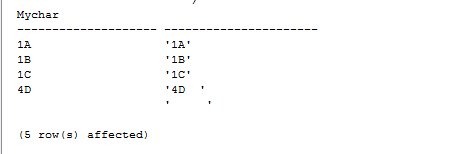
    That gave me these results
    mytable1

    I used the quotes in order to show that one of my columns has spaces trailing in one of the columns. I noticed that the poster was wondering why they had these results?

    SELECT Mychar
        , LEN(mychar)
       FROM dbo.MyTable
    mytable2

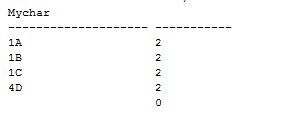
    In the table, clearly there are 4 characters for the row with “4D” and 5 characters for the next row. However the length is being returned as 0. If you were planning on testing for blank strings, or using some substring function, this could be an issue.

    The reason is simple. LEN, as noted in Books Online, ignores trailing spaces. The description of the function is: Returns the number of characters of the specified string expression, excluding trailing blanks.

    So if you have a space at the end of your string, or just a string of spaces, you don’t get the correct length. What should you use?

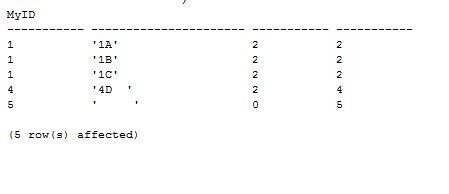
    Datalength – This function is designed to show the number of bytes used by the string, not the characters. Code shown below:

    SELECT 
       MyID
     , '''' + mychar + ''''
     , LEN(mychar)
     , DATALENGTH(mychar)
       FROM dbo.MyTable
    mytable3


    A good thing to be aware of if you are writing string test routines. LEN is the function I know most people use, but it is somewhat flawed, IMHO, in T-SQL

  • SQL Server Connections in a week

    I’m heading to SQL Server Connections next week, part of the DevConnections conference featuring a whole slew of technologies. Once again SQLServerCentral is sponsoring a track at the event, and I’m playing host and reporter.

    We’ve picked some great speakers, including Brian Kelley, Joe Webb, and Jonathan Kehayias to talk on security, locking/blocking, and extended events. We have Brad McGehee as well, talking trace and helping me host the party.

    This spring the event is back in Orlando, which is a great location and while I don’t mind the cold weather of Colorado, it is good to get down to Florida for some warm weather and cold drinks and talk some SQL Server

    Hopefully I’ll see a few of you down there. Look for me in the Hawaiian shirt and cowboy hat.

    There’s still time to register and you can save $200 with “DevCon1” as the registration code.

  • My Connect Items – Won’t Fix

    There’s been some work to close out items in Connect that aren’t going to be fixed. I don’t know exactly if these are items that aren’t good ideas, are dropped because of a lack of resources, or because no one wants to figure that out.

    However, I had three items closed as Won’t Fix in the last couple days. None are what I’d consider critical, but they were ideas I had to make the product work smoother. I won’t resubmit them, unless I get some feedback that people find them important. Here were my items:

    Remove Auto-close

    Set the database default to simple

    Allow User Objects to be Deprecated

    The last one is the one that I think made the most sense. Not as something that’s critical, but something that might help smooth the way that people work with SQL Server, and help them build better software.

  • The MCM is Worldwide

    Well, not everywhere, but as long as Prometric sites meet some security requirements, they can offer the MCM tests. I got a note from Joe Sack after someone asked me the question about when the MCM would be offered outside the US. From what he sent me, it’s in these countries:

    • Australia
    • Canada
    • Germany
    • India
    • Japan
    • Malaysia
    • Philippines
    • South Africa
    • UK

    And the US, where I took my exam.

    Check with Prometric in your area to see if there’s a site near you.