Category: Editorial

  • SQL Server Licensing is Simple

    Over the years I’ve had no shortage of licensing questions for SQL Server. At times it’s felt a little crazy. Look at the licensing guide. Choose EE or SE and the number of cores. Then check if you’re using VMs. Oh, and consider the cloud, and which cloud you’re running a workload on.

    It’s simple right?

    It can seem confusing, and at times I’ve wished Microsoft would make it simpler. And perhaps even give us some add-ons, like adding some additional hardware capabilities (cough more RAM *cough) in SE.

    Then I run into something like the introduction to Oracle licensing. This is one of the smaller guides on a site devoted to Oracle licensing. There are numerous articles on there, with lots of information, perhaps too much, to help anyone get a handle on this process. There are even companies (one, two) built around helping you manage Oracle licenses.

    There’s a core factor table, where you need to figure out how to adjust your “license cost” based on the CPU. That’s after you pick the edition, and likely before you go into the other features you might need. I’m guessing this is why a lot of people might just pay for the Unlimited license and stop worrying. I think this is also why Oracle is still such a huge company and worth billions (or trillions?) of dollars.

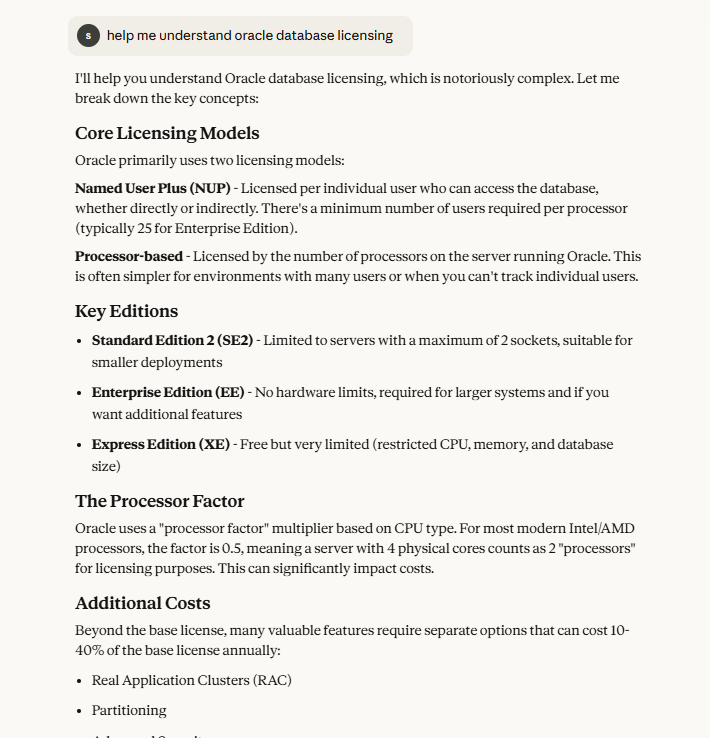
    I actually asked Claude to help me with Oracle licensing. I got these (partial) results, which talks about the different core licensing, editions, and then other costs. As I ask for more details in any area, this gets very complex and confusing. While some of the rules for SQL Server can be confusing, and certainly the HA and virtualization guidelines sometimes leave something to be desired, overall, I find things simple.

    I like simple.

    Over the years, many software companies have made licensing more complex and confusing to customers. Often this results in more profit for them without much benefit for the purchaser. Not all vendors do this, but Oracle certainly has created a complexity that spawned a whole business model for a few companies. SQL Server licensing is simpler, and I’ve learned to appreciate that.

    Steve Jones

    Listen to the podcast at Libsyn, Spotify, or iTunes.

    Note, podcasts are only available for a limited time online.

  • Don’t Let Corner Cases Drive Your Design

    If you graph computer/query cost against the size of data, you can get four quadrants:

    1. small data, small compute (most CRUD app queries)
    2. small data, big compute (complex BI queries for this quarter, most reporting)
    3. big data, small compute (logs, audit data)
    4. big data, big compute (complex BI queries across all our data)

    If you examine the costs here, 1 is the cheapest, with 2 and 3 having a similar cost. Number 4 is expensive, and it’s why we often have big boxes running our database server software. However, where is most of our work? The majority is in quadrant 1, with 2 getting the second most action. 3 might rarely exist, as does 4, but we often design for 4. We have to as we don’t want phone calls, ever. What we want is to provision a system large enough that we don’t hear many complaints about performance. On premises, many of us have over-provisioned systems to handle the peak load to avoid phone calls.

    Can we handle the peaks or the really important things that someone thinks are important? Everyone thinks their workload is important, and it is. To them. However, there are plenty of cases where someone could think about designing for specific types of workloads, rather than just aiming for quadrant 4. I’ve got an image of different types of workloads that I grabbed from the Small Data 2025 conference. For example, if I am working with things like Time Series data or streaming analytics, I might not need huge compute. I might be storing a lot of data, and I need space, but the compute is low. The analysis of that data, however, might be compute intensive.

    This is a reason why we might separate analytic systems out as they often are in quadrants 2 and 4, and we might want serverless or scale up/down systems to handle the rare cases, and get a real cost for them. I found it particularly interesting that the Bronze tier might be where we have big data and big compute, but once we’ve moved to Silver or Gold, we might have lower compute and data requirements. This makes sense as Bronze is more staging, but it is a good reason why we might aim for a Gold layer in our organization and only keep that data for the long term; it’s more cost-effective.

    Often, for simplicity, we build a bigger system for all types of queries. In other words, we are letting corner cases drive our design. That might be required, but it might not be. In this area of cost concerns, especially in the cloud, designing systems with appropriate resource usage is something that might override the analyst’s desire for queries across all data running as quickly as order lookups in an OLTP system. This might be even more true if we can predict some patterns in our workloads during system design. We can’t scale up or down instantly, but in a lot of places, I wish I had been able to scale financial or reporting systems up for a few days as we close out the period and scale them down for the rest of the month.

    When building a system, think about the practical nature of your requirements and assign a cost to them. Let users know what workload you’re building a system to handle and set expectations on performance and cost. If you do that, you can let others decide when we handle corner cases and when we don’t. That’s often a much easier conversation when we have cost numbers to help customers understand the implications of their request.

    Steve Jones

    Listen to the podcast at Libsyn, Spotify, or iTunes.

    Note, podcasts are only available for a limited time online.

  • What’s Your Theme Music?

    A few weeks ago, I was at the Small Data SF 2025 Conference in San Francisco. I attended the inaugural event last year and decided to go back again. It’s a great chance to hear people thinking about data and its impact on the world in a different way, recognizing that building lager and larger systems isn’t always possible. Or a good idea. We might find that smaller systems fit well, especially smaller datasets, which can both serve our purposes and create agility. The manifesto of the conference says that “We champion the power of Small Data and smart AI, believing that less is truly more.” There’s a bit more, but that’s the idea.

    The format for the conference is a little different, with 3-5 talks in a row, all on one stage, each about 25 minutes long. These are talks with or without slides, but no live demos, just speaking and expressing a point of view. What I found fun was that each person picked their own music to play as they walked onto stage (or ran/danced in the case of Glauber from Turso). It was a bit of fun, with the DJ letting the music play as the person made their way to the front and were welcomed by the audience. I heard rock, metal, hip hop, and more.

    It’s Friday during the week of the PASS Data Community Summit, and I had the chance to deliver part of the keynote on Wednesday. I’ve done this before, and no one has every asked me if I wanted a pick a piece of music, but it got me thinking. What would I pick?

    For a fun Friday during the holiday season, think about if you were going to give a presentation. Maybe to your team, maybe other groups in the company, or (for some of you) on a conference stage. What music would you choose to accompany your walk into the bright lights? Imagine you get between 10 and 30 seconds.

    Have some fun, and remember this is a professional setting. My first thought was something from the Notorious BIG, but I realized I’d have to walk fast as most of his lyrics wouldn’t be appropriate. I’m not sure, but I lean towards one of these: one, two, three, or four.

    Steve Jones

    Listen to the podcast at Libsyn, Spotify, or iTunes.

    Note, podcasts are only available for a limited time online.
  • Done is Better than Good

    Mary Spender is a musician in the UK who I follow and hope to see live one day. She works hard producing content about music, that business, and, of course, songs. Recently she had a little essay on Instagram where talked about creative time and focus. In it she referenced Elizabeth Gilbert saying “done is better than good.”

    My initial reaction was “that’s right.”

    Then I thought about software, and poor queries impacting database performance, and thought, “No, that’s not right.” My next reaction was to think maybe it’s “done is better than great”. I do see plenty of engineers trying to build great software. Code that would impress their peers or their former professors. Or maybe their future self.

    Then I thought, no, Elizabeth is right. If things don’t get done, then what’s the point?

    At the same time, I think that “done” and “good” (or great) aren’t mutually exclusive. We can get things done and make them great, which is something to strive for. We can also get good things done.

    Sometimes.

    Sometimes we don’t have that luxury of time, for various reasons. If I had to make a trade, I push for good (or quality) as much as possible if the delay isn’t substantial. If it is, then done is likely the choice I’d make. I do try to return and refactor, improve, etc. to raise the quality over time, but I recognize that sometimes getting something done is important. Certainly, on the ranch, I need to fix things to get by, with the aim of doing a better job later. I have mixed success at returning to improve a patch with a better fix later, but so far, that’s worked well. I’d say the same thing has happened while building software or managing systems, with enough success to be comfortable with my choices.

    What about you? What choices have you had to make about being done over delivering something that’s good? Or maybe great.

    Steve Jones

    Listen to the podcast at Libsyn, Spotify, or iTunes.

    Note, podcasts are only available for a limited time online.