Tag: AI

  • AI Experiments: Parsing Payment Memos

    As part of my running the SQL Saturday charitable foundation, I get sponsorship money from vendors. Primarily Microsoft and AMD, but I hope to change that in the future. In any case, I recently got a payment notification that my invoice had been paid.

    I knew I had a few invoices outstanding, so I wasn’t sure what was included. MS tries to bundle payments, but I don’t get an email for each one. For this one, I didn’t see an email, so I suspected I’d put the wrong one in or typo’d it.

    The Usual Process

    When I get payments, I have to reconcile those in my General Ledger, recording the amount and allocating to the events. I then send out payments to the event organizers and record those.

    This is a mostly manual process, but since I sometimes submit multiple invoices at once, I have to figure out what was paid. I could submit 3 invoices and get 1, 2, or 3 payments. Microsoft Finance usually bundles things, but since I can have a lot of events in flight, I need to know where money gets allocated.

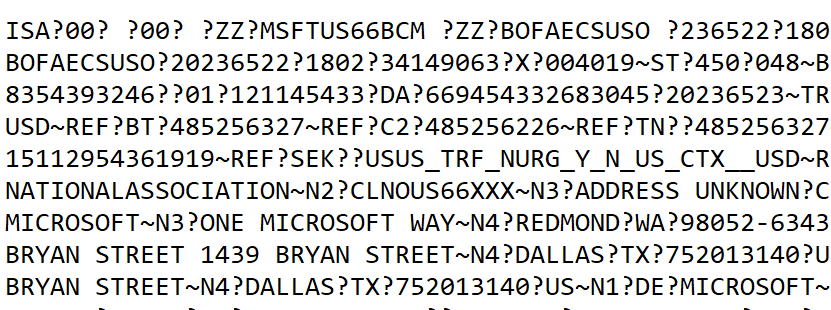
    In this case, I didn’t see an email and didn’t want to log into the invoice system and start finding the various invoices paid and clicking through details. Instead, I logged into the bank to verify the amount and I saw a memo. It was something like this (I’ve changed a bunch of data in here.
    2026-06_0123

    I thought it would be obvious which invoices were paid, but I couldn’t quickly figure this out. I decided to turn to AI.

    AI to the Rescue

    First, I knew I had a “no training” AI plan with Claude, so I wasn’t concerned about data release here.

    I had this prompt and then pasted in the data: “can you help me separate this by ? and make sense of what is included?”

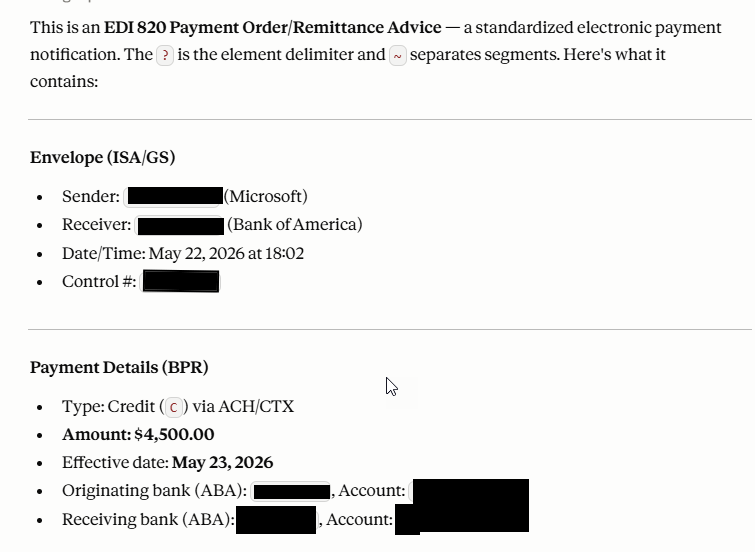
    The result was interesting, and useful. It labeled this task as EDI 820 parsing, so apparently this is EDI format. The last time I worked with EDI is was XML based, but perhaps this is the new way of doing things.

    The results were great. I got a summary, none of which I needed, but good to know this was easily recognized and parsed.
    2026-06_0124

    The really interesting part was below some of the acronym descriptions, where my invoices were found.
    2026-06_0125

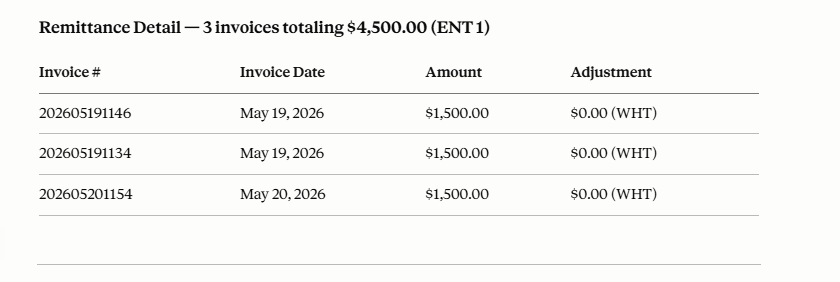
    I knew this would be certain events, but wanted to double check the numbers. When I put in an invoice number, I use the date and event. Here I got 3 of my events (1146, 1154, 1134) paid from a day where I invoiced 5 events. This let me quickly enter my GL and also know to whom I was sending money.

    A cool time saving AI trick. Rather than 10-15 minutes to reconcile things, AI gave me answers in seconds and I had fixed the GL in a couple of minutes, allocating the funds to events.

    Of course, I needed to ensure data security with my plan and I verified these were events where I had planned to send money. Still me as the expert reviewing things and making decisions, but way easier than trying to sort out invoice numbers from a bunch of EDI text.
  • Liability for AI Errors

    This week there was an article that speculated that doctors in the UK could be liable for errors made by AI tools unless rules are changed. The argument is that AI tools should be treated as products, which isn’t necessarily the case right now. Right now doctors may face all the liability instead of AI tool makers having some responsibility. From my reading, this doesn’t appear to say that doctors aren’t still accountable for mistakes, but they aren’t wholly accountable. The Medical Protection Society wants the technology vendors to bear some responsibility.

    I have to admit I’m torn here. If doctors are using tools, they should be sure the tools work well and they agree with the recommendations or results. However, I think AI changes things somewhat. If I read a medical device, say one that analyzes blood, I expect that the results are deterministic and accurate. If they aren’t, how could I, as a doctor, know that. The companies the built (or maintain) the device would be culpable for errors.

    Using AI assistance, however, is a little different. This is a non-deterministic interpretation of data. In the same situation, if an AI were to interpret blood results and summarize them, perhaps failing to point out a deviation of a value and this impacted patient care, is the AI responsible? The doctor for not realizing there is an issue? Joint responsibility?

    I think it’s unclear. I’m not 100% sure how I feel here, and I lean towards both being liable. If someone is training an AI model to help with medicine, then they ought to bear (and feel) accountable for results.

    This seems different than software engineering to me. In medicine we have humans overloaded and AI is supposed to help, but has to be responsible. I don’t think the stakes are as high in producing software. It’s an arbitrary decision to say we need to get xx work done with yy resources. AI can help, perhaps amplify the abilities of people to produce code, but the people still have to verify the AI results. Any time pressure is a decision we make, not one brought on by medical issues.

    Perhaps this seems hypocritical, and I will admin I’m not 100% sure how I feel, but I’m more concerned with AI technology bearing responsibility in healthcare than software. Do you feel the same way? Or perhaps in either case the AI is just a tool? Let me know what you think,

    Steve Jones

  • Monday Monitor Tips: AI Alert Analysis

    We keep adding new AI capabilities to Redgate Monitor, where it makes sense. Check out this new feature we’ve added for alerts. This is a great addition to help a busy Ops staff cope with a large database estate.

    This is part of a series of posts on Redgate Monitor. Click to see the other posts.

    Alert Index Analysis

    One of the new things we’ve added in Redgate Monitor is an AI analysis of your alerts. This isn’t for every alert. Right now, we have three where this works in preview:

    • Long-running query
    • blocking process
    • Deadlock

    This is documented on its own page.

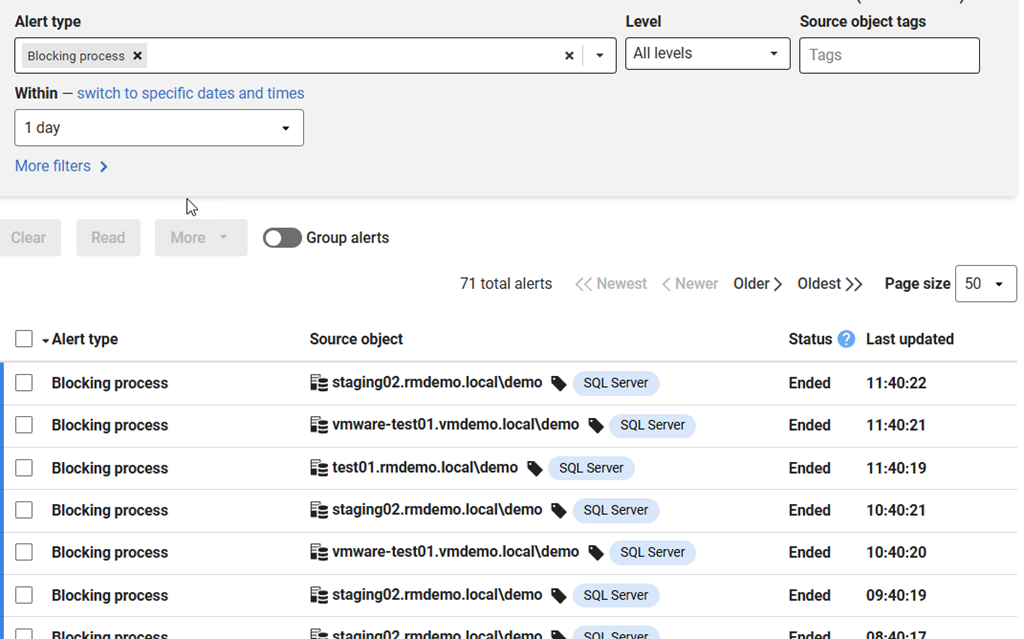
    You can see this if you go to the Alerts page and look for a blocking process alert. Here’s a URL, but this repeats regularly, so just find the alert. You should see something like this:

    2026-06_0115

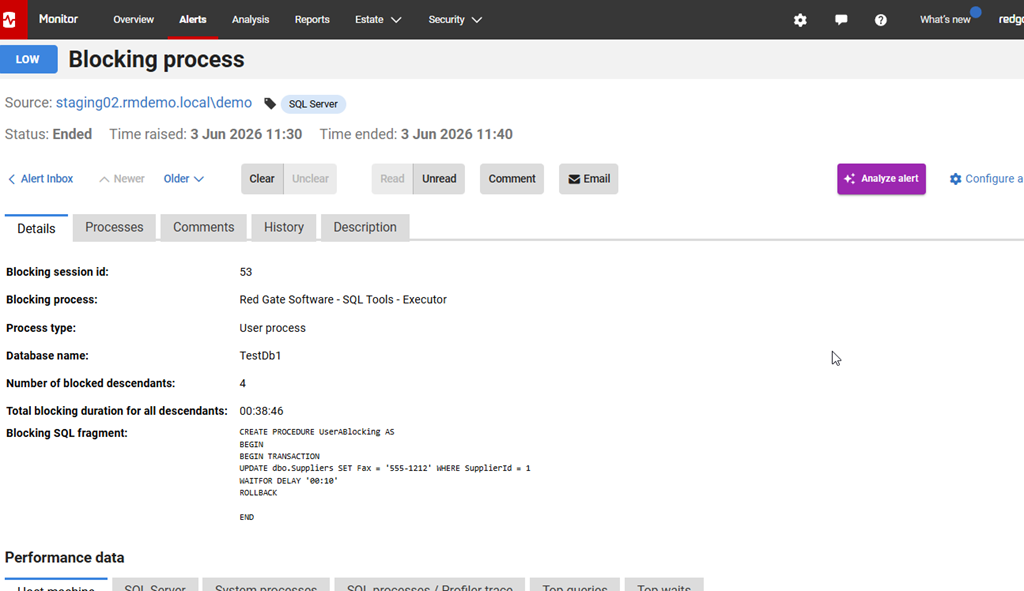
    If you click on the alert, then you’ll see the details, as shown here. However, to the right is an “AI Analyze Alert” button.

    2026-06_0116

    If you click that, a blade slides out from the right, and it has some analysis in it. This has a summary at the top. For my session, this had ended, so the summary is nice in that it gives me an overview with the time of the blocking and the statement. There is also a root cause analysis below this. This is something that would help me quickly answer questions from my boss.

    2026-06_0117

    Further down there is a diagnostic review, which helps you navigate Redgate Monitor to verify things. You should use the AI to help you and still verify what it says. This is a good explanation, but worth double checking. There are also recommended actions below this.

    2026-06_0118

    It’s a good way to approach a series of alerts, especially in a busy environment where you might have lots of these alerts across different systems.

    Summary

    AI is a great tool in places, and this is one of those measured approaches from Redgate to use AI where it’s helpful and useful, and does some work for you. Looking across a bunch of similar data and getting patterns, getting some quick insight into timings, that’s useful. This might be especially great when someone calls you with a question and you need a summary.

    As always, you should verify the diagnosis and recommendations before you do something, but this does give you a quick place to start fixing chronic issues in your system. I look forward to AI analysis coming to other alerts.

    Redgate Monitor is a world-class monitoring solution for your database estate. Download a trial today and see how it can help you manage your estate more efficiently.

  • The New Software Team

    One of the things I used to emphasize in talks about DevOps is that no modern software of any significance is built by one person. Everything takes a team, so the foundation of version control becomes extremely important. We need a way to coordinate work across multiple individuals and communicate what changes are being made. This requires a strong foundation, and that starts with version control.

    In 2026, that hasn’t changed, but what has changed is the makeup of the team. No longer do I need a bunch of humans. In today’s world, with extremely powerful AI LLMs, we can have a team of AI agents that write code, often at a pace far exceeding that of human teams. However, they still need to coordinate and communicate and ensure their changes mesh together.

    In this short article on the rebirth of programming, the team is a team of n humans and m agents. N=1, and the architect, the coordinator, the project manager is the human (or a few humans). Code becomes less important, and the tests and other elements that describe and verify software become more important. Maybe even more important than today.

    I’d even go so far as to say the performance of the code might not matter in the short term. Since the cost of writing, or re-writing code, becomes lower and lower, when something doesn’t perform well, just spin off a new team of your agent coders who don’t need sleep, aren’t worse at development if they work more than 40 hours every week, and are always happy to tackle new work. It’s a project manager’s dream team. At least, in theory.

    That being said, the cost of writing this code isn’t zero. We see this rising every day, sometimes at a level that exceeds what we might pay human developers. That might change over time, but we certainly see some people spending more on tokens than salaries.

    And your agents do lose focus. Fortunately, you can fire them and hire new ones every day, or every hour. It’s like a team of characters in a game that respawn on demand to tackle the next challenge. There is still plenty of coordination and onboarding work for the manager. They will need excellent documentation and descriptions of what the code looks like, what needs to be done, and all of your guidelines on how to structure things. Lots of tests are needed, but your team can build them (with oversight).

    It seems like an amazing system, but we’re learning that excellent team leaders who are good architects are in short supply. And they can’t work long hours. Some early evaluation of these software managers seems to indicate that they can’t even work the full 8 hours for 5 days a week with a high level of effectiveness. They might not even be able to work half that amount of time.

    So is the falling cost of code going to produce more software? Likely, though perhaps with many more leaders needed to manage those teams. I can certainly see many more one person companies spawned during off hours, where one person can focus on their passion project, something completely separate from the work they are paid to do by someone else.

    It’s going to be fascinating to watch this work itself out across the next decade.

    Steve Jones

    Listen to the podcast at Libsyn, Spotify, or iTunes.

    Note, podcasts are only available for a limited time online.