Tag: DevOps

  • Automation Ideas for T-SQL Tuesday #130

    tsqltuesdayThis month we have another great T-SQL Tuesday topic, and again, a host that I pressured into writing the invitation. Elizabeth Noble (@SQLZelda) and I were talking DevOps last year at a SQL Saturday, just as she was effecting some change at her employer. At an event later in the year, I challenged her to host, and here we are, with a great topic, Automation.

    That’s this month’s invitation. Elizabeth describes the process of using automation to smooth out their deployments to SQL Servers. They slowly built a CICD pipeline and migrated projects over and over to save her time.

    This month, what have we done to automate things? I have a few stories.

    Automating Data Collection

    One of the things that I am passionate about is the SQL Saturday events. I loved that PASS maintained a site, and made a feed of event data available, but over time, we’ve lost some data and I don’t think there is much impetus to maintain this over time.

    As a result, I build an automated process to grab data from the feeds and save it as an XML file on my local machine. I have the basic code up at GitHub, though I need to improve and refactor it a bit. These files change as the organizers update them, so I need a good merge process. Right now I tend to delete all 1-2KB files periodically, as the file is built once the event is approved. However, until all the speakers and sponsors are scheduled the file size is just a few KB. Most events are > 100KB once they are set.

    This is a basic way of grabbing some data, and I’m looking to build a few more data collection processes to grab data in my life and keep it around, just in case some service I use goes kaput.

    Automatic Databases

    I work at Redgate, and one of the things I’ve been spending more time doing is the automation of databases for development with the latest code and test data. This is a challenge, but a few of the things that I’ve done with Redgate that help are as follows:

    1. Use Powershell to automate the creation of SQL Clone images.
    2. Use PowerShell to update SQL Monitor alert values and add instances
    3. Use Flyway in a container to deploy changes
    4. Use our SQL Change Automation cmdlets to deploy changes to databases

    All of these items can be automated so that a user just needs to run a script, or sometimes just click a button.

    I’m slowly getting the PoSh code up on GitHub as I build demos and help customers get things done. Right now, getting organized is the biggest part of my job, because I find these questions coming over and over.

    I’m a bit proponent of DevOps and automation. Use tools and computers to do the tedious, repetitive work. Keep your day focused on solving problems and building/improving scripts.

  • Better Government Security Through DevOps

    Most teams building software seem to go a little too fast to ensure their code is both secure and of high quality. I don’t think it really  matters whether you are working in a waterfall process, agile, lean, or any other methodology. Whether fast or slow, humans will make mistakes, new code can introduce a vulnerability. Even if you follow great practices, it seems that hackers and criminals find new attack vectors all the time. I’m not sure we really can go slow enough and stay in business.

    Those of us working as data professionals know that protecting the data in our databases is important. We are reluctant to allow too much change too quickly, especially when there might be changes that affect security. However, is limiting change the best idea?

    I’d argue no. DevOps preaches the ability to update on demand, and often, as soon as code is complete. This doesn’t mean we don’t test or pen test or run security scans or anything else. It does try to limit the work in progress, which means that we aim to allow updates to our lives systems regularly.

    An article for CIOs notes this that DevOps helps us improve security, precisely because we can fix things quickly. This might be especially important in high security environments, like government systems. The ability to patch, correct faulty code immediately, and respond to threats is important. There could be breakage from fast moving code, but another part of DevOps is improving your knowledge and skills, working to improve not only the quality of existing code, but also the quality of all future, first written code.

    I would rather manage database systems that backed applications being updated on demand in a DevOps flow. I’d rather be able to patch and update libraries, platforms, and frameworks quickly. We’ve seen the problems in systems that aren’t updated with the Equifax breach. We should learn from this incident and ensure we can patch and update systems on demand, whenever we need to do so.

    Steve Jones

    Listen to the podcast at Libsyn, Stitcher or iTunes.

  • Real World DevOps

    One of the more interesting aspects of my job is talking about building software with customers. As I do more of this over time, the discussion have changed from “what is DevOps?” to “how do we get started in DevOps” to “how do we improve our DevOps process?” These days so many customers have bought into some aspects of DevOps that the last one is quite common. There are still a number of companies trying to get started with DevOps in some way, but very few people I speak with have no idea of what DevOps is or how why it can improve your company.

    Of course, I’m not sure there’s a great standard definition of DevOps. I often lean towards Gene Kim’s Three Ways or Microsoft’s broad view of the principles. Ultimately, most of the practical things that I find myself discussing are how to smooth the process of integrating code from developers and getting it transferred to production. Everyone wants this to go smoother, with mistakes caught earlier, and with compliance with whatever internal rules, regulatory mandates, and customer demands exist.

    Grant had an interesting conversation with a few customers recently and wrote a blog about the conversation. There are a few items that resonate with me, and things that I like to emphasize to customers. The experiences from Stuart and Chris are common in any journey to improve your software process.

    People need to test and measure. While testing has gained traction in the application development world, it’s still fairly new to database people. However, as people try to reduce mistakes and problems, often from simple issues, they adopt more testing. They also start to realize that having instrumentation to help measure the impact of changes is important to learn what to test and watch out for.

    Starting small is important as well. While there are many, many commonalities in all my customers, the way they solve these with their teammates, and the order in which they solve them, varies. Even if you were to end up with the same VCS, build process and deployment script as someone else, the journey will be different. The challenges from internal people and processes, the evolution of habits in your team with vary. You need to find your own path.

    So start small, with a few people, let them learn and then teach others. Let them build up knowledge, habits, and skills that others can adopt. That’s how most things work in the world. A few people discover something and then many follow their footsteps. If you want to build a better software process, find someone to start doing it. When they find something that works, the rest of the organization can stand on their shoulders.

    Steve Jones

    Listen to the podcast at Libsyn, Stitcher or iTunes.

  • Azure DevOps Changing Build Notifications

    I don’t do a lot of team builds in Azure DevOps, but I constantly use it for demos. However, I’m often experimenting with things and I break builds regularly. I used to show the email notifications to audiences years ago, but I think Continuous Integration (CI) has become fairly common and people are used to getting notified on failures.

    These days I find myself constantly getting success notifications, which are annoying. Instead, what I’d like to do is avoid these and only get build failures. This is a quick post of making this change.

    I am doing this for a project, but you could do this for all projects. In my case, I’ll pick the project settings at the bottom of the main page.

    2020-07-09 15_27_58-

    This opens a list of items on the left, one of which is notifications.

    2020-07-09 15_20_03-Settings · Notifications (SimpleTalk DB Demo - Basic) - Settings

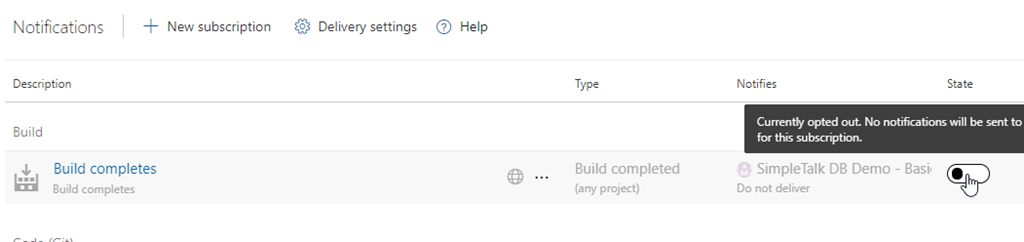
    Select this and you see a number of default notifications set up. The top one is in the “Build” section and is for a build completing. We don’t need to know builds complete. In fact, I wouldn’t ever want this notification, even in a team. I assume most complete and only want failures.

    This is enabled, but I’ve clicked the slider to disable this below.

    2020-07-09 15_20_13-Settings · Notifications (SimpleTalk DB Demo - Basic) - Settings

    Now I want a build failure notification. At the top there is a “New Subscription” area to select.

    2020-07-09 15_22_42-Settings · Notifications (SimpleTalk DB Demo - Basic) - Settings

    This opens a list of various subscriptions you can set up. The first item is build, and you can see on the right that I can choose the build complete or failure. I assume this is because I may want to alter the default settings for the completion.

    2020-07-09 15_22_49-Settings · Notifications (SimpleTalk DB Demo - Basic) - Settings

    I pick this and see some settings I can configure. I can change the name, decide who gets notified and even set this for all projects. I like these custom dialogs, letting me pick a number of criteria that I Can link in an and/or fashion.

    2020-07-09 15_23_05-Settings · Notifications (SimpleTalk DB Demo - Basic) - Settings

    That’s it. Now when I run builds, I don’t get notified if there is success. Only failure.