Tag: DevOps

  • Finding the Visual Designer in Azure DevOps Builds

    This post is really a reminder to me, since I don’t create pipelines all that often, and I’ve forgotten a few times how to do this.

    Plus, while YAML is nice when you want to scale things, it absolutely sucks for getting started. It’s a horrible default and, IMHO, is the worst decision of the Azure DevOps team since the VS 2010 Release Management days.

    When you create a new project, and then select Builds in Azure DevOps, you’ll see something like this. It might be slightly different as the product continues to evolve every few months.

    2019-08-26 21_00_07-Builds - Pipelines

    This looks inviting, a pipeline should be easy. When you click New Pipeline, you’ll get a choice. The intention here is that Azure DevOps wants to help you get started.

    2019-08-26 21_00_40-New pipeline - Pipelines

    Don’t be fooled. If you say your code is in GitHub, you’ll get a YAML pipeline and you can’t convert back? Why? Apparently the developers at Azure DevOps don’t want to write GUI interfaces that render YAML code.

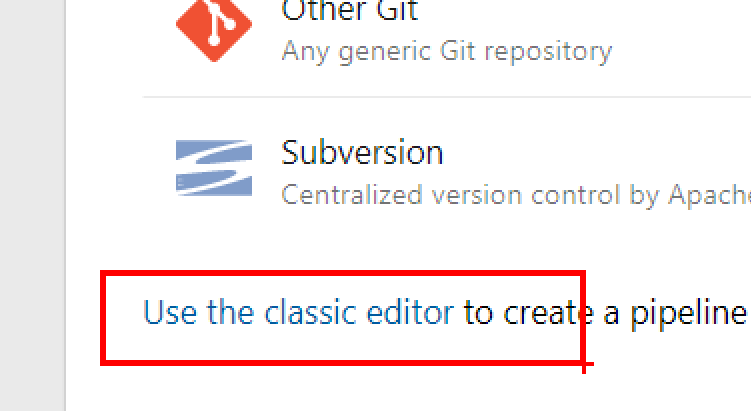
    Instead, at the bottom of this section, there’s a “use the classic editor” link. Click that.

    2019-08-26 21_03_29-Zoomit Zoom Window

    Once you do that, you still have all the choices for code repos, and it’s easier to get your build started.

    2019-08-26 21_04_18-Select a build pipeline template - Azure DevOps Services

    Hopefully I’ll remember that next time instead of fumbling around.

  • Demo Data for Everyone

    As someone learning about DevOps, I follow a number of people, one of whom is Gene Kim. When I see him get excited about a post, I usually read it. That’s how I found this post on Demo Data as Code. It’s a short, but interesting read. I think this is actually something more people ought to implement in their environments and not just for demos.

    DevOps is about reliability and repeatability, among other things, but those two are tackled with automation for a known process. We don’t want simple, silly mistakes, or even complex errors that might undermine our ability to move forward and create value. We don’t want simple errors eating up resources and time from expensive talent with unnecessary work. Part of ensuring both repeatability and reliability involves using data in our databases to evaluate our application. This isn’t necessarily for demos, though it could be used for demos.

    Once of the areas that is often left out of the process is the data that we use in our building our systems. We need some data for developers, for QA, and often for demos. In all of those cases, when humans need to repeatedly look at how well the software performs, and want to re-test things, they need some consistent data. I’d also argue that the need for agility means that we need a manageable data set. I think SQL Provision from Redgate is amazing, but I still don’t want to always develop with 2TB of masked data. I certainly don’t want to demo this for customers from a laptop, and might not want to share this in the cloud.

    At Redgate, we sell masking with SQL Provision, and it supports most of the process that’s outlined in the Demo Data as Code article. What it needs, however, is a small set of data that can be masked in a deterministic fashion. What I recommend to most clients is that they build a known set of test data, which could be used for demos. This can include all your edge cases and show off new features. It’s helpful for developers, testers, and salespeople, who will always have a known, useful set of data.

    This can’t be a build it and forget it, much like what is emphasized in the article. This will need to be altered over time. There ought to be a process to build this dataset, likely from production data that gets sanitized. This can then be distributed through SQL Provision (or similar technology), with backups, or even as a set of scripts in your VCS. Ensure an environment can be hydrated instantly on any platform, from a developer workstation to a sales laptop to a QA server. Once you have this, everyone can work on evaluating your software from a known baseline.

    And if you find the need for more data, then just add it. You have a process, so add an additional step that will cover the holes you inevitably find.

    Steve Jones

    Listen to the podcast at Libsyn, Stitcher or iTunes.

  • DevOps and OSS Can Scale

    Microsoft has changed quite dramatically in the last decade, in many ways. One of the more surprising ways to me is their embracing of open source software, while still building products that customers want and use. This is quite a change from the Microsoft that I knew back in the early 90s when I started working with SQL Server. Open Source software was seen as a complete anathema to the Microsoft way.

    One of the very interesting ways that Microsoft works in the open is their use of GitHub as a VCS (version control system) for many projects. From .NET to Azure Data Studio to the new virtual kubelet code, thousands of Microsoft engineers are writing and committing code in a very transparent way. Not all their products are here, but there are more than I would have ever expected.

    Part of the challenge of using a (formerly) third party platform is the infrastructure and administration of users. Microsoft has a scale issue here that most us do not deal with. While we work with dozens or hundreds of developers, they deal with thousands. There’s a good blog post about how they’ve scaled up to ensure 25,000+ developers can work.

    The post has lots of information, both at a high, conceptual level as well as at a detailed, technical level in places. Some of the big themes I see in the post is that automation is important, and that there are tools that facilitate the collaboration of their developers by sharing information, triggering notices and reminders, and by enabling the discovery of others. Collaboration is a huge part of DevOps, and the more software can encourage this while reducing the burdens of tedious work, the better the system works.

    None of this works without a culture change. If Microsoft can do this with thousands of developers and thousands more non-technical staff, any of us can. Microsoft has grown in the recent years to be one of the more valuable companies on the planet. Many of our organizations can learn from this by adopting DevOps, but not just in name or at a technical level. The technical tools are easy, but to get your organization to perform better, you need to ensure culture grows with the Three Ways and a team environment. Let your management know that you can all do better, but only if they truly embrace all the concepts of DevOps, teamwork, feedback, and learning from our previous actions to drive continuous improvement.

    Steve Jones

    Listen to the podcast at Libsyn, Stitcher or iTunes.

  • Ransomware and DevOps

    Ransomware.

    A scary topic and one attack that is apparently more common than I suspected. Before you go further, if you haven’t restored a database backup in the last month, stop and go verify your DR plan works. That’s one of the overconfident issues facing lots of government and businesses. While this might not help your entire organization, at least you’ll have some confidence in your process and that you can recover a database.

    This is a great article from Ars Technica and worth reading: A take of two cities: Why ransomware will just get worse. I’d recommend you read it and think about a few things. First, do you have insurance because things (or substitute your own word here) happen? Second, have you really tested a DR plan for some sort of software issue like this? You might think about a way to restore systems in an air-gapped manner that prevents them from re-triggering encryption from a remote source, or maybe even in a scenario where you reset dates/times to prevent timer triggered issues. If you don’t think you need to, read this article as well.

    Perhaps the bigger issue is are you actually patching and updating systems? Too many organizations can’t, don’t, or won’t. The former means you aren’t sourcing software properly. Either you’re using vendors with poor practices or have a poor development process. Organizations that don’t or won’t bother prioritizing patching, especially security issues, are likely those that will have issues as more criminals spread and use ransomware and other attacks for profit. Software and environments continue to be more complex, which means that the less you ensure the system is patched, the more likelihood there is of a vulnerability in your environment.

    DevOps and the cloud PaaS/SaaS platforms are attractive for a few reasons. One is that the platforms are constantly kept up to date, forcing you to move along with them. SaaS cloud vendors know this and are constantly patching and updating their software in order to keep it running. DevOps asks that we always have the ability to release, that we have the ability to patch on demand, not only at certain intervals. This is something I try to emphasize when talking about DevOps. It isn’t necessarily about velocity, but it is about being able to release when you need to, whether that’s today or next month. This is especially important for security issues.

    I have had hope for a long time that insurance would drive software to higher quality, and I still do. With the attacks and issues of ransomware, and who knows what other techniques that will be developed, I still believe more companies will buy insurance. I then hope, because of selfish motives, the insurance companies will require frequent patching, regular vendor certification of new platform versions, and better development processes. If insurance drives DevOps, I’m all for it, but I’d prefer you decide to adopt it yourself and start making changes today.

    Steve Jones

    Listen to the podcast at Libsyn, Stitcher or iTunes.