Tag: DevOps

  • Pushing SQL Change Automation Code to Azure DevOps

    Making changes on your own system for a SQL Change Automation project is great, but if you’re the only one using the project, it might feel like a lot of overhead. I’d argue it isn’t and it’s a better way of building software, but that’s a separate discussion.

    For most of us, we need to get a good copy (and backup of code) as well as share this with others. In the previous article, I was making changes in my own SQL Change Automation project. I was committing these to a local git repo and now I want to put them into another place. This article will look at moving my repo to the cloud.

    Enter Azure DevOps

    I love Azure DevOps as a software development platform. It has everything I need, hundreds of extensions, and I can easily replace parts of it with other technology if I want. I could use my own git repo locally (or at BitBucket) and still build/release with Azure DevOps. I could use the Azure DevOps repos and build my software with Team City. Or release it with Octopus Deploy.

    I have flexibility.

    For me, I’m going to stick with Azure DevOps in this series, and I’ll show you how to add a project to Azure DevOps.

    Sign In to Visual Studio

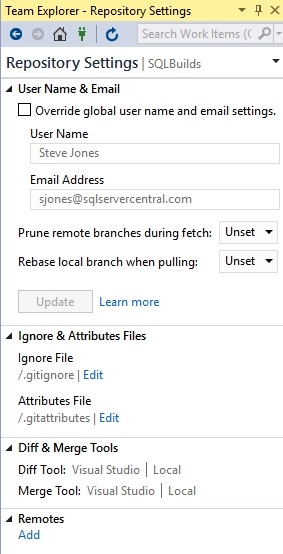
    When I created this project, I used a git repo as the default from Visual Studio. However, as you can see, I didn’t add any remotes.
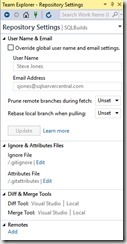
    2019-02-28 16_11_35-SQLBuilds - Microsoft Visual Studio

    I did log into Visual Studio at some point when I started it, and since I’ve used this before, I have a number of connections to different services. You can see below my connections in Team Explorer.

    2019-02-28 16_12_31-SQLBuilds - Microsoft Visual Studio

    If you go to dev.azure.com/name, you can see your organization. For me, this is https://dev.azure.com/SteveJonesRedgate/. When I log in, I see my organization, and a list of projects.
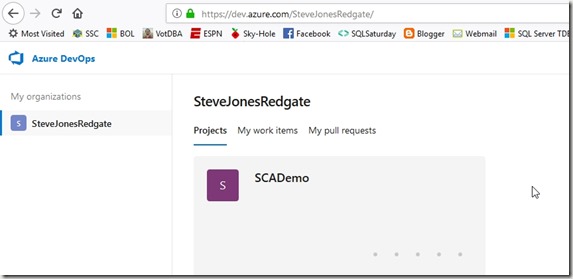
    2019-02-28 16_18_38-Projects - Home

    In the upper right is a “create project” button, and I’ll click that. When I do, I get a blade to enter some data. I can do that, and I’ll make this public, so anyone can see it.

    2019-02-28 16_19_25-Projects - Home

    The project is created, and I get a welcome screen. For now, let me ignore this and go back to Visual Studio. If I click the Sync item in Team Explorer, I’ll see this:

    2019-02-28 16_22_46-SQLBuilds - Microsoft Visual Studio

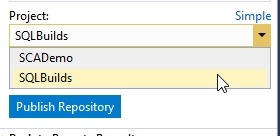
    VS sees my account. If I click advanced, I can see the projects, and I’ll select the one I just created.
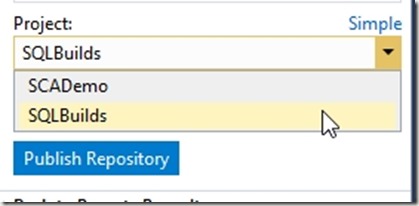
    2019-02-28 16_23_10-SQLBuilds - Microsoft Visual Studio

    When I click publish, this moves the repo up to the web. If I return to my project online, I can click “Repos” and see the code.

    2019-02-28 16_24_19-SQLBuilds - Repos

    This is the structure as my local VS project. If I had make a screen shot of the before, this would be an empty space online, with instructions for connecting local repos, adding files, and more.

    A Backup Copy

    From here, I can continue to do local development and push/pull as necessary between my local project and the online repo at Azure DevOps. I can set up branches and do more. This is also my backup in case my local storage crashes. From here I can pull down copies of my code if needed.

    In the next article, we’ll look at how we get code from this repository onto another machine.
  • Don’t Leave the Database Behind…Or Win If You Do

    If you’ve had struggles with database development and had a real world disaster, you could win in a new Redgate contest. We’re looking for the places where old style, waterfall, traditional database development has been a problem. Especially when application software developers have been adopting DevOps, small, rapid release strategies.

    Enter before Mar 20 and give us your story.  Don’t worry, we’ll anonymize your name and company details. You can enter as many times as you like, but can only win once.

    My Struggles

    I started working with a small startup company that had 8-10 application developers. We tried to work in a rapid format, releasing a new version of our website every 2-3 weeks. This was going OK, but not great. Often we’d release and developers would go to test their new feature, only to realize that they’d forgotten a database component.

    They would roll forward, finding code and deploying a database change during the release process, usually getting the feature working in 10 or 15 minutes.

    Until they broke something else because they hadn’t really tested the database component complete. Or they realized they needed yet another database change. Or they had forgotten to code for some edge case that another developer tried during the release smoke test.

    When I started, we all gathered in the office on a Sunday night and spent an hour or two releasing code. Not one of my favorite times.

    The app developers were using source control, and trying to test, but they often sent code to QA and then fixed things in QA, forgetting that they needed to ensure those changes were deployed again to production.

    Across a few months, we implemented what people would not call a DevOps process, reducing our release time to a few minutes, with myself and another developer on the phone, releasing automated changes from a CLI.

    Database DevOps makes everyone happier.

    Share your story before Mar 20 and good luck.

  • Learn about the State of Database DevOps Next Week

    It’s a week to my webinar with Donovan Brown (b t, y g), leader of the League of Extraordinary Cloud DevOps Advocates, Principal DevOps Manager at Microsoft, and the guy that wants to Rub DevOps on Everything. He’s a passionate, intelligent, exciting guy whose enthusiasm is infectious. I’ve been honored to present with him at Build and I’m looking forward to our chat next week.

    Join us next Thursday for our webinar on the 2019 State of Database DevOps report. You can register now and we’ll be live at 11am EST.

    The 2019 State of Database DevOps report is available now and you can download it today. We’ll be analyzing some of the findings and discussing what this means for many organizations.

    Register today and I’ll see you next week.

  • Webinar next week on Database DevOps

    Next week is my webinar on why the database is the heart of DevOps. You can still register today to discuss and debate why we need to ensure that database development is integrated into any DevOps work we do for other software.

    Webinar social_Heart of DevOps

    Register: https://attendee.gotowebinar.com/register/3005019550714731265?source=KB