Tag: encryption

  • Quick Encryption with Always Encrypted

    What do you need to do in order to access data in a SQL Server that’s encrypted with Always Encrypted? It’s not much, and it’s really simple.

    1. The certificate used for encryption
    2. A parameter in the connection string

    That’s it. It’s a small list of things.

    I was experimenting with this, and I set up encryption on a VM, then copied the certificate backup to another VM and installed it in the Certificate Store.
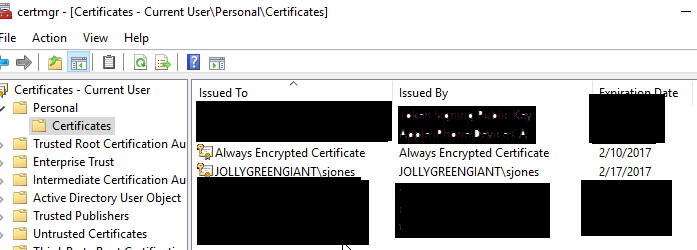
    2016-03-28 17_56_00-Settings

    This is all I changed on my C# application to enable encryption.

    strConnstring += “; Column Encryption Setting = Enabled”

    I had a connection string built, and I added this one little option to the end and when I queried my encrypted table, I could read the data.

    There are certainly more caveats and more to learn about encryption, but this shows how easy it can be to change your application. Just alter the connection string.

  • Create a Database Master Key–#SQLNewBlogger

    Another post for me that is simple and hopefully serves as an example for people trying to get blogging as #SQLNewBloggers.

    One of the first things you need in a SQL Server database in order to implement encryption is a database master key, DMK. This is simple to create, though you need one in each database that will support encryption.

    The syntax is easy, with only really an option to specify a password. There is no name, as there’s a single DMK per database. Set your context to the correct database and end enter:

    CREATE MASTER KEY ENCRYPTION BY PASSWORD = ‘Som3thingR3ally$|tr0ng’;

    When you execute this, you’ll just get a result message. At least, if it works you will. The password must conform to the password requirements of your Windows OS, which is good.

    Note: This is a securable code, like the password for a user account. Make sure you store this in a password manager for your organization.

    By default, this is protected by your password as well as the Service Master Key (SMK) on your instance. In practice this doesn’t usually mean much for you, but be aware of this.

    You do need CONTROL permission on the database, though usually I’d expect a db_owner or more permissions to actually create these keys.

    And, of course, back up the key as soon as you can.

    SQLNewBlogger

    This was about 5 minutes work for me. I would guess most new bloggers could read, understand, and produce an explanation of this in 30 minutes.

    References

    CREATE MASTER KEY – https://msdn.microsoft.com/en-us/library/ms174382.aspx

    Create a Database Master Key – https://msdn.microsoft.com/en-us/library/aa337551.aspx

  • SQL Server 2016: The Data Protection Version

    I’ve spent a few years working with SQL Server encryption and security, trying to educate people on the various capabilities involved. There are some nice features available in the platform that can help you run a more secure SQL Server, but there has been a lot of room for improvement across the last few versions. The openness of the platform is somewhat tempered by the need for each of us to write a fair amount of code to properly secure our databases. That is the hard part as many developers don’t write secure code.

    That is changing a bit. I am really excited about the SQL Server 2016 release in that there are a number of data protection mechanisms that are going to greatly expand how we can protect our data moving forward. From Row Level Security to Always Encrypted to Dynamic Data Masking, the number of new features that will help make security a bit easier is growing dramatically.

    I certainly think Microsoft is definitely encouraging and supporting better, more secure coding practices. If you look in Books Online at MSDN, there is now a Security Center that covers a number of topics and organizes information in a much better way. Security has seemed like an afterthought in past documentation. From Encryption to SQL Injection to Auditing to even Metadata Visibility, it seems like the next version of SQL Server on premise, and in Azure, really is taking security more seriously.

    I look forward to watching the platform evolve and security increasing over time. It does seem as though SQL Server has the fewest security holes in the platform, but I hope that many of us can take advantage of the changes in SQL Server over time and build applications that will be viewed as being secure as well.

    Steve Jones

    The Voice of the DBA Podcast

    Listen to the MP3 Audio ( 2.1MB) podcast or subscribe to the feed at iTunes and LibSyn.

  • Data for Ransom

    Imagine you come into work and all of your database columns are encrypted. You have no idea what key was used, and your application can’t access the data. You receive a message that for a $100,000 payment, the decryption key will be sent to you. What do you do?

    Well, depending on your business, and how quickly you can restore backups, maybe your organization pays. I read a story recently about a hospital that found a number of their files encrypted by a virus, with a demand to pay a ransom for the decryption key. They did, received the key, and opened their files. However that set a dangerous precedent.

    Apparently attacks by ransomware are on the rise. Those of us with database software are not likely to be too affected as we (should) have regular backups we can restore. However the interruption to businesses can be costly, and this can result in more organizations paying the ransom, which then encourages more attacks.

    The new Always Encrypted capability in SQL Server 2016 is great, and I’m excited by it. However, we want to be sure a malicious user doesn’t enable this feature. I could certainly see that as an attack vector for web based systems. An attacker gets sysadmin privileges, enables Always Encrypted and places the certificate on the client web server. Some weeks later, they remove the client certificate, and suddenly no one can decrypt the data. Potentially, depending on backup procedures, there might not even be a capture of the certificate from the web server in any backup files.

    The world is becoming more dangerous, and more troublesome for our data. As with most things, vigilance and monitoring of security segments of our applications is important. While ransomware is unlikely to strike databases, one never knows, and you should ensure that you have good backups in the event that you are attacked.

    Steve Jones

    The Voice of the DBA Podcast

    Listen to the MP3 Audio ( 2.8MB) podcast or subscribe to the feed at iTunes and LibSyn.