Tag: graph databases

  • Working with Neo4j Imports–I HATE CASE SENSITIVITY

    I’ve been working to better understand graph databases and where they can be useful.

    There is a file from Neo4J that comes with the Desktop and contains a data export from Northwind. This looks like this when you open it:
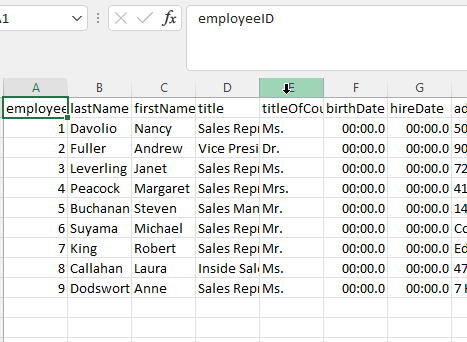
    2022-08-02 16_24_48-employees.csv - Excel

    On the page where Neo4j talks about the employee imports, they have this code:

    // Create employees
    LOAD CSV WITH HEADERS FROM 'https://gist.githubusercontent.com/jexp/054bc6baf36604061bf407aa8cd08608/raw/8bdd36dfc88381995e6823ff3f419b5a0cb8ac4f/employees.csv' AS row
    MERGE (e:Employee {employeeID:row.EmployeeID})
       ON CREATE SET e.firstName = row.FirstName, e.lastName = row.LastName, e.title = row.Title;

    This loads fine.

    When I run this code, it works. When change to this, it fails. It’s erroring out on my file. I tried moving the file, removing nulls, etc.

    LOAD CSV WITH HEADERS FROM 'file:///employees.csv' AS row

    MERGE (e:Employee {employeeID:row.EmployeeID})

    ON CREATE SET e.firstName = row.FirstName, e.lastName = row.LastName, e.title = row.Title;

    Here’s the error in the Neo4j Browser:
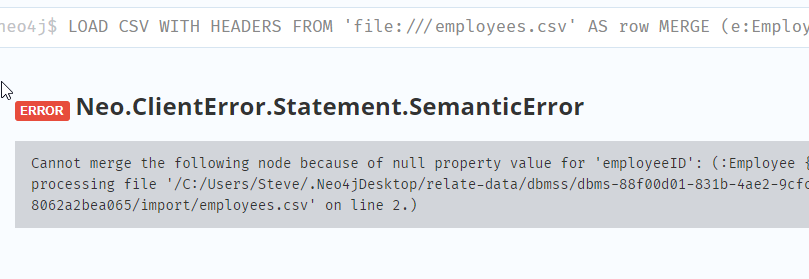
    2022-08-02 16_35_03-neo4j@bolt___localhost_7687_neo4j - Neo4j Browser

    I kept editing the file and trying different things. I compared what I had locally with what was on GitHub. Eventually, I realized this is the issue:

    {employeeID:row.EmployeeID}

    In the GitHub csv, the first row has headers with EmployeeID. In my local file, the header is “employeeID” (lower case). As soon as I edited this, it worked.

    THIS IS THE FILE THAT CAME WITH NEO4J DESKTOP.

    They make mistakes, just like I do. I hate that there are too many things like that that are care sensitive. I get that sometimes you want data to be in a particular format, but I think in the modern world, making metadata case sensitive isn’t productive.
  • Getting Neo4J Running in Docker on Windows

    I was doing a little experimenting with graph databases. My goal was to run Neo4j in a docker container, but it wasn’t quite as simple as I expected. I started with a How-To, but it wasn’t enough. This post covers a few things I did to get this working.

    In looking at the How-To, I got this command:

    docker run \
         --name testneo4j \
         -p7474:7474 -p7687:7687 \
         -d \
         -v $HOME/neo4j/data:/data \
         -v $HOME/neo4j/logs:/logs \
         -v $HOME/neo4j/import:/var/lib/neo4j/import \
         -v $HOME/neo4j/plugins:/plugins \
         --env NEO4J_AUTH=neo4j/test \
         neo4j:latest

    That’s the basic command I was looking for to run. I tried it, but this doesn’t paste well into a Windows shell. I put the entire thing in a .CMD file to run, making it one long line in the file.

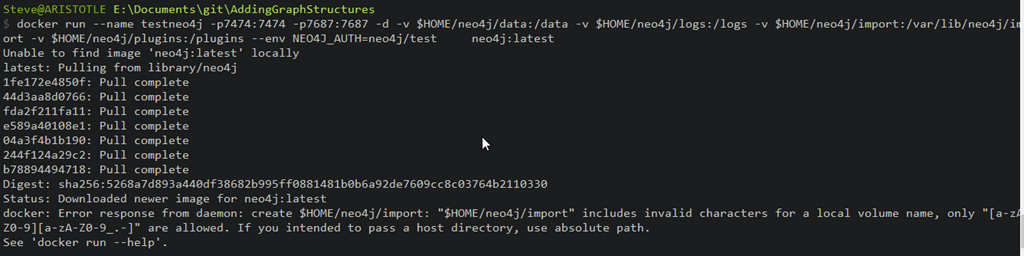
    However, when I ran it, I got this:

    2022-05-09 18_56_46-cmd

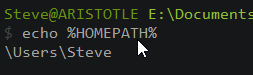
    What’s wrong? Well, $Home is a Linux concept, and it’s looking to map some volumes to folders. The Windows equivalent is %HOMEPATH%. If I check that variable, I see it’s /Users/Steve on my machine.

    2022-05-09 18_57_47-cmd

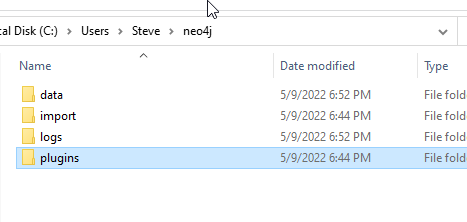
    I created the folders needed for the four volumes, as you can see here:

    2022-05-09 18_58_13-neo4j

    I tried again, but this didn’t work. I realized, I needed to edit $HOME to %HOMEPATH%. I should have done that immediately.

    The next attempt has me seeing this:

    2022-05-09 18_59_16-cmd

    Of course that isn’t the right path. I added a “C:” to each volume and things worked.

    2022-05-09 19_00_49-cmd

    The final command (For me):

    docker run --name testneo4j -p7474:7474 -p7687:7687 -d -v c:%HOMEPATH%\neo4j\data:/data -v c:%HOMEPATH%\neo4j\logs:/logs -v c:%HOMEPATH%\neo4j\import:/var/lib/neo4j/import -v c:%HOMEPATH%\neo4j\plugins:/plugins --env NEO4J_AUTH=neo4j/test     neo4j:latest

    If you want to play with Neo4j and don’t want to install things, you can try this. Of course, you still need a query method from an app or a client tool.