Tag: GraphSQL

  • Graphing Performance

    We have a lot of different database platforms to choose from when building software. Most of us reading this are SQL Server users, and likely relationally biased. However, key-value stores, document databases, graph databases, and more are out there. If you work with developers that embrace change and new options, likely you’ve been asked about implementing some sort of NoSQL database instead of SQL Server for some project. Maybe you’ve even been asked to migrate away from SQL Server to an Open Source (OSS) NoSQL platform, with the lack of software cost being a factor.

    I do think that there are some domains of problems that relational systems don’t handle well. Certainly at scales (data volume or rate), there are better ways to deal with some data sets in a less structured and tightly coupled way. We see that in the large scale web companies like Google, Twitter, Facebook, etc. If these companies had tried to build their entire system on a RDBMS platform, they would have struggled to grow, and maybe not even reached the size they are.

    I’ve been reading and playing with the new graph capabilities of SQL Server 2017, trying to determine what I think of the concepts. Certainly large scale many-many relationships don’t seem to be a strength of relational databases and I’ve thought there are certain types of queries or data models that might be better handled by a graph database.

    Then I ran across this report from a few researchers that examine how graph database compare to relational ones. After all, we’ve grown accustomed to using RDBMSs in many environments and situations. What better way to evaluate the performance of a specialized database than compare its performance in the problem domain its designed to solve to that of a general database platform.

    The results are a little surprising. Even with a sub-optimal query language, I would have expected the graph database to perform better. Instead, relational seems to handle the reference graph workload better. Raw performance isn’t everything. Ease of development and ability to scale are important. There may be other considerations in your system as well, but I did find this to be an interesting paper.

    We will see how the world of specialized databases handles real world workloads over time as more companies use them, but for now, I’d be skeptical of replacing an existing, working RDBMS with something unproven. I’d need to see a good POC that shows quite a bit of improvement across a variety of metrics, not just scalability.

    Steve Jones

    The Voice of the DBA Podcast

    Listen to the MP3 Audio ( 4.0MB) podcast or subscribe to the feed at iTunes and Libsyn.
  • Using OPENROWSET in SQL Server on Linux

    I wanted to import the million song dataset in SQL Server on Linux. There’s a github repo that has the SQL to allow you to use this with the graph database features. However, it’s built for Windows.

    Linux is a slightly different beast. Once I started down this path, I had memories of working on SunOS in college, messing with permissions and moving files.

    I run Ubuntu in VMWare, so I first downloaded the files to my Documents folder. That’s pretty easy. However, once there, the mssql user can’t read them. Rather than mess with permissions for my home, I decided to move these to a location where the mssql user could read them.

    First, I need to use mv to move the files. However, the default location for SQL Server (/var/opt/mssql) doesn’t let me drop files in there. Instead, I need to sudo the mv.

    sudo mv unique_tracks.txt /var/opt/mssql/unique_tracks.txt

    I repeated this for each file.

    However, I still had permissions errors. Files have their own permissions in Linux, so I needed to alter those. I decided to use chown since these are temp files the SQL Server will use and once imported, I’ll delete them.

    chown mssql unique_tracks.txt

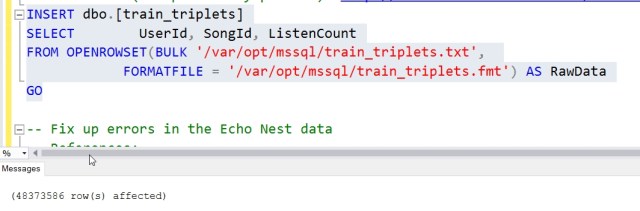
    From here, I could easily run the OPENROWSET commands and get the data loaded. Now to play around with a graph.

  • Quick Graph Database

    There’s a sample to work through here: https://docs.microsoft.com/en-us/sql/relational-databases/graphs/sql-graph-sample

    I decided to try this in CTP2 and just see how it works. I didn’t do much, but I added a node and an edge with this code:

    CREATE TABLE Person (ID INTEGER PRIMARY KEY, name VARCHAR(100)) AS NODE;
    CREATE TABLE friends (StartDate date) AS EDGE;

    Next I added a few values, based on the samples.

    INSERT Person
     VALUES (1, 'Steve')
          , (2, 'Andy')
          , (3, 'Brian')
          , (4, 'Leon')
          , (5, 'Jon')
    GO
    INSERT Friends VALUES ((SELECT $node_id FROM Person WHERE id = 1), (SELECT $node_id FROM Person WHERE id = 2),'3/10/2001')
    INSERT Friends VALUES ((SELECT $node_id FROM Person WHERE id = 3), (SELECT $node_id FROM Person WHERE id = 4),'5/1/2000')
    INSERT Friends VALUES ((SELECT $node_id FROM Person WHERE id = 1), (SELECT $node_id FROM Person WHERE id = 3), '3/1/2001')

    Then I ran query.

    SELECT *
    FROM Person p1, Friends, Person p2
    WHERE MATCH (p1-(friends)->p2)
    AND p1.name = 'Brian';

    What does this give me? First, these columns with this data. It’s a wide result set, so I have the column and data listed after it, even though this is really a 1 row table.

    $edge_id_5F276FF32E2B492A96858AC68B530F09                                               
    
    {"type":"edge","schema":"dbo","table":"friends","id":1}
    
    $from_id_DE63E53A3F4749C2980FC989BC2E5405                                            
    
    {"type":"node","schema":"dbo","table":"Person","id":2}                                              
    
    $to_id_19F4532DDEC74B22876DCCFBB24797BE                                                 
    
    {"type":"node","schema":"dbo","table":"Person","id":3}                                              
    
    StartDate  
    
    2000-05-01
    
    $node_id_D004B78ADB644588BE4B9E337823356A                                            
    
    {"type":"node","schema":"dbo","table":"Person","id":2}
    
    ID
    
    3
    
    name                                                                                                 
    
    Brian
    
    $node_id_D004B78ADB644588BE4B9E337823356A                                        
    
    {"type":"node","schema":"dbo","table":"Person","id":3}   
    
    ID
    
    4
    
    name
    Leon

    What does all that mean? No idea. Clearly there is JSON that’s returned here and can be deserialized to gather meanings. Is this useful? I think graphs solve a certain set of problems very well, and more efficiently than relational systems. Certainly I could implement a graph structure relationally, but at scale I’m not sure the queries would be as easy to write or run as quickly.

    I don’t know if I’d use a graph structure in any of the problems we try to solve in the SQLServerCentral app, but who knows. Maybe we would if we could.

    This is just another option for SQL Server, another tool in your toolbelt. Should you use it? I don’t know, but I’d recommend that if you think you have a complex relationship structure, maybe lots of FKs internal to a table or you are modeling relationships, learn more about GraphSQL and how graph databases work and build a POC. I’m not sure when the SQL Server implementation will be production ready, but it doesn’t hurt to test and learn a bit if you have the chance.