Tag: json

  • JSON Has a Cost

    JSON seems to be everywhere these days. Many application developers like it across all sorts of languages, C#, JAVA, Python, and more. They use it for transferring information between systems, and are comfortable serializing hierarchical object data into JSON from text and de-serializing it back into its various elements.

    For those of us working in relational databases, JSON seems like a blob of information that isn’t easily queried, indexed, or stored. We prefer working with a relational set of data, which brings us into conflict with software developers. We’d like them to convert their objects to a relational structure, and they’d like us to just work with JSON.

    SQL Server has added new JSON functions in SQL Server 2025, expanding the JSON capabilities from previous versions. PostgreSQL has JSON types for a few versions, as has Oracle. Lots of applications are storing JSON data in databases. Unlike XML, however, JSON seems to be working well (overall) as a data storage mechanism.

    Or is it?

    At a recent conference, one of the speakers noted that we do a lot of data movement these days, and there can be a high cost to this as we pay for both compute and network. This data movement often incurs a query cost to get information from the source system. JSON can exacerbate this issue as we may send more data than necessary, and we might find our compute engines don’t support predicate pushdown. Even if we index the JSON, we might still end up querying more data from disks to get what we need. Especially as we move a lot of data to warehouses and lakehouses.

    Using JSON can slow things down. It’s nice for storing a bunch of information quickly and easily, but as we need to work with specific parts of a JSON document, we would likely be better off de-serializing the important pieces into more structured formats that prevent duplication, are easily indexed, and can achieve quick query performance. Everything becomes a little smoother.

    JSON is great, and I do like it, but it’s not a substitute for relational systems and relational models.

    Steve Jones

    Listen to the podcast at Libsyn, Spotify, or iTunes.

    Note, podcasts are only available for a limited time online.

  • No Scalars with JSON_QUERY–#SQLNewBlogger

    Another post for me that is simple and hopefully serves as an example for people trying to get blogging as #SQLNewBloggers.

    I started to dig into JSON queries recently, and as I continued to experiment with JSON, this struck me as strange. Why is there a NULL in the result?

    2020-12-04 14_43_02-SQLQuery3.sql - ARISTOTLE_SQL2017.Compare2 (ARISTOTLE_Steve (58))_ - Microsoft S

    The path looks right. This appears to be somewhere I ought to get a result back. As I looked up the JSON_QUERY documentation, and it says I get an object or array back. I’d somewhat expect that position, while containing a single value, could be seen as an object of

    {“setter”}

    The fact that I need to know I have a single value here seems like poor design. If the document changes, perhaps someone might enter this:

    DECLARE @json NVARCHAR(1000)
         = N'
      {  "player": {
                  "name" : "Sarah",
                  "position" : "setter, DS"
                 },
        "team":"varsity"
      }
    ';

    In this case, a JSON_VALUE would fail, while a JSON_QUERY wouldn’t work in the first example above. This means that I need to modify my code based on documents.

    I don’t like this, but I need to know this, so if you work with JSON, make sure you know how the functions work.

    SQLNewBlogger

    While writing the previous post, I changed one of the function calls and got the NULL. I had to fix things for the other post, but I kept the query and then spent about 10 minutes writing this one to show a little thought into the language.

    You can easily take something you are confused about, made a mistake doing, or wonder about and write your own post.

  • Basic JSON Queries–#SQLNewBlogger

    Another post for me that is simple and hopefully serves as an example for people trying to get blogging as #SQLNewBloggers.

    Recently I saw Jason Horner do a presentation on JSON at a user group meeting. I’ve lightly looked at JSON in some detail, and I decided to experiment with this.

    Basic Querying of a Document

    A JSON document is text that contains key-value pairs, with colons used to separate them, and grouped with curly braces. Arrays are supported with brackets, values separated by commas, and everything that is text is quoted with double quotes.

    There are a few other rules, but that’s the basic structure. Things can next, and in SQL Server, we store the data a character data. So let’s create a document:

    DECLARE @json NVARCHAR(1000) = N'
    {
      "player": {
                 "name" : "Sarah",
                 "position" : "setter"
                }
      "team" : "varsity"
    }
    '

    This is a basic document, with two key values (player and team) and one set of additional keys (name and position) inside the first key.

    I can query this with the code:

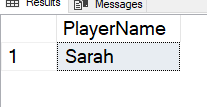
    SELECT JSON_VALUE(@json, '$.player.name') AS PlayerName;

    This returns the scalar value from the document. In this case, I get “Sarah”, as shown here:

    2020-11-21 14_58_17-SQLQuery3.sql - ARISTOTLE_SQL2017.Compare2 (ARISTOTLE_Steve (58))_ - Microsoft S

    I need to get the path correct here for the value. Note that I start with a dot (.) as the root and then traverse the tree. A few other examples are shown in the image.

    2020-11-24 14_49_16-

    These show the paths to get to data in the document.

    In a future post, I’ll look in more detail how this works.

    SQLNewBlogger

    After watching the presentation, I decided to do a little research and experiment. I spent about 10 minutes playing with JSON and querying it, and then another 10 writing this post.

    This is a great example of picking up the beginnings of a new skill, and the start of a blog series that shows how I can work with this data.