Tag: SQL Data Generator

  • Adding Test data to msdb.sysjobhistory

    One of our internal people was looking to test some process in (I assume) Redgate Monitor and needed more job history than they had in msdb.sysjobhistory. They wanted to use SQL Data Generator to help, but couldn’t make it work.

    This gives the solution I sketched for them. It can work with some other system tables, but not all. Many system tables do not allow user data to be inserted. Some do.

    The Main Problem

    The main problem here is that SQL Data Generator doesn’t see system tables. If I open a project in msdb, I see this:

    2024-11_0297

    That matches what I see in SSMS. Only user tables.

    2024-11_0296

    However, I know I can do this and it works.

    INSERT INTO dbo.sysjobhistory
      (job_id, step_id, step_name, sql_message_id, sql_severity, message, run_status, run_date, run_time, run_duration, operator_id_emailed, operator_id_netsent, operator_id_paged, retries_attempted, server)
    VALUES
      ('EA6B3BC3-D358-4B0C-A793-8C3C558098AB', 0, 'mystep', 0, 0, 'Executed as user: NT Service\SQLAgent$SQL2022. The job script encountered the following errors.'
      , 0, 20241111, 175438, 0, 0, 0, 0, 0, 'ARISTOTLE\SQL2022')

    Now, how to get SQL Data Generator to help?

    A Little System Table ETL

    Since I know I can insert data into the table, how can I generate data? Apparently SQL Data Generator cannot read these tables, but I can use a trick that I’ve used in the past.

    First, I’ll run this in msdb:

    SELECT *
      INTO mysysjobhistory
      FROM dbo.sysjobhistory AS s
      WHERE 1 = 0

    This code will make a copy of dbo.sysjobhistory with no data. However, this is a user table. Once I do this, now I can refresh SQL Data Generator and I can see my table.

    2024-11_0094

    Now I can use the settings to get the type of data I want. Here’s a preview of some data I set, using the data in my existing table.

    2024-11_0095

    Now, I can click generate data and I have data added to my user table. If I query this table, I see data:

    2024-11_0096

    The last step is to move this data. I’ll use this query:

    INSERT dbo.sysjobhistory
       (job_id, step_id, step_name, sql_message_id, sql_severity, message, run_status, run_date, run_time, run_duration, operator_id_emailed, operator_id_netsent, operator_id_paged, retries_attempted, server)
    SELECT job_id, step_id, step_name, sql_message_id, sql_severity, message, run_status, run_date, run_time, run_duration, operator_id_emailed, operator_id_netsent, operator_id_paged, retries_attempted, server
      FROM dbo.mysysjobhistory AS m

    Once this runs, I can see the data in msdb.

    2024-11_0097

    Of course, I’d also have to populate sysjobs if I wanted this linked to a job and shown in the Agent Job History Viewer.

    Summary

    This post showed how I’ve sometimes worked in situations where I couldn’t directly access a table from an application. In this case, I want to get data into sysjobhistory, but SQL Data Generator doesn’t support that directly. My solution:

    1. make a copy of the table
    2. insert data into the copy
    3. move the data into the original

    This has worked in a few situations as well where I might need to move/stage data before it gets into an application table. In this case, we wanted to generate some random history for Redgate Monitor to read.

    This can work for other tables as well, as long as you can insert..select into them.

    SQL Data Generator is a neat tool to generate data quickly for a variety of purposes in SQL Server. Give it a try, especially if you already have the Toolbelt Essentials.
  • Foreign Keys in SQL Data Generator

    A customer recently asked about using FKs in SQL Data Generator, and I decided to write a short post showing how these work.

    The Scenario

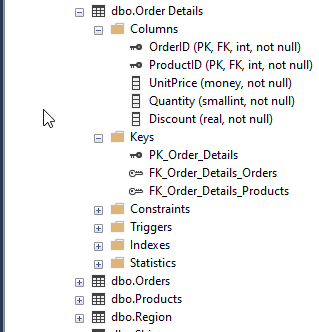
    I’ve got a copy of the Northwind sample database on my system, named Westwind so I can experiment. As you can see below, the Order Details table has a few FKs in it, one to Orders and one to Products.

    2024-02-09 16_00_24-SQLQuery5.sql - ARISTOTLE.Westwind_1_Dev (ARISTOTLE_Steve (59))_ - Microsoft SQL

    This is a very standard setup in many databases, where there are links between tables. I’m also going to add another table with no FKs, but I want data in here from another table.

    CREATE TABLE OrderHistory
    (OrderID INT
    , OrderDate DATETIME
    , Complete BIT
    )
    GO

    This should have an FK declared to dbo.Orders.OrderID, but as I often see, this wasn’t set up.

    Using SQL Data Generator

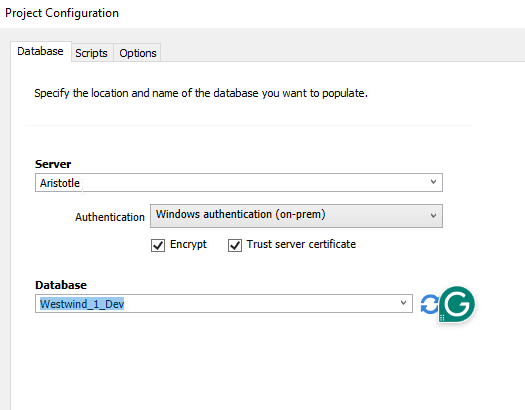
    I’ll create a new project in SQL Data Generator that points to this database. When this configures itself, I’ll deselect all tables except for Orders, Order Details, and OrderHistory.

    2024-02-09 16_02_14-Project Configuration

    When I do this, if I look at Order Details, I can see that in the preview, both OrderID and ProductID are listed as generated data using the keys. In this case, this means I’d get data from both the Orders and Products tables.

    2024-02-09 16_03_17-SQL Data Generator - New project _

    If I check OrderHistory below, you can see that the OrderID is set as an integer to be generated. However, that’s not what I want.

    2024-02-09 16_04_44-SQL Data Generator - New project _

    Fortunately, I can set a manual key here. If I select the Generator drop down at the top, I see  there is a SQL Type generator, and one of the subtypes is a FK. We’ll pick that.

    2024-02-09 16_05_19-

    This changes the configuration and I need to pick a table and column. I’ll choose orders.

    2024-02-09 16_05_31-SQL Data Generator - New project _

    Now I can generate data. Before I do this, I check Orders and there are 840 orders in there. I’ll just generate 10 more. I’ll also generate 10 OrderHistory rows and not delete existing data. Once I generate the data, let’s look at some results.

    Below, we’ve added 10 orders, which makes sense. My OrderHistory table has 10 rows, but when I join with Orders on the OrderID, I get all 10 rows back. Data generator has respected a manual, non-DRI, FK.

    2024-02-09 16_10_36-SQLQuery5.sql - ARISTOTLE.Westwind_1_Dev (ARISTOTLE_Steve (59))_ - Microsoft SQL

    SQL Data Generator should detect your declared FKs, but even if you don’t have them or it doesn’t, you can add them into your generated dataset.

    SQL Data Generator is part of the SQL Toolbelt, and fantastic set of productivity tools for SQL Server developers. If you’ve never used these, download an eval and give them a try today.

    Video Walkthrough

    I also have a video walkthrough of this post, if you’d rather see this in action.