Tag: syndicated

  • Ignoring Comments in SQL Compare

    Recently I had a client that wanted to know how they could use SQL Compare to catch actual changes in their code, but not have comments show up as changes. This is fairly easy to do, and this post looks at how this works.

    Setting up a Scenario

    Let’s say I have two databases that are empty. I’ll name them Compare1 and Compare2. I’ll run this code in Compare1:

    CREATE TABLE MyTable
    (   MyKey INT NOT NULL IDENTITY(1, 1) CONSTRAINT MyTablePk PRIMARY KEY
       , MyVal VARCHAR(100));
    GO

    CREATE PROCEDURE GetMyTable @MyKey INT = NULL
    AS
    IF @MyKey IS NOT NULL
         SELECT
               @MyKey AS MyKey, mt.MyVal
         FROM  dbo.MyTable AS mt
         WHERE mt.MyKey = @MyKey;
    ELSE
         SELECT mt.MyKey, mt.MyVal
         FROM dbo.MyTable AS mt;
    SELECT 1 AS One;
    RETURN;
    GO

    I’ll run the same code in Compare2 and then run SQL Compare 14 against these two databases. As expected, I find no differences.
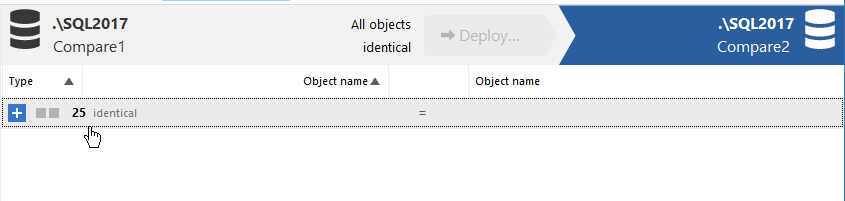
    2020-11-30 14_59_33-

    I used the default options here, just picking the databases and running the comparison. Let’s now change some code. In Compare2, I’ll adjust the procedure code to look like this:

    CREATE OR ALTER PROCEDURE GetMyTable @MyKey INT = NULL
    AS
    /*
    Check for a parameter not passed in. If it is missing, then
    get all data.
    */
    IF @MyKey IS NOT NULL
         SELECT
               @MyKey AS MyKey, mt.MyVal
         FROM  dbo.MyTable AS mt
         WHERE mt.MyKey = @MyKey;
    ELSE
         SELECT mt.MyKey, mt.MyVal
         FROM dbo.MyTable AS mt;
    SELECT 1 AS One;
    RETURN;
    GO

    I can refresh my project, and now I see there is a difference. This procedure is flagged as having 4 different lines, as you see in the image below.

    2020-11-30 15_01_59-SQL Compare - E__Documents_SQL Compare_SharedProjects_(local)_SQL2017.SimpleTalk

    However, the procedure isn’t different. I’ve just added comments to one of the procs. You might view this as different, in terms of how you run software development, but to the SQL Server engine, these procs are the same. How can I avoid flagging this as a difference and causing a deployment of this code?

    Changing Project Options

    Redgate has thought of this. In the SQL Compare toolbar, there is an “Edit Project” button.

    2020-11-30 15_06_34-SQL Compare - E__Documents_SQL Compare_SharedProjects_(local)_SQL2017.SimpleTalk

    If I click this, I get the dialog that normally starts SQL Compare, with my project and the databases selected. Notice that there are actually four choices at the top of this dialog, with the rightmost one being “Options”.

    2020-11-30 15_06_40-(local)_SQL2017.SimpleTalk_1_Dev v localhost.SimpleTalk_1_Dev.scp_

    If I click this, there are lots of options. I’ve scrolled down a bit, to the Ignore section. In here, you can see my mouse on the “Ignore comments” option.
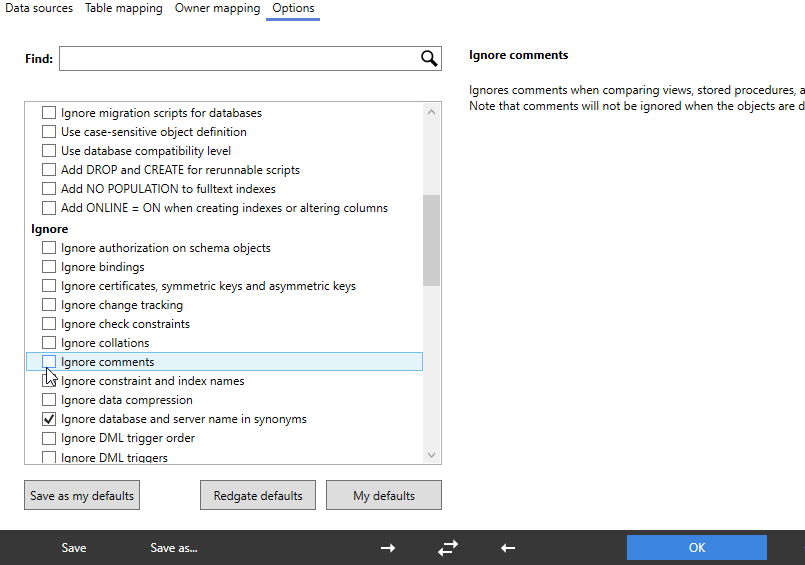
    2020-11-30 15_08_06-(local)_SQL2017.SimpleTalk_1_Dev v localhost.SimpleTalk_1_Dev.scp_

    I’ll click that, click Compare Now, which then refreshes my project. Now I all objects shown as identical. However, if I expand the stored procedure object, I can still see the difference. The difference is just ignored by SQL Compare.
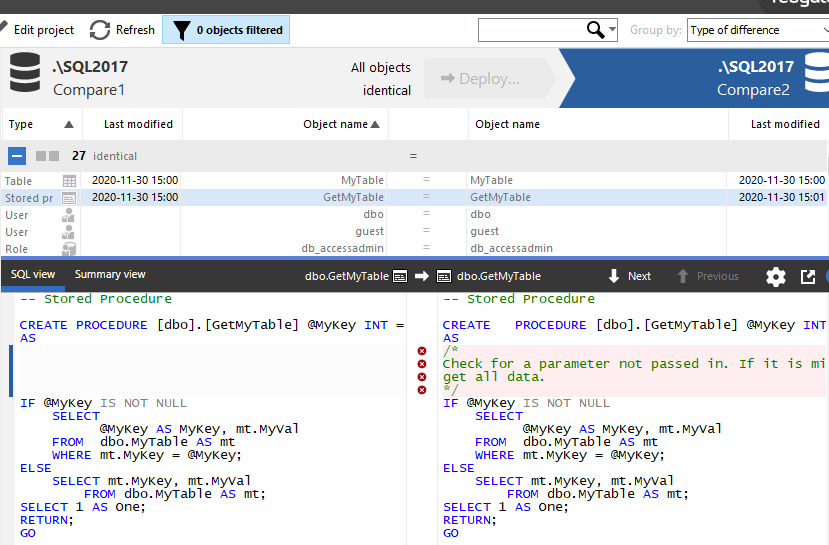
    2020-11-30 15_09_36-SQL Compare - E__Documents_SQL Compare_SharedProjects_(local)_SQL2017.SimpleTalk

    This lets me track the differences, see them, but not have the project flag them for deployment. If I’m using any of the Redgate automation tools, the command line option for this is IgnoreComments, or icm. You can pass this into any of the tools to prevent comments from causing a deployment by themselves.

    This also works with inline comments. I’ll alter the procedure in Compare1 with this code:


    CREATE OR ALTER PROCEDURE GetMyTable @MyKey INT = NULL
    AS
    IF @MyKey IS NOT NULL
         SELECT
               @MyKey AS MyKey, mt.MyVal
         FROM  dbo.MyTable AS mt
         WHERE mt.MyKey = @MyKey;  -- parameter value filter
    ELSE
         SELECT mt.MyKey, mt.MyVal
         FROM dbo.MyTable AS mt;
    SELECT 1 AS One;   -- second result set.
    RETURN;
    GO

    The refreshed project sees the differences, but this is still seen as an identical object for the purposes of deployment.

    2020-11-30 15_17_15-SQL Compare - E__Documents_SQL Compare_SharedProjects_(local)_SQL2017.SimpleTalk

    If you are refactoring code, perhaps by just adding comments or clarifying something, you often may not want a deployment triggered just from changing the notes you leave for other developers. SQL Compare can help here, as can all the Redgate tools.

    I would recommend this option always be set, unless you have a good reason to allow comments to trigger a deployment.

    Give SQL Compare a try today if you’ve never used it, and if you have it, enable this in your projects.
  • Daily Coping 2 Dec 2020

    I started to add a daily coping tip to the SQLServerCentral newsletter and to the Community Circle, which is helping me deal with the issues in the world. I’m adding my responses for each day here.

    Today’s tip is to tune in to a different radio station or TV channel.

    I enjoy sports radio. For years while I commuted, I caught up on what was happening with the local teams in the Denver area. With the pandemic, I go fewer places, and I more rarely listen to the station.

    I miss that a bit, but when I tuned in online, I found some different hosts. One that I used to really enjoy listening to is Alfred Williams. He played for the Broncos, and after retirement, I enjoyed hearing him on the radio.

    I looked around, and found him on 850KOA. I’ve made it a point to periodically listen in the afternoon, hear something different, and enjoy Alfred’s opinions and thoughts again.

  • Daily Coping 1 Dec 2020

    I started to add a daily coping tip to the SQLServerCentral newsletter and to the Community Circle, which is helping me deal with the issues in the world. I’m adding my responses for each day here.

    Today’s tip is to set aside regular time to pursue an activity you love.

    For me, I don’t know I love a lot of things, but I do enjoy guitar and I’ve worked on it a lot this year. The last month, I’ve let it go a bit, but I’m getting back to it. I try to remember to bring it downstairs to my office, and I’ll take some 5-10 minute breaks and play.

    I’ve also started to put together a little time on Sat am to work through a course, and build some new skills.

  • Basic JSON Queries–#SQLNewBlogger

    Another post for me that is simple and hopefully serves as an example for people trying to get blogging as #SQLNewBloggers.

    Recently I saw Jason Horner do a presentation on JSON at a user group meeting. I’ve lightly looked at JSON in some detail, and I decided to experiment with this.

    Basic Querying of a Document

    A JSON document is text that contains key-value pairs, with colons used to separate them, and grouped with curly braces. Arrays are supported with brackets, values separated by commas, and everything that is text is quoted with double quotes.

    There are a few other rules, but that’s the basic structure. Things can next, and in SQL Server, we store the data a character data. So let’s create a document:

    DECLARE @json NVARCHAR(1000) = N'
    {
      "player": {
                 "name" : "Sarah",
                 "position" : "setter"
                }
      "team" : "varsity"
    }
    '

    This is a basic document, with two key values (player and team) and one set of additional keys (name and position) inside the first key.

    I can query this with the code:

    SELECT JSON_VALUE(@json, '$.player.name') AS PlayerName;

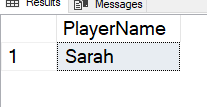
    This returns the scalar value from the document. In this case, I get “Sarah”, as shown here:

    2020-11-21 14_58_17-SQLQuery3.sql - ARISTOTLE_SQL2017.Compare2 (ARISTOTLE_Steve (58))_ - Microsoft S

    I need to get the path correct here for the value. Note that I start with a dot (.) as the root and then traverse the tree. A few other examples are shown in the image.

    2020-11-24 14_49_16-

    These show the paths to get to data in the document.

    In a future post, I’ll look in more detail how this works.

    SQLNewBlogger

    After watching the presentation, I decided to do a little research and experiment. I spent about 10 minutes playing with JSON and querying it, and then another 10 writing this post.

    This is a great example of picking up the beginnings of a new skill, and the start of a blog series that shows how I can work with this data.