Tag: syndicated

  • Daily Coping 29 Oct 2020

    I started to add a daily coping tip to the SQLServerCentral newsletter and to the Community Circle, which is helping me deal with the issues in the world. I’m adding my responses for each day here.

    Today’s tip is to be kind to yourself today. Remember progress takes time.

    This is something that having and working with kids has taught me. I’ve watched them take advice or coaching from me, or not, but I can see there is a difference across time.

    Lately I’ve had a lot of deliverables, for various different presentations. Rather than get upset or concerned when I’ve been delayed in getting something done, I’ve stopped and reminded myself that a task may just take time.

    It’s helpful to remind yourself that despite getting things done today, I may have more to do tomorrow. As along as I’m making progress, that’s OK.

  • Using Write-Debug

    I wrote a post about PoSh output recently, noting that in general we ought to use Write-Output or Write-Verbose for messaging. In there, I mentioned Write-Debug as well as a way of allowing the user to control debug information.

    Since I often find myself fumbling a bit with debugging scripts, I decided to give this a try and see how it works.

    First, let’s build a simple script. In this case, I’ll write a script that takes two parameters and determines which one is larger.

    $i = $args[0]
    $j = $args[1]
    Write-Debug("First Param:$i")
    Write-Debug("SecondParam:$j")
    if ($i -eq #null ) {   $i = 1
      Write-Debug("Setting first as a default to 1")
    }
    if ($j -eq #null ) {   $j = 1
      Write-Debug("Setting second as a default to 1")
    }
    if ($a -gt $b) {   Write-Output("The first parameter is larger")
    }
    elseif ($i -eq $j ) {   Write-Output("The parameters are equal.")
    }
    else {       Write-Output("The second parameter is larger")   }

    If I run this, I get what I expect. Here are a few executions.
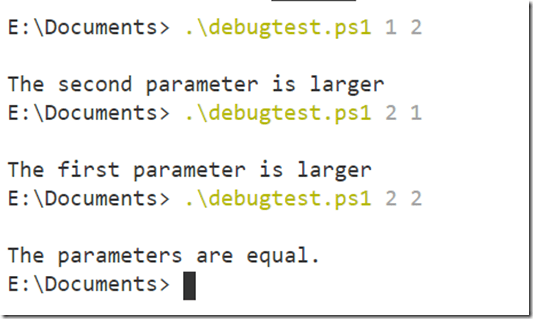
    2020-10-19 13_02_38-debugtest.ps1 - Visual Studio Code

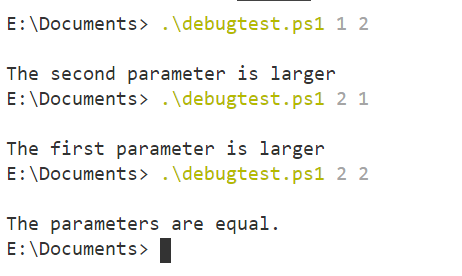
    Now, what if I’m unsure of what’s happening. For example, I forget the second parameter. How does my program know the first parameter is larger? I have some debug information in there, but it doesn’t appear. However, if I change the value of $DebugPreference, I see something.

    2020-10-19 13_05_07-debugtest.ps1 - Visual Studio Code

    The variable, $DebugPreference, controls how Write-Debug messages are processed. By default, this is set to SilentlyContinue. However, if I change this to Continue, all the messages appear. If I want, I can also set it to Stop or Inquire, allowing me to control the program differently.

    You can read more about preference variables here.

    This is a handy thing to use. I’ve often had a variable I set in programs, sometimes as a parameter, that allows me to show debug messages, but I often then need a series of IF statements inside code to check this and display debug information. Now, I can just include write-debug info in my code, and if the preference isn’t set, I don’t see them.

    I’ve seen this used in custom cmdlets from vendors, including Redgate, and it is nice to be able to access more information when something isn’t working, and have it suppressed by default.
  • Daily Coping 28 Oct 2020

    I started to add a daily coping tip to the SQLServerCentral newsletter and to the Community Circle, which is helping me deal with the issues in the world. I’m adding my responses for each day here.

    Today’s tip is to plan a fun or exciting activity to look forward to.

    I’ve got a couple, but in the short term, my wife and I decided to take advantage of a gift from Redgate. For the 21st birthday of the company, everyone got a voucher for an “experience” in their area. In looking over the items, we decided to do a Wine and Painting night with our kids. They are artistic, and we like wine. Actually, my son can drink wine as well, so 3 of us will enjoy wine, with 2 painting.

    I’m looking forward to the night we can do this.

  • Daily Coping 27 Oct 2020

    I started to add a daily coping tip to the SQLServerCentral newsletter and to the Community Circle, which is helping me deal with the issues in the world. I’m adding my responses for each day here.

    Today’s tip is to recognize you have a choice about what to priotitise.

    I have a few hobbies, and I have various tasks that I need to complete on the ranch. I also like getting to the gym on a regular basis. This is on top of the coaching commitments I have in my life.

    Recently I was chatting with a friend and noted that I hadn’t had much time to do any woodworking lately. It’s been busy, and the time I’ve used in my shop has been to try and fix some things around the ranch. When I noted that I was too busy, the person said I needed to prioritize this if it was important.

    That is true. While I wasn’t looking for a solution, and I know this is the case, it’s a good reminder. I put my time in the gym, and my time coaching at a higher priority than some of my other hobbies, so I choose to do those more often, and before I take time for something else.