Tag: syndicated

  • Daily Coping 16 Jul 2020

    I’ve started to add a daily coping tip to the SQLServerCentral newsletter and to the Community Circle, which is helping me deal with the issues in the world. I’m adding my responses for each day here.

    When things go wrong, be compassionate to yourself.

    For the most part things have gone well for me that last few months. However, there have been a few bumps in the road, which are minor in the scheme of things, but they don’t always feel that way in the moment.

    I was doing some furniture movement around the house recently and I hurt my back. It was slightly strained, and really needed a couple days of rest to heal. I hate laying in bed for too long, and I hate not getting things done.

    This item actually came from my wife, who reminded me to relax and take care of myself, accepting limits for a couple days.

    I did, and I feel better. It wasn’t easy, but I consumed some video, practiced some Duolingo on my phone, and read a lot. It was a good break, even if it was unwanted.

  • Daily Coping 15 Jul 2020

    I’ve started to add a daily coping tip to the SQLServerCentral newsletter and to the Community Circle, which is helping me deal with the issues in the world. I’m adding my responses for each day here.

    Today’s tip is to find an action you can take to overcome a problem or worry.

    I have plenty of small problems, and mostly small worries. However, I recognize and appreciate how lucky I am with family, health, security, especially compared with many in life.

    As a result, I try to keep things in perspective. One of the concerns I do have is contributing to a growing number of cases in the US. I have started coaching again as Colorado looks to open up, but I’m still worried.

    I’ve tried to think about how to be more careful, avoiding talking directly at someone, wearing a mask more often, keeping my hands and equipment clean. It’s not perfect, but there are things I can do in my control to try and be more careful.

  • Setting up a New SQL Change Automation Project

    It’s been awhile since I’ve set up a new project in Redgate’s SQL Change Automation project. I’ve mostly used this in Visual Studio, but I need to demo something to a client, so I decided to document the process of getting started here.

    There are often updates to this product, as we release every week or two, so the first thing was the click on the banner in SSMS and upgrade to the latest version. Once you have things working, you don’t need to do this often, but you should to it quarterly at least.

    2020-07-07 18_00_55-SQL Change Automation

    My Environment

    I’ve got multiple copies of my databases on one instance. I have 1 for development, 1 for QA, and one for Prod. This is a good PoC setup for getting familiar with the product.

    2020-07-09 10_13_51-SQL Change Automation - Microsoft SQL Server Management Studio

    The flow is we only make changes in SimpleTalk_1_Dev with SSMS. Everything else will happen through automation.

    These databases already have objects in them, but they’re not overly complex.
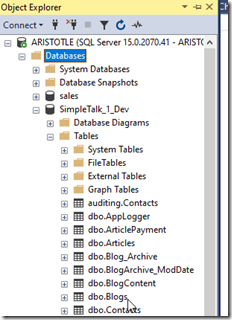
    2020-07-07 17_56_15-SQLQuery1.sql - ARISTOTLE_SQL2017.Sandbox (ARISTOTLE_Steve (54)) - Microsoft SQL

    I have SQL Change Automation (SCA) installed in SSMS, versions 4.2.20176 and 18.5 respectively. Let’s see if we can do some development.

    Creating a Project

    When I open the SCA tab in SSMs, I see the open and new project options.
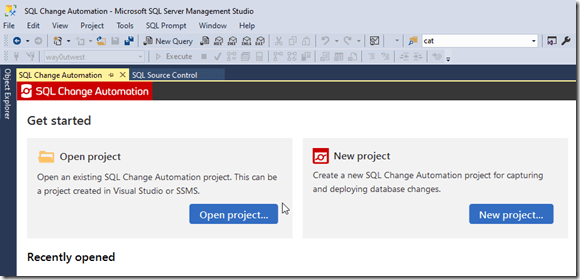
    2020-07-08 10_22_54-SQL Change Automation - Microsoft SQL Server Management Studio

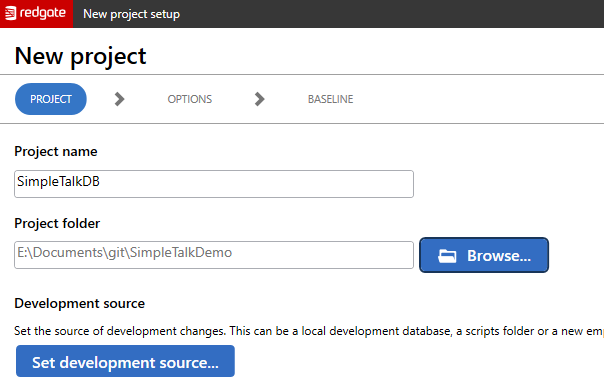
    We are creating a new project here, so let’s click the button to do that. Once I do that, I get a dialog that appears. I’ve entered a name and then select my folder where I keep code.

    Note, I’ve picked a folder name here, and the project will create a subfolder under this with the name of the Project as the folder name. In this case, my actual project files will be in E:\Documents\git\SimpleTalkDemo\SimpleTalkDB.
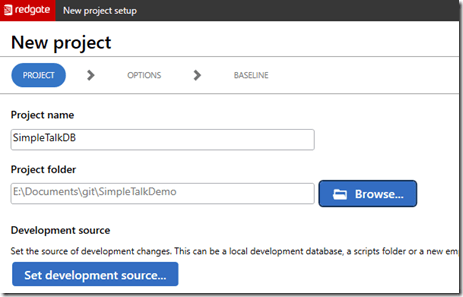
    2020-07-09 11_24_25-New project setup

    I do want the project folder under version control. Before I have SCA do anything, I use a command line and initialize this for git. If you don’t know how this works, I’ve got a post on that.
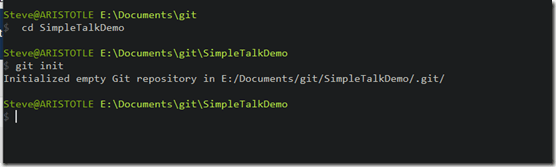
    2020-07-08 19_41_49-SQLServerCentral – The #1 SQL Server community

    Now I can go back and connect to the development source. This is the dev database. There doesn’t need to be anything in here, but in this case, it’s a copy of the schema from production. Once I enter the credentials and pick the database, I come back to this screen and I see the first part of my project.
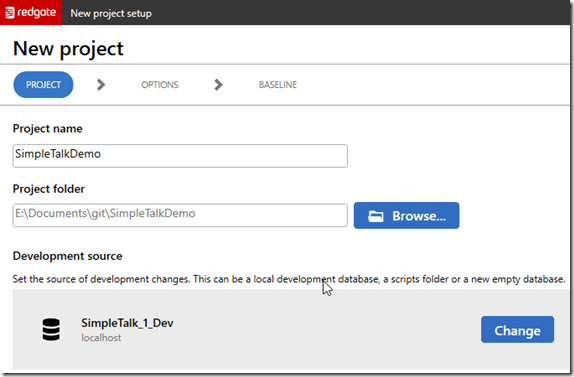
    2020-07-08 19_43_53-New project setup

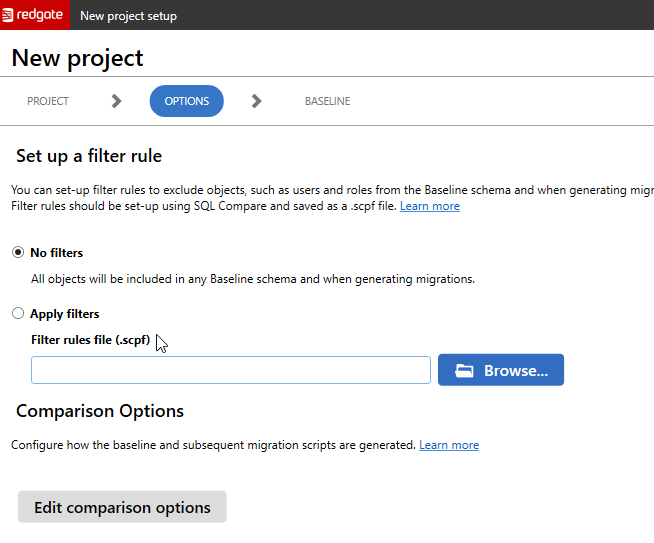
    Clicking Next gives us the filter screen. This uses the filter files from SQL Compare to determine which objects we are including for development purposes. For most projects, we don’t filter anything. We want all objects to be included in our project.

    2020-07-08 19_44_00-New project setup

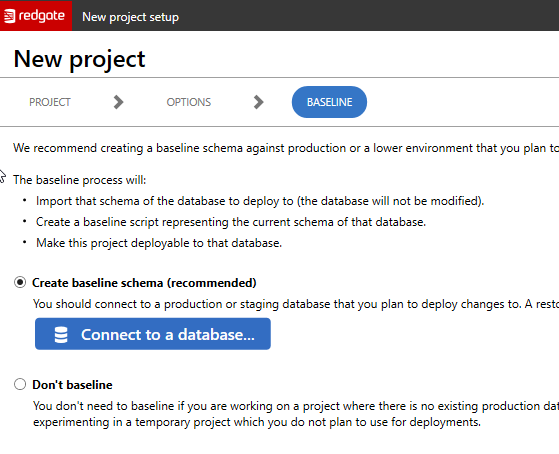
    I’ll leave this alone and click Next. The last screen is the baseline screen. This allows me to set a baseline or not. A baseline is a view of what the target database looks like right now. In this case, this is the production database.

    This process will look at the objects in that database and create a script that builds up a base database to the same state as production right now. That is useful because all items we add to this project depend on the state being this way. You can read more about baselines in the documentation.
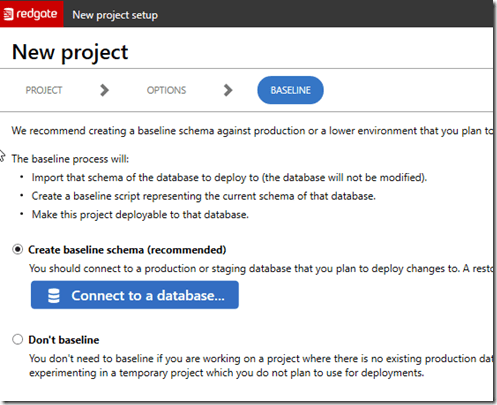
    2020-07-08 19_44_07-New project setup

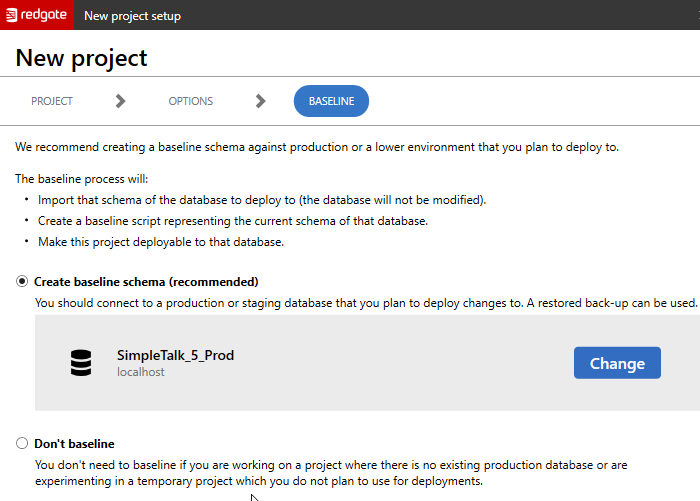
    I will configure this to connect to my production database and once that’s correct, I’ll click “Create” to set up the project.
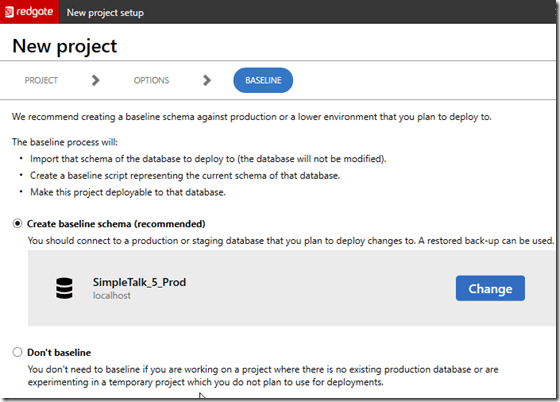
    2020-07-09 11_26_26-New project setup

    The project gets created fairly quickly, and once it’s complete, I get a summary. As you can see below, the project was set up and there are some notes about what was done.

    2020-07-09 11_27_07-SQL Change Automation - Microsoft SQL Server Management Studio

    You can see that one migration script was generated and this was for my baseline. This contains all the objects in my current production database, which won’t be deployed unless I have an empty database, like a CI database.

    There were also 19 programmable objects, which are views, functions, and stored procedures. These are items that we don’t want to track each change to, but only the state at a point in time.

    All of this is reflected in my project folder, which you can see below. There are subfolders below some of these for the various object code.
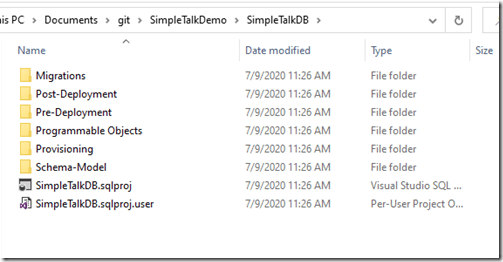
    2020-07-09 11_30_14-SimpleTalkDB

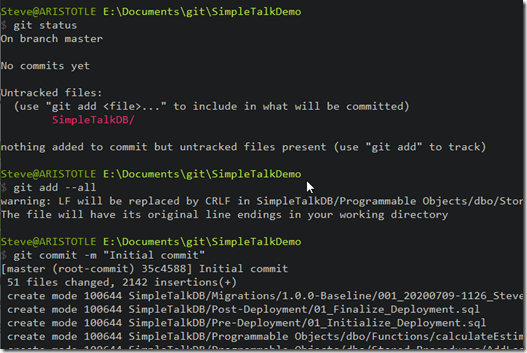
    I’ve got a new project. Now I want to commit this to version control first, and then I can start development work.
    2020-07-09 11_32_04-cmd

    If you’ve never worked with SQL Change Automation, download an eval and give it a try today. I’ll be documenting the process as I build out a demo for a customer, and you can follow along.

  • T-SQL Tuesday #128–Learning From Others

    tsqltuesdayIt’s the second Tuesday of the month and time for T-SQL Tuesday again. This month I’m grateful that Kerry Tyler is hosting. I had the pleasure of sitting with Kerry and his wife at a SQL Saturday last year before the world locked down and presented travel. At the time I was looking for hosts and pressured a few people into agreeing to host a month.

    This month Kerry wrote an interesting invite based on his passion with airplanes and flying. Mistakes and errors with planes can be catastrophic, so they are always revisiting issues and learning from others. He asks us to do the same this month.

    Root Cause Analysis

    One of the things that we talk about in technology is analyzing incidents and failures to determine a root cause. Despite the talk, relatively few places I’ve worked in actually perform a root cause analysis and produce actions that are taken into account in future protocols, processes, and documentation. Too few people perform a blameless postmortem, which is what we need more of.

    And too few companies share their learnings publicly.

    I can’t change that, but I can think forward.

    DevOps

    I talk a lot about DevOps and work with companies to transform what they do. This is part of my job, but it’s also an area I have passion in because I’ve worked in organizations that were following the tenets of DevOps before the term existed. A couple of areas where I learned from others to build better systems for the future.

    Networking is something that relatively few of us deal with as technical professionals. Since DHCP became a very solid platform and the amazing growth of wireless, we don’t need to dig into networking most of the time. However, understanding how DNS works and the networking protocols is still relevant.

    I was fortunate to work with a talented network engineer at one company. We were having issues with a client being able to connect to our database server, and he managed to show us how the DNS records were different between our office and theirs, when working across a VPN. Since then, I’ve always learned to check simple things, with tools like nslookup, to verify a client can see a server.

    As a data professional, I know backups are important. I use BackBlaze at home, but at work I often deal with a variety of products, even with SQL Server. While the backup process has been very consistent and stable in SQL Server, we’ve had different options emerge, as well as third party products that sometimes deal with backups in a different way. I’ve often insisted on verifying that we can restore databases to a point in time, precisely because this is what will be required during some DR incident.

    Over the years, many people have helped me understand how their product or system worked, too many to name, but I’m grateful for those that have helped explain to me exactly how a particular backup or restore process works and helped me validate the process to recover data.

    For the most part, I’ve just been the one pushing to ensure documentation was captured and available for others to use in the future.

    I do try to give back and teach others as well. I’ve been writing about Version Control Systems, including some basics I’ve learned over the years. Sometimes by reading a tutorial or blog, sometimes by making mistakes and trying to work through documentation. My learnings from others inform most of the content I produce to teach you, so it’s not that I’m doing anything innovative; I’m translating the lessons from others and myself for you.

    We all learn from others. We stand on the shoulders of giants and of ordinary people. Remember that, continue to learn, and help others where you can.