Tag: syndicated

  • Jupyter Book Challenges in ADS

    I was excited to try the Jupyter Book feature in the March Azure Data Studio (ADS) release. I’ve thought notebooks were an interesting way to teach and I’m looking to expand my use of them, especially now that SQL Prompt is (kind of) in there.

    I saw the new notebook icon in the sidebar when I restarted ADS.

    2020-03-23 15_48_05-Window

    If you put the cursor on the “Saved Books” line, you’ll see a few things. There is an “Open Book”, a collapse all, and an ellipsis there.

    2020-03-23 15_48_45-Window

    I didn’t have any books, and don’t see any “create” in the file menu, so I ended up clicking the ellipsis. Then I see a “Create”.

    2020-03-23 15_48_49-Window

    Clicking this opens a notebook with three parts. These are designed to help you create a Jupyter Book. There are:

    1. Installation
    2. Create a New Book
    3. Open Your Book!

    2020-03-23 15_52_09-Window

    I started with this and right away found issues.

    2020-03-23 15_29_54-Window

    What in the world is the f”xxx” thing?

    I wrestled with this a bit, trying to search for Jupyter Books, but most of the results are Jupyter Notebooks. Apparently Jupyter Books are new, and that should have helped. I did post a question at StackOverflow, and someone gave me the answer quickly.

    You need Python 3.6+. These are f strings, a new way of formatting, which I hadn’t heard of prior to this. I lightly use Python, and hadn’t upgraded since 3.5.3.

    OK, that’s another whole issue, but once I upgraded and fixed paths, this appeared to work. I first ran the jupyter-book install, and then created a demo book first to ensure things were working.

    I ran step 1 in the ADS notebook and it verified the Jupyter Book module was installed.

    Next I ran step two, which asks for a path for your notebook, which should be an empty folder or a new folder. I entered a new folder that doesn’t exist (e:\jbook). Next, I entered a folder where I have a few random notebooks. I also added a license file, since the Jupyter Book project suggests one. Here was the folder I added:

    2020-03-23 16_12_32-Window

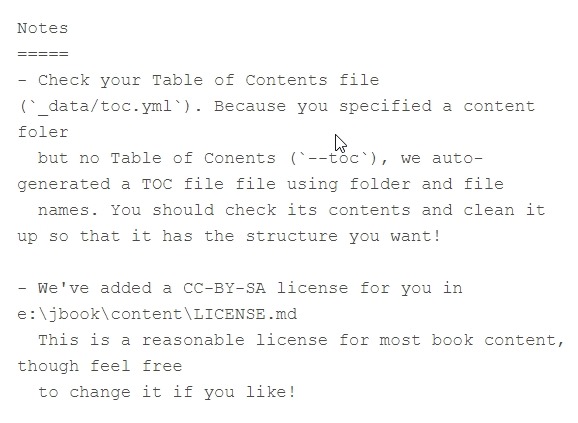
    The cell appeared to run, but then I saw this:
    2020-03-23 16_13_01-Window

    The license file is misnamed, which makes sense. However, I didn’t get a TOC, which I think means I need to have folders under my set of notebooks. I was thinking this book was a simple set, but maybe I need folders.

    I also didn’t create a TOC yaml file because a) I didn’t think I needed it and b) YAML is a PIA to work in. I don’t mind editing one, but creating from scratch is a mess.

    When I got to step 3 and opened my notebook, I got this:

    2020-03-23 16_07_39-Window

    An error down below, as I’m missing something. I’m not sure what, and I can’t open the book and see anything, but I produced something.

    I need to experiment more, so I’ll give this another try soon.

  • Daily Coping 7 Apr 2020

    I’ve started to add a daily coping tip to the SQLServerCentral newsletter, which is helping me deal with the issues in the world. I’m adding my responses for each day here.

    Today’s tip is to rediscover your favourite music that really lifts your spirits.

    I love music. It’s one reason I resisted the change from iOS to Android. The music experience is just better on iOS. If they had kept the headphone jack, I’d likely still use an iPhone today.

    I grew up listening to lots of music and playing some on guitar. I attended lots of concerts before I was 25. My first was Andy Gibb. My second was Kiss. I had varied interests.

    Over the years, I get into moods, and will listen to lots of one genre for a period before I change. My wife didn’t love the rap phase, dealt with a Pop phase well, and doesn’t quite love my retro 70s guitar phase now.

    When I’ve traveled often for work, I will usually pick an artist and download a few albums to play on the plane. No real plan, but I try to discover, or rediscover, music from someone. I’ve had trips where all I listened to was Stevie Wonder, Elton John, Bob Dylan, Journey, Common, Kanye, Prince, the Beatles, and others. I sometimes realize I never real heard something in the past and sometimes rediscover a new thing I like.

    Spotify is my preferred platform, and I decided to pick something I really liked in the past. For me, there was a year of high school where I really liked Duran Duran. I grabbed a few albums (old and new) and created a playlist. I put this on random and let it play. Alternately tapping my feet, singing along, and really enjoying old tunes, and discovering new ones.

    It was a welcome break from current life.

  • T-SQL Tuesday Live–7 Apr 2020

    Last week went a little crazy, and I learned something: don’t post a Zoom link on Twitter. My apologies to anyone that wanted to join and had things go sideways. It took me about five minutes to mute everyone and kick people off.

    We ended up having a great call with just 4 of us, and it was good to touch base and talk through some of the changes in the world.

    This week I’m going to continue with the call. We had very little technical discussion, and I’m going to skip a technical theme this week and stick with a general touch base, health check, and community connection focus. We’re going to try and keep things civil and interesting.

    To try and prevent any craziness, I’m going to put a password on the meeting. Those of you that are data professionals should be able to answer this question for the password: what is the name of the type of index that isn’t stored in a row store? Enter just the first part, lower case (Hint: ______store index).

    The meeting isn’t hotlinked on purpose, as it’s not a complete URL. Zoom security is a thing.

    Call Details:

  • Getting Your dbatools Version–#SQLNewBlogger

    Another post for me that is simple and hopefully serves as an example for people trying to get blogging as #SQLNewBloggers.

    I was trying to test something recently and it didn’t work. One would think that I would remember to check versions, but I didn’t before posting on Twitter. I did get a response from @dbatools, and one of the questions was which version did I have.

    I wasn’t sure, and wasn’t sure how to check, so I had to do some Googling around. This post notes what I found and how I got the version.

    I have known that I can get the PowerShell version from $psversiontable. I can run that and see info about PowerShell..

    2020-03-30 09_42_37-cmd - powershell

    This doesn’t get me a view of modules I’ve installed. I tried Get-Help, but it wasn’t what I wanted.

    2020-03-30 09_44_06-cmd - powershell

    I then tried a search and stumbled upon Get-InstalledModule, which worked well, but it has a lot of info. When I run this, I get lots of data.

    2020-03-30 09_46_20-cmd - powershell

    Fortunately, it’s alphabetical and I don’t have a lot of modules that are named with something after “d”, so I could easily find the data.

    2020-03-30 09_46_39-cmd - powershell

    I know there’s an Update-Module and Install-Module, so I tried Get-Module. That actually works. I thought about this later, after I’d actually gone through the searching and posting results.

    As with anything, there are a couple methods here, but certainly it’s good to be able to solve a simple problem like this one.

    SQLNewBlogger

    This was something I figured out in about 2 minutes. Writing this post took longer, but I bet I now remember this. It also might be something I get asked in an interview.

    Try it yourself today. Start a blog and start documenting what you learn.