Tag: syndicated

  • Launching SQL Compare with Context

    Years ago Redgate Software started some work to link our tools together. I remember early efforts, about which I had dubious thoughts as to the value. I hadn’t looked at how the work had progressed until a little earlier this year, when I started examining in more detail some features I had missed.

    One of these is in SQL Source Control, as it relates to SQL Compare. I often don’t have SQL Compare running, but I will find places where I want to look at the quick differences between one database and another, or between the database I’m working on and source control. While I can easily launch SQL Compare, or find a project with that is set up, it’s slightly annoying to have to find a file or create a new project and load a context.

    Much easier to use SQL Source Control.

    The Product Menu

    In SQL Source Control, there is a Redgate icon in the upper left corner. When I’m working in SSMS, I can quickly switch over to the SQL Source Control (SOC) tab and click the icon.

    2019-09-04 17_50_14-SQL Source Control - Microsoft SQL Server Management Studio

    This will open a long menu, with a list of my Redgate tools. SQL Compare is at the top, and all other tools listed below.
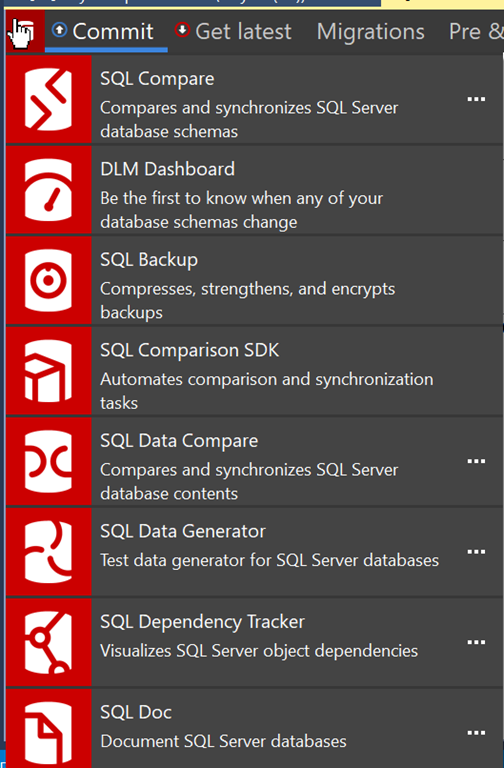
    2019-09-04 17_50_21-

    If I click the ellipsis in the SQL Compare pane, I’ll get a couple of options.
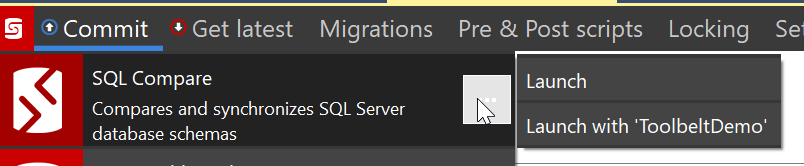
    2019-09-04 17_50_32-SQL Source Control - Microsoft SQL Server Management Studio

    If you don’t see these options, then the database you’re working on isn’t linked to a VCS. That’s a separate problem.

    This feature, however, is designed to fit into our DevOps solution, bringing the tools together for those people that are working inside of the Redgate process. In this process, I can quickly launch many of the tools with context. When I click the “Launch with ‘ToolbeltDemo’, I see this when Compare opens.
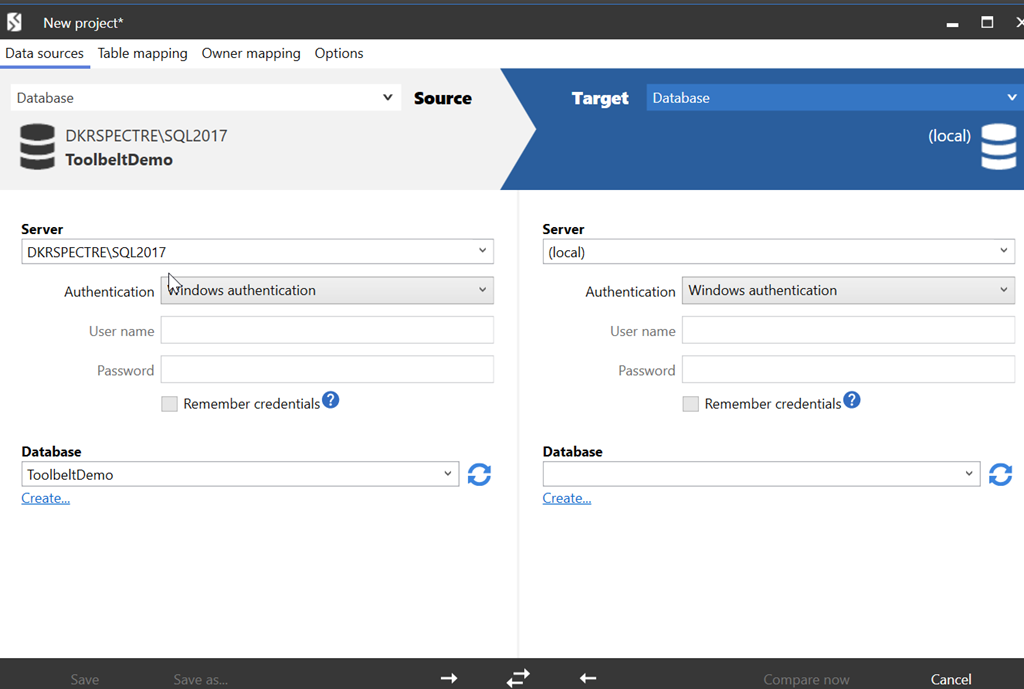
    2019-09-04 17_54_03-New project_

    My current database is listed on the left. I can then pick a database on the right, or a backup, project, etc., and run the comparison.

    A minor time saver, but a nice touch that eases my mental focus. If I continue to work, or check something while I wait for SQL Compare to launch, I know when I come back that half the work is done.

    You can launch other products as well, in a similar manner, making your workflow move along a little smoother.

  • SQL in the City Back in London

    It’s just a couple weeks until the SQL in the City Summit comes back to London. This is our second Summit this year in London, and I’m honored to attend. This time we will be at the Prospero House, on Borough High Street in SE1 1GA.

    This time I get to run two keynotes, a first for me. I’ll open the day with the current state of Database DevOps and close things down with The Future of DevOps before a short happy hour. I’ll also be in the open space if you want to have a more private discussion.

    There are lots of great talks about different topics, including many of our lead developers. I’m excited as we have had, and will have, a few more products to show this time, so I’m excited.

    If you can make a day of learning and talking DevOps, register today and join us on the 25th of October.

  • Just Getting Specific Files in PoSh–#SQLNewBlogger

    Another post for me that is simple and hopefully serves as an example for people trying to get blogging as #SQLNewBloggers.

    Just a quick one today, but a tip I hope I remember. While working on a script, I wanted to just get backup files in PoSh. I tried this:

    Get-ChildItem -Path $BackupPath -File -Include *.bak

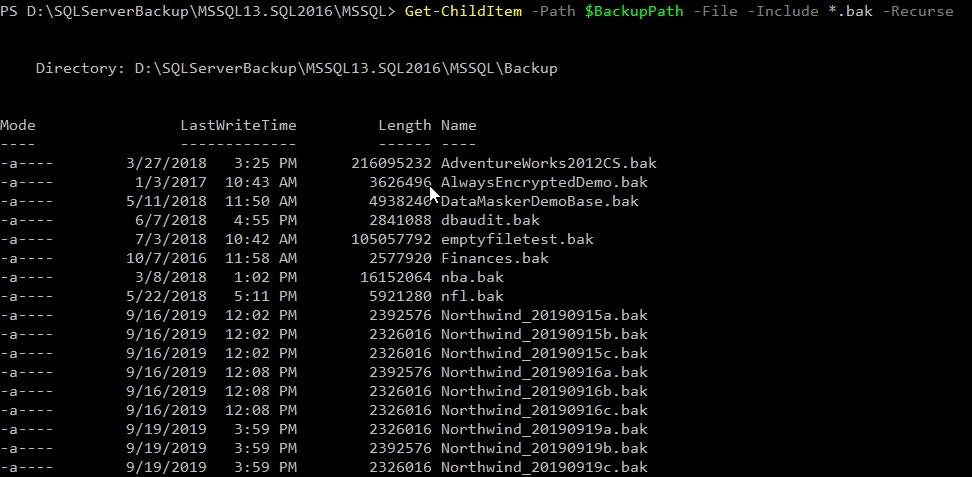
    That got me this:

    2019-09-23 10_06_19-cmd - powershell

    Nothing.

    Why not? Apparently, you need the –Recurse parameter, even though there are no subdirectories in this folder. A bug, IMHO, but who knows. In any case, adding the parameter makes things work. Thanks, SO.

    2019-09-23 10_11_59-cmd - powershell

    SQLNewBlogger

    This was a quick 5 minute thing. After researching and testing for 10 minutes, and finding the solution, I wrote this up.

    You could do that with anything you get working.

  • T-SQL Tuesday #119–Changing My Mind

    After missing the last T-SQL Tuesday, I’m back for the latest invitation from Alex Yates. In this one, Alex asks us to write about something in IT where you changed your mind. Some belief you held, and then decided to go a different way. It’s a good topic, especially as the world has both dramatically changed and also stayed the same in many ways.

    A Strong Belief

    As a young man, I used to think strongly about lots of technology topics. Many of those have been argued about on the Internet in forums, chat boards, and even at times at events. I had my own thoughts, and often argued my own views.

    As I’ve gotten older, I’ve started to hold those strong opinions a little looser. I still have them, but I also know that sometimes things might not be as clear cut as I imagined. I also have learned that my own knowledge is often incomplete, or my application of a technique might be more narrowly focused than I assumed.

    I change my mind constantly, but I’ll give you a relatively recent one that has started to move my career.

    Containers

    I’ve been learning and talking about containers with people for nearly 10 years. It was in 2010 that I met a company using them extensively, and while enamored by the technology, I wasn’t sure how useful it was for me. This company uses Java, where versioning is an issue. In .NET, it’s less of a problem.

    When Microsoft started to work towards containers in the 2015 timeframe, I had a change to take part in early discussions with program managers. These were casual, but I wasn’t convinced that this would really make a difference in SQL Server. I kept an open mind, but most of their arguments and thoughts felt self serving for Microsoft’s business rather than good technical arguments.

    That changed sometime late last year. The work that’s been done on SQL Sever 2017 and 2019 to allow upgrades/downgrades, the scale out capabilities coming in 2019 (and with Hyperscale) and the possibilities of Kubernetes (or some other orchestration tech), make me rethink containers.

    Containers are the future of SQL Server. I’d bet on it, though it’s going to be 5 or 10 years for most of us to get there. However, I’m spending more time learning and working with them because I think this is where databases will move.

    I wouldn’t have said that two years ago, but my mind has changed.