Tag: syndicated

  • Checking the Instance Fill Factor

    I was reading a post from Paul Randal recently and noted that he recommends not changing the instance’s default fill factor. I agree, and you shouldn’t alter it. However if you aren’t sure if it’s been changed on any of your instances, here’s how to check it.

    I’ll show both the GUI and code ways to do this.

    SSMS

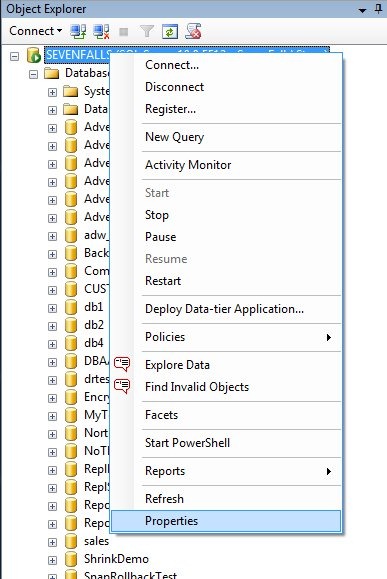
    In SSMS, right click your server instance in Object Explorer and choose properties.

    fillfactor1

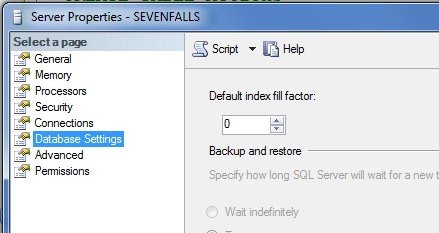
    This will open a dialog that has a number of tabs. If you click the “Database Settings” item on the left, you will have various settings appear on the right side. One of these is the default fill factor.

    fillfactor2

    It should be zero or 100. Nothing else.

    T-SQL

    In T-SQL, we can also check by opening a query window and typing:

    EXEC sp_configure 'show advanced options', 1;
    GO
    RECONFIGURE
    GO
    EXEC sys.sp_configure;
    

    This will return all the settings on the server. This is an advanced setting, so you don’t need to enable those.

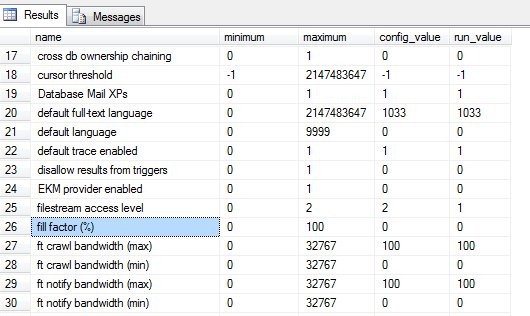
    If you scroll through the list of items, you will find one that is labeled “fill factor (%)”

    fillfactor3

    Again, this should be zero or 100 in the config_value and the run_value columns. To change this, run this code:

    sp_configure 'show advanced options', 1;
    GO
    RECONFIGURE;
    GO
    sp_configure 'fill factor', 100;
    GO
    RECONFIGURE;
    GO
    
  • Vote for my SQL Bits sessions

    “Rob? Tsk tsk tsk. That’s a naughty word. We never rob. We just sort of borrow a bit from those who can afford it. “

    Robin Hood

    SQLBitsLogoSQL Bits XI is coming to Nottingham forest, home of Robin Hood and Sherwood Forest in Nottinghamshire. This is a fun three day event, with a day of pre-cons, a paid day of sessions, and a free day. It has taken place twice a year in the UK, though the organizers skipped this past fall.

    I’ve submitted a few sessions and I need your votes to get the chance to go back. I’d really like to since I really enjoyed the conference.

    You can vote for these by logging into the site and clicking on the description for the sessions. You get to vote for ten sessions, so pick the ones you are most interested. I’m hoping you pick a few of mine, but whether you vote for me or not, vote.

    I really enjoyed SQL Bits a couple years ago and I’m hoping to get the chance to go back this spring.

  • Full-Text Search – Stoplists in SQL Server

    Full-text search is an interesting subsystem in SQL Server. It allows you to implement searches through a variety of text formats stored in SQL Server. This is a one of a series of posts that looks at different facets of full-text search.

    What is a Stoplist?

    A stoplist is a list of stopwords that SQL Server should not include in a full-text index.  These are words that are seen as not adding any value to the full-text index. We typically see these words as important in language for structure, but not for content. Examples of stopwords are:

    • the
    • a
    • an
    • is
    • are

    In previous versions of SQL Server, these were also known as noise words and a noise word list. You can read about the topic in Books Online.

    How are they used?

    Stoplists are used when building the index. The words that are contained in the text, and also in the stoplist are ignored and not populated inside the index. This makes for a smaller index, and it also means that the stopwords are not

    The position of these words in the text being indexed, however, still do matter. This is to be sure that searches using proximity are still correctly carried out.

    Each index can have a specific stoplist associated with it. You can associate a stoplist at index creation time, or alter the index later to add or change the stoplist.

    Creating a Stoplist

    For each language supported in the full-text system, there is a stoplist installed with SQL Server. These are the commonly used words that should be ignored for each language.

    You can, however, create your own stoplist of word with the CREATE FULLTEXT STOPLIST command. The creation can be for a new stoplist, or you can copy an existing stoplist.This includes system stoplists, which you can use as a basis for your custom stoplist. The commands are simple, and they are well documented in BOL.

    To add or remove words from a stoplist, the ALTER FULLTEXT STOPLIST command is used with the ADD or DROP parameters. Alterations to a stoplist must be for a specific language, which is specified with the LCID or name of the language.

    Practical Points

    The stoplists are important for limiting the size of the stoplist and making a more efficient index. Full-text indexes are very efficient and scalable in SQL Server, but the less data that needs to be indexed and searched, the most efficient the system will operate.

    System stoplists works well for many natural language searches, but are not necessarily adequate for domain specific searches. For example, if I were indexing all white papers on SQL Server, I might want to ignore extremely common words or phrases that are in all documents. For example, I might consider “SQL” to be so common as to be useless in searches. Rather than bloat the size of the index with this word, I may add this to a stoplist for the full-text index and assume it’s a word like “the”, which I would not use for searches of these documents.

    I haven’t necessarily found a reason to use custom stoplists in the past, but if my full-text index were extremely large or I had a large volume of searches, I might consider using stoplists to prune down my indexes.

    If you have used these in your system, I’d be interested in knowing the reasons and effects.
  • I Pulled a Forest Gump

    Last Friday I went for a quick run before we packed up and headed to Steamboat Springs for a week’s vacation skiing with the family. Saturday I snowboarded, came back to the condo, found no treadmill, slippery, icy conditions on the roads, and just stopped running.

    No fanfare, no complaints, not even a note to my wife that night. I just stopped running, cooked dinner and went on with life.

    Some of you have followed me on my journey to run every day for a year. That journey ended last Friday, after 1564 consecutive days of running at least a mile every day. I’ve collected a little data along the my journey. This streak, a little over four years of my life, has encompassed:

    • 1564 days
    • 2810.4 miles
    • 754 miles in 2011
    • 2 countries (US, UK)
    • 15 US states
    • 5 pairs of running shoes (due for 2 new ones now)
    • using Nike +, MapMyRun, and Runmeter technologies for tracking
    • used 2 iPod Nanos (1 died), an iPhone 3, 3GS, and 4 across 4 years.
    • a low outside temp of 8F
    • a high outside temp of 110F
    • an early run of 4:15am at a hotel near Heathrow before a flight
    • a late run of 11:40pm at night, after a long day

    There have been some fun memories like Day 1000, which was celebrated late because of bad data. There were two great #sqlrun’s in Seattle with large groups at the PASS Summit. I have had great runs before SQL Saturdays and SQL Connections, along with other events.

    My middle son has the most runs with me, probably 40-50, but the person with the second most runs, and some of very enjoyable ones, is a member of the #SQLFamily, Allen White. Allen and I ran in Cleveland, Las Vegas, Chicago, Seattle, and Liverpool, UK. I always enjoy seeing him, and look forward to more runs in the future, and perhaps even a marathon some day.

    I’ll still be running, but mixing in other exercise more often. Throughout this streak I’ve played baseball, snowboarded, practiced karate, and played volleyball, but I’ve limited some other exercise I’d like to try more.

    I believe that taking care of your health is an important part of life, and exercise is one way I do that. I’d encourage all of you to find some way to ensure you are using your body, and not just your mind as you move through your career.