Tag: syndicated

  • Speaking at Oracle Training Days

    RMOUGSpeakerA first for me. I’m attending a non-SQL Server event, trying to bring a little knowledge of my platform to those that typically work on the Oracle side of things.

    The Rocky Mountain Oracle Users Group is holding their Training Days 2013 event on Feb 11-13 in Denver and a few of us SQL Server people were invited to speak.

    I’ll be talking about Database Maintenance one of the days, hopefully ensuring that some of the “accidental” SQL Server DBAs that also manage Oracle understand the basics of maintenance in SQL Server.

  • SQL Server Thumbnail Metrics – OS Memory

    I’m gathering a few metrics around the Internet for SQL Server from people that I think really know how to run a SQL Server. This is a series of posts that I’m making to gather these metrics up for easy access later.

    Host Memory

    The short metric is:

    Leave 4GB for the OS, or 10% of physical (or guest) memory, whichever is greater.

    Examples: If I have the following amounts of RAM, I leave this for the OS.

    • 16GB of RAM – leave 4GB since 4 > (16 * 10%)
    • 32GB – leave 4GB since 4 > (32 * 10%)
    • 64GB – leave 6.4GB since (64 * 10%) > 4

    Essentially leave 4GB until you get to 48GB of RAM, then go to 10%.

    References: Mr. Brent Ozar of Brent Ozar, PLF who’s presented and written this a few times, but the reference I’m using is: How to Set SQL Server Max Memory for VMware

    Explanation: In the older x86 days there were all sorts of rules for setting memory for the OS and SQL Server. I won’t go into those, and for the time being we’re working in the x64 world, not x128. For that, you need to be sure the OS isn’t starved by SQL Server and unable to manage the host processes. These days 32GB isn’t expensive, and 4GB gives you a nice cushion at lower levels. At higher ones, you need

  • The Last DBCC CHECKDB Date and Restores

    I ran across a question on Twitter recently where someone asked about the DBCC CHECKDB date after a restore. For those of you that don’t know this, you can run this command on your instance (in a database)

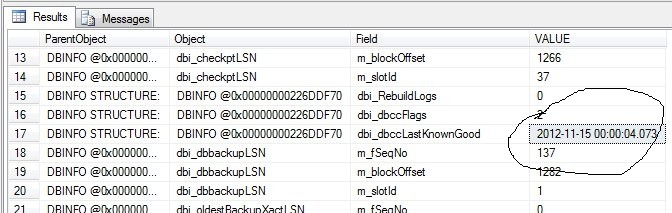
    DBCC DBINFO WITH tableresults;

    This returns a lot of information, but I’ve circled one value below:

    dbcc1

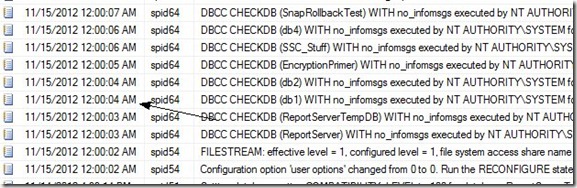
    This is the last known good DBCC date that exists for this database. It’s also the value in the error log from the execution of DBCC CHECKDB on my instance early this morning (Arrow marks the entry).
    dbcc2

    If I were to restore this database, what happens to this value? I’d expect that it would be restored to the last value that was contained in the backup file. That would make sense to me, but let’s test it.

    First I run a backup:

    BACKUP DATABASE [db1] TO  DISK = N'C:\SQLBackup\db1_20121115.bak' WITH NOFORMAT, NOINIT,  NAME = N'db1-Full Database Backup', SKIP, NOREWIND, NOUNLOAD,  STATS = 10
    GO
    

    This should have the last DBCC date inside the file. I know run a CHECKDB and note the time in the error log.

    dbcc3

    This returns successfully (whew, didn’t want to test corruption restores). If I then run DBINFO again, I get the current date from the error log returned. Now let’s restore from my backup.

    This completes and when I run DBCC DBINFO again I find the dbccLastKnownGood date is reset back to the 12:04am value instead of the 9:11am value.

    That’s what I expect, and that was what a few other people confirmed on Twitter. It’s logical that this should be the behavior, but you never know until you’ve tested it.

  • The Encryption Primer Resources

    I delivered my Encryption Primer talk this past Tuesday at the Boulder SQL Server Users Group and last night at the Denver SQL Server Users Group. Great questions and discussions, and I hope those of you that attended found it interesting.

    I’ve updated my deck and code samples, and here are the updated files for download:

    Powerpoint: The Encryption Primer v8.ppt

    Code: EncryptionPrimer.zip