Tag: syndicated

  • Quick T-SQL Performance Comparison

    I’m not a T-SQL guru. When I have something that will run often, or I have performance concerns, I’ll ask someone like Jeff Moden or Wayne Sheffield to help me write a solution.

    However I have a few tricks to check things out quickly and determine what’s a better solution. Recently I ran across a thread asking for a solution to a problem that needed to sum data, but also pick values from a certain row. I posted a quick solution, and a few minutes later there were two others.

    I didn’t think mine was great, using a CTE and a subquery felt slightly inefficient, but was it really inefficient? I grabbed the third solution, which was similar to mine, and put both in SSMS. I then ran both pieces of code together, after clicking CTRL+M (include Actual Execution Plan).

    ; WITH MyCTE (acc_no, c_name, cnt)
    AS
    ( SELECT acc_no
           , c_name
           , COUNT(c_name)
       FROM #testing a
       GROUP BY acc_no
              , c_name  
    )
    SELECT 
      t.acc_no
    , c.c_name
    , number_sum = SUM( t.number) 
    , r_value_sum = SUM( t.R_Value) 
     FROM #TESTING t
       INNER JOIN mycte c
         ON t.acc_no = c.acc_no
     WHERE c.cnt = (SELECT MAX(d.cnt)
                     FROM MyCTE d
                     WHERE d.acc_no = c.acc_no
                   )
     GROUP BY t.acc_no
            , c.c_name
    ;
    
    with cte1 as (
    select acc_no,number,c_name,
           sum(R_Value) over(partition by acc_no) as R_Value,
           sum(time_spent) over(partition by acc_no) as time_spent,
           count(*) over(partition by acc_no,c_name) as cn
    from #TESTING),
    cte2 as (
    select acc_no,number,c_name,R_Value,time_spent,
           row_number() over(partition by acc_no order by cn desc,number desc) as rn
    from cte1)
    select acc_no,number,c_name,R_Value,time_spent
    from cte2
    where rn=1
    ;
    

    With all this code, I ran it and got this in the execution plan window (the results were the same and correct).

    comapretsql

    If you look at the top of each section, where it says “Query 1” and “Query 2”, and then look to the right, you’ll see the relative percentage of cost of the batch. With two queries in this batch, but solution was only slightly worse than the other solution (52% to 48%). That quickly tells me these are similar solutions.

    Now this isn’t an end-all, be-all way to look at queries. This is limited data, and unindexed tables. You’d want to test this with a few loads, and examine the details more closely if you are trying to tune these queries, but as a quick check, this helps to decide if you should think about abandoning one solution quickly.

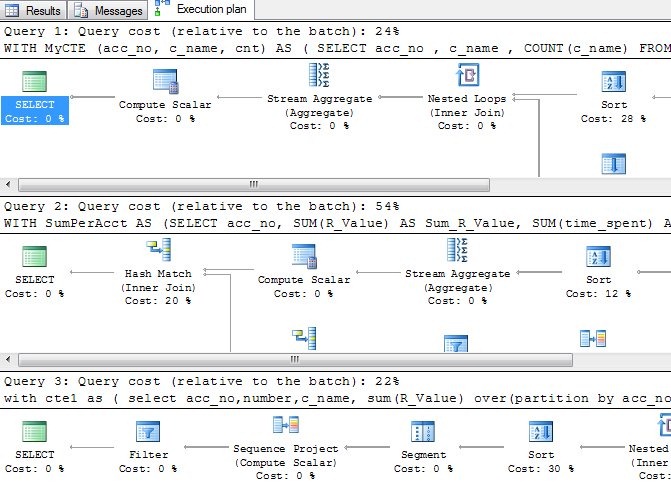
    When I ran all three solutions (mine first, the 48% one above last), I got this:
    comapretsql2

    The second solution is much worse, almost twice as bad here, so I’d give that up and look at both of the other solutions in more detail if I wanted the optimum solution.

    And probably ask Jeff or Wayne for their opinion in the SSC forums. Winking smile

  • Holiday

    Taking some of my own advice. I’m off today and tomorrow, as well as Monday for Labor Day. Across this 5 day weekend, I have a number of chores to tackle, including trying to build another horse shelter before winter.

    However I will look to recharge and relax a bit. No baseball, no kids sports, just a family weekend on the ranch.

  • The Field Museum – SQL in the City 2012 – Chicago

    Chicago is a neat down. My first PASS Summit was in Chicago, back in 1999. My wife joined me with an infant son, and we took in the last baseball game of the season that year at Comisky Park. This year I was hoping to take in a game at Wrigley Field, but the season will be over for the Cubs when I arrive in Chicago on Oct 4.

    I’m arriving for the SQL in the City 2012 – Chicago event, part of our SQL in the City US Tour. We’ll be holding this one at the Field Museum, right near the lake, so guess where I’ll be running? I’ll likely job in San Francisco on Thursday before I leave, so my run along the lake will be a crack of dawn run on Friday, Oct 5. I’m hoping to convince Brent Ozar (b | t) to come with me, but I suspect he might want to sleep in before his session at the event. Maybe Jes Borland (b | t) will come instead.

    Those two, along with the incredible Powershell guru Allen White (b | t), Grant Fritchey (b | t), and a number of Red Gate developers will be speaking with me at SQL in the City 2012 -  Chicago. A bunch of great sessions are packed into one day, teaching you about SQL Server, inspiring you to try new tips and tricks, training you The Red Gate Way.

    2012_London_cThe Red Gate Way is a great location, good content, debate and discussion, answering your questions, and feeding you well. We talk about ways to make your job easier, give you new ideas to consider, and make learning fun. It’s our way of participating in, and improving the community.

    And it’s free. Just register and come down to the Field Museum on Friday, Oct 5, 2012. If you’re really ambitious, follow me on Twitter and plan on a  6:30am run along the lake. It might be cold, so dress appropriately, and we’ll do 2 miles, looking out over the water.

    Register today if you can come. I hope to shake your hand in Chicago.

    This is part of my SQL in the City series, covering a few thoughts on the US tour.

  • Enable Transparent Data Encryption

    This is one of the things in my Encryption Primer presentation that I don’t demo. It’s really easy to do, and it’s rather mechanical, so I just show the image that has the steps from MSDN and leave it at that.

    However there are a few things I wanted to change, and test, so I thought I’d show my procedure on a local database. I roughly follow the MSDN article, but a few slight items.

    First, use master and create your keys and certificates.

    CREATE DATABASE TDETest
    ;
    GO
    USE master
    ;
    GO
    CREATE MASTER KEY
     ENCRYPTION BY PASSWORD = 'AReallyStr0ngP@ssword'
    ;
    go
    CREATE CERTIFICATE SteveCert
     WITH SUBJECT = 'My DEK Certificate'
    ;
    go
    USE TDETest
    ;
    GO
    CREATE DATABASE ENCRYPTION KEY
     WITH ALGORITHM = AES_128
     ENCRYPTION BY SERVER CERTIFICATE SteveCert
    ;
    GO

    I created a test database here for another process, and this is roughly the setup. However before I enable the encryption, here’s what I recommend you do:

    USE master
    ;
    go
    BACKUP CERTIFICATE SteveCert
    TO FILE = 'c:\SQLBackup\SteveCert'
    WITH PRIVATE KEY 
    (
        FILE = 'c:\SQLBackup\SteveCertPrivateKeyFile',
        ENCRYPTION BY PASSWORD = 'R@ndomP3ssW0rd'
    );
    go

    Encryption is serious stuff. If you lose this certificate from a server crash, you are definitely not going to be able to open your database or recover your data. Gone is gone, and data loss means data loss here.

    Back up your certificate.

    Quick question: do you know where your backup of the certificate is?

    Once this is done, you can continue on:

    USE TDETest
    ;
    go
    ALTER DATABASE TDETest
    SET ENCRYPTION ON;
    GO
    

    The encryption is quick on this new, small database.

    Now let’s see if this worked. We’ll add data and make a backup.

    CREATE TABLE MyTable( LogData VARCHAR(MAX))
    ;
    INSERT MyTable SELECT 'This is an encrypted database'
    ;
    GO
    BACKUP DATABASE TDETest
     TO DISK='tdetest.bak'
    ;

    If I go to my backup location and look for this backup, I can open it in an editor.

    encrypt2

    It’s random gibberish. If I run a search for data in my table:

    encrypt1

    I get no results

    encrypt3

    Don’t think this is valid? Run this below and re-search this backup for the string. You’ll find it. This is one thing encryption protects you from.

    CREATE DATABASE NoTDE
    ;
    GO
    USE NoTDE
    ;
    GO
    CREATE TABLE MyTable( LogData VARCHAR(MAX))
    ;
    INSERT MyTable SELECT 'This is an encrypted database'
    ;
    GO
    BACKUP DATABASE NoTDE
     TO DISK='notde.bak'
    ;

    The database is encrypted, but anything I do with the database doesn’t require code changes, hence the “transparent” nomenclature.

    The value of this is debatable, but I think it’s not a bad feature to implement if you have Enterprise Edition and you need this protection for PCI, HIPAA, or some other regulation.