Tag: tde

  • TDE and DDM

    Someone asked a question about TDE (Transparent Data Encryption) and DDM (Dynamic Data Masking), which are two different technologies that are in the security area. As I’ve mentioned in the Stairway to Dynamic Data Masking, DDM is not a security technology. It makes programming some obfuscation easy, but it’s not really security. It can be easily bypassed.

    In any case, how do these work together? Or do they work together? Good questions, and I’ll answer them.

    First, TDE is a technology that encrypts your data at rest, meaning when on storage devices. This handles the encryption and decryption as data is read or written from storage, without coding for it or the user having to do anything.

    DDM is a technology that takes results from a query and replaces some of the data with masked values. This works in memory, after a query runs. Query processing, with WHERE, GROUP BY, etc. clauses is not affected by DDM.

    These work together since data is encrypted on disk. It is read into RAM and decrypted. The query processor then assembles some of this data into a result set. Once this is done, before the results are sent to the client, DDM will make data.

    Demo

    I’ll setup TDE and then add DDM and run a query. Here’s a quick table and enabling TDE:

    CREATE DATABASE TDE_Primer;
    GO
    -- create and populate a table
    USE TDE_Primer
    go
    CREATE TABLE MyTable
    ( myid INT
    , myname VARCHAR(20)
    , mychar VARCHAR(200) 
    ) ;
    go
    DECLARE @i INT = 65;
    WHILE @i < 92
      begin
       INSERT mytable SELECT @i, 'Steve Jones', REPLICATE(CHAR(@i), 200);
       SELECT @i = @i + 1;
      END;
    GO

    From here, let’s enable TDE. If you have a master key in the master database, you’ll get an error, but it won’t really affect things.

    CREATE MASTER KEY ENCRYPTION BY PASSWORD = 'AlwaysU$eaStr0ngP@ssword4This';
    go

    -- create certificate to secure TDE
    CREATE CERTIFICATE TDEPRimer_CertSecurity WITH SUBJECT = 'TDE_Primer DEK Certificate';
    go

    USE TDE_Primer;
    GO
    -- Create DEK
    CREATE DATABASE ENCRYPTION KEY
    WITH ALGORITHM = AES_128
    ENCRYPTION BY SERVER CERTIFICATE TDEPRimer_CertSecurity;
    GO

    ALTER DATABASE TDE_Primer
       SET ENCRYPTION ON;
    GO

    Once this is done, let’s alter our table. We also need a user that isn’t privileged.

    ALTER TABLE dbo.MyTable ALTER COLUMN myname ADD MASKED WITH (FUNCTION = 'partial(1,"XXX",0)')
    GO

    CREATE USER JoeDBA FROM LOGIN JoeDBA

    GRANT SELECT ON dbo.mytable TO JoeDBA

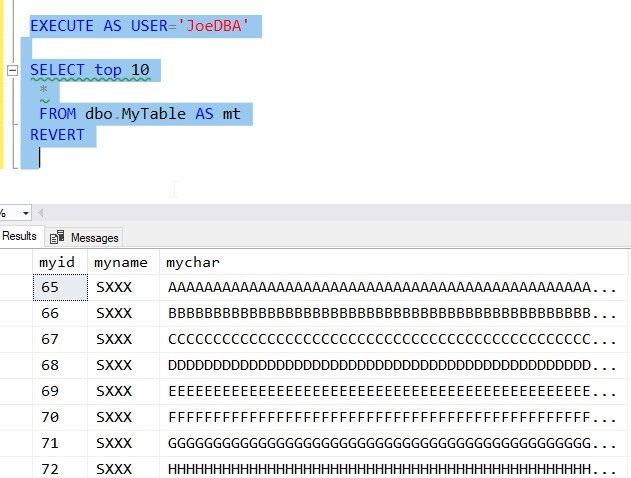
    Now we can check the execution of a query.
    2018-11-14 10_37_40-Microsoft Edge

    Masked data with TDE.

  • Post TDE–Getting Unencrypted Backups

    I saw a question posted recently about someone that had disabled TDE and was still having issues restoring a backup. This doesn’t seem like that should be an issue, but it can be. A little testing shows how.

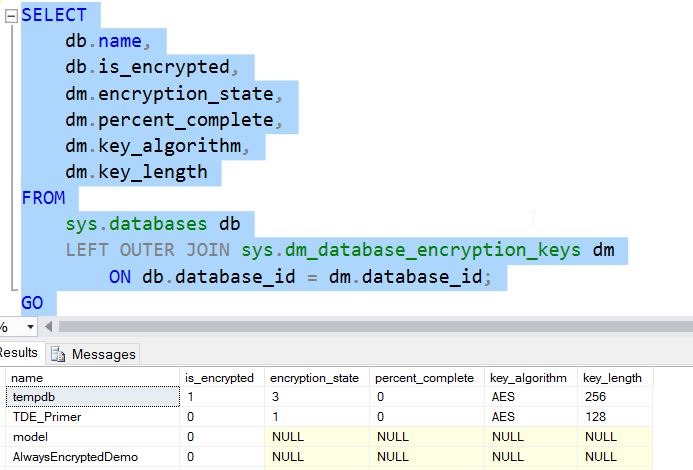
    Let’s assume I have an encrypted TDE database. If I run a query, I can see the status as 3, which is encrypted.

    2016-11-23 11_16_07-11_TDE_Demo.sql - localhost_SQL2016.TDE_Primer (PLATO_Steve (64))_ - Microsoft S

    If I take a backup at this point, the backup will be encrypted, and to restore this on another instance, I’d need to first restore the certificate. I don’t want to do that, so let’s remove encryption. This is a simple command

    ALTER DATABASE TDE_Primer

      SET ENCRYPTION OFF;

    This runs quickly.

    2016-11-23 11_18_08-11_TDE_Demo.sql - localhost_SQL2016.TDE_Primer (PLATO_Steve (64))_ - Microsoft S

    If I now query for encryption, I see this.

    2016-11-23 11_19_00-11_TDE_Demo.sql - localhost_SQL2016.TDE_Primer (PLATO_Steve (64))_ - Microsoft S

    A one means that this is an unencrypted database, but a DEK (Database Encryption Key) exists. If I were to detach and examine this database file with a hex editor, the pages would be decrypted.

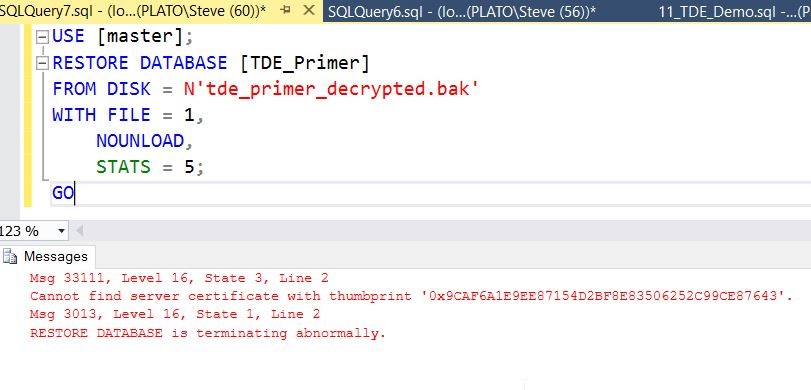
    I’ll now take a backup and move that to another instance. Once I’ve copied that over, I’ll try to restore the backup. In T-SQL, I’ll see this:

    2016-11-23 11_21_43-SQLQuery7.sql - (local)_SQL2016_qa.master (PLATO_Steve (60))_ - Microsoft SQL Se

    Why is this? The database was decrypted, as was the backup. In fact, if I open my backup file in a hex editor, I can see row data.

    2016-11-23 11_23_12-XVI32 - tde_primer_decrypted.bak

    The Problem

    When SQL Server goes to restore the file, it reads part of the header. In here, the process must detect the DEK and try to decrypt that key. However, since this new instance does not have the certificate, this doesn’t work and an error is thrown, despite not needing the key since the data isn’t encrypted.

    The issue here is the DEK still exists in the source database.

    The Solution

    Let’s fix this. I’ll return to my first instance and the original database that was TDE encrypted and now is not. I can issue this:

    DROP DATABASE ENCRYPTION KEY

    Once I do this, it completes quickly. This is a standard DDL command, but one that’s not often used.

    Once I do this, I’ll take another backup and return to the second instance. Now when I try the restore, I see this:

    2016-11-23 11_27_28-SQLQuery8.sql - (local)_SQL2016_qa.master (PLATO_Steve (58))_ - Microsoft SQL Se

    If you’re having issues restoring a database that used to be TDE encrypted, try removing the DEK and then backing it up.