Watch and check this out. This is especially close to my heart as I’ve been pushing for subsetting from Redgate for a long time. I think subsetting is incredibly important for development agility.
Some interesting thoughts on the problem space, which isn’t a simple thing to solve. It’s not that complex (hard to understand), but it is complicated (lots of moving parts). As I’ve talked with others and worked on the problem, it’s not something that you can just knock out quickly.
What’s funny to me is that Andy Warren and I asked Redgate for this in the early 2000s and they didn’t build it.
We have a subsetter and masker at Redgate in our Protect/TDM area. Check those out if you need a solution for your org.
Test Data Manager (TDM) is a suite of products from Redgate that make it easy to build dev and test databases in seconds. It’s a nice rewrite of a number of pieces of technology that we have sold for years, and it was launched at the PASS Data Community Summit in 2023.
I’ve been working with a few customers and sales engineers as they evaluate the fit for TDM in their environment. TDM is great once it’s running and can create a lot of agility for development teams as well as help them build better tested, higher quality software.
One of the challenges we’ve found is that the setup can be complex, and the knowledge required to get up to speed is high. There are a lot of moving parts to get this working in a way that makes it seem simple for the end users (usually developers).
In the spirit of ingeniously simple software, one of our engineers, Alex Yates, built a mini-PoC system using PowerShell that’s available. This post shows how you can get started to demo subsetting and masking in less than 10 minutes.
There are really a few things you need, but the tool does most of the work:
dbatools
Redgate tools (and a Redgate account)
git
make sure c:\temp exists
If you have dbatools installed, we import the module, if not, we download and install it for you. For the tools, we’ll download them and start a trial or you can get these tools and a license from your account executive. These tools run on various platforms, so ping your rep or sales@red-gate.com.
You should have git installed, and temp should be there.
Git makes this super simple. Just clone this down.
Configuration
There isn’t much to configure. In the repo, open run-auto-masklet.ps1 and look at the first 15 lines. These are where you might change things.
The local instance is set in line 2. If you have a named instance, use that. I’ve included a config file below that I used on a named instance.
That’s it. The repo includes a copy of Northwind in an install script to create the full sized database as Northwind_FullRestore. The subsetter will then move a portion of data to Northwind_Subset. If you want to change these names, you can do that.
Running the Tool
This tool can run run as a normal user, but if you need dbatools installed (it will do that), then it needs to run as Admin. I added that as a requirement above, so you don’t need to run this as an admin.
Here’s what the tool does:
Get dbatools
Get the latest versions of the subsetter and anonymize.
authorize you, and start a trial if a license isn’t assigned to your Redgate ID.
drop the two databases (Northwind_FullRestore and Northwind_subset by default)
Creates the two databases with schema (and data for the full restore)
pauses with output
runs the subsetter to move a portion of data to the Northwind_Subset database
pauses
runs the classification process against Northwind_Subset to classify columns
pauses
Runs the masked against Northwind_Subset to mask data
Here’s the first set of output, showing the config and first part of the process.
Here is the first pause. You can see there are db create notes and then an explanation of what to see:
I like that this gives the subset command, which takes some getting used to. The TDM GUI hides this, but every customer has wanted to customize things, so this is a helpful way to do the PoC.
The subsetter does a lot, as you can see below, but basically it map out the database and then starts to determine which data needs to move. In this case, lines 10 and 11 of the source scripts shows that we are subsetting dbo.Orders with the OrderID<10260.
When this is complete, we get another message that explains what happened. We get some telemetry as well with the time taken here.
We also see the next part of the process, which is classifying the data. Again, we see the command for this, and you see this runs quickly.
Lastly, the next pause tells us there is a classification file at a particular location. We get the path if we want to look or edit the file.
Then the masker runs, and we see that 5 tables are masked. We get telemetry and below the results you see, there is more info on what’s happened and what to look for in the databases.
Checking the Tool
Once the execution is complete, I decided to look at the two databases. In SSMS, I had a vertical tab group to compare things.
First, subsets. I’ll count orders, order details, products, and employees. You can see the original db on the left and the subset on the right. Less data.
Not super impressive, but imagine there were a factor of 1000 on the left. That would be cool.
What about masking? Let’s check.
The Shippers, Suppliers, Employees, Customers, and Ordere tables were masked. Let’s look at Shippers. We can see the phone number is masked.
Checking Employees, I see less as there is a subset here, but I see data masked.
You should see similar results, and what’s more, you can alter the various config files or filters to test how your changes work.
I’m a big believer in sandboxes for learning and experimenting. This gives you a nice sandbox. You can change the various files or script and then re-run the tool in a couple minutes to see your changes.
Here are the CLI docs you might use to change things:
TDM was based on some existing technology, and incorporated a product that we were already selling, but it was an evolution based on our knowledge and experience that helps organizations build better software. We’ve had these products for a number of years:
data masking – Data Masker for SQL Server and Oracle
data generation – SQL Data Generator for SQL Server
classification – SQL Data Catalog for SQL Server
However, we didn’t want to just rebrand these, but rather attack the problem space in a new way. We especially wanted to be sure that our products would work across different database platforms.
The result is Test Data Manager, which includes these capabilities:
classification
subsetting
masking
data generation
database virtualization/cloning
Of these areas, only the last one (virtualization/cloning) uses an existing product, Redgate Clone. The rest of these are CLI driven brand new products designed to be put together to meet your needs. I’m particularly excited by subsetting (I wrote about this recently), as I think this is a boon to agility.
If you want to shift-left, empower your developers, and build better quality database software faster, check out Test Data Manager and get a demo scheduled.
I have been a proponent of subsetting databases in dev/test for a long time. It took awhile, but as part of the Test Data Manager that Redgate launched at the PASS Data Community Summit, there is a subsetting component. I was very excited to try this out, and this shows my first experience.
The subsetting tool is a part of Test Data Manager, so you need to get that installed. Once it’s set up, there are a few CLIs that work from within the GUI or separately to perform certain functions. One of these is subsetter.exe, which is a Windows executable.
I copied that to a folder in my path (c:\utilities) and I was ready to experiment. There is a doc page, but really it’s copying a file. You can see this below, and it’s a handy spot on my machines where I put in various CLIs or batch files I need to run from anywhere.
That’s the easy part, not the harder part.
Setting up Databases
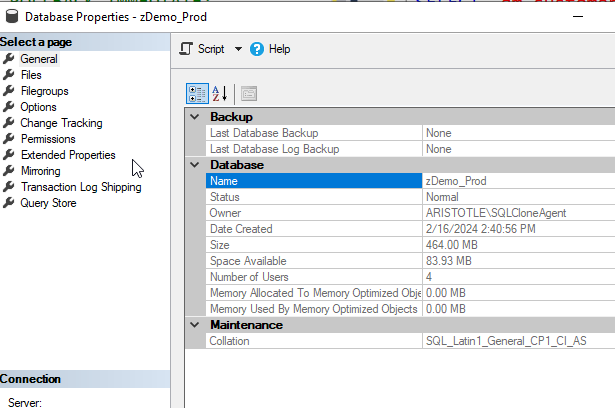
I set up a quick zDemo_Prod database to hold some data. I then grew this to a few hundred MB because many of my test databases are small. Since this was a quick test, I wasn’t searching for something large.
Next I needed a blank copy of this. The worked examples page shows an easy way to do this, but essentially you need a copy of the schema in another database. I ran this to get the db.
DBCC CLONEDATABASE(zDemo_Prod, zDemo_Dev) WITH VERIFY_CLONEDB;
go
ALTER DATABASE [zDemo_Dev] SET READ_WRITE WITH ROLLBACK IMMEDIATE;
GO
Once that was done, I was ready to subset.
I used a batch file because this is a CLI and there are a number of parameters. I like editing those in a file and then just calling one thing from the CLI. Here’s my file:
The required parameters are the engine, the source, and the target. Everything else is optional. As I was experimenting, I decided to add a target size.
Once this was saved, I just ran the batch file. As you can see, there is a lot of output.
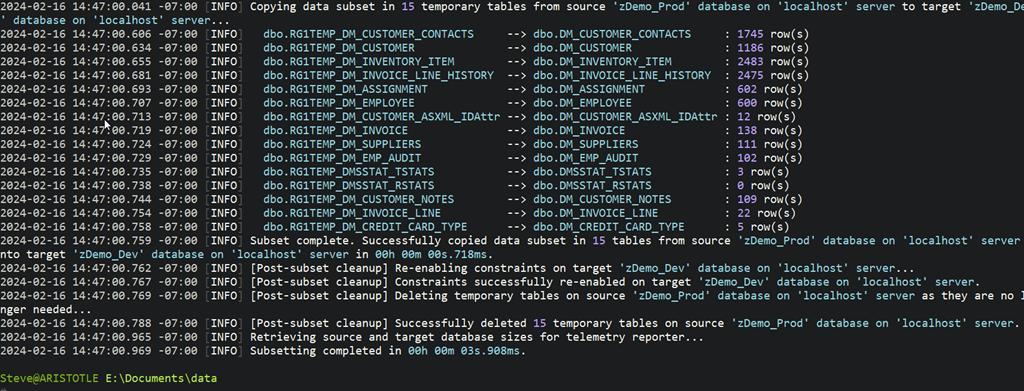
Essentially this analyzed my database, talked the PK/FK structures, and then decided to grab a limited set of data. This isn’t all the output, but the bottom portion is shown below and it lists the tables that were “shrunk” by this process.
I also set up a few queries to check the row counts before and after. You can see how much was moved above, but below you see the two queries from different databases. zDemo_Dev is on the left and zDemo_Prod is on the right. Same queries on both sides.
My DM_Customer table started with 15005 rows, but only 1745 were moved over The DM_Customer_Notes had 1025, but only 109 moved. I’m sure this is because the rows in here have a FK to DM_Customer.
Overall pretty cool, and on a 300MB database, 10% of that took me a few seconds to get moved to a second database.
Summary
This worked pretty well. It took me very little time to get this set up, as it’s a CLI, but getting it configured took a little learning. However, I’m pleased so far with how it works.
I’ll be experimenting more and passing back feedback to our devs. If you have thoughts or ideas, let me know.
If you want to try Test Data Manager out for yourself, contact your Account Executive at Redgate, or ping sales@red-gate.com for a demo and a Proof of Concept eval.