Tag: xml

  • ADS Copilot Experiments with XML

    I sent some code to a customer recently to help them decrypt some stored procedures. I sent a quick and dirty set of code, noting at the bottom that the results were in XML and needed to be extracted.

    The customer wrote back that my code produced XML and the procedure code had to be copied and pasted into SSMS to create a decrypted procedure.

    1f926-2642

    Before I spent time on this, I decided that I should play with Copilot here. This is the perfect place and it’s what I’d hope at some point if I sent that code, the other person would use some sort of AI to help them fix things.

    Maybe not, but here’s what happened.

    This is part of a series of experiments with the ChatGPT and other AI systems. Lots of Copilot lately.

    Asking for Help

    I could look up the syntax for working with XML, but what about Copilot? Let’s see what happened.

    2023-08-03 15_37_47-● SQLQuery_1 - Aristotle_SQL2022.sandbox (Integrated) - VCS_Primer-1 - Azure Dat

    An interesting suggestion. One problem: when I run this, the result isn’t great.
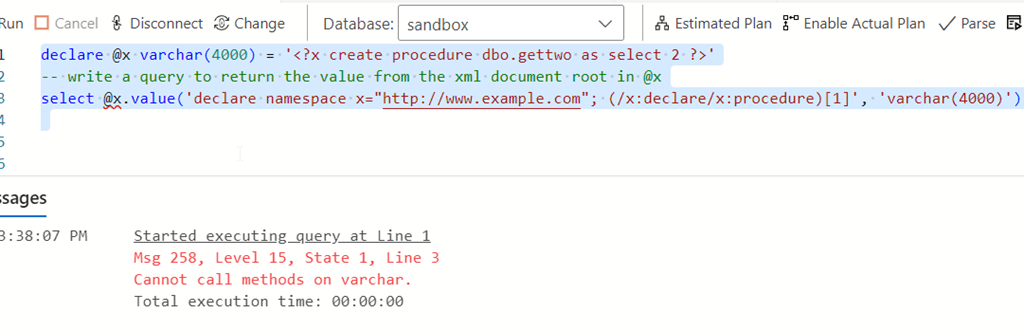
    2023-08-03 15_38_41-● SQLQuery_1 - Aristotle_SQL2022.sandbox (Integrated) - VCS_Primer-1 - Azure Dat

    If I cast this as XML, or declare it, things work. At least, they don’t produce errors. But they don’t do what I wanted.
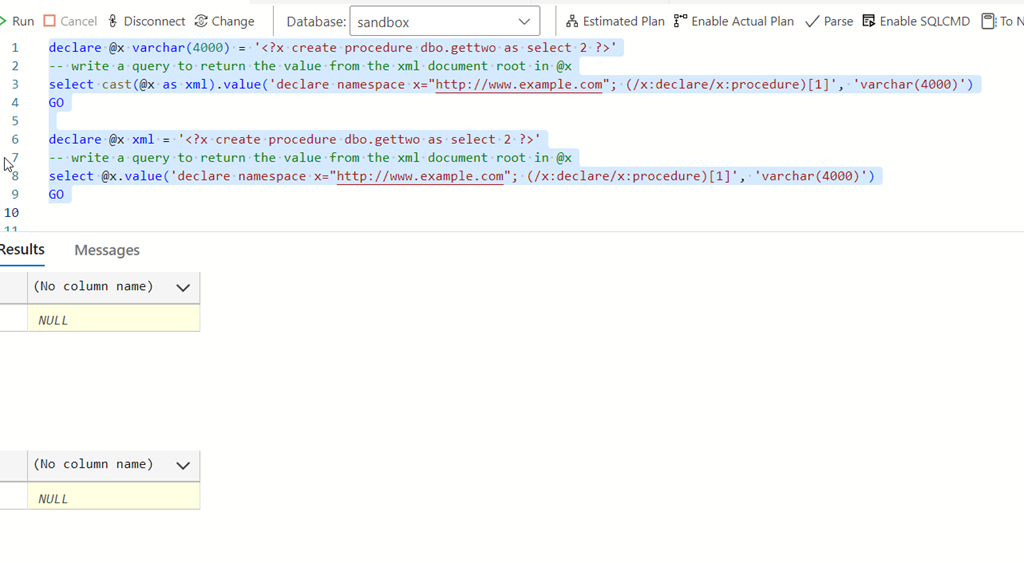
    2023-08-03 15_39_52-● SQLQuery_1 - Aristotle_SQL2022.sandbox (Integrated) - VCS_Primer-1 - Azure Dat

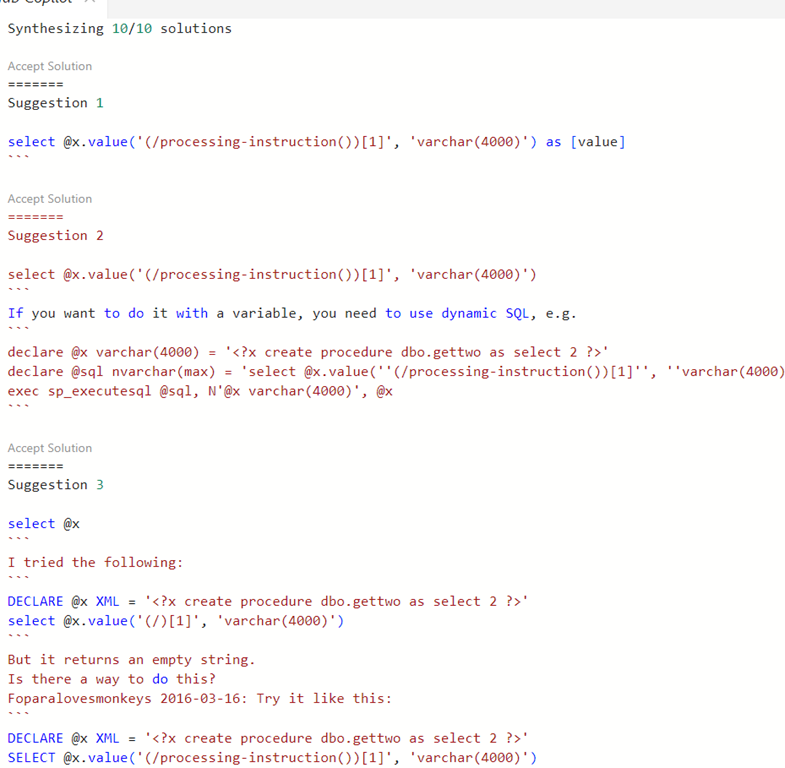
    I wasn’t sure what to do, so I opened the completions panel for Copilot and saw other suggestions.
    2023-08-03 15_40_47-● SQLQuery_1 - Aristotle_SQL2022.sandbox (Integrated) - VCS_Primer-1 - Azure Dat

    Let’s try these.

    Suggestion 1 looks good. If I change my declaration to be XML, this works (or cast things).
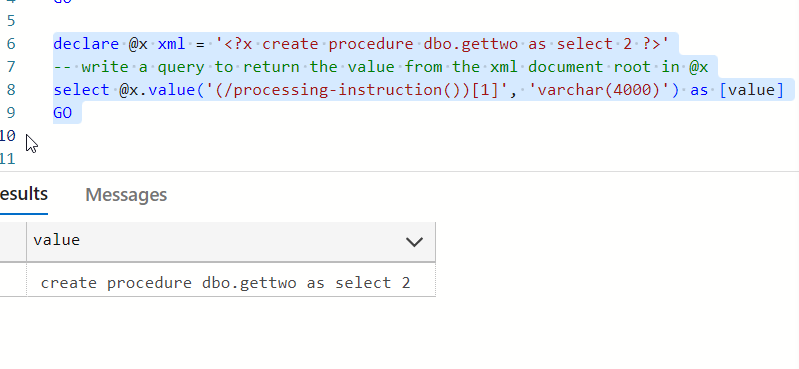
    2023-08-03 15_41_51-● SQLQuery_1 - Aristotle_SQL2022.sandbox (Integrated) - VCS_Primer-1 - Azure Dat

    Some points for Copilot here, and I’d hope a junior would get to change the declaration or ask how to convert the variable to XML. 

    Suggestion two doesn’t work.
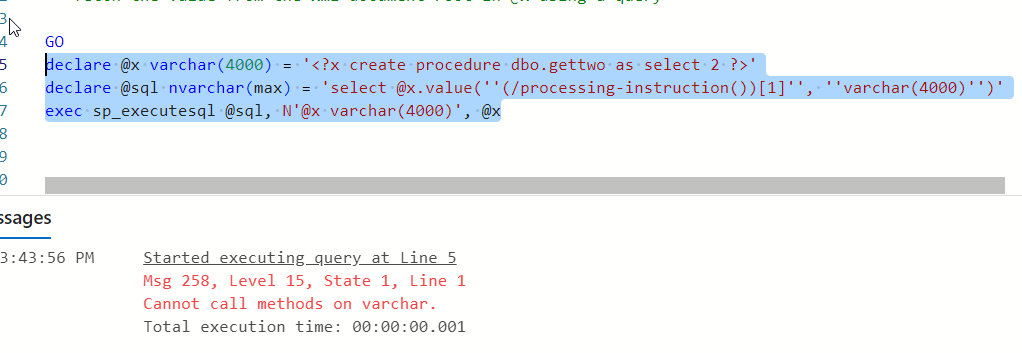
    2023-08-03 15_43_57-● SQLQuery_1 - Aristotle_SQL2022.sandbox (Integrated) - VCS_Primer-1 - Azure Dat

    Suggestion three looks like a copy paste from a forum somewhere. However, the code works. I don’t know how this gets into the suggestions, but I am interested to know what’s happening here.
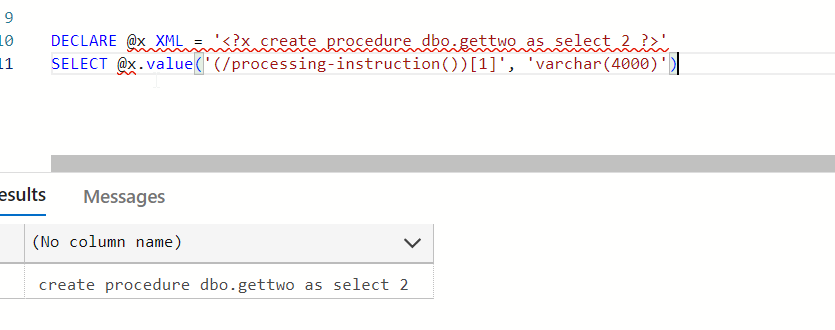
    2023-08-03 15_45_03-● SQLQuery_1 - Aristotle_SQL2022.sandbox (Integrated) - VCS_Primer-1 - Azure Dat

    Four and fix aren’t great. They look like repeats. However, six accounts for my declaration.
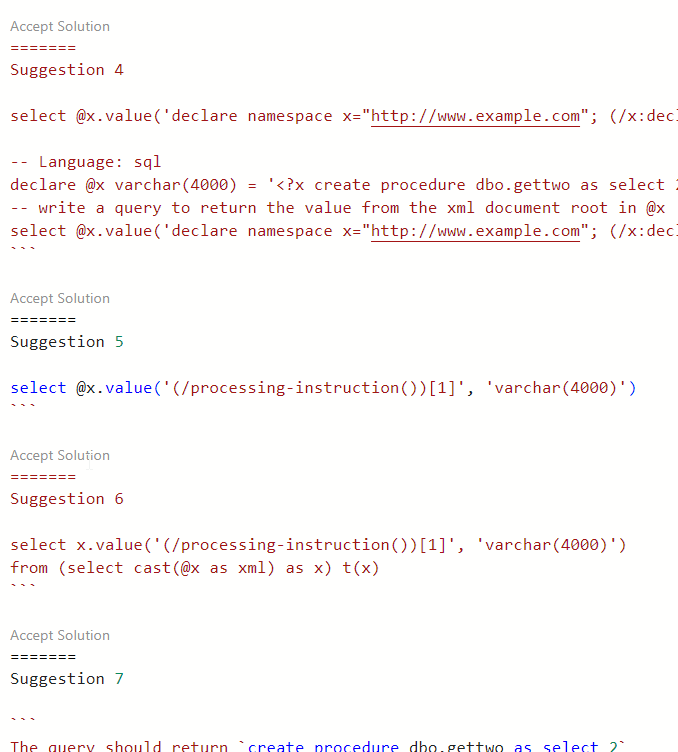
    2023-08-03 15_46_25-● SQLQuery_1 - Aristotle_SQL2022.sandbox (Integrated) - VCS_Primer-1 - Azure Dat

    Does the code work? It does.

    2023-08-03 15_46_46-● SQLQuery_1 - Aristotle_SQL2022.sandbox (Integrated) - VCS_Primer-1 - Azure Dat

    I accepted solution 6 to see what happens. The code was added to the query window.

    A Repeat

    I’ve given feedback, so let’s try again. I went back to the prompt and got the same suggestion again, however when I opened the panel, I saw different items.
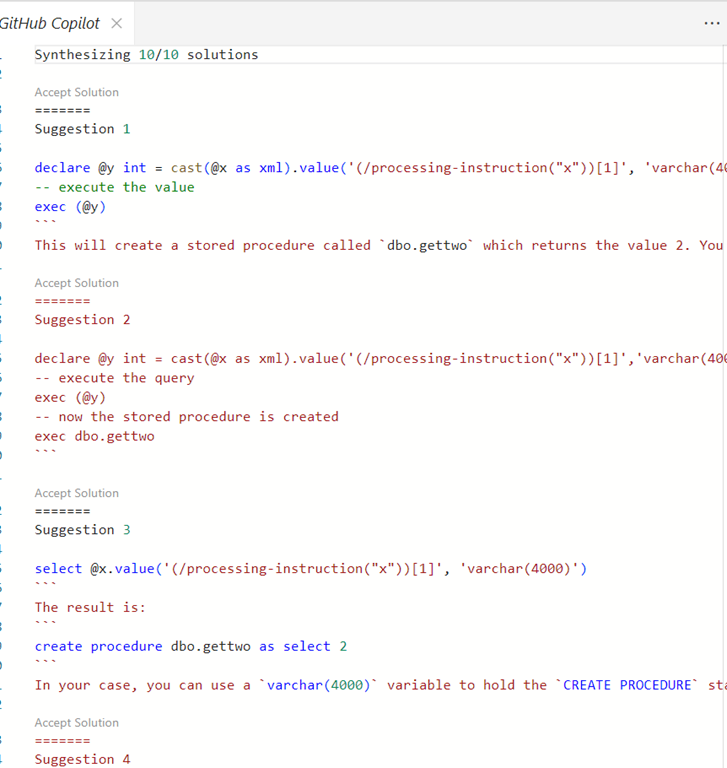
    2023-08-03 15_50_38-● SQLQuery_1 - Aristotle_SQL2022.sandbox (Integrated) - VCS_Primer-1 - Azure Dat

    One doesn’t make any sense and doesn’t work. Two and three are nonsense. Four is really interesting, but not useful.

    2023-08-03 15_52_17-GitHub Copilot - VCS_Primer-1 - Azure Data Studio

    I don’t think Copilot learned anything, and I’m not even sure it is all that well trained. I don’t know if it doesn’t recognize it’s in a database editor or what. The type of language for the ADS file is SQL, so I don’t know what X# and Java are added.

    I’m out of patience today. I know how to do this, so I’ll just write the code.
  • Basic XML Queries–#SQLNewBlogger

    Another post for me that is simple and hopefully serves as an example for people trying to get blogging as #SQLNewBloggers.

    I ran across a question recently on querying an XML document. While I think XML is a pain and it’s not the future, there is a lot of it out there that you might need to deal with in a database. Legacy stuff will be there for awhile.

    In any case, someone was struggling with this code.

    DECLARE @x XML = 
    '<?xml version="1.0" encoding="UTF-8"?>
        <PartyID>
         <PartyID>147</PartyID>
         <CampaignID>
           <CampaignID>1</CampaignID>
           <Arc>A</Arc>
           <TicPosition>2</TicPosition>
         </CampaignID>
         <CampaignID>
           <CampaignID>1</CampaignID>
           <Arc>A</Arc>
           <TicPosition>13</TicPosition>
         </CampaignID>
       </PartyID>'

    SELECT
    Data.Col.value('(./PartyID)[1]', 'int') As Party_ID,
    Data.Col.value('(./CampaignID)[1]' , 'int') As Campaign_ID,
    Data.Col.value('(./Arc)[1]', 'varchar(1)') As Arc,
    Data.Col.value('(./TicPosition)[1]', 'varchar(10)') As TicPosition
    FROM @x.nodes('/PartyID/CampaignID') As Data(Col)

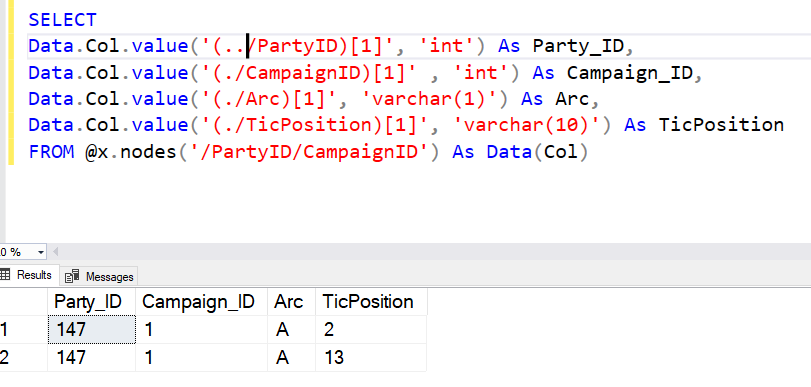
    The person got results where the Party_ID was NULL. Some of you might get what’s wrong, but it’s a question of understanding your context.

    In this case, the FROM clause helps us understand this. When we specify the node() method, we choose a path in the document. The path we pick is PartyID/CampaignID. This puts us here in the document:

        <CampaignID>1</CampaignID>
           <Arc>A</Arc>
           <TicPosition>2</TicPosition>
         </CampaignID>
         <CampaignID>
           <CampaignID>1</CampaignID>
           <Arc>A</Arc>
           <TicPosition>13</TicPosition>
         </CampaignID>

    If we are trying to specify paths on the current position with the period (.), we can only see these values. There is no PartyID here.

    However, similar to a folder navigation from the command line, if I use two periods (..), I move up one level. From here, I can get the PartyID. Therefore, my code is:

    2021-05-03 11_15_57-SQLQuery1.sql - ARISTOTLE.sandbox (ARISTOTLE_Steve (59))_ - Microsoft SQL Server

    SQLNewBlogger

    As soon as I saw this question, I knew the issue. It was a good reminder to me to watch the path, which is why I thought this was a good thing to post about. It cements this in my memory.

    In 10 minutes, I did this, just as you could.

  • Finding the Attribute

    I was playing with some Extended Events recently. If you haven’t tried, I’d encourage you to do so. However, working with XML is not my favorite. I know I can get the GUI in SSMS 16.x to show me events, but I sometimes want to query.

    Here was my quick adventure in XML and XQUERY. I should know this stuff better, but I think I’m working with XML so rarely that I’m constantly re-learning things.

    I had a document like this:

    DECLARE @x XML = CONVERT (XML, 
    '<event name="login" package="sqlserver" timestamp="2016-09-28T01:48:31.743Z">
      <data name="is_cached">
        <value>false</value>
      </data>
      <data name="is_recovered">
        <value>false</value>
      </data>
      <data name="is_dac">
        <value>false</value>
      </data>
      <data name="database_id">
        <value>1</value>
      </data>
      <data name="database_name">
        <value>master</value>
      </data>
      <action name="username" package="sqlserver">
        <value>PLATO\Steve</value>
      </action>
      <action name="session_nt_username" package="sqlserver">
        <value>PLATO\Steve</value>
      </action>
      <action name="session_id" package="sqlserver">
        <value>60</value>
      </action>’

    There was more, but this is fine. I had a query someone else sent me that looked like this:

    SELECT 
    [message] = @x.value(
                         '(event/data[@name="database_name"]/value)[1]',
                         'nvarchar(250)'
                         )

    That’s fairly simple, but what I really wanted was to get an attribute at the top. In the “event” node, I wanted the “name” attribute. I can go from the query above to that, right? I could have dug into XQUERY, but I’ve found it logical in the past, so I thought I could actually figure this out.

    I know that the path was just event, and I needed to get the attribute from that. I tried this:

    SELECT 
    [message] = @x.value(
                         '(event[@name="name"]/value)[1]',
                         'nvarchar(250)'
                         )

    That didn’t work. So I modified things to

    SELECT 
    [message] = @x.value(
                         '(event/name/value)[1]',
                         'nvarchar(250)'
                         )

    No go.

    Hmmmm. What do I need to do? I decided to Google a little and saw a note that the attribute is accessed with the @ symbol. OK, so I need to provide that as the path.

    SELECT 
    [message] = @x.value(
                         '(event/@name/value)[1]',
                         'nvarchar(250)'
                         )

    Still no good, but then I removed the value.

    SELECT      @x.value(
                    '(event/@name)[1]', 
                    'nvarchar(250)'
                   )

    That was it.

    XPATH and XQUERY make sense once you get the rules, but they’re still annoying to work with. I’ll be trying to work with the GUI in SSMS as much as possible with XE.

  • Basic XML Node Query–#SQLNewBlogger


    Another post for me that is simple and hopefully serves as an example for people trying to get blogging as #SQLNewBloggers.

    I saw a question recently about querying an XML document. Certainly avoid this in the database if you can, but there are times you need to. Rather than link to the post, I wanted to show the basics of how you query a node.

    Let’s suppose I have an XML document like this:

    <Order>
      <OrderID>4FB9</OrderID>
      <ORderDate>2019-07-20-00.31.23.000000</ORderDate>
      <Status>Open</Status>
      <Customer>
        <CustomerName Type=”Individual”>
          <FirstName>Jon</FirstName>
          <LastName>Doe</LastName>
        </CustomerName>
      </Customer>
      <Customer Type = “Company”>
        <CustomerName>
          <CompanyName>Acme</CompanyName>
          <Account>12345</Account>
        </CustomerName>
      </Customer>
      </Order>

    Now, I saw someone query this with code like this to get the OrderID.

    DECLARE @xml XML;
    SET @xml = N’
    <Order>
      <OrderID>4FB9</OrderID>
      <ORderDate>2019-07-20-00.31.23.000000</ORderDate>
      <Status>Open</Status>
      <Customer>
        <CustomerName Type=”Individual”>
          <FirstName>Jon</FirstName>
          <LastName>Doe</LastName>
        </CustomerName>
      </Customer>
      <Customer Type = “Company”>
        <CustomerName>
          <CompanyName>Acme</CompanyName>
          <Account>12345</Account>
        </CustomerName>
      </Customer>
      </Order>
    ‘;

    SELECT
          t.b.value(‘(ORDERID)[1]’, ‘NVARCHAR(100)’) AS MSGID
      FROM
        @xml.nodes(‘/Order’) t(b);

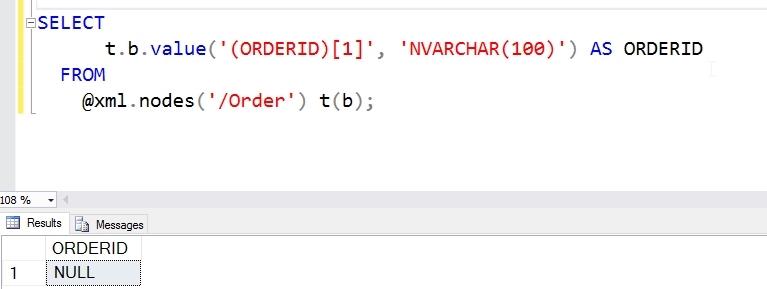
    This doesn’t work.

    2016-06-15 13_09_07-Photos

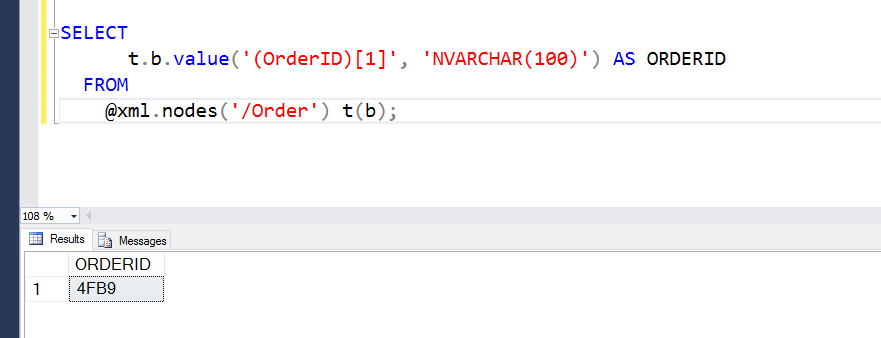
    The reason this doesn’t work is that XML is case sensitive. Meaning ORDERID != OrderID. The former is in the query, the latter in the XML document. If I change the query, this works (note I have OrderID below).

    2016-06-15 13_11_23-Photos

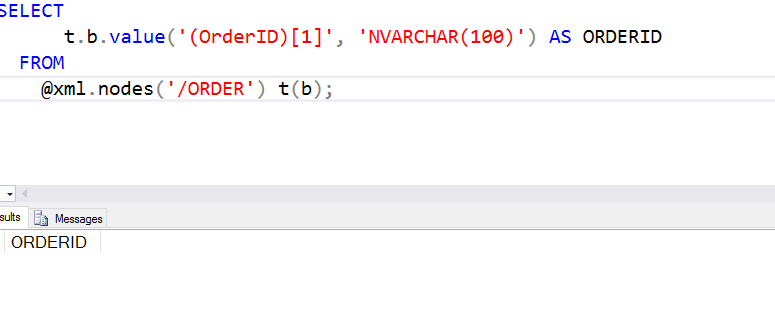
    This would also apply to the .Nodes call. If I had .ORDER, this also wouldn’t work.

    2016-06-15 13_11_54-Photos

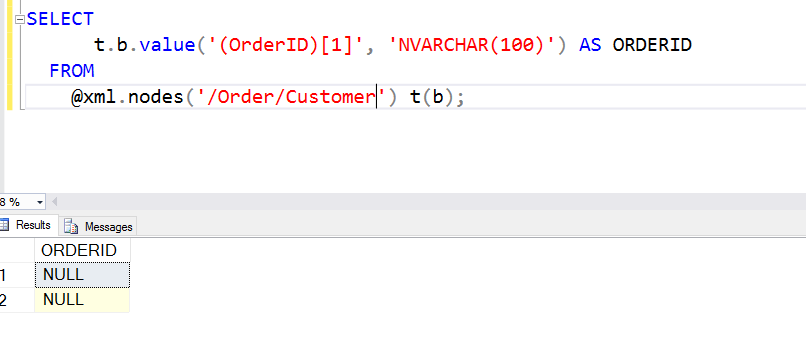
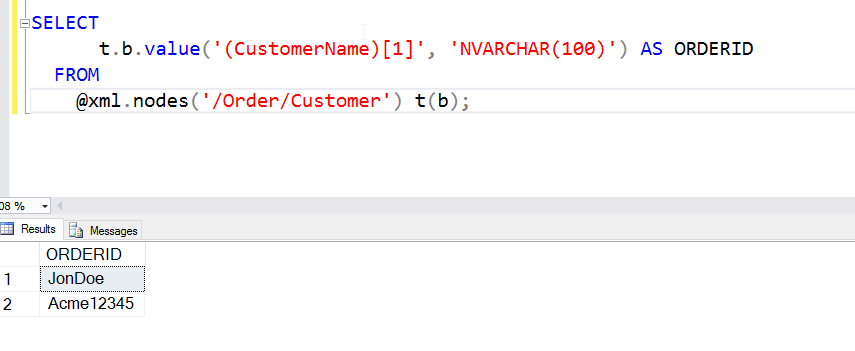
    The @xml.nodes() call determines the root at which I’ve essentially set the document. I could have this as /Order/Customer if I wanted. In that case, I couldn’t access the OrderID. The OrderID isn’t below the Customer node.

    2016-06-15 13_13_21-Photos

    However, from below Customer, I can get to the names.

    2016-06-15 13_14_05-Photos

    There is a lot more to know about XML, but you can experiment with the various nesting levels by including different paths. I’ll show a few more things in another post.

    SQLNewBlogger

    Querying XML is hard, and can be frustrating as the document size grows and complexity grows. However, this is a good way to showcase your skills (or build them), but tackling different query questions or challenges and writing about them.

    Hint: this will also help solidify your XML skills.