Author: way0utwest

  • Speaking at SQL Bits XII

    I’m heading back to SQL Bits for the third time and I’m excited to be going again. I think that this is my favorite conference, hands down. The large mix of people, the incredibly welcoming hosts and the casual atmosphere make this one of the events I look forward to every year. It also means I get to swing by the Red Gate office without making a special trip.

    This year the event is in Telford, near some racetrack that’s supposed to be famous. I’m not sure if they is any tie in with the event, but who cares. Chances are you won’t want to leave SQL Bits because you’ll be alternately excited by the content and charmed by the hosts and other attendees.

    I’ll be delivering two talks at the event:

    • Continuous Integration for Databases
    • Branding Yourself for a Dream Job

    I’ve done both of these a few times and they are very popular and thought provoking. I’m hoping that the crowd enjoys them as much as I do.

    If you can make it to the UK, register today and I’d love to see you there. This is a great event, and I’m sure you’ll learn a ton and enjoy yourself while doing so.

  • That didn’t last long

    Here was my speaking schedule, a page I updated Wed night.

    speakschedule

    Late yesterday I got emails notifying me of acceptance to a new event. Two whole days without something scheduled.

  • One Database to Rule Them All

    This is what you build to juggle 6,000 tweets a second. That’s the headline that caught my eye and it’s about the challenges of Twitter and the data that they handle. Twitter definitely has a tough problem, one that few of us have, but perhaps they can help us learn to better deal with our own data from their experiences on an edge case.

    The story is journalistic, not so technical, but it is interesting. Twitter has struggled with a blend of data that is partially crucial and must be consistent now (usernames) and other data that can be a bit out of date (tweets). They also have lots of unstructured data (photo/video) that is combined with more traditional, structured data. They’ve used a few different database platforms to store this data and assemble it with their application. That’s the same things that most of us also do when we deal with many different types of data.

    However Twitter is trying to find away around dealing with disparate systems. They’ve had a number of engineers working on Manhattan, their database designed to handle both structured and unstructured data. And because they work for Twitter, this platform is designed to manage all of this data with very high workload demands at scale.

    It will be interesting to see if they come up with any innovative ideas. Certainly SQL Server already has options for managing structured and unstructured data, though perhaps not at the scale Twitter needs.

    Steve Jones

  • FileTable–Adding a file to a folder

    At my Filestream/Filetable talk yesterday at SQL Intersection, someone asked me about programmatically adding a file to a Filetable. Easy enough, I thought, since I’d seen someone do this in .NET and was thinking this has to be simple. Turns out it’s not quite so simple.

    I was assuming that I could use the GetDescendent method of the hierarchy ID for the path_locator field to get the path you needed and insert that. It turns out that’s not correct.

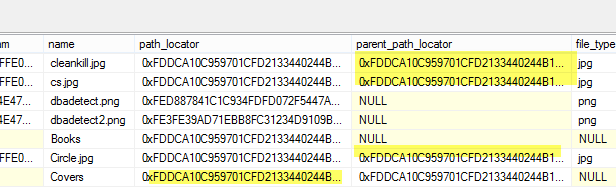
    I searched around when that didn’t work and found this post from Bob Beauchemin and a question on StackOverflow. If the two, Bob’s post explains things better. He actually dug into the Filetable, looking at the constraints and defaults in the schema. If you do that, you can find this constraint on the path_locator field:

    filetable_h

    The code in this constraint looks like this, which matches with what Bob and SO show as the way to calculate the path.

    ALTER TABLE [dbo].[Explorer] ADD  CONSTRAINT [DF__Explorer__path_l__6477ECF3]  
    DEFAULT (CONVERT(HIERARCHYID, '/' +     CONVERT(VARCHAR(20), CONVERT(BIGINT, SUBSTRING(CONVERT(BINARY(16), NEWID()), 1, 6))) + '.' +
         CONVERT(VARCHAR(20), CONVERT(BIGINT, SUBSTRING(CONVERT(BINARY(16), NEWID()), 7, 6))) + '.' +
         CONVERT(VARCHAR(20), CONVERT(BIGINT, SUBSTRING(CONVERT(BINARY(16), NEWID()), 13, 4))) + '/')) FOR [path_locator]
    GO

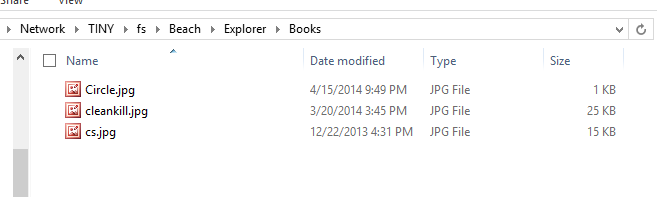
    This means that your insert statement needs to perform this calculation. For me, I decided to insert a jpg of a circle into the table, under the folder “books”. The folder looks like this:

    filetable_g

    Since I have the binary values for a circle image, I’ll use those, and then the code below. The first part of this code calculates the new path that’s needed, basing this on the path_locator value for the “Books” folder, and then building a NewID(). From there, it’s a simple insert.

    DECLARE @path HIERARCHYID
    DECLARE @new_path VARCHAR(675)
     
    SELECT  @path = path_locator
    FROM    dbo.Explorer
    WHERE   name = 'Books'
    
    SELECT  @new_path = @path.ToString()
            + CONVERT(VARCHAR(20), CONVERT(BIGINT, SUBSTRING(CONVERT(BINARY(16), NEWID()),
                                                             1, 6))) + '.'
            + CONVERT(VARCHAR(20), CONVERT(BIGINT, SUBSTRING(CONVERT(BINARY(16), NEWID()),
                                                             7, 6))) + '.'
            + CONVERT(VARCHAR(20), CONVERT(BIGINT, SUBSTRING(CONVERT(BINARY(16), NEWID()),
                                                             13, 4))) + '/'
    INSERT INTO dbo.Explorer
            ( stream_id
            , file_stream
            , name
            , path_locator
            )
    VALUES  ( NEWID()
            , 0xFFD8FFE000104A46494600010101006000600000FFE100684578696600004D4D002A000000080004011A0005000000010000003E011B0005000000010000004601280003000000010002000001310002000000120000004E00000000000000600000000100000060000000015061696E742E4E45542076332E352E313000FFDB0043000201010201010202020202020202030503030303030604040305070607070706070708090B0908080A0807070A0D0A0A0B0C0C0C0C07090E0F0D0C0E0B0C0C0CFFDB004301020202030303060303060C0807080C0C0C0C0C0C0C0C0C0C0C0C0C0C0C0C0C0C0C0C0C0C0C0C0C0C0C0C0C0C0C0C0C0C0C0C0C0C0C0C0C0C0C0C0C0C0C0C0C0CFFC0001108000A000D03012200021101031101FFC4001F0000010501010101010100000000000000000102030405060708090A0BFFC400B5100002010303020403050504040000017D01020300041105122131410613516107227114328191A1082342B1C11552D1F02433627282090A161718191A25262728292A3435363738393A434445464748494A535455565758595A636465666768696A737475767778797A838485868788898A92939495969798999AA2A3A4A5A6A7A8A9AAB2B3B4B5B6B7B8B9BAC2C3C4C5C6C7C8C9CAD2D3D4D5D6D7D8D9DAE1E2E3E4E5E6E7E8E9EAF1F2F3F4F5F6F7F8F9FAFFC4001F0100030101010101010101010000000000000102030405060708090A0BFFC400B51100020102040403040705040400010277000102031104052131061241510761711322328108144291A1B1C109233352F0156272D10A162434E125F11718191A262728292A35363738393A434445464748494A535455565758595A636465666768696A737475767778797A82838485868788898A92939495969798999AA2A3A4A5A6A7A8A9AAB2B3B4B5B6B7B8B9BAC2C3C4C5C6C7C8C9CAD2D3D4D5D6D7D8D9DAE2E3E4E5E6E7E8E9EAF2F3F4F5F6F7F8F9FAFFDA000C03010002110311003F00E97FE0E87FF82CA7ED35FB04FED85E09F03FC2BD6A5F87BE1097408B5C4D523D2ADAF1BC41746795248CBDC4722F970848C18940399373E43478FD75FF00827CFC68F177ED17FB0FFC2AF1D78F3461A078C7C59E19B2D4F57B110B42B14F244199846DF346AFC384392A1C024E335E95E2EF87BE1FF880968BAF687A3EB6B612F9F6C2FECA3B916F27F7D3783B5BDC60D6C5007FFFD9
            , 'Circle.jpg'
            , @new_path      
          );
    go


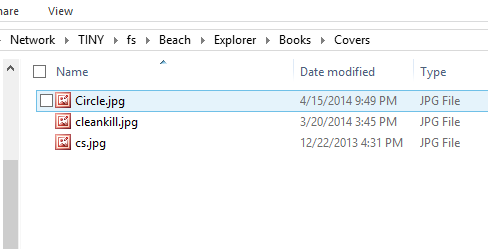
    If I now look at the folder, I see this:

    filetable_j

    An insert into the folder of a file.

    I could easily adapt this to stream in the binary values from a .NET application, or OPENROWSET, but this works well enough.