Author: way0utwest

  • AI Is Improving Security

    I was updating the SQL Server build lists the other day. I typically get a notification from Microsoft when new builds are released. This is something that happens every month as a new CU appears. For SQL Server 2022, we get a CU every other month since it’s still in mainstream support. Older versions just get these security patches. Since SQL Server 2025 is new, we’re getting a CU a month, which will slow down next year. However, I’ve also seen this for most versions:

    • Oct 2026 – GDR
    • Sep 2026 – GDR
    • Jul 2026 – GDR
    • May 2026 – GDR
    • Apr 2026 – GDR
    • Mar 2026 – GDR

    That’s a lot of out-of-band patches. In the last decade of SQL Server, there have been relatively few GDRs. Often the main CU comes a day or two later (or a month later for older versions). If you react and start to plan patching, you might find yourself trying to decide if you apply CU9+GDR or wait for CU10, or do both.

    There have been few GDRs in the last , but before that, relatively few: three in 2025, two in 2024, and two in 2023. I suspect that AI is being used to discover bugs in existing software, and this is forcing Microsoft to perform remediation work. Brent posted a similar thing, noticing a large number of security fixes and speculating that AI is finding issues.

    That’s good, right?

    Or is it? If Microsoft can find security issues, can’t malicious actors? Including nation-state-sponsored hackers? I’m not even sure that Microsoft is finding most of these, as there are lots of CVE issues, which can be discovered by anyone and sent to Microsoft. This might be to obtain a bug bounty payment, as Microsoft and other vendors will pay security researchers.

    Or it could be that a hacker finds an issue and exploits it. A customer then notices an issue and reports a problem to support. Microsoft realizes there is a vulnerability, works on a fix and reports the issue to the CVE database.

    AI is great for security, as it can scan software and look for known issues. We have decades of security bugs that have to be included in the frontier LLM training, so using AI to scan your code is a good idea. I am sure code scanning tools are adding AI review to their systems. I’m also sure those vendors are worried you’ll use AI on your own to scan code and find your own issues.

    You can do that, but ensuring your AI does a good job scanning isn’t necessarily easy. Or fast. Deterministic systems, like SonarQube and Flyway can find code issues quickly, in a deterministic fashion, and likely with less cost than AI. That’s not to say AI doesn’t have a place, but it’s likely an out-of-pipeline review that takes place less often than every CI build.

    Security is a constant battle, and it’s hard. The age of AI makes it easier and harder (and more expensive) to manage security, but I think that’s a good thing. We’re seeing lots of vulnerabilities, but also more patches. Perhaps the better outcome is that there is more awareness and focus on security from vendors who now know if they don’t scan their code carefully, someone else will. Perhaps someone they don’t want finding issues.

    Steve Jones

    Listen to the podcast at Libsyn, Spotify, or iTunes.

    Note, podcasts are only available for a limited time online.
  • Experimenting with CHOOSE: #SQLNewBlogger

    I was looking over the CHOOSE() function while editing an article at SQL Server Central. I realized there isn’t a documentation note on how many parameters can be included. I decided to test.

    This post looks at the tests and results.

    Tl;dr It appears 3925 is the most arguments.

    Another post for me that is simple and hopefully serves as an example for people trying to get blogging as #SQLNewBloggers.

    Building a Script

    Since I want to know where things fail, I decided to make a short T-SQL script that tests increasing numbers of parameters. This script builds a dynamic CHOOSE() select using a number of parameters and then loops for a set number of times, adding 1 parameter each time.

    SET NOCOUNT ON; DECLARE @MaxValues int = 5150; -- largest number of CHOOSE value arguments DECLARE @n int = 300; -- current number of value arguments DECLARE @i int; DECLARE @idx int; DECLARE @args nvarchar(max); DECLARE @sql nvarchar(max); WHILE @n <= @MaxValues BEGIN -- Build value list: 'Value 1', 'Value 2', ... 'Value n' SET @args = N''; SET @i = 1; WHILE @i <= @n BEGIN SET @args += CASE WHEN @i > 1 THEN N', ' ELSE N'' END + N'N''V' + CAST(@i AS nvarchar(10)) + N''''; SET @i += 1; END; -- Random index in 1..n (CHOOSE is 1-based; out of range returns NULL) SET @idx = ABS(CHECKSUM(NEWID())) % @n + 1; SET @sql = N'SELECT ' + CAST(@n AS nvarchar(10)) + N' AS ArgCount, ' + CAST(@idx AS nvarchar(10)) + N' AS PickedIndex, ' + N'CHOOSE(' + CAST(@idx AS nvarchar(10)) + N', ' + @args + N') AS Result;'; PRINT @sql; -- show the generated statement EXEC sys.sp_executesql @sql; -- run it SET @n += 1; END;


    This returns the command run. For the first 2 values of n, setting @n to 1 and @max to 2, I get this:

    SELECT 1 AS ArgCount, 1 AS PickedIndex, CHOOSE(1, N'V1') AS Result;
    SELECT 2 AS ArgCount, 1 AS PickedIndex, CHOOSE(1, N'V1', N'V2') AS Result;

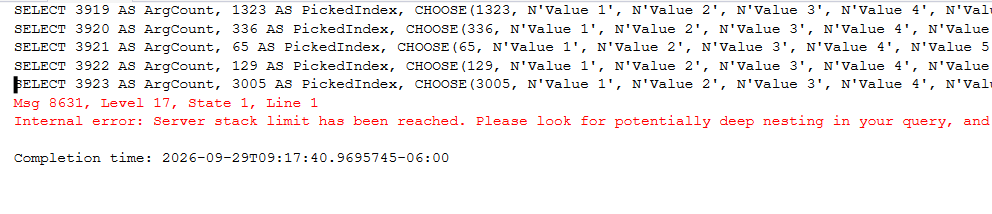
    This let me test different values. I tried various values and eventually got this error:

    2026-09_0159

    I tried this a few different times, disconnecting and reconnecting and it seemed that I could get the number of parameters up to 3925. It failed sometimes at 3924 and sometimes at 3925.

    I’ve submitted a PR to add the max number to the docs, but it appears CHOOSE() works at a level that would cover lots of items. I see this as a small syntactic sugar add, and if I really needed to index 1000 entries, a join with a reference table would be a better choice.

    SQL New Blogger

    This script took a few minutes to write, but the testing took about 45 minutes. I was running this in the background with different values. 1..256, 255..1024, etc. I noticed that SSMS responded slower, so I started jumping to small ranges at large values to find the error.

    This post took me about 20 minutes to put together after the testing, which included the PR for Microsoft. This is an easy way to show that you can examine possibilities and find the limits of your code. That helps us decide how scalable or robust our solutions are.

    You could write this post and impress an interviewer. Choose your own T-SQL function and run an experiment.

  • A Fun Prize at the PASS Data Community Summit

    I had a briefing for the 2026 PASS Data Community Summit, which is just a couple of weeks away. Amongst a bunch of admin type stuff, there was a slide with a picture of the Redgate Software prize at our booth.

    It’s a Lego Concorde model. That is very cool.

    2026-10_0144

    If you’re attending the Summit, swing by and enter for your chance to win. It’s a pricey (to me) set, though I might have to get one and put a shelf behind my desk with it, and a few other things I need to get on display.

  • Making an Impression

    It’s a weird time in the job market. Companies are hiring, and I see friends and colleagues starting new positions. At the same time, I have had many more friends reach out, saying they are struggling to find employment, and job searches are dragging on for months. I sympathize, and it certainly seems that lots of people are trying to hold onto their existing positions.

    Whether you’re looking for a new position or trying to create security in your existing role, it pays to be aware of the impression you leave in the world. Is it a positive one? Do others want to work with you? Or maybe you find people gravitate towards others. Are they impressed with your output? Satisfied? Left wanting?

    Maybe a better question is: if you were running your team, would you hire you again?

    I think it’s a very human tendency to overestimate our abilities and underestimate our weaknesses. That’s why 90+% of people rate themselves as above-average drivers. In my travels, I find plenty of people who aren’t very self-aware of the impression they make, good or bad. Lots of people aren’t very observant, which is another human tendency.

    Recently, a friend was hiring for a position and noted that they received a large number of resumes and cover letters with spelling and grammar mistakes. They deleted those and then started to review the rest. They also mentioned that while checking LinkedIn, they were turned off by people who hadn’t added their picture. I’m not sure if those candidates were discarded.

    Whether you think those are valid reasons to judge others, the reality of the world is that humans judge each other. We have our own prejudices, attractions, turn-offs, and more that influence our decisions. It’s easy to say that you’ll pick the best candidate, but that’s much harder in practice. Many of us fall into buckets with lots of others who are applying. How do we stand out?

    It can be hard, especially when different people form different impressions from the same experience. Not enough experience is a challenge, and these days too much experience can also be a challenge. There are plenty of hiring managers who might not consider a candidate if their impression of a candidate is “too old”, “too expensive”, or “too set in their ways.”

    It’s a tough world these days, and AI doesn’t help. What I can say is that you should be aware of the impression you make and work to regularly improve it. It’s unlikely you’re clearly above or below others who have similar experiences and skills, but building a preponderance of evidence that you are a good hire might make a difference.

    Steve Jones

    Listen to the podcast at Libsyn, Spotify, or iTunes.

    Note, podcasts are only available for a limited time online.