Tag: windows

  • The New OS Wars

    In the last year I’ve seen a lot of statements about data and sovereignty between countries. While there have been concerns in the past, there seems to be more worry around the world with AI services primarily being run by, and hosted by, US companies. Plenty of my customers at Redgate Software have concerns over our ability to see data when we run AI models, though we don’t store the data. Once the session ends, the data is discarded by policy

    Recently I saw a piece about France trying to rid itself of the reliance on US technology, specifically the Windows OS from Microsoft. They are looking to move to their own version of Linux, as well as a number of open source software packages. This quote was fascinating to me: “We can no longer accept that our data, our infrastructure, and our strategic decisions depend on solutions whose rules, pricing, evolution, and risks we do not control.”

    With AI being added to lots of software, including OSes, I suspect that other countries might look to follow France. I know the EU is looking to move, and Brazil has been trying to use more Linux and OSS for decades. While I find Windows works well, I completely understand wanting to move, especially in this era where many software packages are web-based and can run on a different OS.

    SQL Server runs on Linux, and half of my testing is on Linux, since I run SQL Server in a container on my laptop. My desktop still has a native Windows install, but I find it easy to port almost all code back and forth between the two versions. While I understand others might have a preference for PostgreSQL or MySQL or some other OSS platform, I think SQL Server provides a great value for many organizations. I also think it’s incredibly hard to port your software and data from one database platform to another.

    I do wonder if governments or organizations outside the US that look to leave Windows will also look to leave SQL Server. It’s one thing to move away from the OS and software like Office. A little training will get most users productive on a new system in a relatively short time. Moving a software application and its database is a much larger challenge.

    I expect SQL Server to remain incredibly popular for many years, and with the ability to configure the new AI capabilities to use your own models, I am not sure a country that wants to reduce their reliance on US technology will choose to do so for their databases. They will likely start elsewhere and continue to use SQL Server for years.

    Steve Jones

    Listen to the podcast at Libsyn, Spotify, or iTunes.

    Note, podcasts are only available for a limited time online.

  • 30 Years of SQL Server on Windows

    I’ve spent over 30 years working with SQL Server. I saw a post recently from Bob Ward who is celebrating 30 years at Microsoft, noting this is also the 30th anniversary of SQL Server on Windows. It’s been an honor for me to get to know Bob, learn from him, and spend time socially at various events around the world. He’s truly been a force in improving the SQL Server platform through the years.

    While SQL Server has been on Windows for 30 years, I’ve got a bit more than 30 years working with the platform as I actually started managing a SQL Server instance on OS/2. With the addition of Linux, I’ve now run SQL Server on three different server OS hosts: OS/2, Windows, and Linux. That’s somewhat amazing to me, especially as one of my April Fools jokes came true. This was one of the most-read articles on SQL Server Central for a long time, and perhaps it influenced enough people at Microsoft to build and release a Linux version.

    Over three decades, the growth of the platform has been amazing. We’ve had the core engine lose tables in memory and then get them back with In-Memory objects. We have seen the heavyweight trace evolve into Extended Events and SQL Audit. The language has grown with many new ANSI features that help us write better code. We’ve deprecated a number of objects and added the ability to create our own with the CLR. We’ve added new data types, not all of which are named well, but we still have the ability to process more types of data natively. We’ve even added new services, with SSIS, SSRS, and SSAS packaged into the platform.

    Not a lot has been removed, but a few things are gone, like Notification Services. Replication doesn’t seem to have changed a lot in 30 years, which is a bit disappointing to me, but there have been a lot of improvements in HADR capabilities. We even have other companies (Amazon and Google) selling their own version of SQL Server as a platform, where you don’t have to manage the instance.

    In many ways, I’ve found SQL Server to be easier to use, but also much harder to learn about because the breadth of what’s in the product is so wide now. I can’t imagine anyone actually knows the entire product at a very deep level. I’ve also found myself more disappointed with the experiments Microsoft makes when adding features and not continuing to invest and evolve them (or even fix all the bugs).

    There certainly have been plenty of bugs, security issues, and maddening moments in working with SQL Server, but it’s been a great 30 years of a career working on the Windows version. I likely won’t do that for another 30 years, but I hope those of you making a living working with the platform enjoy it as much as I do.

    Steve Jones

    Listen to the podcast at Libsyn, Spotify, or iTunes.

  • Setting up a Local http Server with Node

    Setting up a local web server was something that I haven’t done in a long time and this was really easy. This post shows how to do this with a command line node web server.

    A Need

    Most software that needs a web server sets one up for you. This is pretty easy, and if I have a web app in Visual Studio, it will start up its own server when you run the app. If you had to set your own up, IIS was in many versions of Windows, but it wasn’t a simple thing to configure and manage.

    I like simple.

    I needed to just serve a file over http to test something. I could have done this by uploading a file to this blog or somewhere else, but I was hoping to keep this small and portable.

    Looking Around

    As always, I started with Google. I found a bunch of articles on Apache, python (should have tried this) and others. Then I saw this short article on a test web server on Windows. I looked, and this seemed to be something simple. I had node installed, so really I ran this:

    npm install -g http-server

    This installed somewhere. I had created a new folder in d:\http, but the web server was installed elsewhere. When I typed “http-server” in the command line, it seemed to be running. I saw this:

    2023-05-04 09_19_04-http-server

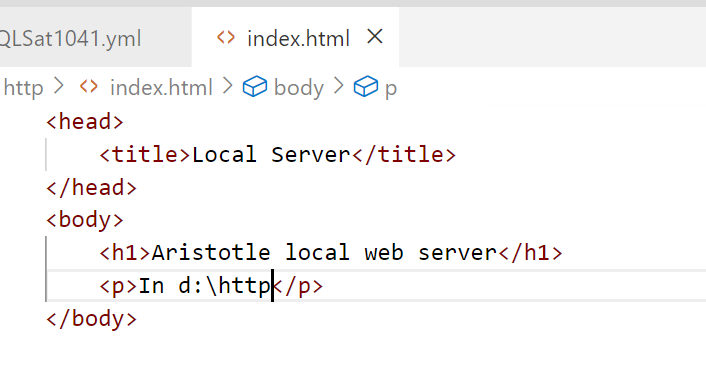
    I created a quick html file, index.html, with this content:

    2023-05-04 09_19_40-index.html - sqlsatwebsite - Visual Studio Code

    and voila, I had a web server.

    2023-05-04 09_19_47-Local Server

    It’s basic, but any file I drop into d:\http can be served over http by entering the file name in the path. You can see in the image above, I was testing moving SQL Server backups. That URL actually downloaded that file from my browser.

    Summary

    This showed how you can set up a server with node. It’s quick and easy, and flexible. I can set this up as needed for tests without any big config. If you need this, here’s one way to test your own web stuff.

  • Windows 11 Complaints

    I upgraded my primary laptop to Windows 11. A few people had said they liked it, I know that I needed to keep up at some point, and in the later stages of a pandemic, I thought this was the safest bet. I have a desktop I use regularly, and didn’t want anything risky there, and I have an older laptop, but it’s a 2015 era device, so I wasn’t sure that was a good idea. This was a 2019 laptop, so fairly new.

    In most cases, Windows is Windows. The task bar centers icons, and the start menu comes up in the middle, not the side. Not big changes.

    However.

    A few things I’ve noticed, which I find rather disturbing.

    Slow

    Windows 11 is slower, and often has interrupts or pauses that I didn’t have before. If I press the Windows key, the Start menu is slow to appear, and even then, loses some of the keyboard buffer. So if I type Windows+n+o+t+e, expecting notepad, I find the Start menu and “ote” or “te” in the window.

    Incredibly annoying.

    It also appears more checking online for stuff, and a poorer experience when I’ve changed networks.

    This is the most disturbing thing as it appears Microsoft has gone back to bloatware for Windows, assuming hardware gains. Windows 7 and 10 were slimmer, and felt like the OS was more hidden, understanding that it is a platform on which the software we need runs. The OS isn’t important for UI/UX most of the time.

    Get it out of the way.

    Task Manager

    Second thing is that Task Manager isn’t available from the status bar. I don’t know who thought this was ergonomically a problem, but when your Start menu doesn’t start, not being able to get Task Manager is a problem.

    In addition, I find at times the System Interrupts are using 100% of the CPU and outside of getting Task Manager up, nothing else works.

    Ugh.

    Too Much AI or MS Preference

    One of the more annoying things I’ve found is that if I look for some apps, Microsoft stuff gets in the way. For example, I will sometimes need to stat OpenLiveWriter. For some reason it sometimes disappears from my task bar where I pin it. If I try to start it, with the Windows key (pause) then type “open”, Excel is the first thing that appears. No other apps, but Excel.

    #$%##@#$#^%^

    Stop with the guessing here.

    I see similar things if I type “SQL” as the list of matching apps, SSMS + Redgate stuff, is hidden and I get the one, almost always wrong, guess.

    Overall

    I don’t see anything great about Windows 11 so far. Tbey’ve moved things, made minor additions, and likely made it easier for some users, but not for someone used to Windows that lives in the keyboard. Even finding some of the older things, like User Account names, is harder in W11.

    I wish I hadn’t upgraded. I dread the day I need to move away from Windows 10 on other machines.