Tag: windows

  • What’s my MAC Address in a Command Prompt?–#SQLNewBlogger

    Another post for me that is simple and hopefully serves as an example for people trying to get blogging as #SQLNewBloggers.

    The other day I was working with a licensing issue and someone requested my MAC address to track something down. I know I could dig into the adapter properties, but that’s an annoying set of clicks in Windows. I decided to spend that time checking out how to get the MAC address from a command line.

    Normal CMD

    I tried “ipconfig” at the command line, which I always have open. I got my IP and DNS info, but no MAC. A quick search on Google showed me I needed more detail.

    ipconfig /all

    This gives me all the info, as you can see below:

    2021-10-25 09_38_29-cmd - flyway  info -url=_jdbc_sqlserver_____db=demo_db&user=_

    PowerShell

    I’d prefer PowerShell for many things like this, mostly because I could programmatically extract the values and use them elsewhere. I don’t need that here, but I might for something.

    In this case, this is in the WMIObject, which is an ugly command. I’ll never remember this.

    Get-WmiObject win32_networkadapterconfiguration | select description, macaddress

    However, there’s an easier cmdlet.

    Get-NetAdapter |select MacAddress, Name

    This will return what I want. I get see which MAC is associated with which adapter.

    2021-10-25 09_42_55-C__Users_Steve

    Both quick ways to get some information.

    SQLNewBlogger

    I had to get some info, and I took a minute to learn something. This took me just 2-3 minutes to learn how to do this and practice. Then it was less than 10 minutes to do this post.

    For reference, I used these links:
  • Fixing Python on Windows 10 – #SQLNewBlogger

    Another post for me that is simple and hopefully serves as an example for people trying to get blogging as #SQLNewBloggers.

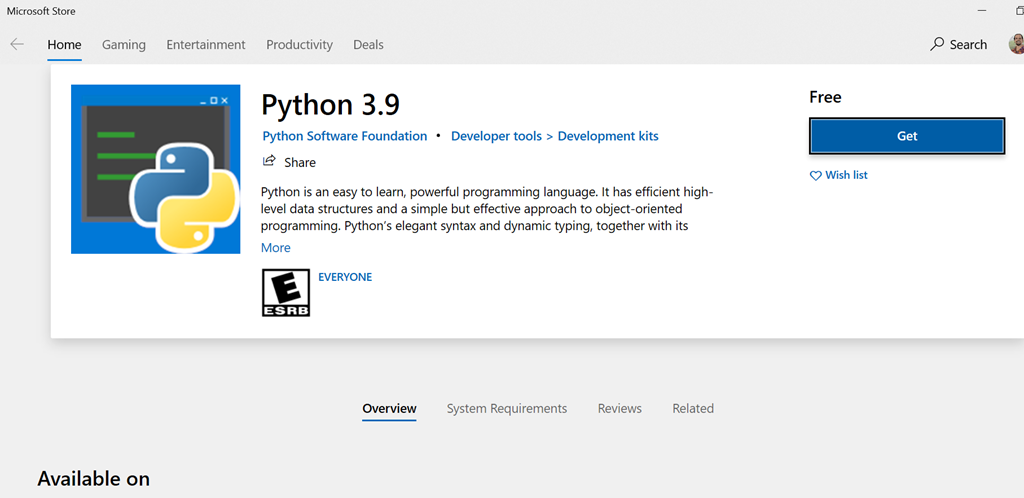
    The other day I picked up a laptop, opened a command prompt and typed “python” to check something. I got this:

    2021-02-04 17_52_35-Microsoft Store

    I did have Python 3.8 installed, so upgrading to 3.9 wasn’t out of the question. However, why did this come up?

    I searched around and found out that Windows sets up application aliases for some versions. I can only assume since I had python on here that some update last fall did this and I hadn’t used this laptop for python because I’m stuck at home.

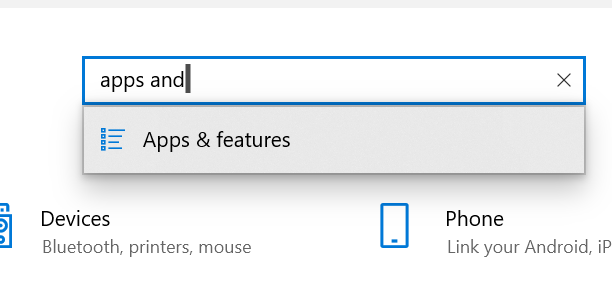
    I saw this on SO as an issue, and followed the instructions. I used Win+I to open the control panel. Here I typed “apps and” to get to Apps and Features.

    2021-02-04 17_56_28-Settings

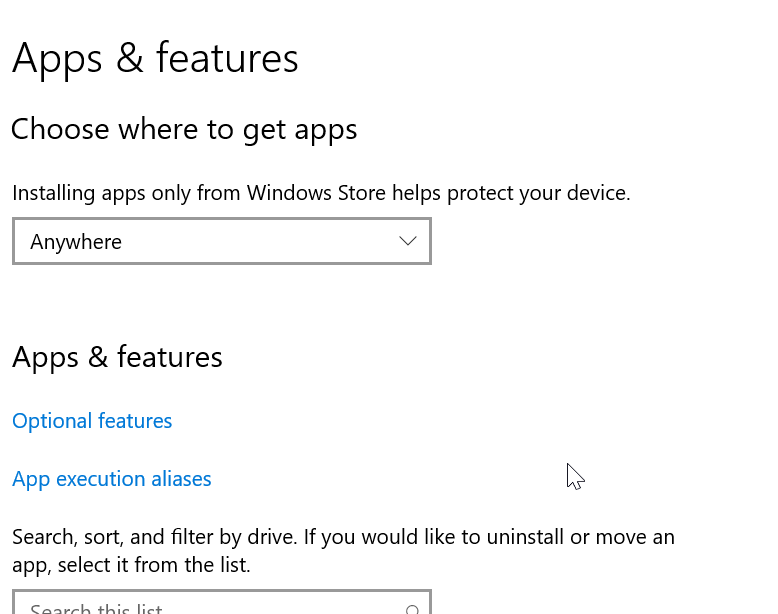
    In here, I see there are “App execution aliases” as a link.

    2021-02-04 17_56_57-Settings

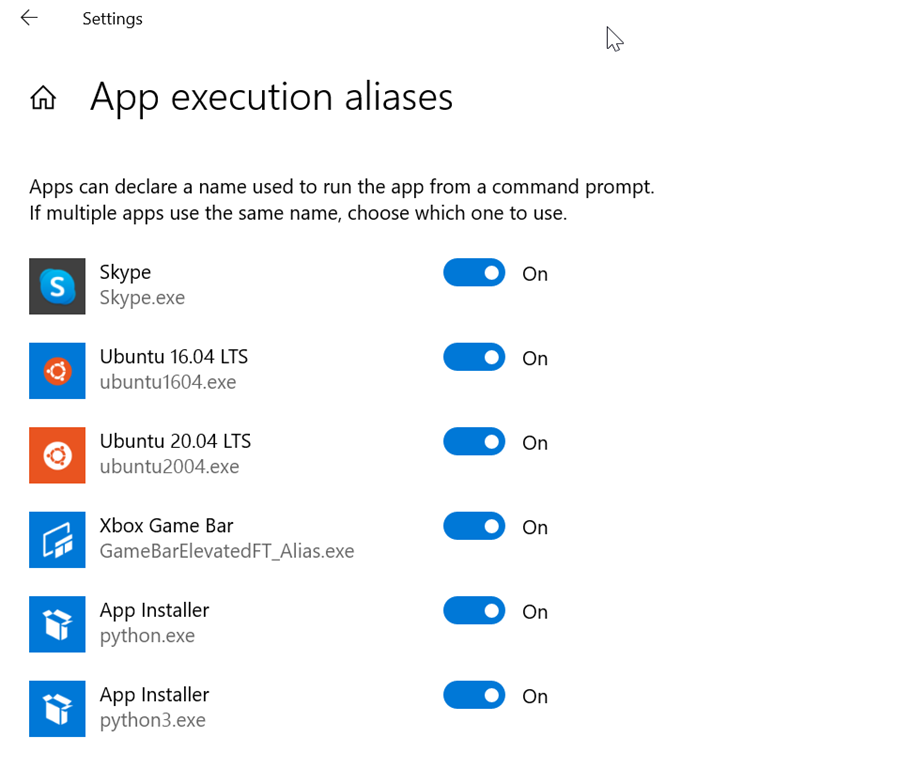
    In here, I see that both Python.exe and Python3.exe are set as aliases.

    2021-02-04 17_57_38-Settings

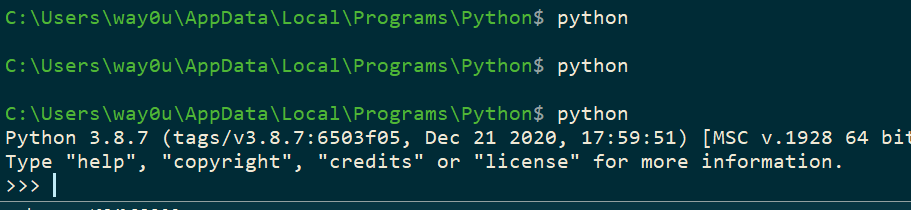
    I turned these last two off and then when I type “python,” I get what I want.

    2021-02-04 17_58_14-cmd - python

    SQLNewBlogger

    I wrote this as many of us run into silly issues, and while I found that SO article quickly, you might not. Your search terms might be different, or the search engine might give you different results. This might help you get setup quickly with Python, which is becoming more useful for data professionals.

    This took my about 5 minutes to type up and grab a few screenshots.

  • Better Productivity: Cycling the Windows Clipboard in Windows 10

    A quick tip I learned, that has become handy for me.

    Tl;dr: Try Win+V

    Often I am moving lots of information between different applications. I might do some editing, some code movement, even grabbing notes for reporting feedback to dev teams or something else. I may need 2-3 pieces of info, and make heavy use of the Windows Clipboard.

    However, sometimes an app is running slow, and I might end up cutting a second piece of data before pasting in the first one. I ran cross this tip recently, which was really handy.

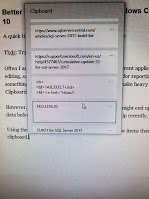
    Using the Windows key and V, I can get a list of a few items that I’ve recently put on the clipboard. While writing this piece, he’s an image (actually a picture) of what my Win+V looks like.

    20200911_130930

    As you can see, I have a few items I can pick from. I can arrow up and down and then hit Enter to insert the pasted item. I can also use the mouse.

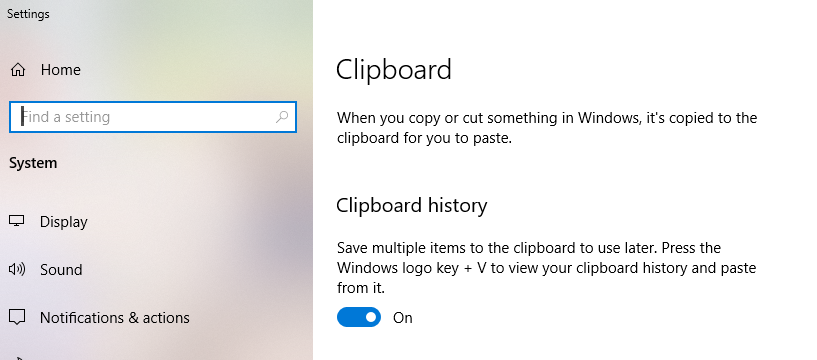
    You can ensure this is enabled in your control panel (settings). Click Win+I to get this and search for Clipboard. In there, the history item is what you want to enable.

    2020-09-11 13_12_46-Settings

    A little trick, but it keeps me from slowing down when I’m trying to get a few things done at once.

  • The Evolution of Windows

    I like Windows 10. I’ve used every Windows version since 3.1, abandoning Windows 98, Windows ME, and Windows 8. That last versions I used very briefly, didn’t like it, and quickly returned to the previous version. I thought Windows 7 was amazing, using less hardware resources for the first time ever, and I’ve enjoyed Windows 10 since I upgraded. In fact, I think at this point I’ve built 4 or 5 different Windows 10 machines from scratch.

    I don’t change hardware, but Windows 10 has evolved, essentially growing without changing versions. It had its 5th anniversary recently, and I was surprised to see a few articles like this one, that all talked about Windows 10 not being a success. News to me, since I’ve been happy with it.

    It’s interesting that the article talked about some of the promises of Windows 10 not being fulfilled. I don’t know about the “free” aspect of it, though I do think Cortana was a bit of a failure. I didn’t use it much, but I think the always listening and the issues with Siri/Alexa/etc. for speech platforms is an issue. I don’t know many people that aren’t geeks using Cortana, but perhaps this just isn’t a useful thing in a non-phone OS? There are a few other things, but you’ll need to read the article for yourself.

    What I’ve noticed is that the evolution of the OS has faded a bit into the background. I do worry about updates, but I worry about lots of software updates. While quality has improved, the chance of being down is always disconcerting. While I haven’t had any Windows 10 update issues across my 3 machines, or even any Android updates across the last 3 phones in 4-5 years, I still worry.

    I also think the evolution of adding the Windows Subsystem for Linux is cool. I don’t run a lot of native Linux stuff, but I do run Linux containers for SQL Server and I SSH into systems once in awhile, so I appreciate the native tools rather than some Windows port.

    I do think we may get to the point where SQL Server versions fade a bit, with patches adding features, but I don’t know we completely get away from versions. I think there’s too much revenue from major upgrades, and since customers rarely want to make that investment, both for financial and time resources, means that I think we’ll continue to get new major versions of SQL Server periodically, unlike Windows.

    The one thing I’d like to see if SQL Server stop evolving the database structure, and allowing the restore of a SQL Server 2021 database on a SQL Server 2019 instance, assuming no new keywords are used. I don’t know if we’ll see that, but I know many people would like that.

    Listen to the podcast at Libsyn, Stitcher or iTunes.