Tag: T-SQL

  • The SUM of Nothing: #SQLNewBlogger

    I caught this interesting item over on Pinal Dave’s blog: Eleven Interview Questions that Look Too Easy. I decided to give you a few thoughts from me on the SUM one.

    Another post for me that is simple and hopefully serves as an example for people trying to get blogging as #SQLNewBloggers.

    The Sum of Nothing

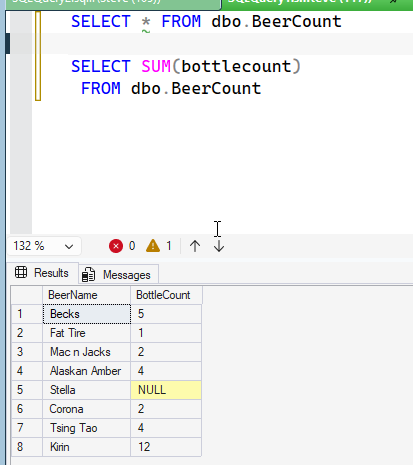
    I am guessing more people working with SQL know that if you have a NULL in your data and try to sum the column, you get the NULL ignore. After all, you can’t sum up values if one is unknown. The code and query below show this:

    2026-09_0133

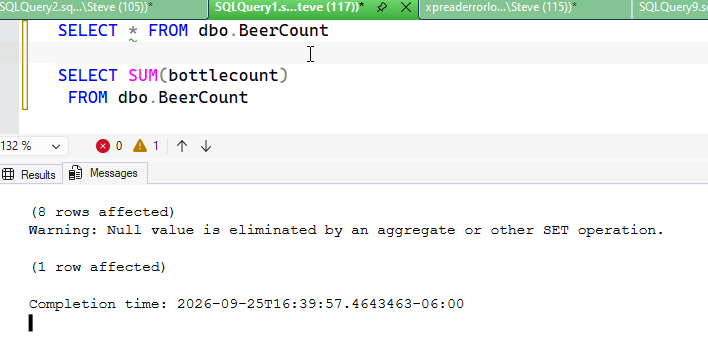
    Note, with ANSI_WARNINGS I get a note in the Messages tab:

    2026-09_0134

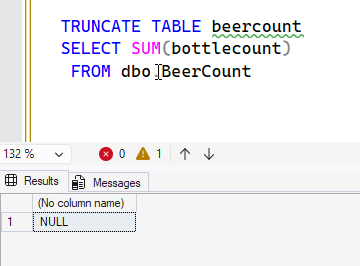
    However, what if there are no rows? Would you expect a 0, because if there isn’t any data, the sum is zero, correct?

    No.

    2026-09_0136

    Why? The docs don’t mention this (I’ve added a PR).  The ANSI standard notes that if all values are NULL or the set is empty, NULL is returned.

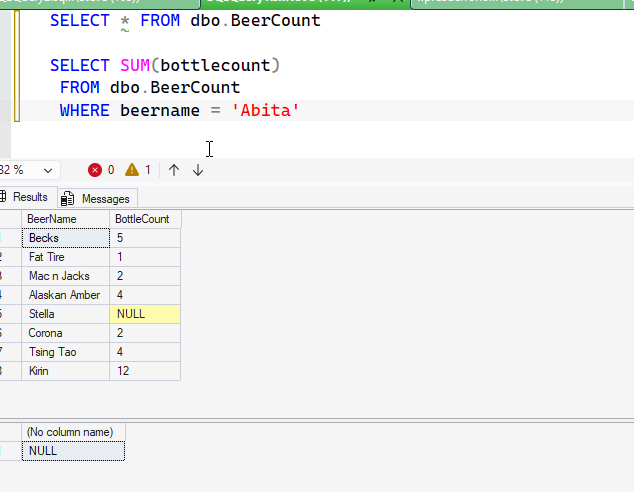
    Most of us don’t query empty tables, but we could get an empty set. Remember, the column list, and therefore aggregate, is evaluated after the WHERE and JOIN clauses. Therefore, as you see below, I could get a NULL in a sum where I expect data.

    2026-09_0135

    Make sure you account for this in your queries.

    SQL New Blogger

    I read reading another blog (Pinal’s) and realized this was interesting. I thought about if I’d have a problem and realized that I could because I’ve often assumed there is some data, but if I let users filter data from an app, I could return NULL.

    Easy to write, about 15 minutes to setup and do. You could do this.

  • Using the SIGN() Function: #SQLNewBlogger

    I was trolling the docs and noticed the SIGN() function. I have never written this in production code, but it is an interesting function. This post looks at where I might use this and when the need arises.

    Another post for me that is simple and hopefully serves as an example for people trying to get blogging as #SQLNewBloggers.

    How It Works

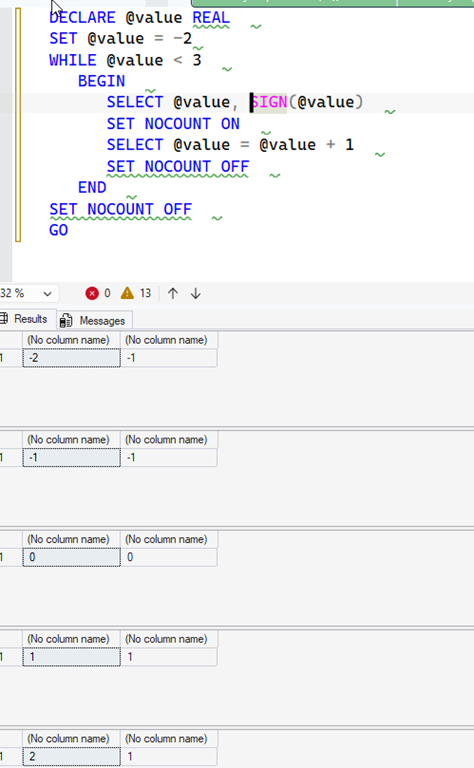
    The SIGN() function works by taking an argument and evaluating if the value is positive, negative, or zero. The example in the MSLearn Docs shows the values working in a few ways. I’m reproducing that here to look at how it works.

    2026-08_0196

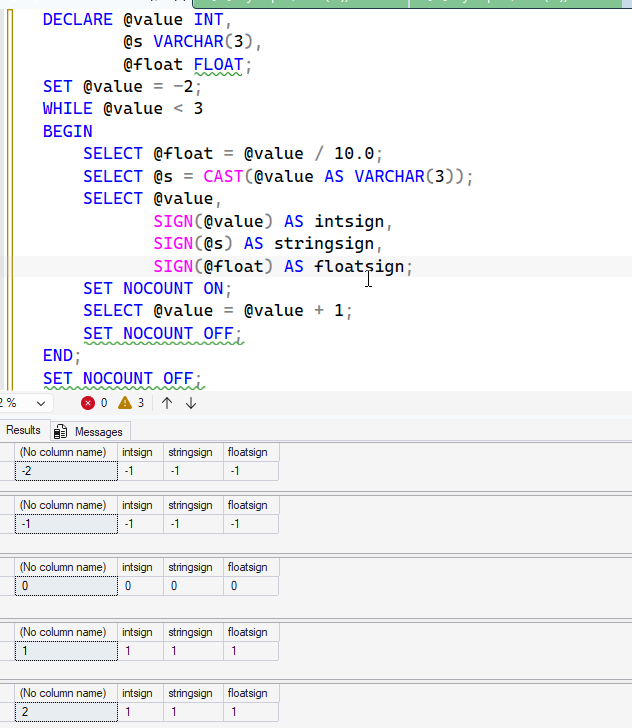
    If I change this to work with float and strings, we get similar values.

    2026-08_0199

    Essentially, this implements this code:

    IF @value > 0 SELECT @value, 1
        IF @value = 0 SELECT @value, 0
        IF @value < 0 SELECT @value, –1

    Or this code:

        CASE WHEN @value > 0 THEN 1
        WHEN @value = 0 THEN 0
        WHEN @value < 0 THEN -1
        END AS valsign

    This is a simple function, and it’s easily duplicated in code, so why use it?

    Use Cases

    Most of the mathematical algorithms I’ve implemented don’t deal with negative numbers in a material way. Aggregates, such as averages and sums will take the value into account and the sign isn’t important.

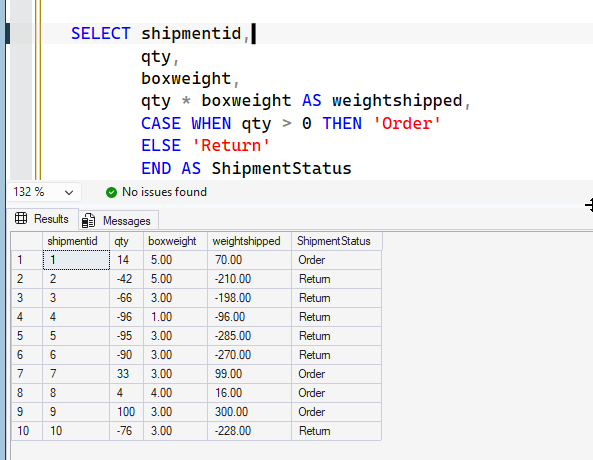
    In some cases, it might. Perhaps I want to do some math around distances from zero, but I don’t want the values to cancel each other out. For example, maybe I have a small data set. I have some shipments and weights.

    2026-08_0207

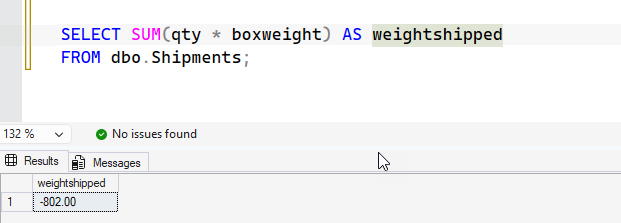
    Now, it makes sense that we’re shipping to and from our warehouse and tracking the direction with a negative quantity for returns. However, to calculate total shipping weight, a sum doesn’t work:

    2026-08_0209

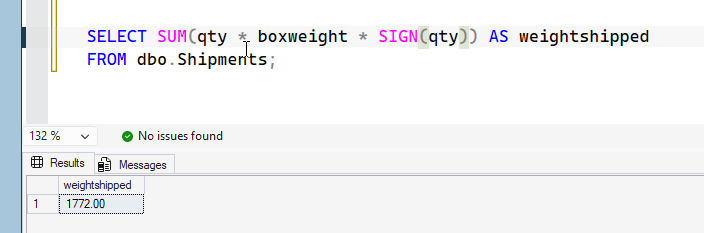
    I really want to normalize the values. I could use SIGN() here, as shown:

    2026-08_0210

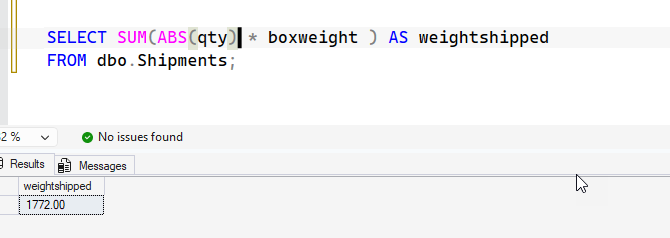
    Of course, ABS() works as well, so that’s not necessarily a great example. I’d argue both are slightly obscure without a comment in the code.

    2026-08_0211

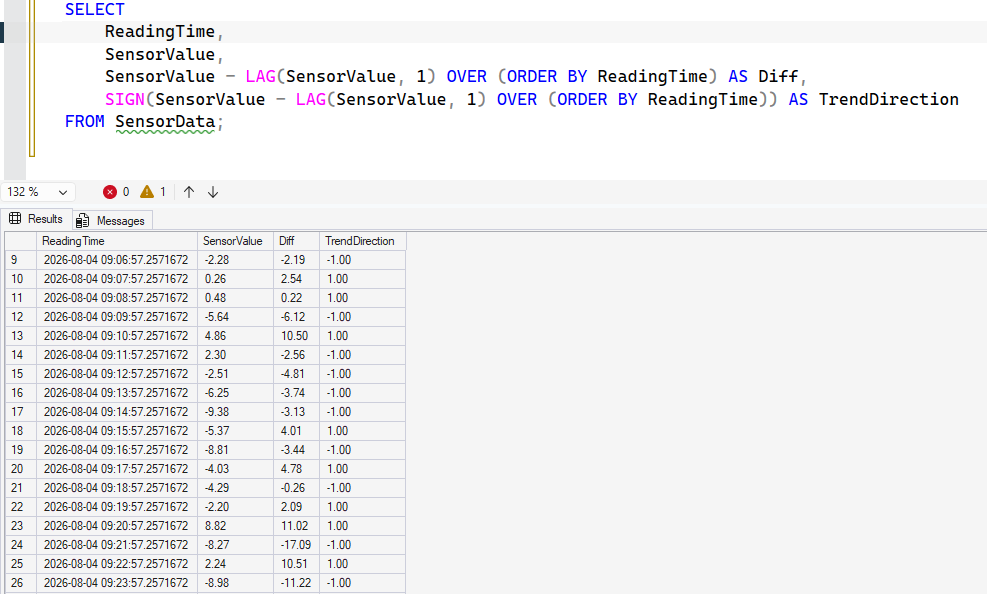
    Another example, perhaps I’m looking to determine a trend of movement. I saw this on the Internet from someone else.

    If I run this code, I’m getting the change of values, but also the direction of travel. That TrendDirection lets me know which ways things changed.

    2026-08_0202

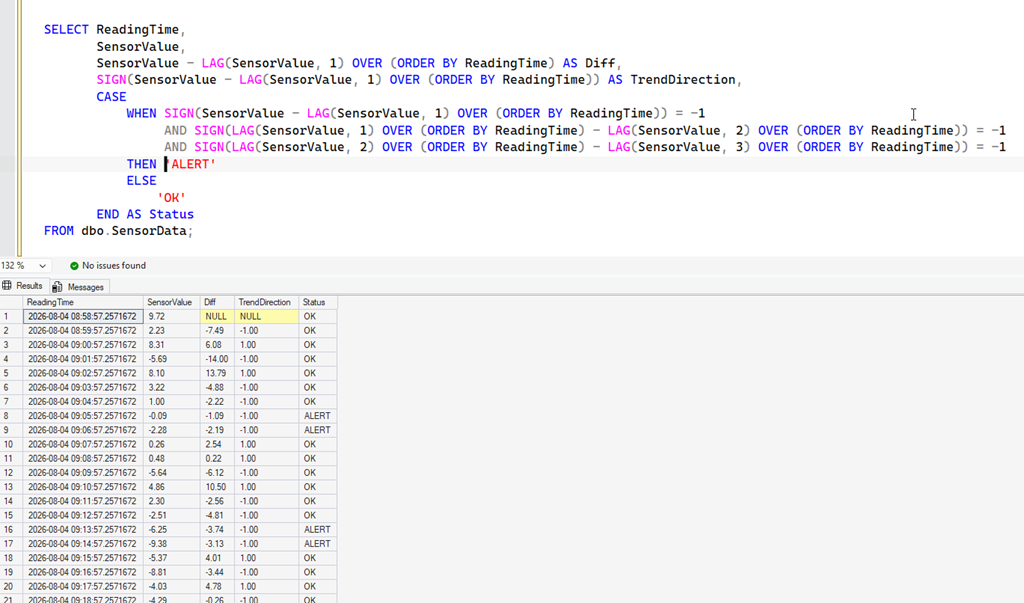
    I might want to look for (or alert on) a trend. So, if I look at lines 14-17, I have a trend of increasingly negative values. Perhaps if I have 3 in a row (a complex LAG), I raise an alert.

    Here’s a LAG with SIGN repeated to show that.

    2026-08_0205

    There are other cases I might care about, but these come to mind.

    SQLNewBlogger

    This is an example of a post that shows I know how a function works, but mostly where I might use it. I added my own thoughts, and a couple of use cases.

    This post took about 40 minutes to write, with the code setup and some internet searching involved. I did use Prompt AI to generate some tables and code, which made things easy, but I had to think a bit on the scenarios and how I felt about them.

    All good things to showcase in the age of AI. If an AI generated code, could you determine the use? Knowing SIGN() can help. Write your own post and showcase your knowledge. Disclose if AI helps.

  • Why Use TRY_PARSE(): #SQLNewBlogger

    Someone asked why I would use TRY_PARSE after I posted a question at SQL Server Central: Getting the Average. Isn’t is slower?

    A fair question. This quick post looks at why.

    Another post for me that is simple and hopefully serves as an example for people trying to get blogging as #SQLNewBloggers.

    A Quick Setup

    The question above has the setup code, but what if I add another row? For example, I’ll run this .

    insert dbo.commission
    (
        salesperson
      , commission
    )
    values
    (‘Steve’, ‘A’)

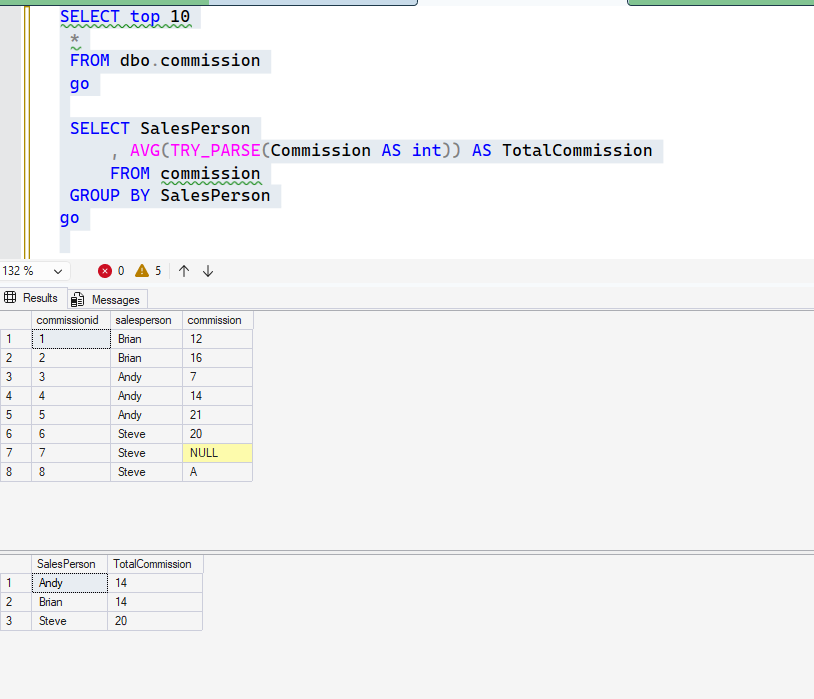
    Now, let’s look at the data and run the query from the question.

    2026-07_0371

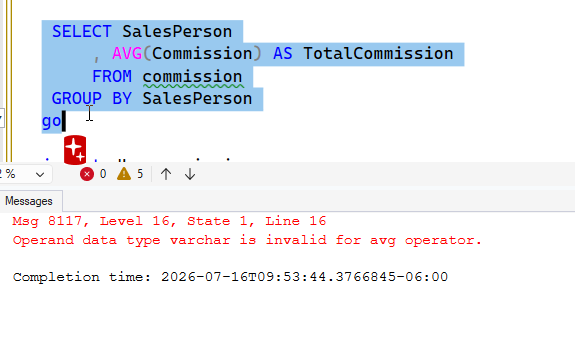
    This works. However, let’s remove the (slow) TRY_PARSE() from the aggregate.

    2026-07_0372

    Error. Why? I can’t convert “A” in the AVG to a number. It fails.

    You might think, I’ll never get bad data like this. But you might? A user might enter something you don’t expect. An AI might model this as a string, which is bad, but it happens. If it’s an EAV type table, or there are other data  items and you’re trying to extract the numbers from here, TRY_PARSE is helpful.

    SQLNewBlogger

    I wrote a post last week and this is a followup that really just took less than 5 minutes to setup and run. Plus I responded for the user in the post.

    This showcases me thinking about a question and situation and really gives an interviewer something to ask me. This lets them dive into my thought process and gives them confidence I don’t just write code without thinking.

    Add to your blog with short posts like this (or drop on LinkedIn).

  • T-SQL Tuesday #201: Temp Tables

    This month we have a new host, which I am grateful for. So many people have stopped blogging that it’s a challenge to keep this going. Jeff Taylor has an invite asking us about a core T-SQL topic that can affect the performance of your app and your server: temp tables.

    This is an interesting one for me, as I’ve changed my mind on these over the years, especially as Microsoft has made improvements to the SQL Server storage engine and query processor that have helped tempdb to perform better.

    They’ve also added things that can impact and load tempdb.

    If you want to host a T-SQL Tuesday, ping me. I’m always looking for new (or returning) hosts.

    My Answer

    My answer to Jeff’s question of temp tables as friend or foe is yes.

    They are friends.

    They are foes.

    Most things that we struggle with in database work are tradeoffs. We have to balance the demands. It’s why we say “it depends” so often because we have to find a way to do more of one thing, while accepting less of another.

    If I use temp tables in a query, I can potentially run a query to get a smaller data set that I can query with to get the results I need. I can reduce the memory grant, which might be required if the initial query scans a lot of data.

    Suppose I have a 100mm row table. If I am doing a complex join of this data on unindexed columns with multiple other tables, perhaps I want to do something like this (delivereddate might not be indexed):

    select c.customerid, o.orderid, o.delivereddate, oho.shipperid, o.salespersonid, ,qty, oh.price
    into #limitedorders
    from orderheader oh inner join orderdetail od on oh.orderid = oh.orderid
    where customerid = 12

    This can get me a filtered list of things, which I can then join this temp table with the customer, shipper, salesperson, and other tables, which will be a smaller, quicker join.

    However, a temp table can be a problem as well. If you have a query that does something like this:

    select *
    into #orderlist
    from orderheader oh inner join orderdetails od
    on oh.orderid  = od.orderid
    where oh.orderdate > dateadd(year, –10, getdate()

    And then you have some sort of query that aggregates across the years.

    select c.customername, sum(t.qty * t.price)
    from #orderlist t
    inner join customer c
    on t.customerid = c.customerid
    where customerid = 12

    I’ve done a lot of work in the first query to gather data, allocate space in tempdb, copy this over, use memory, etc. Then I am going a simple query to aggregate things, and filtering it. In this case, the developer likely followed a pattern of gather data, then sum it from other queries. It might have worked for them, but if I have 1mm orders a year, this will suck up resources.

    My Advice

    My advice is like Jeff’s. In general, try to work with a query to solve your problem. Use joins, beware of views, and make sure you’ve indexed well. Use CTEs to break down your problem, and don’t use temp tables.

    If you struggle to get a single query, or you have poor performance because of memory grants or other issues, then think about shrinking your dataset down using a temp table and indexed columns. Then join this to get other data that you need.