Tag: Backup/Recovery

  • Restore One Backup From Many in a Device–#SQLNewBlogger

    I wrote recently about finding multiple backups in a file. This post looks at how to restore one of those. The one you choose.

    Another post for me that is simple and hopefully serves as an example for people trying to get blogging as #SQLNewBloggers.

    Setup

    In the previous post, I did these things:

    • took a backup
    • added a table and data
    • took a second backup
    • truncated the table
    • took a third backup

    If I restore the default last backup, I get my table without data. You can read that post to see how I got here.

    Let’s restore things.

    Restoring a Backup

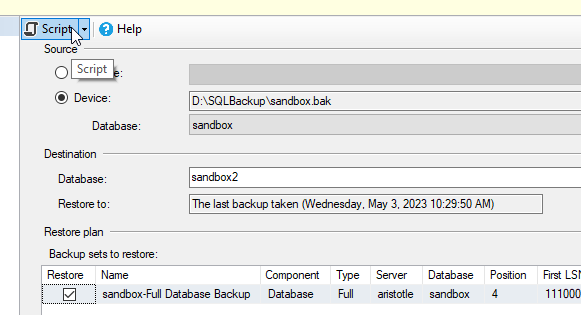
    I cheat with restores. I remember some syntax, but typing it in and trying to remember the order is a pain, even with SQL Prompt. So I click restore database in SSMS and fill out the dialog. I pick the device and when I change the name in the Destination database, the file names change. Once I have the dialog below, I click “Script” at the top.
    2023-05-03 10_46_36-Restore Database - sandbox2

    This gives me code in a new window. In my case, I get this code:

    USE [master]
    RESTORE DATABASE [sandbox2]
    FROM  DISK = N'D:\SQLBackup\sandbox.bak'
    WITH  FILE = 3, 
    MOVE N'sandbox' TO N'C:\Program Files\Microsoft SQL Server\MSSQL15.MSSQLSERVER\MSSQL\DATA\sandbox2.mdf', 
    MOVE N'sandbox_log' TO N'C:\Program Files\Microsoft SQL Server\MSSQL15.MSSQLSERVER\MSSQL\DATA\sandbox2_log.ldf', 
    NOUNLOAD,  STATS = 5

    By default, this gives me file=3, which is the third backup. If I run this and then query the new database, I see this:
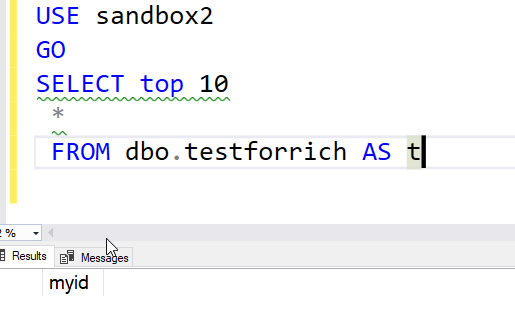
    2023-05-03 10_48_41-SQLQuery11.sql - ARISTOTLE.sandbox2 (ARISTOTLE_Steve (55))_ - Microsoft SQL Serv

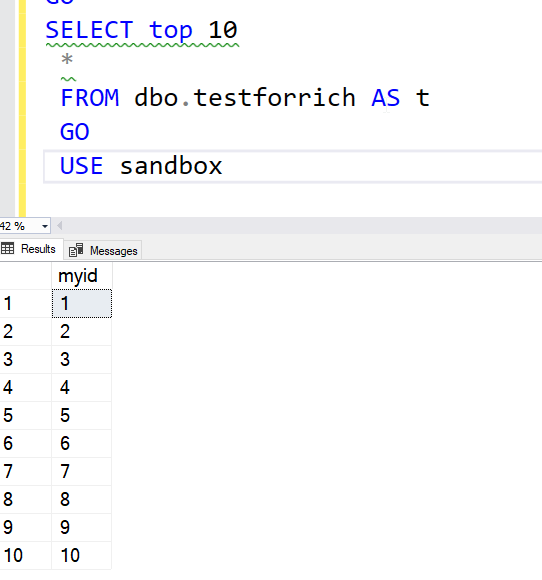
    That’s what I expect. The third backup had the table with no data. Let’s restore the second one. First delete the database and then change File=3 to File=2. Once I run the restore and the same query, now I see data:
    2023-05-03 10_51_49-SQLQuery11.sql - ARISTOTLE.sandbox (ARISTOTLE_Steve (55))_ - Microsoft SQL Serve

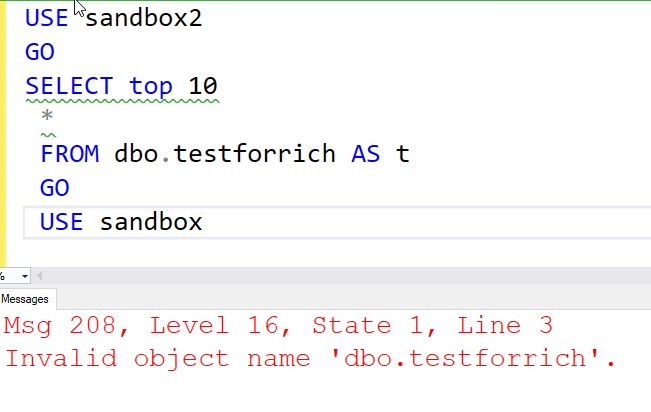
    If I restore file=1, then there is no table.
    2023-05-03 11_04_47-SQLQuery11.sql - ARISTOTLE.sandbox (ARISTOTLE_Steve (55))_ - Microsoft SQL Serve

    Alter the FILE parameter to pick the backup in the file.

    SQL New Blogger

    This post took less than the 10 minutes of the previous post. I basically restored my database a few times with a query. The code was a couple minutes to generate and modify in SSMS, and this writeup was short.

    The key was doing this immediately after the previous post and reusing the setup and code. Plus, the concept was in my mind.

    As with the previous post, this is a good way to show knowledge and learning, and in this case, 20 minutes got me two posts.

  • Backup Architecture

    I saw a question posted recently on what data is included in a full SQL Server database backup. I hadn’t seen that question in some time, but the post was a good reminder that this is not an intuitive concept, and new data professionals might not understand how a full backup works. If you don’t know, you should do a little research (and write a #SQLNewBlogger post for yourself).

    The way a SQL Server backup works, either with an on-premises install or the Azure SQL Database version, is well known and documented. Even if you can’t make a “normal full backup” in Azure SQL Database, the process is the same. You don’t have to run the backup, as Azure does that for you, but you can specify a restore and understand which data will be available in your restored database.

    Cosmos DB is a different type of data store, existing only in Azure and storing non-relational data. The service has been promoted quite a bit, and some of you might even be using it. Do you understand how backups, and more importantly, how restores work?

    I ran across an article that discusses the way Cosmos DB continuous backup works. This process isn’t quite what I’d expect. Changes are backed up locally (either LRS or ZRS), which makes sense. However, all changes (called mutations for some reason) are backed up within 100s, asynchronously. That’s good, and it’s not perfect, but it’s pretty good. What’s more, you can restore a container, a database, or the entire account. That matches up closely with what I expect in Azure SQL, including the need to restore into a new account. What isn’t great is that stored procedures, triggers, and UDFs aren’t restored.

    As with any sort of backup and restore operation, you should be sure you understand the way operations occur, the impact of restores, and the costs involved. You get charged for backup space and restores. Maybe the most important thing to know is how to perform a restore. If you have a problem, you want to be sure that you not only know the mechanics of restoring data but how to reconcile any potential changes between the old and new database, as well as how to ensure all other objects (stored procs, etc.) are put back in place and clients are directed to the correct database.

    This process might not be as simple as MS Docs describes, and certainly, I’ve found SQL Server restores are not always as simple as we might like. Practice ahead of time and be sure you can recover a system in a way that meets your clients’ needs.

    Steve Jones


    Listen to the podcast at Libsyn, Stitcher, Spotify, or iTunes.

  • How Paranoid Are You About Backups?

    A friend sent me this article from Backblaze on backup strategies. He asked me what I thought, since I do write on DR and backup strategies. I’ve also blogged at times on my personal strategy, which is Backblaze and cloud services. I have a subscription, that I just renewed, to ensure that my two primary desktops are backed up outside of my house.

    The article talks about the 3-2-1 backup strategy and then some more modern evolutions of this. If you don’t know, 3-2-1 means 3 copies of your data on 2 types of media with 1 copy offsite. That’s a strategy I’ve followed for years in enterprise environments. We usually had a local current copy of databases on disk, a second copy on tape, and multiple tapes offsite.

    These days there are some other variations, with 3-2-1-1-0 and 4-3-2. These might include adding air-gaps between items and verifying there aren’t errors in your backups. They also include the idea that for cloud providers, you include multiple regions or countries in case your vendor has issues.

    Being slightly paranoid is a good thing, especially in today’s environment when ransomware is such a huge issue. While some companies might choose to pay a ransom and decrypt data quickly, many start recovery efforts, with the pressure on IT staff to quickly restore backups, and hopefully not bring in another copy of the ransomware that is time activated.

    No matter what strategy you choose, and there are pros and cons to all of these, you need to be sure you can execute on this strategy quickly. I’ve run test restores from Backblaze, just to see if I can get back a random file or folder that was backed up. I’ve also wanted to ensure I understood how this works in the event of a disaster. I’ve been able to bring back a file to a different machine, which is likely the strategy I’d employ in my personal life.

    At work, the same idea applies. You need to test your restores, and with a large staff and constantly changing environment, you should do this more often. The tolerance for delays (RTO) and lost data (RPO) is lower at most organizations, and clients expect recovery to be sooner rather than later. I’ve also seen upper management (directors, VPs), show up and watch technical staff try to recover data. They don’t like to see you fumbling through documentation or googling how to restore certain applications. They do expect you quickly and efficiently get the process moving.

    A disaster is stressful, and they will likely occur at inconvenient times, like when you’re on vacation or in the middle of a big project. Having some knowledge, and some confidence in your skills, will help ensure that you can function under stress. The more confidence you have in yourself, the more others will have in you, so make time to build that confidence on a regular basis.

    Steve Jones

  • Restoring an Expired Certificate–#SQLNewBlogger

    Another post for me that is simple and hopefully serves as an example for people trying to get blogging as #SQLNewBloggers.

    One common task that you might need to handle if you work with encryption is dealing with a certificate. Whether this is for TDE, SSL, or something else, you will want to ensure that you know how to restore a certificate.

    I’ve written about this before (restoring a certificate), but what about restoring an expired certificate? If you forget to replace one in TDE, does it still work?

    Tl;dr yes.

    Validating a Restore

    I backed up an certificate from one instance that had expired. I used this in a customer demo a few years ago, and it was on my system. Here’s what I saw.

    2019-08-23 14_35_57-SQLQuery1.sql - Plato_SQL2014.MASTER (PLATO_Steve (57))_ - Microsoft SQL Server

    I ran the backup script shown to get the expired backup of the cert.

    Next, I connected to a new instance and ran this.

    CREATE CERTIFICATE FinanceCert
    FROM FILE = N'C:\SQL\FinanceCert.cer'
    WITH PRIVATE KEY
    (
         FILE = N'c:\SQL\FinanceCert.pvk',
         DECRYPTION BY PASSWORD = N'AReallyStr0ngK#y4You'
    );

    This completed, but I get the warning that this cert is expired. It’s a warning. SQL Server will still use the certificate to decrypt anything necessary, like a DEK for TDE.

    2019-08-23 14_37_20-SQLQuery2.sql - Plato_SQL2017.master (PLATO_Steve (55))_ - Microsoft SQL Server

    This is a good reason to keep an eye on certificates, as someone might be worried about expired certs. They work, but some people (auditors) do not like to see these in use.

    To change the certificate used, see Key Rotation in TDE.

    SQLNewBlogger

    Anything DR related is a good skill to showcase. Blog about your practicing different skills. The writing will cement the skills further in your mind and employers will appreciate you showing the way you handle things.