Tag: continuous delivery

  • Agent Phases in VSTS Deployment

    VSTS (Visual Studio Team Services) continues to grow and change over time. It seems every few months I see some new features and changes, which are good and bad. Good in that usually things improve. Bad in that I get confused and lost at times, and sometimes have to re-acquaint myself with the system.

    One of the changes I noticed recently was the Deployment phases, which come as Server and Agent phases. I won’t cover server here, but I wanted to make a quick note on Agent Phases because I think they’re handy and a nice packaging concept.

    Agents

    There are agents that run for VSTS to do work. I’ve written about how to download an agent so tasks run inside of your network (on a server or client).  This post will look at the other side, how do I control an agent from the release process.

    Once I get a new release definition, I’ll see something like this:

    2017-04-02 11_18_05-New Empty Definition 02-Apr - Visual Studio Team Services

    This is a blank deployment definition. To the left I see the environment I’m working with, in this case, just the generic Environment 1 name. For each environment, I can set up tasks. On the right I have the Add Tasks button, but also the “Run on Agent” item. This is the container where I will add tasks.

    I used to just add tasks with VSTS 2015 here, expecting that everything would run on an agent. VSTS has hosted agents that contain a set list of software, and also downloadable agents that you run on your servers or workstations. Things changed recently to include phases.

    Phases

    The phases are place of execution, which allow a series of tasks to be grouped together. VSTS and TFS 2017 give you two choices. We now have Agent or Server phases. The difference between these is that I can choose where items execute, on an agent or on the server (VSTS or TFS). In addition, I can set these to execute in parallel if need be.

    If I click the down arrow next to the Add Tasks, I’ll get this dialog. This allows me to set up a process that can run on the VSTS server, or one that can run on the Agent.

    2017-04-02 11_18_25-New Empty Definition 02-Apr - Visual Studio Team Services

    I haven’t played with server phases, but when I add an agent phase, this gives me a section under which I add tasks. Note that when I click the “Agent phase” item, I get a new blade to the right. Note that the pool for these agents is the default.

    2017-04-02 11_18_43-New Empty Definition 02-Apr - Visual Studio Team Services

    This threw me early on because I have a separate pool of agents for mobile development. As I upgraded some deployment definitions, I couldn’t figure out why I didn’t have any agents available to execute my tasks. It turns out I needed to change the agent pool here.

    There are options here, but I haven’t really played with parallelism or demands since I typically deploy to one system at a time.

    Once I’ve selected an agent, I can click Add Tasks and then add a series of tasks to that agent. If you look below, I have added a couple tasks to each of the two agent phases. These will run one phase, then the other.
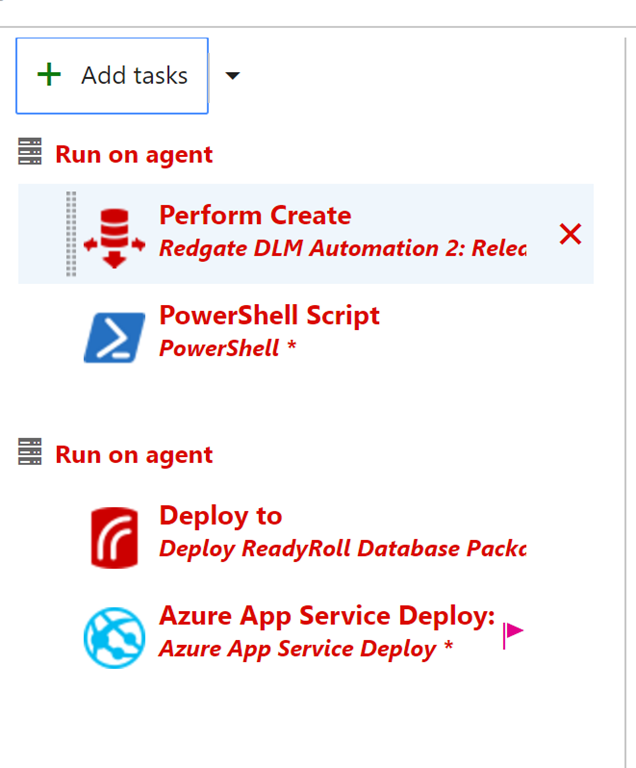
    2017-04-02 11_19_47-New Empty Definition 02-Apr - Visual Studio Team Services

    Each of these phases is independent, and as of the time I wrote this, there’s no way to copy a phase and duplicate it.

    I’ve used this to upgrade my release definitions by adding new tasks, and then copying settings between one phase and the other. This is a manual, copy/paste operation, but I can easily see if I’ve duplicated everything by going back and forth quickly.
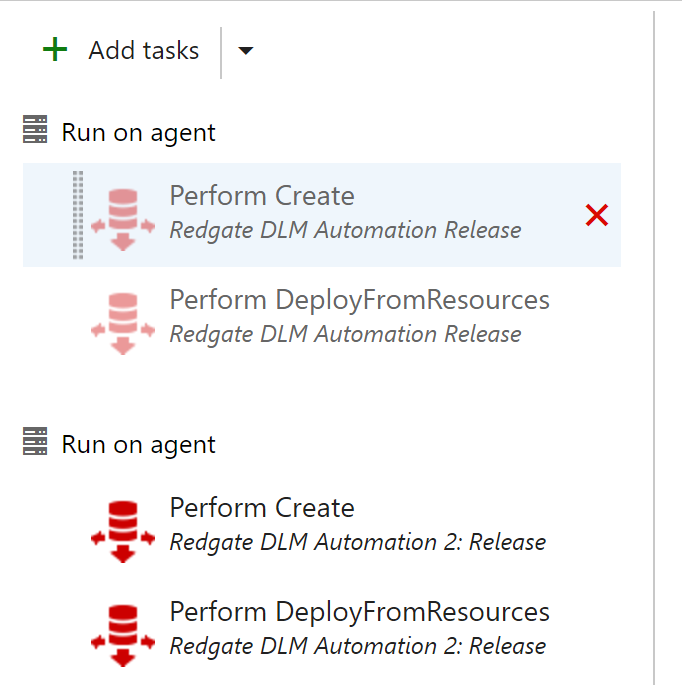
    2017-04-02 16_32_43-ST Pipeline_Mobile - Visual Studio Team Services

    Once I’m done, I can just click the “x” to the right of the agent phase and delete the entire phase. I have to confirm this action, and then I’ve removed a complete phase.

    Right now I haven’t see any benefit outside of the upgrade scenario, but that’s useful. I will duplicate my tasks, disable all the ones in one phase and then see if the other one runs. If it doesn’t, I can always enable the old tasks and disable the new ones.

    I expect as I look to perform more complex deployments I will use these to logically separate things, and also perhaps use the server to do some things when I don’t need an agent.

  • Making VSTS Deployment Changes to Databases without Breaking Your Application

    One of the things that I do a lot is demo changes to databases with CI/CD in a DevOps fashion. However, I also want to make some application changes to my sample app without breaking things. As a result, I’ve built a few ideas that work well for both situations. I found recently these ideas can help me when I need to actually upgrade or change my CI/CD pipeline.

    Note: DevOps isn’t a thing, it’s a set of principles, ideas, and culture that produces results. I will endeavor to ensure I call out the specific principles I use to adhere to DevOps ideas. In this case, automation and CD.

    Release On Your Schedule

    One of the principles of DevOps is that we use feedback loops to ensure information moves from right (operations) to left (development).  One way of doing this is to release more often, though this isn’t required. What we really mean is release on your schedule, when you want, and allow developers to get feedback on their work quickly.

    If a developer takes a month to build a feature, they don’t need hourly or daily releases. They need a release after the month is over (assuming testing, review, etc. has taken place). If releases occur on the 5th of the month, and the developer finishes on the 6th, they must wait a month before they get feedback. What I want to ensure is that we can release on the 5th, and also on the 6th if I need to.

    Upgrading my VSTS Pipeline

    I wrote in another post that I planned on upgrading my Redgate DLM Automation tasks in VSTS. I was doing this on a trip to a conference, and I didn’t want to start making the demo changes I’d make as I’d have to undo them, and it’s possible that I’d forget to clean something up. I hate making that silly mistakes, so I needed a way of testing my build and release without breaking demos.

    I decided to use a technique that I use in presentations when I’m talking process and not code. In those cases, what I deploy doesn’t matter, but if I change random objects, sometimes I break the application using the database. As you can see here, I needed to do a bunch of tests, and repeat some.

    2017-04-01 11_52_03-ST Pipeline_Mobile - Visual Studio Team Services


    Deploy Often

    When I talk with Redgate clients, and they are starting to get comfortable with the idea of deploying on their own schedule, they will sometimes make innocuous changes that trigger a deployment they can test, without breaking things. For example, a user might take this stored procedure (partially shown):

    ALTER PROCEDURE [dbo].[GetEmailErrorsByDay]
      @date DATE = null
    /*
    Description:

    Changes:
    Date       Who         Notes
    ———- —         —————————————————
    2/14/2017  WAY0UTWESTVAIO\way0u   
    */
    AS
    BEGIN

    IF @date IS NULL
      SELECT @date = DATEADD(DAY, -1, GETDATE())

      SELECT Errcount = COUNT(*)
       FROM dbo.EmailErrorLog
       WHERE EmailDate = @date


    and make a small change. Perhaps they add SET NOCOUNT ON, or maybe they’ll add a comment. I’ve even see someone add this code:

    AS

    BEGIN

    SELECT 2 = 2

    These aren’t big changes, and certainly choose which stored procedure to change (one that isn’t used a lot or is critical). These are changes to test your process, gates, approvals, deployments, etc.

    I decided to try something else. I tend to write this code when I want to test changes, since I can be additive with a procedure like this:

    CREATE PROCEDURE Get7

    as

    SELECT 7

    Or I can modify things with this:

    ALTER PROCEDURE Get7

      @plus int

    as

    SELECT 7 + @plus

    In either case, I can see if my changes go through. Since I often deploy to multiple environments (QA, Staging, UAT, production, etc.), and I don’t always have deployments go all the way through (see my image above), I will usually end up creating Get7, Get8, Get9 as subsequent procedures. This way I can continue to commit new changes to the VCS, get new builds, and get new releases.

    I can also do this with tables. My favorite is MyTable, MyTable2, etc. I usually just have an integer MyID column, but I can add other ones to test the ALTER process. I can even use this to test data movement, static (reference/lookup) data, or anything else to do with tables.

    Eventually (hopefully) I get clean deployments all the way through to all environments.

    Cleanup

    I sometimes get collissions, where a test will return the error that “Get10 exists”, and I’ll move on to Get11. However, I don’t want to leave those objects in all environments. After all, likely I’ll find a way to improve things in the future and I’ll want to repeat this testing.

    This usually is one last deployment for me. I’ll delete these objects in dev, and then deploy the changes all the way through to production. This allows me to test my checks to prevent data loss, if I have any. Including if approvers actually read scripts Winking smile

  • Including Your Database in a DevOps CI/CD Process

    Abstract

    DevOps is changing today’s software development world by helping us build better software, faster. However many organizations struggle to include their database changes with their application deployment. In this session, we will examine how the concepts and principles of DevOps can be applied to database development by looking at both automated comparison analysis as well as migration script management. We will cover using branches and pull requests for database development while performing automated building, testing, and deployment of database changes to on premise and cloud databases.

    Level: 300

    I chose 300 because you’ll need some understanding of how software development proceeds, be very comfortable with producing code and executing it on different servers, using a variety of techniques.

    Downloads

  • Held Hostage by the Database

    Your database platform will constrain and limit the flexibility you have in evolving your software. It doesn’t matter which platform you choose, which type of database, or even the format for your data. At some point, you will be dealing with legacy data in some legacy schema or structure, and your development, and certainly deployment, will be slowed or impacted. Face it, the need to maintain state for your data is an impediment in a relational system. In a NoSQL or other store, the need to maintain code in your application that can interpret your data might be the issue over time.

    That’s not to imply this need to maintain state has to slow your development. On the contrary, there are many companies that find themselves moving quickly, able to make database changes on a weekly, or even daily, basis. There are multiple tricks and techniques for managing change, but ultimately the real secret is having a process that computers can follow and your developers adhere to.

    In other words, having some automation.

    Certainly you need to program the automation, or use tools like those from my employer, Redgate Software, but it doesn’t matter which what process you use. The process does need to be flexible because it will change over time. I can almost guarantee that the way in which you need to deploy code to the database in your environment will change over time. It has to as the needs and requirements of your business change.

    This means the way in which your developers need to build, test, and package changes will need to grow and evolve as well. While every developer and sysadmin needs to work within the process, the process does also need to be flexible as needs change. That isn’t to imply that your process should change every week, or for every deployment, but it will need to do so periodically, and hopefully, rarely.

    There are techniques to make deploying database changes easier on the developer and system administrator, but there are no magic techniques. All the tools I’ve encountered, including those from Redgate, do the same types of things you’d do manually. They just save you time and stress by helping you get set up and easily maintain your deployment tasks over time.

    Whether you use tools or not, please don’t allow the database to hold back your software development. Learn new ways to alter your database. Learn the ways to make changes to large tables. Learn how to avoid downtime. Just learn to design database changes in a better way and then automate the deployment of those changes.

    Steve Jones

    The Voice of the DBA Podcast

    Listen to the MP3 Audio ( 3.6MB) podcast or subscribe to the feed at iTunes and Libsyn.