Tag: version control

  • Does Version Control Scare You

    As a part of my job, I often work with customers on how they can get database code into a version control system. That’s Git for the most part today, which is the most popular system in the world. I’m comfortable using Git for many basic tasks, but I am not an expert by any means. I’ve used version control for years, and quite a few systems, and I like Git as a way of managing code.

    I have been surprised how many people aren’t comfortable with version control or Git. Many don’t have the habit, but are amenable to it. What I’m amazed by in 2025 is how many people don’t use it, given that so many tools we use to work with databases, and even other systems, will store items in Git. This isn’t just for development code, but also for infrastructure code. Lots of data tools and servers can store data in Git and use it to deploy changes to all kinds of systems. I’d have expected more people to know Git.

    As a part of my charity work, I manage the SQL Saturday site, which is stored in a public GitHub repo and all changes are submitted through pull requests to make changes to the site. A few organizers will fork the repo and submit changes to me as pull requests. I love those as I can approve those on my phone. A very few organizers can merge their own changes, as they’ve built up trust. I am, however, surprised at how few people are willing to do any Git work.

    It seems that so many data professionals don’t want to use or learn Git. I’d have thought this was a core skill for many technical people these days. At least the core ability to clone, branch, commit, and create pull requests. Squashing commits, rebasing, and more can be challenging, but often there will be someone in your organization that can help you if you need to perform those actions.

    I wonder if you are intimidated by version control, or if you find yourself too busy to use it, or maybe you don’t think it’s valuable. I am curious what you think today.

    I’ve written about how to use Git in ADS (don’t do that anymore), but those instructions work for VS Code.  I’ve written a bit about how DBAs can start using Git. If you don’t like the CLI, there are many thick clients, which are easy to use. Give Git a try today and see how it might help you manage and version your code, your scripts, your documentation.

    Steve Jones

    Listen to the podcast at Libsyn, Spotify, or iTunes.

    Note, podcasts are only available for a limited time online.
  • Deleting a Git Branch–#SQLNewBlogger

    I had someone ask me recently about deleting branches. While I had known how to delete a local branch, I had to look up how to delete a remote one. Documenting these both will hopefully help me remember this.

    Another post for me that is simple and hopefully serves as an example for people trying to get blogging as #SQLNewBloggers.

    Deleting Branches

    Most parameters have something do to with the action, and most people might guess a –d is used to delete a branch in Git. The actual syntax for a branch named “Feature123” is:

    git branch –d Feature123

    You can also use a –D, though be aware that –D is the same as –d with the –force option. The –d actually aliases to –delete, so you have three options:

    • -d
    • –delete
    • -D (this will run –-force)

    To delete a remote branch, you can use (with v1.7+)

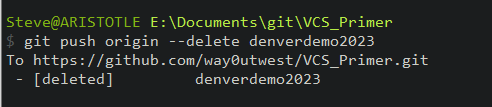
    git push origin –-delete Feature123

    where origin is the remote name and Feature123 is the branch. This is better than the old syntax, and you ought to keep your git up to date.

    You can see this working for one of my branches below:

    2023-10-11 13_20_00-cmd

    Git docs for branch have more details.

    Use this to clean up branches if your changes are merged and you don’t need to send in any more PRs for this branch.

    SQL New Blogger

    This is a simple thing, but one that I don’t do often, so I wrote this as much to document it for myself as to put this out there as a piece of knowledge. If someone reads this post and asks the question in an interview, it’s likely an easy one for me to give.

    You can do this, help showcase your career knowledge and control the interview. This piece took me about 8 minutes to write. You could do your own version of this topic.

  • SQL Saturday Denver 2023–VCS Primer for the Database slides

    My slides are here: VCS Primer Denver 2023

    This was an overview of what version control is, and the basics of Git.

    Not too many questions, but if you have some, ask.

  • Easily Repeating Work

    I love this idea from Ken Fisher: saving your work. I don’t act as a DBA anymore, but when I did, I did something similar. We often logged the scripts we used in a file,  as a part of a log, so that if we broke something and another DBA got a new ticket, they could check what you had done. Over the years, we tried two different methods. First was using the desktop of the instance itself, since we often went to a room to log into the server in those days

    The second way was in an Exchange public folder, where we added a new entry for each day. This way we could note the server and the scripts run. Since most tickets were dated, we could easily find the scripts if we were looking at a ticket. Since a user often updated or re-opened the ticket, we could use the public folder as a central note location from the DBA team. We could even point to this folder for our ISO and SOX auditors to show them what had been logged by people who supported the systems. Not a perfect auditing system, but one that often was accepted by auditors.

    However, the one thing missing in there, from my perspective, is version control. While I think it is important to track these scripts in a team of DBAs, I also think we want to ensure that as we grow and change these scripts, we know how and why. Junior people can learn from changes made by senior ones, and if a DBA alters one of these scripts and breaks something, just as a developer might refactor code and introduce a bug or break functionality. After all, these scripts are code.

    If there is a problem, we want to be able to roll back, which means that we ought to save these scripts into a repository of some sort. While I like the idea of a share that all DBAs can access, I more like the idea of a (secure) Git repository that can be downloaded anywhere, provides a second backup, and can be audited over time. All of these are important features that any enterprise should implement, especially one that is regulated. We want to protect ourselves if a DBA gets hit by the proverbial bus.

    I like collaboration, sharing knowledge, and tracking the work you do in a team. It’s important for raising the skills of everyone on the team and helping new members get up to speed quickly. This facilities consistent results, and if done using a tool like version control, helps ensure that your scripts are backed up in a way that preserves the knowledge in your code through any changes made by the team.

    Steve Jones

    Listen to the podcast at Libsyn, Stitcher, Spotify, or iTunes.