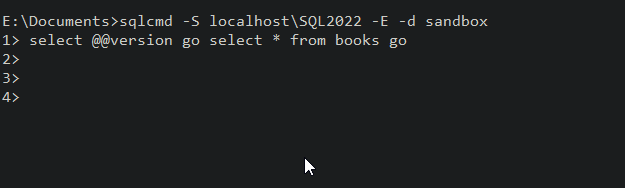
I was messing around with SQLCMD and I realized something I hadn’t known. I’ve never tried it, but the batch separator has to be separate, which I’ll show.
Another post for me that is simple and hopefully serves as an example for people trying to get blogging as #SQLNewBloggers.
The Batch Terminator
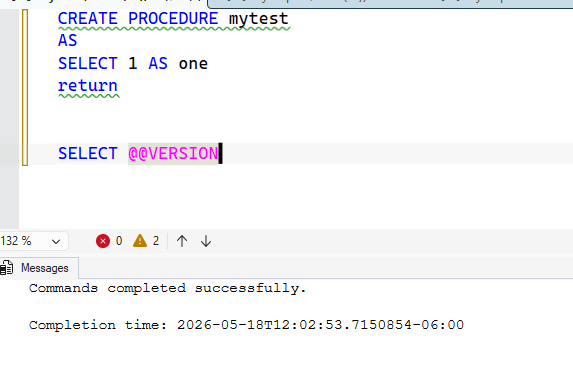
The default batch terminator in SQL Server tools is “GO”. We tend to use this in SSMS, and many of us know to type this in SQLCMD when we use it. In SSMS, we sometimes need it. Here’s an example where I create a proc and add a RETURN, which some people think means the proc ends.
It doesn’t.
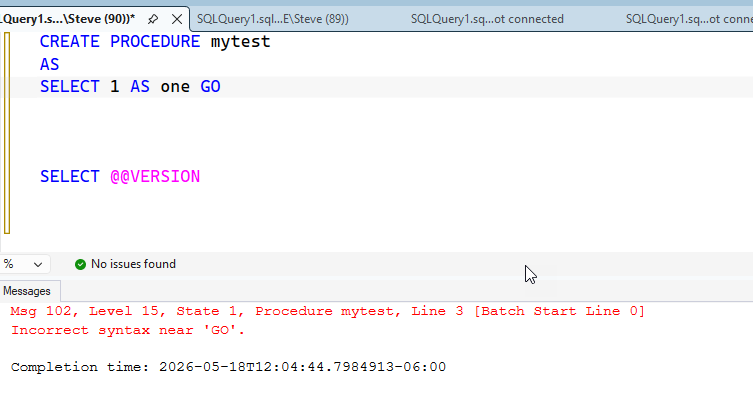
The SELECT @@VERSION is a part of the proc. Now, if I drop the proc and then add a GO at the end of a line, , I get this:
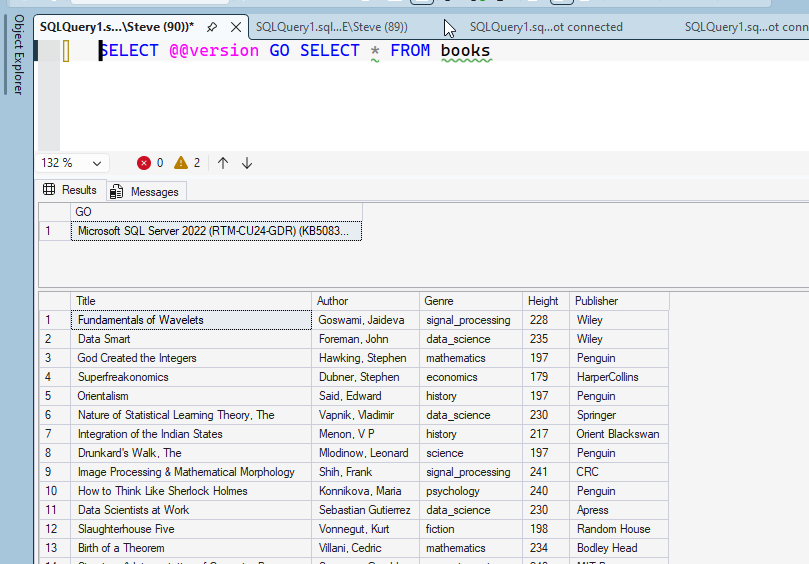
Makes sense. Let’s try two commands. In this case, the GO is skipped and I get two results.
Using SQLCMD
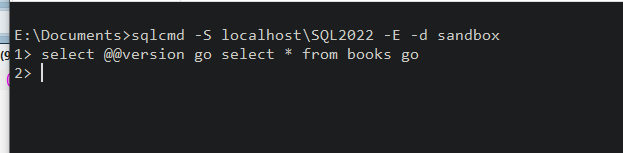
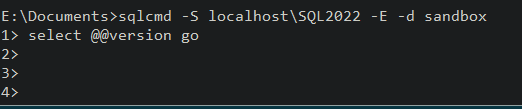
If I run SQLCMD and enter that code, I get a new prompt. That’s because the batch separator in SQLCMD is a batch terminator. This is in the SQLCMD docs, and since I haven’t terminated a batch, nothing happens.
If I hit enter, I get a new prompt. This continues until I enter a go.
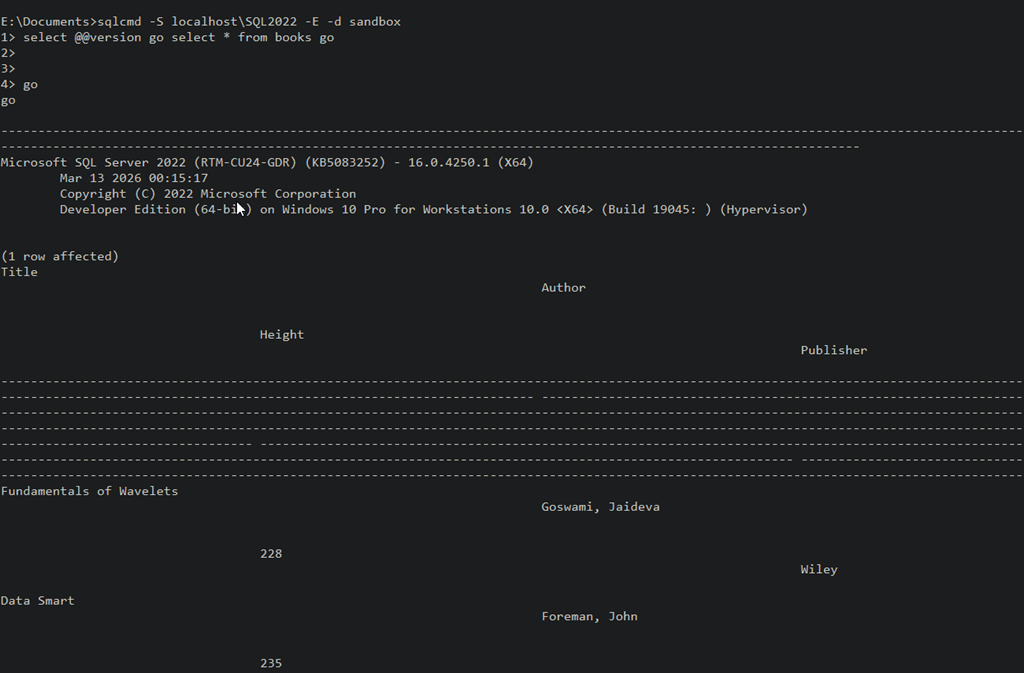
Once I enter Go, I’ll see my results.
A good thing to know, as you might think you can enter “select * from @@version go” and think it might execute. It won’t, as you see below:
This isn’t likely a problem for most people as they’ll instinctively enter GO if something doesn’t run, but newbies might miss this.
SQL New Blogger
This was about a 10 minute post, based on an experiment to see if I could get something to run quickly. Since I ran the experiment, I captured some screenshots and built this post.
Showcase continued learning, especially in this era of AI where you might need to guide an LLM along a better path.
While working with a customer recently, I heard this sentence: a tool is better than a script. The reference was that this customer preferred a known, tested, approved tool for most of their staff rather than a script built, lightly tested, and perhaps changeable by anyone in their organization.
I was surprised, because in many ways, I’ve depended way more on scripts, more often, than “tools” in my career. Often I struggled to find tools that actually worked in the way I wanted them to and built them myself with Unix shell utilities, VB Script, PowerShell, or some combination of those or other technologies.
I asked them if they wouldn’t prefer to customize things and let one of their senior people write their tools. They said that it wasn’t necessarily a problem for a few people, but too many people might edit and change the script, even the senior people, and then others couldn’t depend on them. They weren’t sure if they were reliable if a known script wasn’t being run. Even among their senior people, someone would edit a script then they thought something wasn’t quite right, or there was a new requirement and then the script would return unpredictable results.
I felt they didn’t completely trust their staff, but I also understand. I’ve changed my own “tools” and broken them or gotten back incorrect results. Depending on what the script did, and how busy I was, I might not even notice the problems. That might cause me problems if I expect data or actions to occur one way and they work differently.
Scripts can be changed by anyone. The results might not be what’s expected on a team. I get that. At some point in my career, I put all our DBA “scripts” or “tools” into a version control system and we had a path to the trunk (main) branch of them that was read-only, so that we knew what was being executed. If we wanted to change the script, we had to open an branch in the repo, make our edits, and then have another DBA approve the change before it would be merged into the main, and subsequently pulled into the folder in our path. This didn’t prevent changes, but it did give us some versions and history of changes.
There’s a balance between flexibility and customization that is challenging to tread amongst team members. Sometimes a known, reliable execution is better than one that changes too quickly. We’ve been asked at Redgate Software to ensure people using Redgate Monitor can audit what actions are taken in the tool. Sometimes a team member changes a setting, such as an alert threshold, and other team members aren’t aware. That can impact their ability to diagnose problems when they assume the tool works one way, but it’s actually working another way.
Tools we decide to use, whether purchased or OSS, won’t always do what we need. There is a requirement to build our own, but we also need some expectation and assumption of how they work. Especially in a team. I don’t want to have to re-read the code every time I run a tool; I should know how it works.
At the same time, I can’t have every tool change each time someone wants something new. I love sp_whoisactive, but I depend on it working a certain way and wouldn’t want Grant to change how it reports data unless I know about the change.
Working in a team requires teamwork, which means that whatever type of tools we buy/download/build, we need to ensure we all are aware of how they work.
This is the oldest editorial we have on the SQL Server Central site. This is being re-run for the US President’s Day holiday as Steve is on vacation and we are celebrating 25 years of SQL Server Central.
I was browsing the web recently and caught this note on coders and their tools and a related article on must have tools. It seems the focus was more for programmers and network administrators, but there are definitely some good tools in the list for DBAs to understand.
However, since it’s Friday, it got me thinking…
What are your essential DBA tools?
By these I mean those pieces of software not included with SQL Server, that you find very handy. It can be a utility that serves some purpose or a programming aid, I’m wondering what tools outside of those that come with SQL Server do you consider essential.
For me I have to say that the one tool I find most handy right now is Litespeed. I’ve used this utility for backups to save space for years. We made a deal a long time ago with DBAssociates, who developed the tool, and we’ve stuck with it. As of now we’re quite a few versions back since Imceda and then Quest took over the tool, but we’re happy with the way it’s worked.
That’s not to say other products aren’t just as good or even a better value, but that’s the one tool I’ve found most handy for me with SQL Server.
So are you using compare tools? Programming IDEs? Something else I’m not thinking of that has proven to be an essential SQL Server DBA or developer tool?
Recently I was working in VS Code and I saw a walkthrough for the new Copilot chat features. I decided to give those a try in trying to get some information from my SQL Server instance.
This post walks through a few things I did with this GenAI agent. There is a video walkthrough at the end.
Note: I have copilot access set on VS Code as a part of my employer’s benefit.
One of the Walkthroughts recently mentioned copilot. If I click the “More” at the bottom right, I’ll get this image. You might see something different, but Id’ expect you have a Copilot walkthrough if you can use Copilot. I choose the 4th one down (where the mouse pointer is).
This opened a Copilot pane. There were a few items, and you can see on the left in the image below, some have checkmarks. I’d explored these before.
If I scroll up, I see the one I wanted to get, which was “chat about your code”. I picked this one. This opened a blade to the left when I clicked the blue “Chat with Copilot” button.
I had read there are these @ agents (look up at the right side) and decided to type “@”. I saw a list of things.
Lots of places to work, but I choose the @mssql agent, since this is the place I tend to work. In the lower pane, I typed a question.
Above this (still in the left blade), I got a response.
Below this, I got some text and code explaining how to access a list of databases on various platforms. Not sure why MySQL is first, but I’m assuming this is alphabetical. For SQL Server, I saw this. This is a reasonable answer, with some help on how to execute it.
I then decided to connect to my local instance. I have the MSSQL extension, so I clicked that and got a connection.
Rerunning that query produced the same response. However, when I opened a query window, I got different results. Note the little database icon on the left, below my prompt, with “Untitled-1” next to it. This is the context, which I also saw added to the lower prompt box, just above where I would enter a prompt.
However, this didn’t work. After a few minutes, I got this.
and this. The LLM is trying, but can’t seem to get a query to run. It did try.
I then decide to move on.
Getting Results Back from Questions
This isn’t really the type of thing I’d do, but I decided to try and get some info from a database. The one above isn’t that interesting, so I switched to asking the model some questions. Here’s the first one, where I don’t remember the exact table name, but I ask.
It’s queried the database, and there isn’t a player table. However, it continues to look and finds dbo.players.
Even better, once it has the answer, it also provides a little more info. Maybe good, maybe bad. This reminds me of talking with a person that gives me more information than I asked for.
I try something else. Let’s get some metadata, since I clearly don’t remember what’s in this database.
I get a nice response, with some guesses about what information is contained inside these tables.
OK, can I query for information. I’ve always been a bit more of a hitter than a pitcher, so I’ll ask a question. This isn’t asking to join specific tables, but get me an answer.
It worked, though to be fair, I tabbed over to SSMS and wrote this query in the same time (with SQL Prompt) as the Copilot agent. Cool to see as I’d forgotten Thome and Vlad were up there.
While I got the answer, I didn’t get the query. I asked for it and got it, with an apology.
I’ll do something else. Who played the longest. Might be a somewhat funny query to write for a quick answer. I’d have to join a few tables and look for a sum.
It likely remembered I wanted the query, so that was included, with an explanation. However, it only looked at the batting table.
I asked other questions about fielding and pitching and got those answers (Nolan Ryan, 27 years with fielding stats and pitching stats. So I asked that:
Below this, I see the two players who tied, which Copilot noted.
The code provided only returned one player. I checked, which is something that you should always do. I asked if I could get better code. I got a few options, and I liked the RANK one, so I tried it and it worked.
Slightly annoying, but when I think about this type of conversation with someone else, especially a junior dev, I might have the same results and iterate this way.
At this point I also asked about databases, and I got a result. Maybe I needed a query to run first? Not sure why this works now.
Summary
This was an interesting set of things I could get done with this agent in VS Code. It’s not amazing, but it was helpful. I could tackle some light query tasks or db query ones while also handling some other work. In this case I wasn’t in the zone, trying to code or decode a database schema. Instead, I had a few things to try, and I let the agent work while I tabbed over to close some emails and chats.
In a job where I might need to find info from an unfamiliar database, this could be helpful in getting things done, though it’s hard to know if it’s slower for me if I were focused on ths all the time. The agent can find some info without me, but it also failed in a few cases. I started to try and get other things done when I noticed delays in responding and some hung queries.
Learning to use an AI agent to help you is a skill, and it’s one that takes time to develop.
I’ll look at some more practical tasks in the next post.
Video Walkthrough
Here’s a video walkthrough of most of the stuff in this post. It differs slightly as working with LLMs is not deterministic.