Tag: dbatools

  • Updating dbatools–Fixing the Certificate Failure

    I was trying to update my dbatools install to test something and go this error.

    2024-06-27 13_23_12-C__Users_Steve (Admin)

    I fixed it with a little help.

    The Fix

    The short answer from Chrissy LeMaire is to run this:

    install-module dbatools  -Force –SkipPublisherCheck

    That worked.

    2024-06-27 13_35_36-C__Users_Steve (Admin)

    Why?

    Chrissy explained this, but essentially it’s a certificate approval thing. Certificates work by verifying each other in a chain. One cert checks another, which checks another, etc.

    In this case, Microsoft changed some things and while the dbatools goes through some of these things, the update-module is doing extra checks. Supposedly MS will fix this.

    In any case, if you need an update, you need to bypass things for now.

  • Searching dbatools–#SQLNewBlogger

    Another post for me that is simple and hopefully serves as an example for people trying to get blogging as #SQLNewBloggers.

    I learned something new about dbatools. That’s using the Find-DbaCommand cmdlet, which is handier than Get-Command. I’ll show you why in this post.

    Searching PowerShell

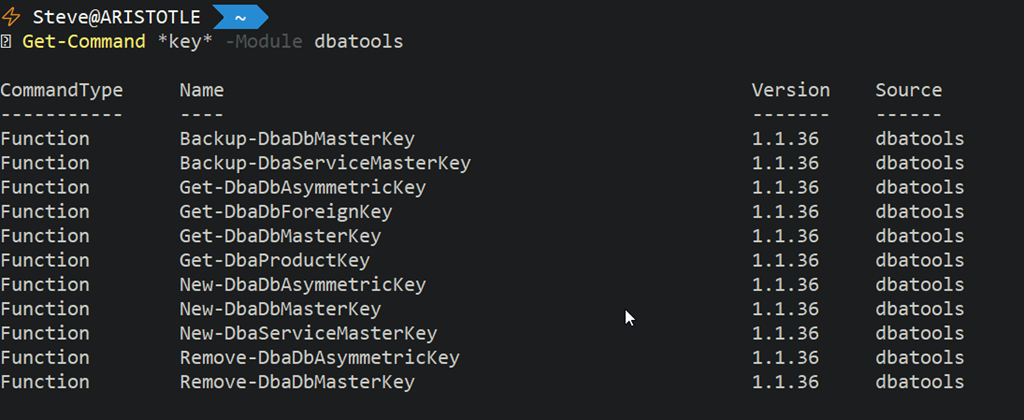
    You can search for commands with Get-Command. If I search for “key” in the dbatools module, I’d run this:

    Get-Command *key* -Module dbatools

    This returns me a number of items. In fact, it returns 11 items.

    2021-11-20 11_56_58-C__Users_Steve (Admin)

    That’s not bad, and this is how I’ve often been looking for command when I’m coding. This is faster than going to the index page on the site.

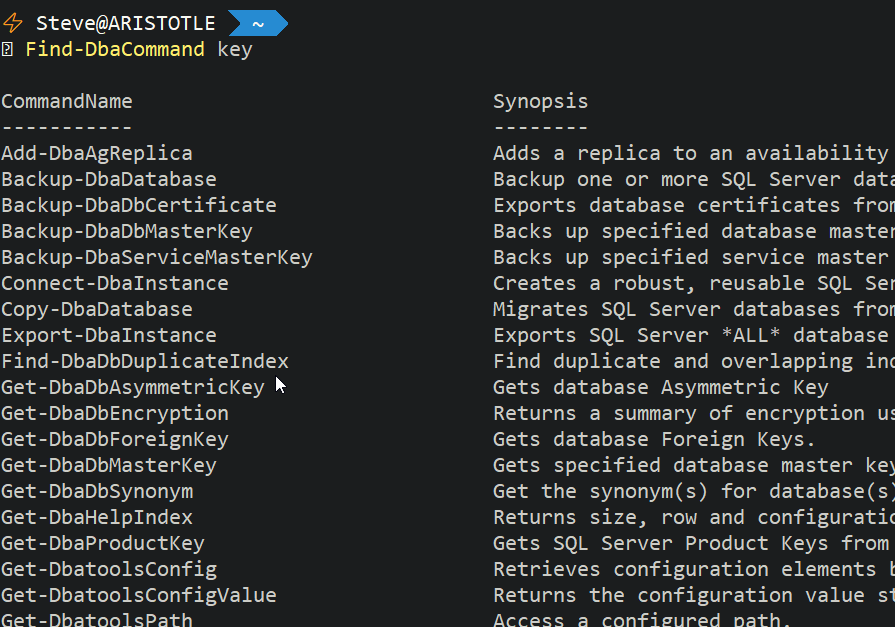
    Find-DbaCommand

    I was reading the upcoming dbatools in a Month of Lunches, and saw the Find-DbaCommand listed. If I use this, and include “key”, I get different results.

    2021-11-20 11_59_14-C__Users_Steve (Admin)

    This might be more than I want, but I thought this was a neat addition to the dbatools module to help someone find commands quickly.

    It is definitely easier than going to dbatools.io and trying to search for a command in the command list.

    SQLNewBlogger

    I learned something, and I sketched out how to explain it to someone. I took 5 minutes to knock this post together. You could do the same thing, but expand on a way that you actually use this to find a command.

    Might teach someone how a skill. Might even teach someone that wants to interview you.

  • Getting Your dbatools Version–#SQLNewBlogger

    Another post for me that is simple and hopefully serves as an example for people trying to get blogging as #SQLNewBloggers.

    I was trying to test something recently and it didn’t work. One would think that I would remember to check versions, but I didn’t before posting on Twitter. I did get a response from @dbatools, and one of the questions was which version did I have.

    I wasn’t sure, and wasn’t sure how to check, so I had to do some Googling around. This post notes what I found and how I got the version.

    I have known that I can get the PowerShell version from $psversiontable. I can run that and see info about PowerShell..

    2020-03-30 09_42_37-cmd - powershell

    This doesn’t get me a view of modules I’ve installed. I tried Get-Help, but it wasn’t what I wanted.

    2020-03-30 09_44_06-cmd - powershell

    I then tried a search and stumbled upon Get-InstalledModule, which worked well, but it has a lot of info. When I run this, I get lots of data.

    2020-03-30 09_46_20-cmd - powershell

    Fortunately, it’s alphabetical and I don’t have a lot of modules that are named with something after “d”, so I could easily find the data.

    2020-03-30 09_46_39-cmd - powershell

    I know there’s an Update-Module and Install-Module, so I tried Get-Module. That actually works. I thought about this later, after I’d actually gone through the searching and posting results.

    As with anything, there are a couple methods here, but certainly it’s good to be able to solve a simple problem like this one.

    SQLNewBlogger

    This was something I figured out in about 2 minutes. Writing this post took longer, but I bet I now remember this. It also might be something I get asked in an interview.

    Try it yourself today. Start a blog and start documenting what you learn.

  • Evolving Our Tools

    This week the next preview version of SSMS v18 was released. This is the sixth preview release, and I’m guessing that this will be one of the last. Six seems like a lot of releases, and I’d like to think that this is getting close to being ready to use by most people, but I’m not sure. I certainly have some some annoying and problematic bugs, so I can’t be sure there won’t be a seventh, eighth, or ninth preview, but it does seem to be fewer issues are being reported.

    With the release of SQL Server 2016, SSMS was decoupled from the database engine, and we saw some SSMS v16 releases. I didn’t use many of those before moving to SSMS v17, which came slightly after SQL Server 2017. I’m glad we’ll start to get the versions separate from the engine as this is confusing to many people. However, I do expect that plenty of people will call this SSMS 2019 or think there’s a SQL Server 2018, etc. If we could get more people to leave the older SSMS versions that came with 2008 R2, 2012, 2014, then I’ll take a little confusion in how we talk about SSMS.

    However, we don’t need to stick with SSMS these days. If you’ve been heads down and just focused on keeping your existing systems running, you might not realize that not only do we have different SSMS choices, but we also have other tools. I’m not talking about SQLCMD, bcp, and Visual Studio, but we have other ways of working with SQL Server. Visual Studio Code has an mssql extension if you write code in that IDE, which might be something you full stack developers need.

    For the SQL Server people, we have a fork of VS Code in Azure Data Studio. This is a lighterweight IDE built for SQL Server work. We also have the mssql-cli tool, giving us way more control over command line work than we have with SQLCMD. I haven’t worked with it much, but it’s on my list for January to play with a bit. I don’t know how well either of these will catch on, but let me know your thoughts. Are you doing more work with either of these tools?

    There are certainly plenty of other choices as well. My company (Redgate) and others make plugins for SSMS that improve how you work with SQL Server. There are even other IDEs, such as DataGrip, that you can use and abandon the Microsoft tools altogether. I’m not sure I would look to leave SSMS entirely, but perhaps I should give some of these a try at some point.

    Tools matter to many professionals. Mechanics treasure their sets of wrenches, chefs love their knives, and we ought to have tools that we know, use, and are comfortable with. This includes both the actual software and the various scripts, code, and helper applications that allow us to work efficiently. If you don’t love your tools, or have a collection, maybe now is the time to start the new year building some skills with the one you use, or try a new one. Wayne Sheffield has a nice series on SSMS and I’m hoping to get some other pieces written for other tools. If you want to tackle one for SQLServerCentral, let me know.

    If you’re looking for a new tool to try for SQL Server work, might I suggest some PoSh and dbatools. It’s an amazing combination for lots of tasks.

    Steve Jones