Tag: dbatools

  • Scripting Tables with dbatools

    I really like the dbatools project. This is a series of PowerShell cmdlets that are built by the community and incredibly useful for migrations between SQL Servers, but also for various administrative actions. I have a short series on these items.

    I’ve been experimenting with scripting some tables, and I wanted to check to see if dbatools made that easier. I was amazed by the number of new cmdlets in the project, and after hunting around, I found a couple cmdlets: Get-DbaTable and Export-DbaScript. I decided to see how these work.

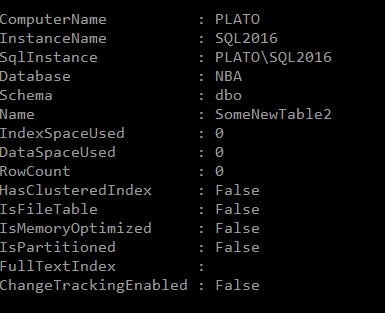
    My first experiment was to run Get-DbaTable. This takes an instance and database as parameters and returns a set of table objects. I get space and size information and some metadata. As a short look, here’s one table.
    2018-03-22 14_26_18-cmd - powershell (Admin)

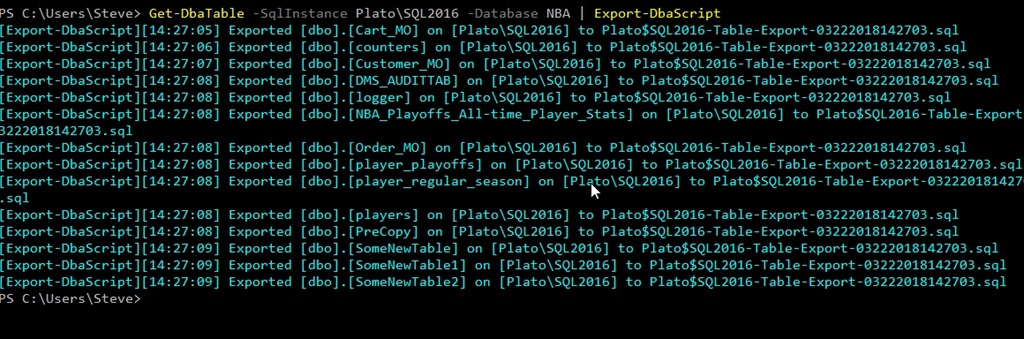
    I decided to use this as input to Export-DbaScript to see what happened. I used this command:

    Get-DbaTable -SqlInstance Plato\SQL2016 -Database NBA | Export-DbaScript

    This gave me some output. It wasn’t quite what I wanted, but it worked.
    2018-03-22 14_27_38-cmd - powershell (Admin)

    Note that all of the tables were exported to the same file. If I opened that file, here’s a snippet of the code. I get a header, and then each table’s code put together as single batch.

    2018-03-22 14_29_06-Plato$SQL2016-Table-Export-03222018142703.sql - (local)_SQL2016.WideWorldImporte

    Not quite what I wanted.

    I can determine the file, using the –Path parameter. This still gets me one file, but I can make this better. I’ll make a folder and change to that folder in my PoSh window. Now I can run this, using ForEach-Object to iterate over the tables, outputting each to a file.

    Get-DbaTable -SqlInstance Plato\SQL2016 -Database NBA | ForEach-Object { Export-DbaScript -InputObject $_ -Path ($_.Name + “.sql”) }

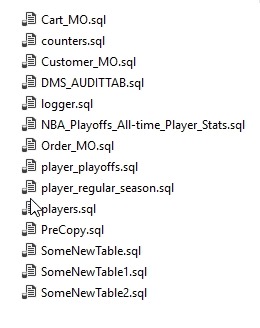
    When I do that, I get this:
    2018-03-22 14_50_27-Tables

    Each table’s code is now in a separate file.

    That’s nice, and with filtering, I could have this generate scripts for specific objects, or types of objects and update them from PoSh, likely a job or task, relatively easily.

    Certainly the Generate Scripts process in SSMS is easier than writing this script, but that’s not programmable. This wraps around the SMO scripting objects and makes the process much easier.

    If you haven’t tried dbatools, give it a go. You’ll appreciate the ease of scripting and might start to enjoy working with SQL Server in PoSh.

  • dbatools and Orphaned Users

    I really like the dbatools project. This is a series of PowerShell cmdlets that are built by the community and incredibly useful for migrations between SQL Servers, but also for various administrative actions. I have a short series on these items.

    One of the common issues that I would run into with refreshing development and test environments are the orphaned users. These are accounts that typically exist in production, but not in development. The logins and users are different in these environments, and often there isn’t a login on the development instance. This creates an orphaned user: one that exists in the database, but has no instance level mapping.

    Cleaning up these users isn’t that hard, often with a removal of the user, mapping to a different login, or repairing this user by adding back the server login.  These aren’t difficult tasks, but the logic to write a script to quickly fix this, especially in a DR situation, may not be handy.

    dbatools can help here with a few cmdlets. I’m not recommending this is any better than the T-SQL, but if you keep dbatools on your instances, this is a quick way to fix things.

    With Get-DbaOrphanUser, we can quickly get a list of those users that aren’t matched on the restored server. I can limit this to an instance or a database, but it gives me a list of users that I can then pipe into one of a few other cmdlets: Repair-DbaOrphanUser and Remove-DbaOrphanUser. These two cmdlets will do, as the British say, what it says on the tin. They’ll remove or remap the users, which can make it easy to quickly get your users working again.

    Note that you will want to ensure this does what you expect and run with the -WhatIf command to be sure that you aren’t altering users that you don’t want to change.

    This isn’t necessarily the way I’d always clean up users, but as part of a flow that might include automated restores, data masking, and other steps, being able to access orphaned user data and repair users from  PoSh is something I’d certainly consider.

  • Better Security with dbatools

    I really like the dbatools project. This is a series of PowerShell cmdlets that are built by the community and incredibly useful for migrations between SQL Servers, but also for various administrative actions. I have a short series on these items.

    One of the things that I see many junior SQL Server people struggle with (or forget) is the need to get logins onto multiple servers. This is often in situations where some sort of DR or HA technology is being used between instances. An admin will set up a second server, add logins, and forget about the entire system.

    Until something fails. Then their failover works perfectly, or mostly, or good enough, and they move on with their day. A few days later

    The cmdlet, Sync-DbaSqlLoginPermissions, is designed to help solve this issue. I certainly could use this to quickly sync logins (SQL or Windows) between two instances, but it’s great for an automated, regular sync between two HA or DR instances. If you set this up as a job, it won’t necessarily catch every login if servers fail between the syncs and a login is added, but this will give you some added protection over a long term as you make changes on one system.

    This is a way to solve some cross instance issues that are hard in T-SQL, but simple in PoSh. Kudos to the dbatools team for this cmdlet.

  • Finding the Default Path with dbatools

    I really like the dbatools project. This is a series of PowerShell cmdlets that are built by the community and incredibly useful for migrations between SQL Servers, but also for various administrative actions. I have a short series on these items.

    It’s been awhile since I worked on any dbatools learning with holidays and travel. I find these cmdlets to be really handy, and if I had to manage a large estate of instances, they would be invaluable.

    I ran across Get-DbaDefaultPath on another blog, and thought this would be a handy little item to have. It is.

    I know the project changes, so I ran an update-module to get the latest items first. Then I tried the cmdlet. I ran a simple query against a local instance, and I quickly get the details, my instance and the Data, Log, Backup, and ErrorLog locations.

    2018-01-15 11_54_46-cmd - powershell (Admin)

    This is handy information, especially as I often have multiple instances (same or different machines) and I may want to make sure I don’t put a database on a small drive, or I need to find out where a backup is (or errorlog).

    The normal way of getting this information for me has been to right click the instance in SSMS, possibly connect first, get the properties, and look at the panels in the dialog. It works, but it’s slow.

    This is a much quicker way for me to find out paths, which  just makes admin easier. With tab completion, this will be the new way I find paths.

    The advantages of using this to gather paths, check sizes, and do some scripting to find files, copy them, make decisions about where to create databases, etc. are many. I can see this would be a great way to build scripts that include some decision making that adapts a simple process to new environments.

    If you haven’t tried dbatools, do it today. It’s a fantastic administration tool for your toolbelt.