Tag: dbatools

  • Automate Migrations–T-SQL Tuesday #94

    tsqltuesdayIt’s T-SQL Tuesday time again, and I’m slightly pressed for time, which is sad. This is a great topic.

    Rob Sewell hosts this month with his question about what we are going to automate? He’s a PowerShell advocate, so I’m not surprised here. As much as I enjoy working in various languages, PoSh becomes more and more handy to me when I need to work outside of the SQL Server platform. I’ve been trying to play with it, and I enjoy it more and more.

    If you want to participate, check out the rules:

    1. Write a post on the topic below
    2. Schedule the post to go live on Tuesday, September 12th (between zero am and midnight, UTC)
    3. Include the TSQL Tuesday logo in the top of your post
    4. Link the post back to this one (it’s easier if you comment on this post and link it)
    5. Optional: Tweet a link to your post using the #tsql2sday hash tag on Twitter

    Automate Things Between Instances

    The first time I saw the dbatools project in action was at SQL Saturday Cambridge, where Chrissy Lemaire gave a session with Rob. I was surprised at the power and ease of the project. I was impressed, and decided to help learn more as well as promote the project. I’ve tried to blog regularly about their cmdlets as I get a chance to play with them and I’m pretty much always impressed.

    The next time you need to move some object, setting, job, etc. from one instance to another, you should try this:

    1. install the dbatools module
    2. look through the command index
    3. try migrating your object(s) with PoSh.

    That’s it.

    Maybe you need to copy a database or login. Maybe you want to copy jobs to a new server. The dbatools module makes all of these things easy.

    So give it a try. There are some great tools for migrations as well as wonderful items for common DBA tasks.
  • Responsible Log Growth with dbatools

    I really like the dbatools project. This is a series of PowerShell cmdlets that are built by the community and incredibly useful for migrations between SQL Servers, but also for various administrative actions. I have a short series on these items.

    I love dbatools, and I’ve been trying to explore the various cmdlets over time, both to practice my PoSh and see if there are easier ways of accomplishing some tasks.

    Recently I was browsing the dbatools.io site to see what’s changed and noticed a new cmdlet, Expand-DbaLogResponsibly and just had to check this one out.

    Often I’ve considered proactive space management a part of my DBA responsibilities that is core to a well run system. I don’t look at storage every day, but I usually try to look monthly, with an eye towards keeping about 3 months worth of data growth as a pad in most systems. That’s a general guideline that varies by system.

    However, logs can be different. They are sized based on workload and backup schedule, which usually works. However, sometimes there are issues and I want to grow my log quickly. If you’ve read about growing log space (like this piece), you’ll realize that there are a variety of things to consider. And the rules change by version, or even patch level, of SQL Server. A lot to consider.

    Fortunately, this cmdlet wraps those things up into a command. Just call it with the server, database, target size, and optionally log FileID. It will capture the rules for growth and take appropriate actions.

    NOTE: This does not look at the current number of VLFs. You need to be sure you’ve managed your log file.

    If you wonder how this works, or if the rules are appropriate for your system, check out the code at Github. I’m sure you’ll find that this is the easiest way to manage a log file.

  • Using Test-DbaOptimizeForAdHoc

    I really like the dbatools project. This is a series of PowerShell cmdlets that are built by the community and incredibly useful for migrations between SQL Servers, but also for various administrative actions. I have a short series on these items.

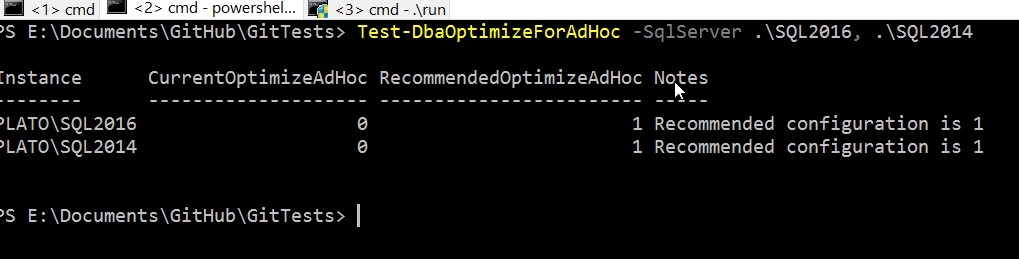
    One of the cmdlets is Dba-OptimizeForadHoc, which is designed to help you determine if this particular setting is enabled on your servers. There are plenty of ways you could get this data from sp_configure or PoSh, but this is a setting you might want to check in a hurry when there are potential performance issues.

    The cmdlet is easy to use and takes a –SqlServer parameter where you can list multiple instances. There are options for credentials that can be used for a connection, just remember that this credential needs to have rights to read the setting.

    2017-07-07 18_32_11-cmd - powershell

    If this cmdlet isn’t useful, check out the full list. I bet you find some that you will want to try out.

  • Copy-SqlJob, a handy dbatools cmdlet

    I really like the dbatools project. This is a series of PowerShell cmdlets that are built by the community and incredibly useful for migrations between SQL Servers, but also for various administrative actions. I have a short series on these items.

    One of the things I’ve often needed to do is move jobs around between instances of SQL Server. I’ll often test a job on one instance, maybe run it for awhile to see if it’s a useful addition to my instance, and then deploy the same job to other instances.

    I do this often with jobs that help each instance manage itself independently. While each new build often includes some standard settings and jobs, I do find that I’ll adjust jobs over time, fix bugs, enhance them, and I’ll need to move the job over. This has usually involved scripting the job on one instance, adding delete code, and then running the script on other instances.

    No longer.

    Enter Copy-SqlJob

    One of the cmdlets in dbatools is Copy-SqlJob, which does what you’d expect. It copies jobs from instance to instance. If you look at the docs, but default it copies all jobs, but I rarely need that. Though I might start using that for new builds along with Copy-SqlDatabase to move my DBA database from machine to machine.

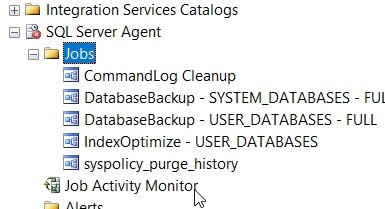
    However, I can copy specific jobs, which is perfect for my purposes. Just put a list of jobs to be copied in a script and run that. Let’s see how this works. On one instance  I have a number of jobs.

    2017-05-01 13_58_50-SQLQuery2.sql - (local)_SQL2016.master (sa (82))_ - Microsoft SQL Server Managem

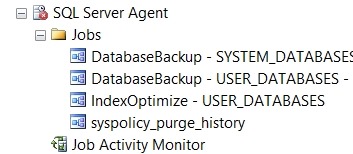
    Another instance has fewer jobs.

    2017-05-01 13_58_55-SQLQuery2.sql - (local)_SQL2016.master (sa (82))_ - Microsoft SQL Server Managem

    Let’s move just the CommandLog Cleanup and Output File Cleanup jobs over. I can fire up a PowerShell and go from there. I’ll start with the –WhatIf parameter, which lets me test without moving anything.

    2017-05-01 14_06_19-powershell

    That’s easy enough. Let’s just move one job for now, the CommandLog Cleanup job.

    2017-05-01 14_07_08-powershell

    And refreshing the second instance:

    2017-05-01 14_07_18-SQLQuery2.sql - (local)_SQL2016.master (sa (82))_ - Microsoft SQL Server Managem

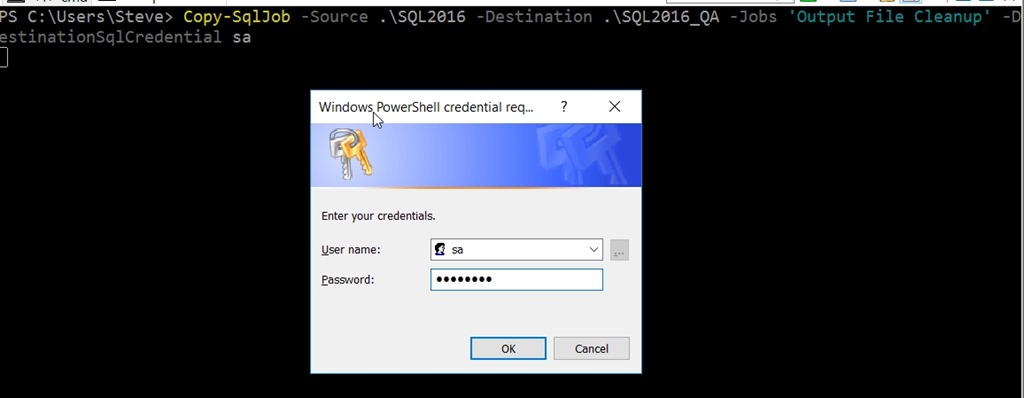
    That’s useful, and it works easily across these instances with Windows Auth. What if I need SQL Auth? I can use SourceSqlCredential and DestinationSqlCredential to specify accounts. I can even have this prompt me for the password:

    2017-05-01 14_09_06-SQLQuery2.sql - (local)_SQL2016.master (sa (82))_ - Microsoft SQL Server Managem

    Once I type it in, the copy works.

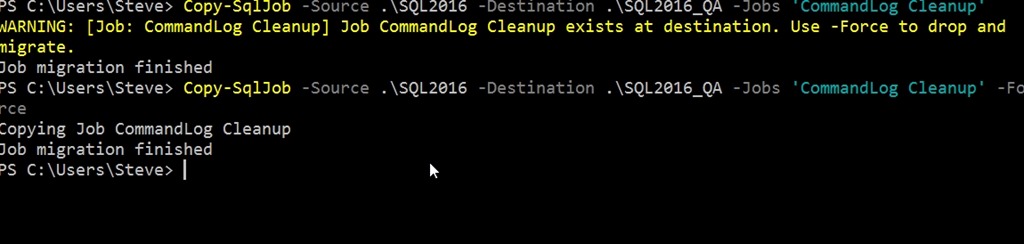
    What if I update a job on the source server, and need to ensure the changes get copied to the destination? I can use –Force. If I don’t, I’ll get a message that the job exists. With the Force parameter, the job gets copied.

    2017-05-01 14_12_10-powershell

    This is a simple, but handy way to move jobs between servers. Many of the dbatools cmdlets are designed for migrations, and this is no exception. You can migrate jobs easily if that’s your requirement.

    I’d urge you to download dbatools and see which of these cmdlets might make your administration of SQL Server easier than you ever expected.