Tag: dbatools

  • I’m on dbatools!

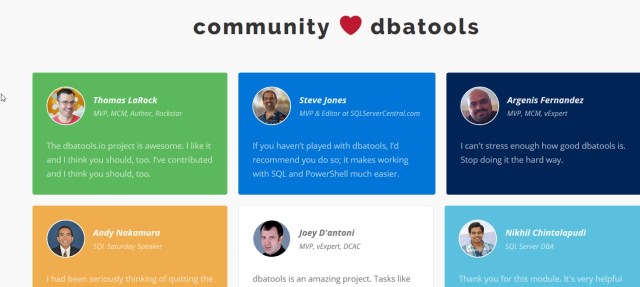
    I made the front page of dbatools, as a part of the community that is supporting this project. Along with quite a few others, I’m happy to be there and doing my part to make SQL Server administration and scripting easier.


    Maybe I’ll even write a cmdlet some day.  Since I keep working on my PoSh skills and playing with the various cmdlets.

  • Get Your SQL Server Product Key with Powershell #dbatools

    I really like the dbatools project. This is a series of PowerShell cmdlets that are built by the community and incredibly useful for migrations between SQL Servers, but also for various administrative actions. I have a short series on these items.

    There are lots of tasks that are easily accomplished with both PowerShell and T-SQL.

    UPDATE: The cmdlet was renamed to Get-DbaProductKey

    Get-SqlServerKey is a command that will find your product keys. It’s not often you might need this, but it’s a pain to track them down from the registry and be sure you get them for all your instances.

    Here’s the view from one of my development machines:

    2017-01-27 15_31_08-powershell

    There is a limitation here that appears to have issues with SQL Server 2016, but it’s still helpful for other versions. You can also specify a list of servers in a file for this to use, as well as using credentials to connect.

    A quick, handy item, and one that should make auditing (pre-2016) SQL Servers easy.

  • Finding Sysadmins with dba tools–GetDbaRoleMember

    I really like the dbatools project. This is a series of PowerShell cmdlets that are built by the community and incredibly useful for migrations between SQL Servers, but also for various administrative actions. I have a short series on these items.

    I’ve been wandering through the dbatools set of cmdlets, trying to see where various cmdlets are useful, and also practicing some PoSh skills.

    Recently I noticed there was a Get-DbaRoleMember cmdlet to use. Of course, when I tried to check it, I found an issue. I didn’t have the cmdlet in my system. Autocomplete didn’t find it and running the cmdlet returned an error. I assumed that there had been a dbatools update, and I hadn’t gotten it.

    I run into this before, and a quick query to @sqlvariant helped me realize I needed to run update-module, not re-run import-module. I did that and it worked smoothly (I did need to be an administrator to update this).

    2017-01-20 09_09_12-cmd - powershell (Admin)

    One I did this, I could run the cmdlet and get data.

    2017-01-20 09_09_55-cmd - powershell (Admin)

    Interesting, but this doesn’t seem incredibly useful. After all, I can easily query this in T-SQL, and my monitoring software will check to see if roles change.

    However, perhaps I am actually going to write something that checks to see if we have consistent sysadmins on all instances. Or perhaps we’re looking to add a sysadmin to an instance where he/she doesn’t exist. In any case, PoSh is a way to easily connect to multiple instances on many machines in a way that’s more cumbersome in T-SQL or SQLCMD.

    I can get the server level roles with –IncludeServerLevel parameter. When I do that, I see my roles and members.

    2017-01-20 09_51_34-Atlas Home Lab .201 - VMware Workstation

    I can also connect to remote servers and get this:

    2017-01-20 09_52_25-Atlas Home Lab .201 - VMware Workstation

    How can I do this in bulk? Well, I can certainly run this multiple times with a list of instances. Let’s make a quick list. I’ll make a quick array:

    $instances=”.\SQL2016″,”Atlas”,”Atlas\SQL2016″

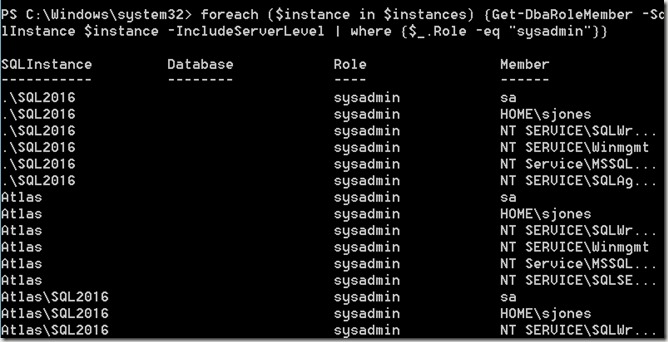
    Now I’ll use that in a foreach loop, sending the server name to the cmdlet and looking for sysadmins.
    2017-01-20 09_56_36-Atlas Home Lab .201 - VMware Workstation

    And I have the sysadmins on all of my instances. Certainly this isn’t terribly useful by itself, but I can easily add more programming that looks for a user, maybe checks for which machines have a sysadmin, maybe add (or remove) a sysadmin from instances that are out of sync with what I need.

    This isn’t one of the cmdlets I’d use the most often, but I can see it being handy when trying to automate some of the permissions checks across multiple machines that I need to keep in sync. At the very least, this could be helpful in comparing permissions between primary and secondary (or DR) nodes.

    Note: I haven’t tried it, but I suspect that the migration cmdlets at dbatools would be better for keeping primary and secondaries in sync.
  • Installing dbatools on WS2012 R2

    This is actually a simple, short post, but writing helps me remember things, and since I had to learn this, I decided to write something short.

    I have a number of Windows Server 2012 R2 VMs. I need to get rid of these and upgrade to WS2016, since installing SQL 2016 is a pain on these VMs. However, for the time being, I’m stuck with them.

    I was looking to try some of the dbatools modules. I popped open an elevated command prompt and

    2017-01-20 09_30_50-Atlas Home Lab .201 - VMware Workstation

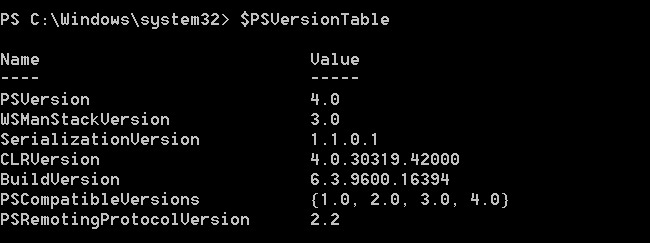
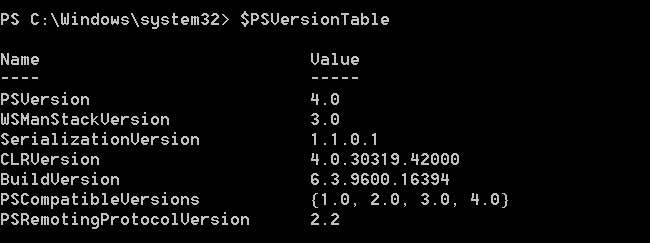
    This is because that module isn’t in this version of PoSh. I checked, and I could see this is v4, and Install-Module was added in v5.

    2017-01-20 09_31_06-Atlas Home Lab .201 - VMware Workstation

    I had to go to the download page to see what my options were. One of these is to download the modules myself, but that seems like a pain. Instead, I used this command:

    Invoke-Expression (Invoke-WebRequest -UseBasicParsing https://dbatools.io/in)

    That worked great, and I had the modules installed.

    2017-01-20 09_44_05-Atlas Home Lab .201 - VMware Workstation

    Nothing much new in this post that isn’t in the dbatools download page, but I did learn a bit more about PoSh and its versions. Since I’ve gotten used to working on Windows 10, it’s good to remember that previous versions of the OS will have different capabilities.

    In this case, the pain of using WS2012R2 means I’ll try to find time and upgrade to WS2016 as soon as I can.