Tag: dbatools

  • Finding #dbatools #PowerShell commands

    I really like the dbatools project. This is a series of PowerShell cmdlets that are built by the community and incredibly useful for migrations between SQL Servers, but also for various administrative actions. I have a short series on these items.

    I was reading about Pester from Rob Sewell and saw he talked about a new command I hadn’t seen in dbatools: Find-DBACommand. This is a fantastic idea, and I think it’s my new favorite dbatools command, err, cmdlet.

    This is the search cmdlet for dbatools. With this, I can pass in a parameter of something I’m looking at and get results. For example, if I run this with “attach”, I get:
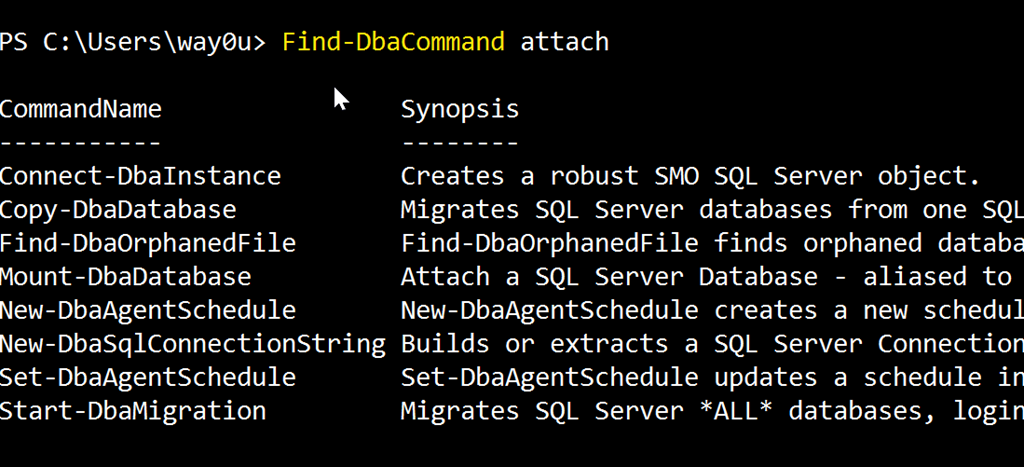
    2017-11-16 08_58_34-cmd - powershell (Admin)

    If I use “security” I get:

    2017-11-16 09_00_15-cmd - powershell (Admin)

    These are the ways that I’d most often use the command, but I can certainly do other things. There are tags on some cmdlets, so I can do this: Find-DbaCommand –Tag job

    2017-11-16 09_03_31-cmd - powershell (Admin)

    This gets me less results than just a search for the string “job”, and these are items focused on jobs themselves.

    I can loo for specific authors with the –Author parameter. I can also look for minimum or maximum versions of SQL Server, though I haven’t found anything that returns here in quick testing. In looking through some help and source code for other commands, I don’t see version tags, but hopefully that comes over time (Submit your PRs here).

    This is a fantastic addition, and certainly better than trying to search all of PoSh help for something like Backup. I might get way more commands I don’t care about there.

    If you haven’t tried dbatools, do it today. It’s a fantastic administration tool for your toolbelt.

  • Using Backup-DbaDatabase for a Quick Backup

    I really like the dbatools project. This is a series of PowerShell cmdlets that are built by the community and incredibly useful for migrations between SQL Servers, but also for various administrative actions. I have a short series on these items.

    One of the core tasks of a DBA is backing up a database. In fact, I’d argue that it’s the most important thing for a DBA to know. Second would be restores.

    I’ve used the BACKUP DATABASE command so often from T-SQL that it’s a quick way for me to just get a backup of a database. I almost always have SSMS running, so I can easily just run the backup.

    For regular backups there are some great tools out there, SQL Backup Pro from Redgate, Minion Backup, Ola Hallengren’s scripts, and more. However, there still might be a time I want to make a few backups, perhaps copy them over, and that’s where I think dbatools and Backup-DbaDatabase might help.

    This is a nice, easy cmdlet to use. You can probably guess how to use it. Give it an instance, a database (or few), include a path, maybe create folders for each database, and let it go.

    That’s about it.

    If I run this interactively, I’d get the progress bar:

    2017-10-02 17_04_29-{15%} cmd - powershell (Admin)

    When the command is done, I see the results from each database. I get the file, folder, full path, and the script used.

    2017-10-02 17_04_36-cmd - powershell (Admin)

    I could include a different path if I wanted, and certainly I can chain this along with other PoSh commands.

    I don’t know that I’d use this often, but it is handy in places, and certainly if I want to script the movement of some files, perhaps for something like HA/DR testing or setup, or even to refresh other environments.

  • Test Your SQL Memory Setting with dbatools

    I really like the dbatools project. This is a series of PowerShell cmdlets that are built by the community and incredibly useful for migrations between SQL Servers, but also for various administrative actions. I have a short series on these items.

    One of the settings that has caused me problems at times is the max memory setting for a SQL Server. Overall, I like to have dedicated hosts for SQL Server and may not care about limiting SQL Server in way way. However, there are places where I may have multiple instances, or other applications, and I should be setting memory to some level.

    Jonathan Kehayias wrote a post about calculating max memory, and that was the inspiration for Test-DbaMaxMemory. This is a great little resource that you may use rarely, but it saves some time and makes the memory check quick and easy.

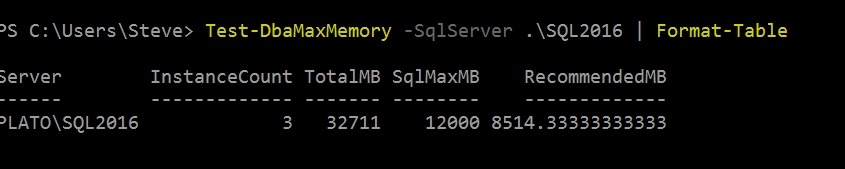
    It’s a simple command, with a parameter for the instance. The Format-Table is a great place to pipe this output. For one of my instances, I see:

    2017-09-28 13_29_48-powershell

    Not great, since I have other instances running. I wouldn’t want this to take over my workstation. My other instance is a little better configured.

    2017-09-28 13_30_38-powershell

    There are all sorts of filters here to use with this. The doc pages shows filtering to find instances where the setting is greater than total  memory. Maybe a better one might be looking for instances greater than (total memory –2GB), or 4GB. Or maybe you want some deviance from the recommended value.

    You can run this with any list of servers as well, and get a nice report. Maybe even one that you can use to convince your boss that you need a bit more RAM for that busy instance.

    As with the other dbatools, this fulfills a simple function. It’s quick, easy, and helpful. Give it a try today.

  • Test Database Compatability with dbatools

    I really like the dbatools project. This is a set of PowerShell cmdlets that are built by the community and incredibly useful for migrations between SQL Servers, but also for various administrative actions. I have a short series on these items.

    One of the items that few DBAs think about often is compatibility. We tend to create databases with the default level, based on the instance. If we upgrade an instance, I’ve seen many people assume the level changes with the upgrade script (it does). However, if you restore a database, or attach one, the compatibility level might not match, and that could cause issues.

    The dbatools project has thought of this, and they have a great cmdlet that can help you build checks of all your databases. The Test-DbaDatabaseCompatibility cmdlet will return the databases and whether they match the server level. You can also get more details if you like. Here’s a quick view. I can run:

    Test-DbaDatabaseCompatibility -SqlServer .\SQL2016

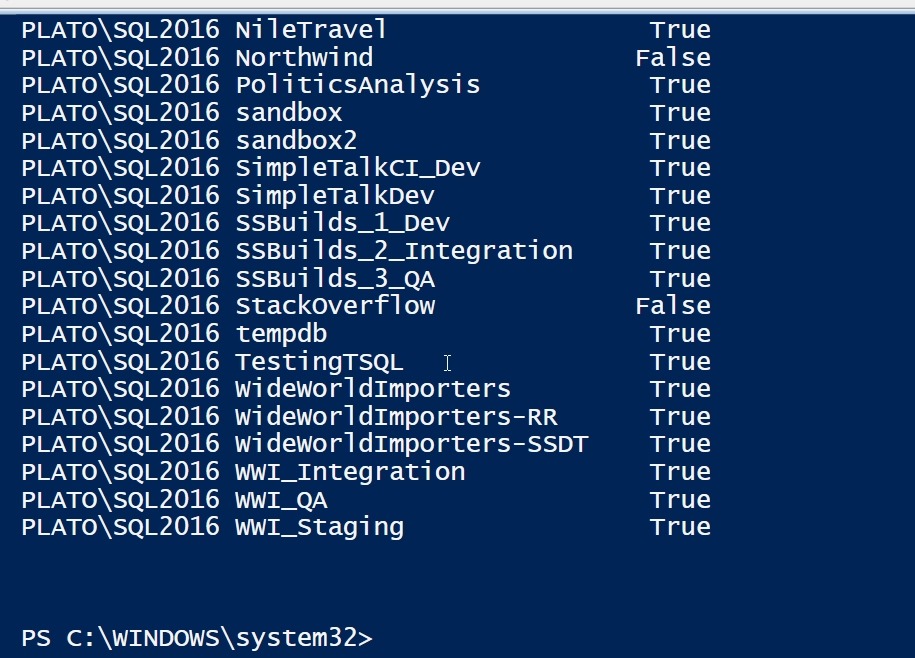
    This gives me a lot of databases on this instance. In fact, they scroll off the results quickly.

    2017-09-14 10_50_03-Windows PowerShell ISE

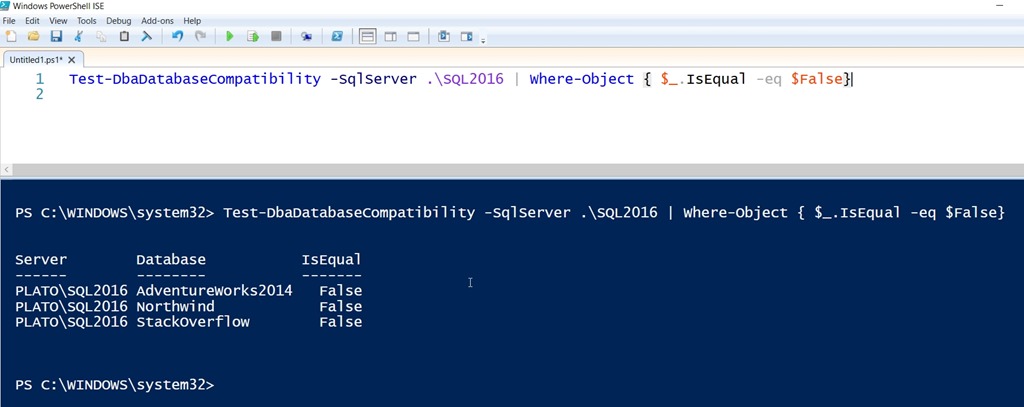
    I don’t really worry about those databases that match. In fact, I expect that most databases do. My rule of DBA information is often that I want to only see those items that might cause me to take some action. Here, I only want those items that don’t match.

    I can easily use filtering to do this:

    2017-09-14 10_55_43-Windows PowerShell ISE

    Of course, I could simple wrap this in a function as well, add this in a pipeline that takes a list of instances, or more. For me, I’d want each instance to check itself with this cmdlet and record the results.  That way I could periodically review the list and decide if I can actually can change any of these.

    I could also put a query in my SQL Monitor monitoring system as a custom metric and have this tracked there, but I wouldn’t want alerts for this. It’s not critical enough to interrupt me too often.