
Author: way0utwest

  • T-SQL Tuesday #25 – T-SQL Tricks

    TSQL2sDay150x150It’s time for T-SQL Tuesday again, and this time Allen White (@SQLRunr | blog) is asking for your tricks. If you want to participate, read Allen’s post and learn how.

    The question this month is: What T-SQL tricks do you use today to make your job easier?

    My Tricks

    I don’t have any great whiz bang tricks in T-SQL, and I’m sure there are more than a few people that can out-code me with their. However I do like to make my job easier, and so I have a couple of administrative tricks for use with your T-SQL environments. These are the ways that I save time, and work more efficiently.

    The thing that has helped me most often in my career is to keep little snippets of code handy to that I make few mistakes and save time. These days I do that quite often with SQL Prompt, a third party tool from my employer. It basically implements intellisense for SSMS, but more importantly, it gives me shortcuts.

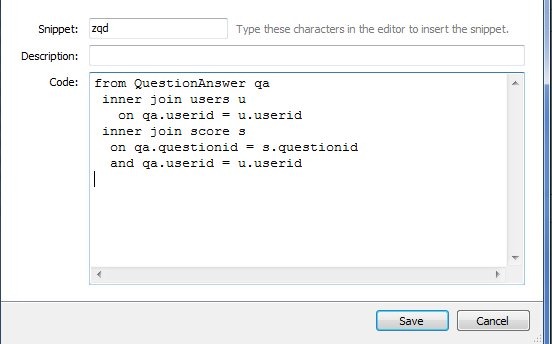
    However the biggest advantage to me is the Snippets in Prompt. There’s a feature that allows you to type a shortcut and then press “Tab” and have that shortcut replaced with a longer section of text. For example. I have this shortcut:
    prompt1

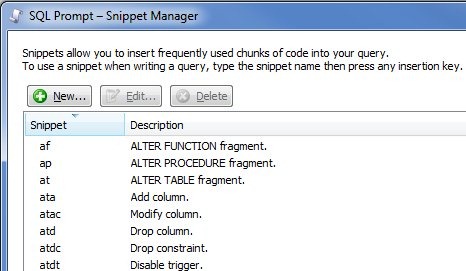
    If I type “zqd” in SSMS, and then hit tab, the T-SQL in the “code” box above appears. There are a few very frequently used slices of code that I can insert like this, without taking my hands off the keyboard, which is very handy. There’s even a whole snippet manager in Prompt that has pre-defined, and custom, snippets.
    prompt2

    The most often one I use is “ssf”, which inserts this:

    SELECT TOP 10 * FROM 

    So do you need to buy SQL Prompt? No, but if you do, tell them I recommended it so my boss with be happy and maybe send me a nice bonus next Christmas.

    A very similar functionality is in SSMS. I actually used to heavily use templates in the old Query Analyzer days of SQL Server 7/2000 and this has continued in Management Studio with the Template Explorer

    template1

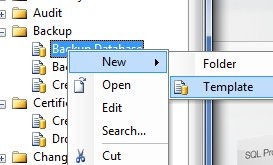
    I can drag a template from the explorer on the right into the code window and the code appears. I’ve pulled in the backup template. You can even add your own:
    template2

    It’s easy to do, and you can read more about Template Explorer in BOL.

    However if you’re like me, you move around, you use VMs for coding, and you want to be sure that your tools are on all these machines. There are a few ways to do this:

    • portable drives
    • cloud sevices

    I guess these are both the same thing, just implemented differently. I’ve used both ways, and while I do carry some flash drives, and hard drives, with various items on there, I find that I can never quite keep these up to date, and they’re really emergency drives for me in the event I don’t have connectivity.

    The primary way that I manage mode snippets, templates, etc. is by putting all my code in centralized places. For Prompt and SSMS, these locations are known, and while configurable, I stick with the defaults. For me this means I have three folders to track:

    • SQL Prompt default snippet folder
    • SSMS Templates folder
    • \SQL in my Documents folder in Windows

    All three of these folders are the same on all my machines, and I use a cloud service to keep them in sync. For me, I have two difference services in play, mostly for testing, and I see little difference between them. I have Live Mesh, a Microsoft service, for some folders, and DropBox for others. From what I’ve seen, they both work essentially the same, though DropBox is a little smoother for me with the Apple integration of some apps. That probably doesn’t matter for most of you, but it’s a difference. Live Mesh works on my Macbook, but not on the iPhone.

    There are other cloud services, and you can choose the one that works well for you, but I highly recommend you have a script library, as well as a snippet/template library, and you use a cloud service to be sure you can access those files if you are away from your primary machine. You might be surprised how handy this is when working on a server or remote machine.

    That’s my T-SQL Tuesday trick for T-SQL, better script management to make your work easier.

  • Jacks of all trades

    I'm a jack of all trades at the ranch, but not in software.

    Does your envrionment look like the one at Instagram? I’d bet that you ha there are a few of you that have an applicaiton or two that contains as many servers, components, pieces and parts, all held together with the proverbial duct tape and baling twine. I think I’ve had a few environments that were close to this complicated, but in general I try to avoid this type of mish mosh of technologies tools and platforms.

    When I look at the SQLServerCentral architecture, while much smaller, still scales nicely on a single database server (clustered) and a web server. If I needed more performance, I’d hope that I could do something more similar to the setup at StackOverflow, with better development and fewer parts of my architecture than adding the type of complexity that powers Instagram.

    That’s not to say that one environment is better than the other. I know that the staff at Instagram is learning a lot about integrating disparate systems, building new tools that can better manage their environment. As I read through the list, I’m not sure it’s a lot different than some of the environments I’ve worked in. If I listed all the pieces of software I’ve used in some applications, it might be just as complex, though it didn’t feel that way at the time.

    I tend to prefer a simple environment, using as few pieces of software as necessary, but using the pieces that are appropriate for the job. Rather than build a complex XML processor, or fumble with XML in T-SQL, if I could buy a module that handled that function, I’d be happy to do so.

    Working in technology is about choices, making the build/buy decision over and over, on a regular basis, and making the best decisions we can.

    Steve Jones


    The Voice of the DBA Podcasts

  • Working with SQL Server Third Party Vendors

    I ran across Denny Cherry’s (@MrDenny) blog on Fixing Vendor Performance Problems in which he outlines three methods of dealing with the. His list is basically

    1. Work with the vendor
    2. Do nothing
    3. Fix it yourself

    Denny recommends that you do #3, and add indexes, statistics, etc., and script them so that you can drop them if the vendor needs to access the database, and add them back afterwards. This is done to avoid voiding a service contract.

    I’ve done that in the past, but I try to avoid it. My first inclination is always to choose #1. I have had great success with this in the past, with a number of vendors, and it’s the item I recommend. Try to work within the system and make change, rather than just go "cowboy” right away and make the changes you think need to be made. I’ll give you the how and why I recommend this.

    How

    How do you get the vendor to make changes? The same way you get the best support you can from a vendor: you have a logical and rational discussion, explaining your thoughts with backing documentation.

    I have had vendors insist that the “sa” login was needed, and avoided it. I have fixed performance problems by getting vendors to add and drop indexes. I have convinced vendors that they application could run, and be supported, on an instance with other databases.

    All of this has been done with tracing the calls, analyzing performance, and then explaining where I saw issues with the vendor’s application. lt wasn’t done to prove I’m right, it wasn’t done to tell the vendor their code was sh*t, It was always done with me in the middle, along with the support person, between my boss, and their boss.

    Talk to the vendor like he’s a friend coding in the next office, and he’s doing his best, but perhaps doesn’t understand why something isn’t working well. Give them supporting documentation, show them execution plans, show them before and after views on test systems, give them reasons why a chance is needed. Even offer to be a guinea pig for the tests. I’ve done that before, and we convinced a vendor that they didn’t need to index every column in a few tables based on six months of evidence from our system.

    If they argue with them, perhaps they have good reasons. Get them to prove to you that they have logic and evidence on their side. They might, but if they don’t, then you ask to talk to their manager, or their development lead, and work through the argument there. Most vendors don’t want crappy performance, but as Denny mentioned, they often just don’t have expertise.

    Work with them, not against them.

    Why

    Why should you spend time educating and teaching the vendor about SQL Server performance? Obviously you want to maintain your support contract status. There’s nothing worse than violating this and then having a problem that doesn’t get supported. That’s an ugly conversation to have with your boss.

    You also don’t want issues with upgrades. I have seen more than a few problems with upgrades because someone “touched” the system. Make sure that you not only document the changes, but get the vendor to document them in your account. They might even work with you on upgrade scripts.

    Lastly, you want to be right. There are plenty of people out there that make mistakes, or make a decision based on an incomplete picture. You might be sure that an index is needed for this query that runs every day, but maybe the vendor tested it and found a better index, or they found it caused worse performance for some other queries. Maybe you’re misreading the evidence yourself.

    If you are forced to explain yourself, and can do so in a way to convince someone else, you should have more confidence that you are making the correct decision.

    Plus it gives you something to blog about and put on your resume. Winking smile

  • Encryption Works

    If you have better encryption than this, it will work.

    I don’t know that the government hires the best people or they have the best tools to work with, but they have some expertise. There’s a short note from Bruce Schneier that full disk encryption (FDE) does appear to by preventing unauthorized access to computer systems by police in many cases.

    If you read the comments, there are all sorts of flaws and potential holes with encryption, which are valid arguments. However that doesn’t mean that you shouldn’t implement any encryption on your removable or portable drives, especially those in laptops. Those devices are like the locks on your home or car. They can be defeated by determined professionals, but all too often the casual criminal doesn’t bother if they are in place.

    Keep in mind many laptops are lost, stolen, or sold without wiping the drives. Most people that received the drive wouldn’t bother to try and decrypt it unless they were sure it had something valuable on the drive. Since it’s no guarantee that a laptop grabbed at Starbucks or from a car has valuable data, most likely the target is the hardware, not the disk contents.

    I think disk encryption is a good layer of defense in your security strategy and worth implementing. My laptops are encrypted, mostly because it’s an easy security mechanism, and I’m not always sure if something I have on there is sensitive enough to worry about. My recommendation is that you implement FDE if you can.

    You should also make sure you are backing up your data. Losing the laptop might not result in the release of sensitive data, but losing the data itself could be a major problem.

    Steve Jones


    The Voice of the DBA Podcasts