This post is also serving as my T-SQL Tuesday post for the month. This month the party is brought to you by Stuart Ainsworth. If you want to know more about what T-SQL Tuesday is about, read Stuart’s post as well as Adam Machanic’s original post and then join in next month.
An inner join is essentially an intersection of two sets. If you go back to grade school, and think about sets, you can have two items like this:
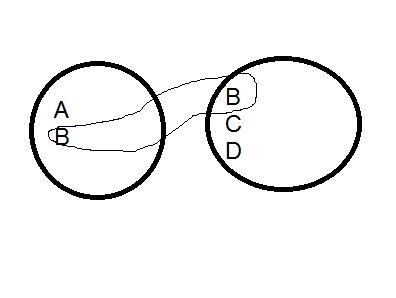
If you look at these two sets, you see that there are various elements in each set. If we were to show the intersection, it would be this set: (B). This is shown below (excuse my horrible artwork):
In SQL, we deal with tables, but we can model this as follows:
CREATE TABLE SET1
( mychar varchar(1) ) GO CREATE TABLE SET2
( mychar varchar(1) ) GO INSERT SET1 SELECT 'A' INSERT SET1 SELECT 'B' GO INSERT SET2 VALUES ('B'), ('C'), ('D') GO SELECT a.mychar
  , b.mychar
 FROM SET1 a
   INNER JOIN set2 b
     ON a.mychar = b.mychar
mychar mychar
------ ------
B      B
The results are the matching values in each table. In this case each table is a single column, modeling the images above where there is a single letter in each item of the set. The matching columns are the join columns, and in database work, these would be the data items that we are storing in both tables.
However to expand this, in a database table, we usually have multiple items, so each letter could be a series of data elements, or could have a series of other fields attached to it. Suppose I change these “sets” a little:
DROP TABLE set1
DROP TABLE dbo.SET2
go CREATE TABLE SET1
( mychar varchar(1) , Customer VARCHAR(50) , ActiveDate datetime ) GO CREATE TABLE SET2
( mychar varchar(1) , Customer VARCHAR(50) , ActiveDate datetime ) GO INSERT SET1 SELECT 'A', 'Bob', '1/1/2011' INSERT SET1 SELECT 'B', 'Bill', '2/1/2011' GO INSERT SET2 VALUES ('B', 'Steve', '1/2/2011'), ('C', 'Andy', '3/1/2011'), ('D', 'Brian', '3/3/2011') GO SELECT a.mychar
  , b.mychar
 FROM SET1 a
   INNER JOIN set2 b
     ON a.mychar = b.mychar
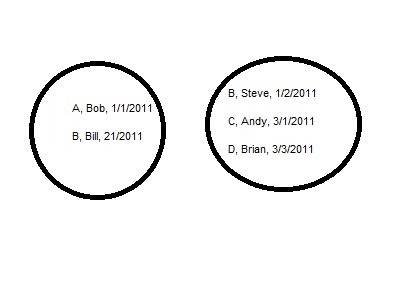
I still only have one matching row, but there are other data points. If I alter my diagram, they look like this:
The matching rows, in this case the rows with a “B” in them, have different data, which seems to be an issue. However suppose set 1 was a list of customers along with their first order date and set 2 was a list of salespeople and the dates they started. Then the join might be on sales, with the letter (A, B, C, D) representing the order.
That’s the basic of a join. It gets complicated as you look to join three, four, or more tables, but this is the basic idea of an inner join in SQL.
Advanced Study is hard, but worth it when you want to get better at something
I was talking with someone recently about features in SQL Server and they mentioned that partitioning was something DBAs should know. It’s only available in the Enterprise and Data Center editions for production use, but my friend noted that it works in Developer edition and felt there was no excuse for a DBA not being familiar with a feature that’s been out since SQL Server 2005, nearly four versions removed from its introduction.
I can understand that, but if you don’t have the ability to actually tune large data sets and see the impact of partitioning in a larger, production environment, it’s easy to dismiss this as a feature that doesn’t provide many benefits in a smaller situation. The same could be said for clustering, SSIS imports, or any number of features that aren’t often used. So how do you actually learn to get some experience with these features?
The first thing you need to do is get a copy of SQL Server Developer Edition and install it as a virtual machine on your primary computer. I use VMWare, but you could use Virtual PC, Hyper-V, or VirtualBox as well. The important thing to do is have a sandbox to play in and a machine you can easily copy, clone, or destroy as needed. I would recommend a base install of Windows and SQL Server DE, and then copy that for a machine you can experiment with.
One way to learn is duplicate the work that someone else has done. Make a copy of your virtual machine and then implement partitioning as described in an article. See if you can duplicate the way the author used the feature and get the same results. If you can’t, find out why, and if you can, experiment with the feature and try to improve the author’s implementation. The SQLServerCentral Stairway Series is a great way to do this in SSIS, SSRS, or other features that you may never have seen. Set aside an hour or two a week to learn some feature. After a month or two, you might be surprised what you’ve learned.
The most important is to understand how a feature works and gain some experience in using it. You might not become an expert, but being able to talk about the feature, and explain how you might use it in a situation comes from practice. That ability might get you the project or job that allows you to become an expert over time.
It’s been two years or more that I’ve been invited to SQL Bits. Not by email, but while shaking the hand of one of the organizers. Mostly Simon Sabin, but I think Darren Green, Allen Mitchell, or someone else has cornered me at PASS, the MVP Summit, or elsewhere asking if I’ll come over. I was ready to come in the spring, but a potential conflict with SQL in the City had me hold off a submission. I knew that time would be tight in the fall with PASS coming October, but I also realized that there probably wasn’t any good time to come, ever, so I should just do it. With Brad not coming, I decided to submit a few sessions, and a pre-con and see what happened.
My pre-conference session wasn’t selected, but I understand that completely. I’m not sure I’d pay for a pre-conference “career-based” session, so I wasn’t offended. However one of my regular sessions was voted in, so I made plans to come over, trying to limit my time away from family. This is the second trip in a 60 day time period where I’m gone 20 days, so shortening the trip was preferred. I planned on flying Wednesday, returning Sunday, and that worked out well. In fact, this is the first “smooth” trip across the water I’ve had. Four planes, four segments booked and four planes, four segments flown, with only a delay in Heathrow on the way back that didn’t affect my bookings. Whether it was SQL Bits or my trip through Canada, I don’t know, but I’ll be booking through Canada in the future.
A nice, smooth, easy flight on Air Canada
I arrived Thursday morning and went to Cambridge to visit the Red Gate offices. I was only there for a little over three hours, arriving in time to eat lunch, shake a few hands, and say “hi” to some people before a via ride to Liverpool for SQL Bits 9. Traffic was heavy at first, but lightened up and I managed a short nap on the drive. I think that, combined with a nap on the way to Cambridge had me feeling fine when we arrived. I checked in to the Adelphi Hotel, near the university, and just a short walk from the docks in Liverpool and skipped an 8:15pm dinner in favor of a run. I hadn’t run, had been traveling for 24 hours in real time by then, and needed a run. I took off through the streets of Cambridge, envisioning a 15-20 minute run. After turning around at the 10 minute point, I got lost, jogging for about 15 minutes before I realized something was wrong. I jogged a bit more, trying to sort things out, found a bus map, wasn’t sure where I was, and stopped a gentleman having a smoke outside a pub. He gave me directions that had me back at the Adelphi in 15 minutes, catching Allen White outside at the end of my run.
A quick shower, and then I was back downstairs, protein bar in hand, meeting people at the opening night party. I’d missed Chris Testa-O’Neil’s band, but caught part of the Fab Beatle’s second set while chatting with various people and enjoying a lager or two. The hotel was a nice, medium sized hotel, old, but with lots of architecture and trim everywhere and 25 foot ceilings in the exhibition hall. A nice looking place, made better by conversations with the various SQL people I’ve gotten to know over the years. Not a late night, I called it quits around 11, not exhausted, but tired and looking forward to the morning.
Friday was my day to speak in the afternoon, but I wanted to get the chance to see how the event ran. Up at 6:30am, running a couple miles with Allen White at 7:00, showering and then back down for breakfast at 7:45am. I’m not a big fan of English cuisine, especially breakfast and while the breakfast rolls and sausage were edible, they weren’t great for my limited American palate. Fortunately there was a large cauldron of coffee next to the cauldron of tea and that helped.
Laerte Junior came all the way from Brazil
The event was similar to PASS, or a SQL Saturday, but in between. Friday was the paid training day and there were plenty of people, over 200 there. Volunteers checked in the attendees, food was catered in the middle of the large exhibition hall, and sponsors had booths around the edges. Rooms were all around the exhibition area, spread out in various places, as you might expect in a hotel setting. It was easy to find any room and says to walk from one to the other in five minutes or less. Not as strict or formal as PASS, more organized than a SQL Saturday, but very well run. All sessions had video and audio recording, and I took advantage of that, popping in and out of sessions for 15 minutes, trying to decide if it was something I’d watch later. I did watch a few full sessions, but mostly I wanted the chance to meet and talk with people.
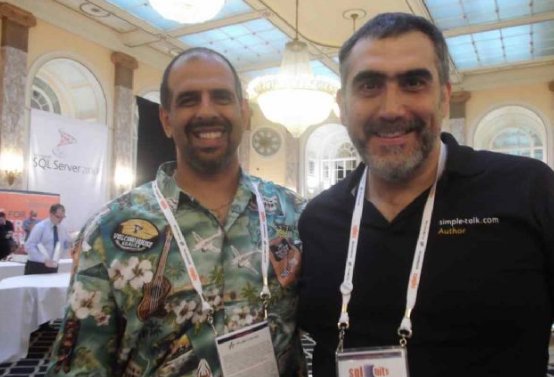
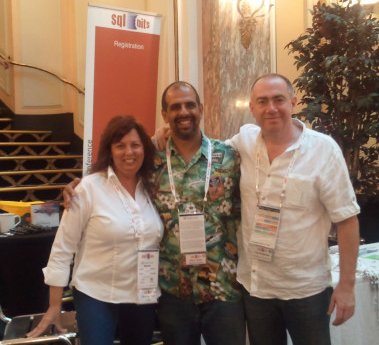
And I did. I had long stretches of conversation with many of the SQL Bits organizers, as well as a few UK SQLServerCentral community members. I don’t remember a lot of names (my apologies), but there were a few highlights. I met Laerte Junior, coming all the way from Brazil. We’ve talked before and exchanged emails, but this very talented Simple Talk author and I have never shaken hands or spent significant time together until this week. I met the famous Ola Hallengren, author of probably the best backup script out there for SQL Server, and I met Ed Vassie, author of the FineBuild automated install for SQL Server. The highlight, for me, has to be meeting David Poole. He and I have exchanged many emails over the years, and he’s been a very popular author on SQLServerCentral for 6 or 7 years. Getting the chance to talk with him for 15 or 20 minutes on a couple of occasions was great.
I liked the way the conference was organized overall. The sessions were 60 minutes, which I don’t like (too short for me), but there were 20 minute breaks in between. With coffee and snacks catered during those breaks, in the same room with the vendors, it was a great way for people to mingle, to talk to vendors, and get on their feet. I’d like to see 75 minute sessions instead, but this seemed to flow well throughout the day. The rooms were various sizes, but having audio (mics for speakers) and video meant that people could see and hear the sessions.
Food was plentiful and though I’m not a fan of everything that was served, I’m an ugly American and I wasn’t hungry. Breakfast and lunch were buffet lines, with vegetarian options. Coffee and tea were plentiful in large servers to start, supplemented by smaller thermal pitchers. There were plenty of mugs, milk, and sugar around and bottled water (still and sparkling) was everywhere in large bottles. I took advantage of this to fill a plastic bottle I carry, but there were real mugs and glasses available for others. Lunch and dinner were buffets with plenty of food. In between sessions there were snacks of all sorts placed out on trays. Usually sweets, so I didn’t partake, but they looked good. During the evening events, all the speakers and volunteers were able to give out lots of drink coupons and I think very few people paid for drinks. I know I had 2-3 drinks each night and still had coupons I gave to others.
Saturday night was casino night, with a series of tables set up in the back room for roulette, blackjack, craps, and more. There were also shooting and racing simulators. I’m not a gambler, even with fake money, but Andy Leonard, Allen White, and I took a chance on the virtual skeet shooting, proving that Americans might appreciate the second amendment, but they can’t necessarily shoot well. The organizers, and a few people dressed up in tuxedos or evening dresses. The ladies in the crowd definitely took it more seriously than the men as most of them were dressed up. I was in my normal clothes: Hawaiian shirt and jeans 😉 Everyone seemed to have fun, and the tables were plenty busy with those gambling their “free money” away. Like the SQLServerCentral party at PASS, this isn’t a real casino and everyone got $1000 of fake money when they walked in.
The downside, at least for this SQL Bits, was the wi-fi. It was very flaky in the conference area, seeming to die out on Friday after lunch and be very spotty on Saturday. However that wasn’t the big problem for me. The bigger issue was that the hotel didn’t have wi-fi. With a CDMA phone, I was hoping to use wi-fi to keep in touch with family and work while I was there, but that didn’t work out. Slightly annoying, but I lived with it across the 2 days I was in Liverpool, sending emails and letting them sit in my outbox, assuming they’d send when the wi-fi did work for my phone. I think most of my emails went, but with delays. Not a huge big deal, and for attendees, I’d assume most of them were UK people with data plans if they needed email or Internet access. I’ll plan for issues in the future and just not worry about any access problems.
The Main Exhibition Area at SQL Bits
A large crowd on Saturday, the free day, with people coming from all over England to the event. Again, a nice run in the am with Allen White, taking advantage of the great weather in Liverpool this weekend. A tank top and shorts were plenty for me at 7am, and I wasn’t cold at all. The hotel didn’t have AC, and it was definitely warm at times. There was one room on the mezzanine level that was closed off and fairly warm. Andy Leonard (blog | @AndyLeonard) did fine with a packed room, moving slow in his Southern style, but the next hour Gert Drapers was struggling a bit as he’s more animated and the room was packed again.
I left Saturday afternoon during the last session, for a long journey back to Heathrow to my hotel for the night. I am sorry I missed the prize raffles, which I hear go around the exhibition hall, allowing each vendor to say something and draw for a prize they are sponsoring, but I can’t control the trains and wanted to get to my room before midnight.
Overall it was a great event, and about half the people I had a chance to sit and talk with for 5 or 10 minutes had been to multiple SQL Bits events. Holding a 3 day event, with both paid and free days, is a great accomplishment and I applaud the SQL Bits organizers for making it work. Not once, but 9 times. I hope that someone will consider this format in the US, which is great.
Will I come back? I don’t know that I’ll make a dedicated trip to SQL Bits as I did this time. The travel is hard, and despite it being a smooth trip, it wears on me. However I do plan on coming to the UK once a year for a 2-3 day summit with my group at Red Gate Software. If I can convince them to schedule it during the SQL Bits week, I’ll definitely submit some sessions or plan on attending. I enjoyed it, the people were very friendly, and it was a very well run event.
When you create a SQL Server login (with SQL authentication), you have the option of enforcing password policies from Windows (in SQL Server 2005 and above).
The recommendation is that you check all three and force strong passwords. You also force a password change so the person has a private password not known by the administrator.
If you go back into this account later, and look at the boxes, only 2 are available to be checked. The “User must change password at next login” is grated out.
In order to access this box and force a password change, you need to change the password. The reason is that if the account is compromised, the hacker should not be the one to set a new password. The security model assumes the administrator can contact the legitimate owner offline and give them the new password.
Start typing in the password box, and you can check the box:
Of course you need to set a password that conforms to the policies, and it needs to match the confirm edit box