Author: way0utwest

  • Five Lines of Code

    An interesting story on how a database speeds up by changing some application code. Worth the read for sure.

    I caught this from Andy Warren’s blog, and it shows why we need developers to think for themselves and ask relevant questions, not just meet the spec. If someone had asked if Accuweather needed micro-granularity for location earlier, they might never have had issues.

  • Regular Audit Analysis

    Do you regularly review audit data?

    I was reading over a digital supplement that I received from Dark Reading recently, which details some of the issues in the Epsilon, Gawker Media, and a few other data breaches. It was light on details, but there were some nuggets of knowledge in there about how these attack occurred. Some were sophisticated, and some were insider attacks, but the advice given to help protect your data was all similar: limit access, watch for injection, audit, and monitor.

    I know that over the last decade as I’ve run SQLServerCentral, the topic of security and auditing has grown in importance. More and more people are implementing auditing functions in their applications and slowly tightening security where they can. There is a lot of work to do, and a lot more education that needs to be spread to a wider audience, but the trend is positive.

    However one thing in the article caught me eye, and it had me wondering how many people are going beyond the basics. For those of you that have auditing built into your application or database, I have a question this week:

    Do you regularly analyze the audit data to look for abnormal trends or access?

    All the data in the world doesn’t have any value if it’s not used. In a security context audit data isn’t all that useful if it’s only examined when an incident is discovered. The real value in auditing data is the ability to uncover problems before they occur. Looking for inappropriate access, unusual access for a particular individual or application, or even repeated attempts to gain access can help prevent a data breach.

    After all, catching the criminal later doesn’t necessarily mean you’ve “recovered” the data. Unlike physical objects, data can easily be copied and spread in way that prevents it’s complete recovery.

    Steve Jones


    The Voice of the DBA Podcasts

  • Setting a Unique Index on a Bit Field

    Can you set a unique index on a bit field? Well, you can, but you’d end up with a very short table of two (or three) rows. I defined this table:

    CREATE TABLE [dbo].[BitTest](
        [MyBit] [bit] NULL,
        [MyName] [varchar](50) NULL
    ) ON [PRIMARY]
    
    GO
    
    USE [db1]
    GO
    
    CREATE UNIQUE NONCLUSTERED INDEX [IX_BitTest] ON [dbo].[BitTest] 
    (
        [MyBit] ASC
    )WITH (PAD_INDEX  = OFF, STATISTICS_NORECOMPUTE  = OFF, SORT_IN_TEMPDB = OFF, IGNORE_DUP_KEY = OFF, DROP_EXISTING = OFF, ONLINE = OFF, ALLOW_ROW_LOCKS  = ON, ALLOW_PAGE_LOCKS  = ON) ON [PRIMARY]
    GO
    

    and then added some data

    INSERT BitTest SELECT 1, 'Test'
    INSERT BitTest SELECT 0, 'Test2'
    INSERT BitTest SELECT NULL, 'Test 3'
    
    SELECT * FROM BitTest

    This table has these rows:
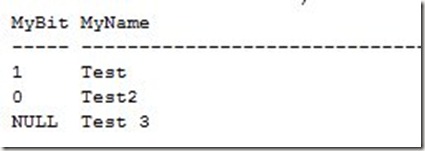
    bittest2

    Adding another row:

    INSERT BitTest SELECT 1, 'Test 4'
    

    gets you an error:

    bittest3

    However what about a compound index? What if I make the table larger and add more fields. Here’s a larger table:

    CREATE TABLE UniqueBit
    ( BureauID INT
    , CompanyID INT
    , DivisionID int
    , DefaultType BIT
    , ProductName VARCHAR(100)
    )
    GO
    INSERT Uniquebit SELECT 1, 1, 1, 1, 'Product 1'
    INSERT Uniquebit SELECT 2, 1, 1, 1, 'Product 2'
    INSERT Uniquebit SELECT 3, 1, 1, 1, 'Product 3'
    INSERT Uniquebit SELECT 4, 1, 1, 1, 'Product 4'
    INSERT Uniquebit SELECT 1, 2, 2, 1, 'Product 5'
    INSERT Uniquebit SELECT 1, 2, 3, 1, 'Product 6'
    INSERT Uniquebit SELECT 4, 1, 1, 0, 'Product 7'

    If I now add a unique index:

    CREATE UNIQUE NONCLUSTERED INDEX [IX_UniqueBit] ON [dbo].[UniqueBit] 
    (
        [BureauID] ASC,
        [CompanyID] ASC,
        [DefaultType] ASC,
        [DivisionID] ASC
    ) ON [PRIMARY]
    GO
    

    It works fine. I can add another unique row like this:

    INSERT Uniquebit SELECT 4, 2, 1, 0, 'Product 7'

    without an error. Adding in a non-unique row:

    INSERT Uniquebit SELECT 4, 1, 1, 0, 'Product 7'
    

    gives me an error:

    bittest4

    There’s nothing special about a bit column for a unique index. There are restrictions for bit fields in some ways that relate to indexing, but uniqueness is not one of them.

    This was inspired by this post (before the complete details from the OP): http://www.sqlservercentral.com/Forums/Topic1126794-149-1.aspx#bm1126850

  • The Age of Software

    Do you use old software?

    Does the age of software matter? It’s an interesting question and one which recently came to my attention after a blog post by Dan Jones. Dan works on the SQL Server team and posted a note that the SQL 11 (Denali) tools would only be supported on certain operating systems, of which Windows XP was not one. In the comments on his post it seemed that there was a split in how this decision was viewed by readers, with a number of people saying that a ten year old OS didn’t need to be supported and should be upgraded.

    However, in my mind, the age of the OS isn’t an issue. If the OS still works for you, there’s no problem running it. My wife’s company has the majority of their users on XP, and she just received a new laptop with Windows 7 just a few weeks ago. There wasn’t any fundamental reason for the change, as all their business applications work fine with Windows XP, but as new hardware is purchased, there often are not XP drivers, so employees are slowly moving. That seems to be the case with many companies, who find XP to be a very solid OS for most users.

    However for SQL Server, I agree with the decision. The test matrix for SQL Server tools is likely huge, and they are supporting two desktop operating systems (Vista and Windows 7) as well Windows Server 2008 and Server 2008 R2. I would rather that the resources working on adding features, and fixing bugs in SQL Server, not be diverted to working on XP or Windows Server 2003 as those are too old. Not old in age, but old in versioning, being more than a version behind the current operating systems.

    I know there are a lot of people that are not happy with this, and I can understand their reasoning, but I just don’t think that the number of companies that want to go to SQL 11, and are unwilling to allow developers and DBAs to upgrade to Windows 7 is large. Personally I’d rather have more resources devoted to more exhaustive testing on the current set of operating systems and fixing any bugs that are found.

    Steve Jones


    The Voice of the DBA Podcasts