Author: way0utwest

  • SQL Saturday Boston 2024 Plans

    I was accepted to speak at SQL Saturday Boston 2024, which is taking place on October 5, 2024. One month away. This is a fun event that takes place in Burlington, MA, just north of Boston. I’ve been there twice now and I’m honored and excited to go back.

    There is also a pre-con. Bob Ward is teaching an all day session on Friday, October 4th that is a Cloud Workshop for the SQL Professional. Check out the description and register today.

    Definitely come on Saturday. I have a new session that I’m working on to help you balance life and career, but there will be a bunch of other great talks. Each year I go there, I find a few interesting things to see and this year is no different. Check out the schedule and I’m sure you’ll agree.

    So click on over to https://sqlsaturday.com/boston and register for this SQL Saturday and I’ll see you next month.

  • Fifty Percent

    Most of us will have more than one job in our career. In fact many of us will likely find a new job in the next five years. I hope I’m not in that group, but I recognize that it’s a possibility. We never know when our situation will change, or our employer’s situation will change. That is one reason I recommend you keep your resume up to date and continue to work on improving your skills.

    I saw an office hours short recently from Brent Ozar, in which someone had asked him if they should apply for a job even though they didn’t meet all of the requirements or know all of the desired technologies. Brent recommended the person apply, and his reasoning was that often a DBA (or other data pro) often gets asked to do a variety of tasks in an organization. The DBA job often crosses lots of boundaries and may end up working on a Active Directory issues, reporting, ETL, and more. When A DBA leaves a job, the organization looks for a replacement that can handle that same wide variety of things.

    I think this is good advice, and I usually tell people that if you meet 50% of the requirements, apply. Part of this is Brent’s reasoning, part of it is because I’ve had to write job descriptions, part of it is because I’ve interviewed people. While we often have a standard description, usually I then think about how our technology matrix has changed over time and add items to the job description. If I ask another employee what else we might need in a candidate, more requirements get added. At some point, the job description isn’t realistic anymore and it’s unlikely we’d ever find a person that meets 100% of our desires.

    The other thing I’ve learned in interviews is that sometimes a candidate impresses us and makes the interviewer think about the position differently. Maybe the candidate is impressive enough in some areas that we can ignore their deficiencies in others. Sometimes the candidate might say something that causes me (as the interviewer) to pivot the job slightly to address other possibilities I think of at that moment.

    Job hiring isn’t a meritocracy. It’s a mix of many things, often depending on what the interviewer thinks at that time, how the candidate impresses them, and maybe some restrictions on who they can hire. I’ve seen companies that won’t hire developers without a CS degree, regardless of experience. I’ve seen situations where the hiring manager creates a new position because the candidate is so desirable. I’ve sometimes chosen a weaker technical candidate over a near expert in an area because of soft skills.

    There are lots of variables, and you can’t control them, but you can control a few things. You can work on the way you communicate with others and improve your skills, both verbal and written. You can also showcase your ability to learn and adapt, whether that’s with stories and examples or a blog that you can point to, documenting the work you’ve done on your skills.

    This is a tough time for many tech professionals, but it’s also a time where there are many open positions in lots of companies. Part of this is an mismatch of candidates and opportunities not finding each other. Part is a more discriminating approach from companies who don’t just want people, but talented people, talented in multiple ways including soft skills.

    You never know when you’ll need a new job, so make sure you’re prepared to impress others. Make sure you spend time on your career on a regular basis.

    Steve Jones

    Listen to the podcast at Libsyn, Spotify, or iTunes.

    Note, podcasts are only available for a limited time online.

  • Simple Talks Episode 5

    The fifth episode of Simple Talks is out.

    Simple Talks is the Redgate podcast from myself, Grant, Ryan, and Louis. The main page is here, and it has links to the audio versions as well as a the video one.

    This episode was recorded in Austin, where we celebrated the Redgate 25th Birthday as a company. Grant, Ryan, and I grabbed a conference room. Ryan and I also grabbed some cowboy hats that were in the office.

    20240717_162755

    This was a fun one, as both Ryan and Grant have a lot more experience with PostgreSQL, so I was picking their brains on which is better in different ways.

    We recorded a few more in Austin, which are being edited and scheduled. Look for those to come out in the next few months.

  • Stop Snagit from Saving .SNAGX Files Automatically

    I recently installed SnagIt and it was annoyingly saving both PNG and SNAGX files. This post shows how to get rid of the SNAGX file. If you just need the solution, scroll to the bottom.

    I installed Snagit recently with a new machine. The old screenshot software I had been using was banned by IT as it had an unpatched vulnerability.

    The main reason I want a screen capture tool is for sharing an image. This might be for a note for me, feedback to a product team, a part of a screen for a blog or article, or even showcasing something for a customer.

    What I have done for a couple of decades:

    • hit a hotkey
    • select a region of the screen
    • move on

    I expect to have the region of the screen saved in a folder on my workstation, where I can then grab it later and send it somewhere.

    The SnagIt Problem

    When I added SnagIt, I set up a automatic capture with these settings.

    • select: region
    • Effects: non
    • Share: File, automatic filename, specific folder
    • No preview, no delay, capture the cursor
    • Preset – One set up
      • hotkey: CTRL+Shift+B
      • Image type set to PNG

    This worked well, with my images being captured.

    Except, with every PNG, I also had a SNAGX file. That was really annoying because if I edit, I’m editing the PNG  and resaving it. I don’t need 2 image files.

    Customer Support

    I had a chat with customer support, who was not helpful. They suggested this article: Save to another format. I eventually got the person to understand I didn’t need that, and they said this wasn’t supported.

    I complained a bit on Twitter, mostly just annoyed. The person who responded gave me the same article, but then they responded later with the solution.

    The Solution

    The place to configure this isn’t the SnagIt app, which is where I’d expect it. It’s in the Snagit Editor. I’m guessing that the capture process calls the editor somehow, which is why this design exists.

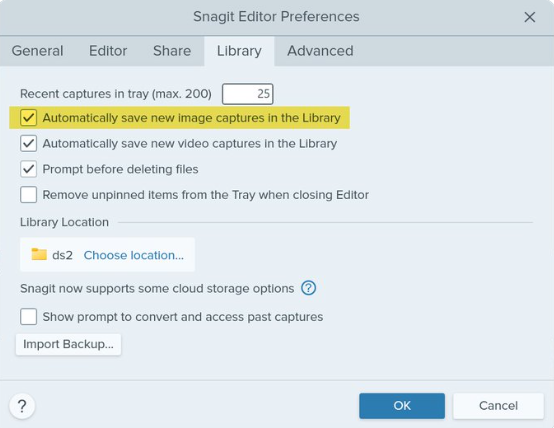
    Go to the Edit menu, then select Editor Preferences. Go to the Library tab. In there, uncheck the “automatically save new image captures to library”. It’s checked below, but remove that and it should stop with the SNAGX versions.

    2024-08_0118

    Summary

    No screenshots because, well, when I try to capture one the SnagIt app and Editor disappear. The one above is from Twitter.

    This is a weird architectural design. The capture widget would be the place I’d expect this, but the “save new image captures” implies to me all image captures, not just the SNAGX format. It’s poorly worded, IMHO, for users to understand.

    However, my problem is solved and I don’t need the job I created that runs every day and deletes *.SNAGX from my folder.: