Author: way0utwest

  • Rogue Colleagues

    The economy might be good or bad for you right now. Some of that depends on where you live, what your employment situation is like, what your habits dictate about how you live life, and more. No matter what your situation, likely there are people around you that complain about the world and others who think things are fine. There are likely more of the former than the latter, but that’s because humans tend to complain out loud more than they praise.

    When people think there is an economic downtown for themselves, they may be more likely to engage in malicious activities. While I don’t think most data professionals will start to hack other systems, or even their own employer’s systems, there is evidence to support the idea that some might be susceptible to recruitment by bad actors. This piece references some research and warns security groups to be wary.

    There is no shortage of books, or television and movie scripts that might show creative ways to access information, but how can you tell if a colleague makes a simple mistake or they are a bad actor? Clicking on a phishing email could be either one. Not removing anonymous access to an S3 bucket could be either. Losing their credentials through social engineering is something that happens every day. Who’s to say that this happened purposefully?

    I don’t want to second guess the people I work with making mistakes, but I also think these possibilities are why we want to use our computer systems with strong auditing and multiple groups reviewing logs. We might not necessarily stop all activity, but we can often detect it quickly and mitigate the issues. It’s also why DevOps and automated deployments with logging are a good idea. They can limit the problems from both accidents and malicious actors.

    My employer has started to do more education around security and how individuals can avoid accidentally causing issues. We use a lot of automation, and more all the time, that ensures once we know how we ought to patch and update systems, we can do it regularly and confidently. Repeatable, reliable deployments of changes are what we aim for.

    We know they’ll be some mistakes, but we also know that we can quickly identify issues (MTTD) and fix them (MTTR). Even if we get a bad patch from a vendor, we can quickly deploy a “fix” if we get one, or even reinstall and re-patch to lower levels, if needed.

    DevOps, GitOps, and other xxOps aren’t just about getting new features out quickly. They also include the ability to fix problems when the need arises. They don’t prevent rogue actors from causing issues, but they should help you detect and recover quicker than you might expect.

    Steve Jones

    Listen to the podcast at Libsyn, Stitcher, Spotify, or iTunes.
  • The PASS Data Community Summit On Guy in a Cube

    I’ve known Adam and Patrick for a long time and I’m thrilled with the content they produce on their Guy in a Cube show. It’s a great resource for anything Power BI, and now, starting to cover Microsoft Fabric.

    I’ve been on their show before, but we did a new episode recently, talking about the PASS Data Community Summit 2023. They are teaching a pre-con session on Fabric and I recommend going to this one if you have a need to do data warehousing in Azure.

    Give the show a watch, and I hope to see you in November in Seattle. It’s a great trip for both you and your employer. You’ll get a lot of value from the event and I’m sure you will bring some knowledge back to your team.

  • Looking Forward to the PASS Data Community Summit 2023

    I was lucky enough to attend the very first PASS Summit in 1999. It was a brand new event, and while not overly large, it was busy and crowded in the basement of a Chicago Loop hotel. I had the chance to meet Kalen Delaney there and ask her a question. That was the highlight of the trip, but I also learned a lot about SQL Server 6.5 and 7 there, spending all the time I could in sessions and hanging out after each one listening to the questions others asked the speakers.

    Since then, I have been lucky enough to go to most of the Summits. The event has changed a bit, and I look forward to going to see friends each year and re-connect with them. I’ve also loved meeting new people, often those I’ve corresponded with online. Each event has been memorable and exhausting at the same time. It’s a busy week, and I can sometimes feel overwhelmed. However, it’s always felt like it was worth the trip.

    I saw a video from Kendra Little where she talks about what she’s looking forward to this year. She has a few things on her mind: connecting with people, learning from the people who write the software, learning from those that use the software, broadening her horizons, and being a part of the data community.

    My thoughts are similar. Last year I was looking forward to the event in person, but apprehensive with all the commitments I had for Redgate with speaking. This year I’m much less involved, working more on things before the Summit and I’m hoping I can enjoy the experience more with less work during the event.

    For many years I was always excited about the SQL Server Central party. That was a highlight for me and I was sad when the referrals that funded it went away. Perhaps I’ll get find a way to get it back in the future. For now, I want to connect with more people. I want to do this casually in a few ways. From the #sqltrain on Sunday to a few quiet dinners with friends during the week to taking time at night to attend some of the events that various vendors will sponsor, that will be a great chance to bond with friends (new and old) in a social way.

    I also want to connect more professionally with people, which I’ll do in the Community Zone, as Kendra suggests, but also around the convention center. I am planning on not having to rush to many things, which means I’ll have more time in hallways and after sessions to talk tech with speakers and attendees. I’m always amazed by the ways some of you use databases and software, and I find myself learning creative solutions that I might suggest to others in the future.

    The last thing that I’m looking forward to is the chance to motivate a few more people to run SQL Saturday events in 2024. We’ve had some new events in 2023, a few more than 2022, but not nearly as many as we used to see each year. I’m hoping to connect with more community leaders and volunteers to try and get them to consider organizing an event in the future.

    The Summit is a great investment in your career as a data professional, and it can be a good investment for your employer. Make a case, show them you want to learn and grow, and that what you learn there will help you in your job. It’s a park for those of you that bring value to your employer and the can help with retention. You’ll gain knowledge and make contacts that help you on a daily basis.

    I hope to see you in Seattle this November.

    Note: The price goes up Sept 20, so get registered before then.

    Steve Jones

    Listen to the podcast at Libsyn, Stitcher, Spotify, or iTunes.

  • Friday Flyway Tips: Visualizing Undo Scripts

    One nice thing with Flyway Enterprise is that it will automatically generate the undo scripts for migration scripts. However, it used to be that finding these and seeing the script was hard. It’s easier after Flyway Desktop 6.5.2

    I’ve been working with Flyway Desktop for work more and more as we transition from older SSMS plugins to the standalone tool. This series looks at some tips I’ve gotten along the way.

    Undo Scripts

    If you have Flyway Enterprise, you can have Flyway Desktop automatically generate scripts: both forward (versioned) and undo scripts.

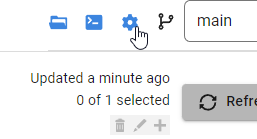
    The config option for this is in project options, which is in the upper right.

    2023-08-10 15_53_53-Flyway Desktop

    Clicking this

    2023-08-10 15_53_57-Flyway Desktop

    Once have this, if you add a new object, when you generate the migration script, Flyway Desktop will generate the undo script. In the older UI (pre 6.5) this was a script below the generated script, which meant you had to scroll down, or up and down to compare the forward and undo scripts.

    The new UI is better. Now there is just a button. Let me show you how to do this.

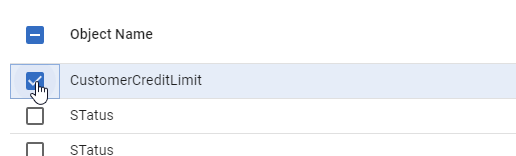
    First, I have a few changes in the schema model. I’ll select one.

    2023-08-21 12_27_19-Flyway Desktop

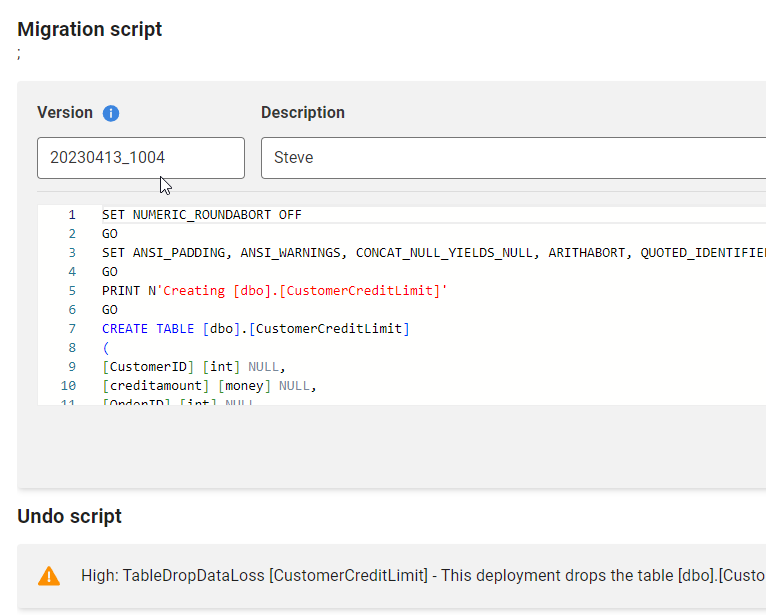
    Now I’ll generate the scripts. When I do that, I see the two scripts. The versioned (forward) script is first, and you can see the “Undo” at the bottom.

    2023-08-21 12_28_05-Flyway Desktop

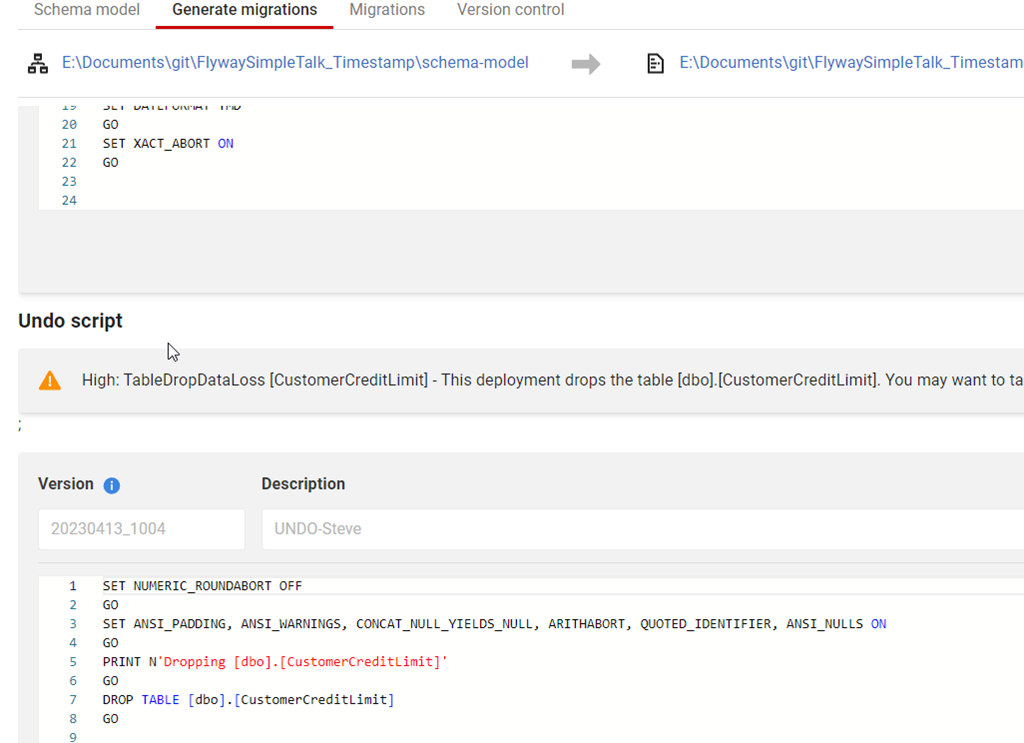
    Below this, the rest of the undo script is visible if I scroll down.

    2023-08-21 12_28_12-Flyway Desktop

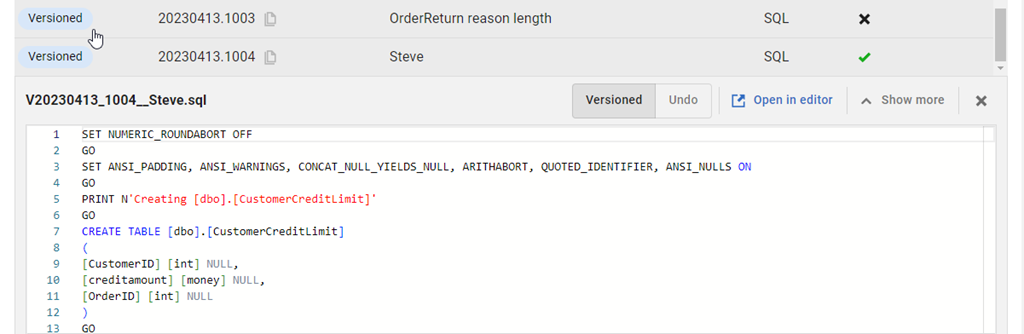
    It’s a bit of a pain to scroll up and down, so there is a small improvement in the migrations tab. If I go there, I can find my script at the bottom of the list and click it.

    2023-08-21 12_30_33-Flyway Desktop

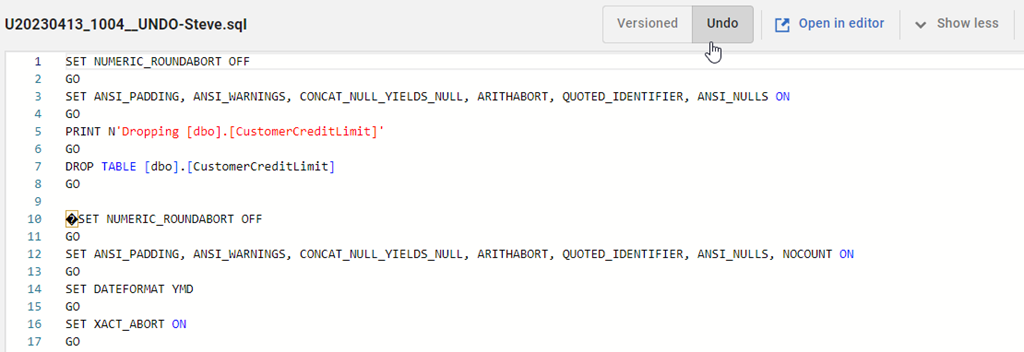
    At the top of the script, in the bar, there is now a set of toggle buttons for version and undo.

    2023-08-21 12_24_35-Flyway Desktop

    I can click back and forth to easily see both scripts. The V script is above, and the undo is below.

    2023-08-21 12_39_44-Flyway Desktop

    Try it out today. If you haven’t worked with Flyway Desktop, download it today. There is a free version that organizes migrations and paid versions with many more features.

    Video Walkthrough

    I made a quick video showing this as well. You can watch it below, or check out all the Flyway videos I’ve added: