I’m in the UK today, having arrived this morning in London. Hopefully, by this time ,I’m in Cambridge and at the Redgate office. Maybe sitting in the foyer alcove, playing a little guitar (like I did last Oct).
I’m here for a week of Redgate meetings as we kick off the year and it’s good to see colleagues and friends. All of the advocates are here, including Pat Wright, our newest advocate, and we’re hoping to record a Simple Talks podcast episode this afternoon. Maybe a second one if I can get someone from our data team to come in on a Monday.
Part of this week will be some brainstorming and planning for the year and I’m wondering if there are things you’d like us four advocates (myself, Grant, Kellyn, and Pat) to cover and discuss. Any hot database topics or things you’d want to hear about?
Leave a comment for me if there are things you want to discuss. Otherwise, we’ll have to come up with things that we think might be of interest to you out there.
I appreciate default passwords on systems. Often, for routers or other devices, I might need a way to connect initially. Or, if I perform a hardware reset, I want some password that I can use to reconfigure things. However, I am pretty good (not perfect, but really good) at changing those passwords to something else. It drives my wife slightly crazy at times, but I save the passwords and stick them in a manager I share with her periodically.
SQL Server doesn’t store a default password when you install it. If you enable the sa account, you need to create your own password. I primarily deal with containers, and I always set one, usually my own default. However, lots of software either allows a blank password or has a default password set on installation. Oracle even lists theirs in docs. That’s not the worst idea if sysadmins change them, but if they don’t, it’s a threat vector for attackers. I was working with a customer last year who had an Oracle database. I asked them to try a default user/pwd as a test and it worked. I think my head was slowly shaking for the rest of the call.
Recently, Silicon Valley saw the result of a default password not being changed when someone hacked the crosswalk signals and uploaded fake audio files that played when the signals changed. The vendor (not surprisingly) advised the city to change the passwords to something strong. A somewhat harmless prank, but it’s possible that someone might have made a more nefarious change.
It’s 2026. We know there are people out there with malicious intentions, as well as those whose prank goes sidesways and have unexpected side effects. There isn’t a good reason to keep default passwords anywhere, including in your own personal devices. These days, connectivity among many systems is a reality with network, Bluetooth, NFC, and who knows what other connections are possible. Your personal devices ought to have defaults changed for your own protection.
Inside organizations, it can be worse as the weakest link can be exploited to gain access to other systems. Quite a few hacks started in test systems and progressed to accessing production data. Even places we might not expect to be problematic, such as version control systems, have been used by hackers to gain access.
To me, finding a default password is worthy of a reprimand and a note in whoever’s file forgot to change it. A second offense ought to lead to a suspension at a minimum and possibly termination. This is such a low bar of required security that I can’t think of a good excuse to allow it anywhere.
When I was at the Small Data 2025 conference, one of the speakers was talking about their work with AI technologies. This person uses it a lot in their day job, often to complete tasks that they would have struggled to work on in the past, mostly because of time constraints, but also a lack of resources. Sometimes this person has an idea, but doesn’t want to distract themselves or others by having them work on a side project.
During a recent ride in a Waymo (self-driving car), this person had their laptop out and running Claude Code. They gave it a prompt, asking it to build a small app for some data analysis. During the 8-minute ride, the agent had spit out the code, a Readme, and committed this to a git repo. Later, the speaker tried it and found it solved most of his requirements, and then did some other work on the project, as well as having Claude write more code to get something that was beyond a minimally viable app.
He then gave us this William Gibson quote: “The future is already here — it’s just not very evenly distributed.” I’ve thought about this quote a lot during the last few decades, especially as mobile phones and apps have become prominent. In Colorado, the bandwidth and connectivity have lagged behind other places. When I get frustrated with the mobile network, I want someone to put a copy of that quote above every developer’s desk at Google, Microsoft, Meta, etc. so they realize the way things work in Silicon Valley isn’t how they work elsewhere.
I’ve been feeling that way about AI tech lately. It’s the future, and it’s not well distributed. There are some successes out there, among lots of failures, but I suspect that some of this is that we’re all working with unevenly distributed models, knowledge, and problems. Some of us are learning to use things better than others.
So I’m wondering, what do you think you could do in 8 minutes with a coding agent? Take a Waymo if you want, but you might be more comfortable with Claude Code (or another agent) at your desk. Take a problem you’ve been working on and give it to the AI agent. See what happens. Maybe even tackle a side project you can’t seem to find time on which to work and see what happens.
As I started this, I actually kicked off Claude Code and asked it to load some data from messy files into a database. Across a couple of days (I started late one afternoon), I estimate I spent 10 minutes approving actions, but for less than $5, I had a lot of data loaded (88 files) and the code to do it committed in a repo. With very little effort from me.
Think about what you could do in a few minutes with an agent. You might get something useful, with little effort or cost. It probably would not be a production-ready app, but it would be something to test an idea, or maybe some code that might inspire others to tackle some of their own backlog.
AI is a big deal in 2026, and at Redgate, we’re experimenting with how AI can help developers and DBAs become better at their jobs. One of the areas we’ve started to add some AI is in Flyway Desktop (FWD), with a few features designed to help reduce the cognitive load and context switches needed while developing code, and help users better understand what changes they’re making in their systems.
I wrote about summaries of migrations scripts last week, which are helpful when you or your colleagues don’t generate good script names, or commit messages. This post looks at another of those changes, which is the generation of the script name.
I’ve been working with Flyway and Flyway Desktop for work more and more as we transition from older SSMS plugins to the standalone tool. This series looks at some tips I’ve gotten along the way.
Generating Complex Scripts
In Flyway, we call the deployment scripts “migration scripts”, but they are the same thing. These are scripts that are changing, altering, or evolving our database schema in some way. New or altered objects, various schema items, and more.
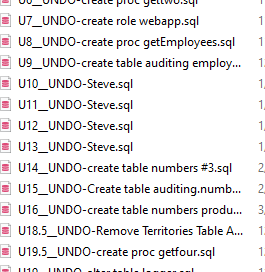
Our guidance for a lot of customers is to keep the migration scripts simple and easy. That can work, but sometimes we want to put a few things into a script to ensure that we deploy all the changes at once. In the last article, I had this list of changes in one script.
I generated this in the last post with a poor name.
Let’s fix that.
Using the Power of AI
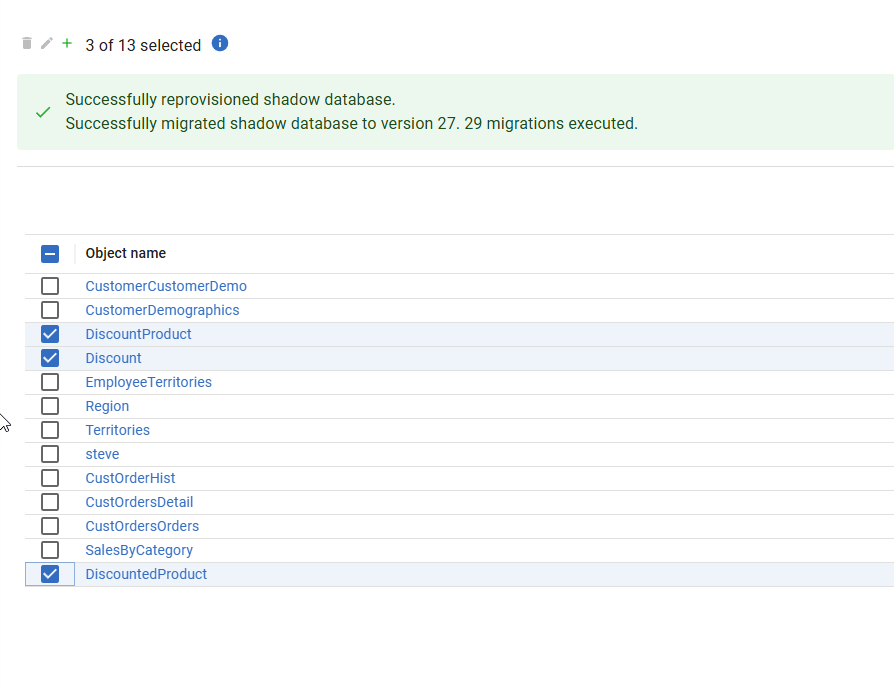
I’m going to delete that script and get my list of objects in the Generate tab. I’ll select a few, as shown below.
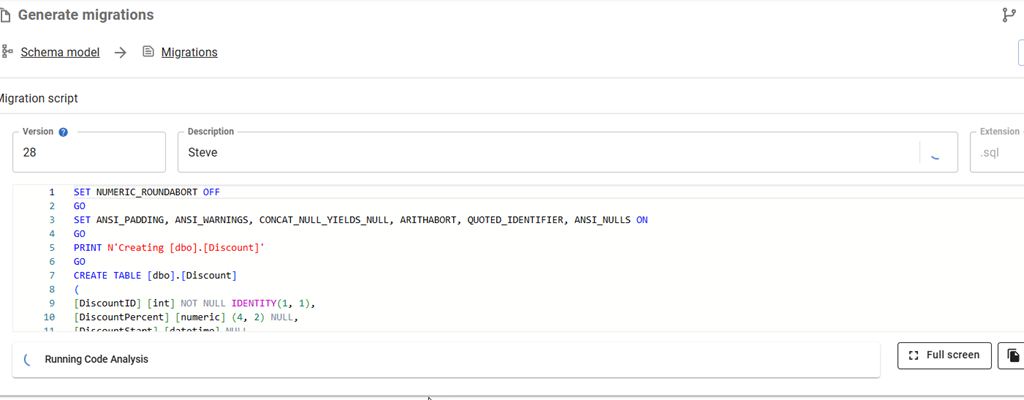
Now I’ll generate the script.When the script completes, I see my default “Steve” name for the description. However, look to the right. There’s a looping circle at the far right side of the Description box. I didn’t capture a good image, but it’s actually moving in a circle.
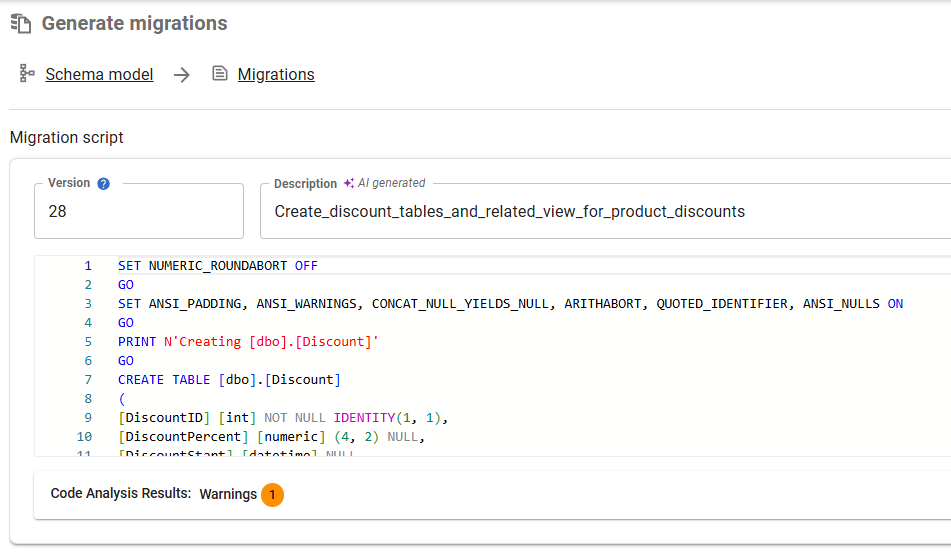
When it completes, I have a better description for my changes.
Let me save this and repeat it for the other changes to the customer tables.
That’s a way better description than I would typically write.
Enabling AI Features in Flyway
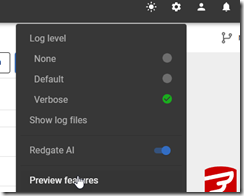
This is a preview feature as of Jan 5, 2026 as I write this. To get this in your FWD, your organization needs to have enabled AI features in your portal. I’m just a member, but whoever is an admin for your Redgate products would find it here.
In FWD, you need to look at the Preview Features item under the config menu.
In this area, you can enable or disable features as needed. I see these marked as Red-gate only, but I think they are supposed to be released to some customers by this time. It’s likely I need to upgrade my FWD, which I’ll do when I have time.
Once you do this, you should start seeing some AI stuff with the purple/pink shaded area and the sparkle icon that we’re all seeing everywhere.
Summary
Getting good migration script descriptions, or really any good descriptions, is hard. Developers get tired, they aren’t always creative, they forget things, and they sometimes just take the default.
Witness my repo.
This feature reduces the burden on developers and auto-generates a name for the file. It can be edited and changed, but the dev doesn’t have to.
This feature is documented, but we are likely to enhance and change it a bit, so all feedback is welcome. If your organization doesn’t want you using AI, and you could share some schema from a migration script, I’d be happy to test it for you and see what summary is produced and send it back to you. Ping me on X/LinkedIn/BlueSky if you want.
Flyway is an incredible way of deploying changes from one database to another, and now includes both migration-based and state-based deployments. You get the flexibility you need to control database changes in your environment. If you’ve never used it, give it a try today. It works for SQL Server, Oracle, PostgreSQL and nearly 50 other platforms.

![2026-01_0168_thumb[1]](https://voiceofthedba.com/wp-content/uploads/2026/01/2026-01_0168_thumb1.png "2026-01_0168_thumb[1]")


![2026-01_0173_thumb[1]](https://voiceofthedba.com/wp-content/uploads/2026/01/2026-01_0173_thumb1.png "2026-01_0173_thumb[1]")
![2026-01_0172_thumb[1]](https://voiceofthedba.com/wp-content/uploads/2026/01/2026-01_0172_thumb1.png "2026-01_0172_thumb[1]")