Author: way0utwest

  • Daily Coping 3 Dec 2020

    I started to add a daily coping tip to the SQLServerCentral newsletter and to the Community Circle, which is helping me deal with the issues in the world. I’m adding my responses for each day here.

    Today’s tip is to join a friend doing their hobby and find out why they love it.

    Joining someone else isn’t really a good idea or very possible during this time. Colorado is slightly locked down, so it’s not necessarily legal, and likely not a good idea to join someone else.

    However, my daughter picked up some supplies and started knitting recently. I decided to sit with her a bit and see how the new hobby is progressing. It’s something I’ve been lightly interested in, and it looks somewhat zen to sit and allow your hands to move along, building something while you sit quietly. I remember reading about Rosey Grier picking up the hobby years ago.

    I have done some minor paracord crafts, usually making some bag pulls for the kids I coach. This was similar, and while I don’t need another hobby now, I enjoyed watching her work.

  • Ignoring Comments in SQL Compare

    Recently I had a client that wanted to know how they could use SQL Compare to catch actual changes in their code, but not have comments show up as changes. This is fairly easy to do, and this post looks at how this works.

    Setting up a Scenario

    Let’s say I have two databases that are empty. I’ll name them Compare1 and Compare2. I’ll run this code in Compare1:

    CREATE TABLE MyTable
    (   MyKey INT NOT NULL IDENTITY(1, 1) CONSTRAINT MyTablePk PRIMARY KEY
       , MyVal VARCHAR(100));
    GO

    CREATE PROCEDURE GetMyTable @MyKey INT = NULL
    AS
    IF @MyKey IS NOT NULL
         SELECT
               @MyKey AS MyKey, mt.MyVal
         FROM  dbo.MyTable AS mt
         WHERE mt.MyKey = @MyKey;
    ELSE
         SELECT mt.MyKey, mt.MyVal
         FROM dbo.MyTable AS mt;
    SELECT 1 AS One;
    RETURN;
    GO

    I’ll run the same code in Compare2 and then run SQL Compare 14 against these two databases. As expected, I find no differences.

    2020-11-30 14_59_33-

    I used the default options here, just picking the databases and running the comparison. Let’s now change some code. In Compare2, I’ll adjust the procedure code to look like this:

    CREATE OR ALTER PROCEDURE GetMyTable @MyKey INT = NULL
    AS
    /*
    Check for a parameter not passed in. If it is missing, then
    get all data.
    */
    IF @MyKey IS NOT NULL
         SELECT
               @MyKey AS MyKey, mt.MyVal
         FROM  dbo.MyTable AS mt
         WHERE mt.MyKey = @MyKey;
    ELSE
         SELECT mt.MyKey, mt.MyVal
         FROM dbo.MyTable AS mt;
    SELECT 1 AS One;
    RETURN;
    GO

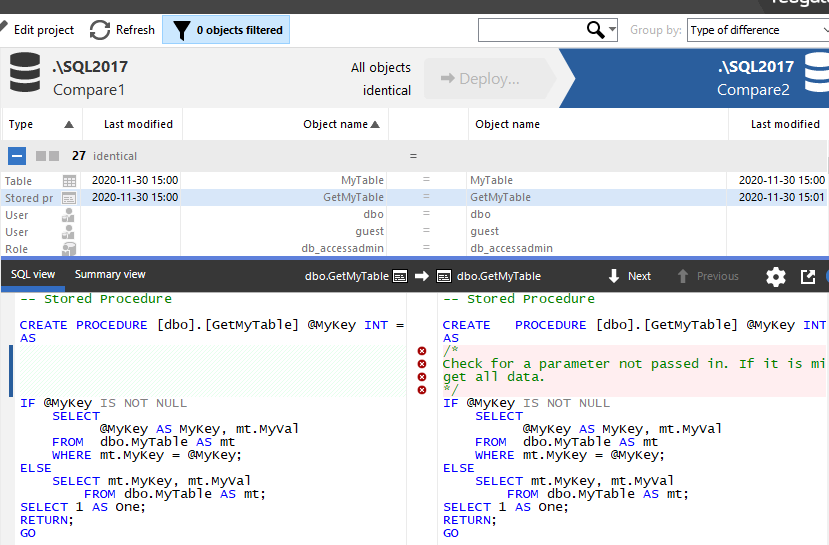
    I can refresh my project, and now I see there is a difference. This procedure is flagged as having 4 different lines, as you see in the image below.

    2020-11-30 15_01_59-SQL Compare - E__Documents_SQL Compare_SharedProjects_(local)_SQL2017.SimpleTalk

    However, the procedure isn’t different. I’ve just added comments to one of the procs. You might view this as different, in terms of how you run software development, but to the SQL Server engine, these procs are the same. How can I avoid flagging this as a difference and causing a deployment of this code?

    Changing Project Options

    Redgate has thought of this. In the SQL Compare toolbar, there is an “Edit Project” button.

    2020-11-30 15_06_34-SQL Compare - E__Documents_SQL Compare_SharedProjects_(local)_SQL2017.SimpleTalk

    If I click this, I get the dialog that normally starts SQL Compare, with my project and the databases selected. Notice that there are actually four choices at the top of this dialog, with the rightmost one being “Options”.

    2020-11-30 15_06_40-(local)_SQL2017.SimpleTalk_1_Dev v localhost.SimpleTalk_1_Dev.scp_

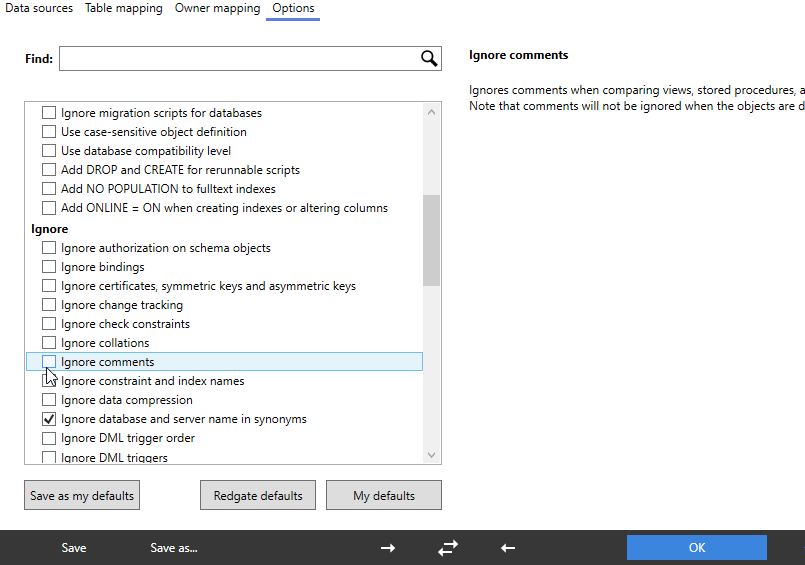
    If I click this, there are lots of options. I’ve scrolled down a bit, to the Ignore section. In here, you can see my mouse on the “Ignore comments” option.

    2020-11-30 15_08_06-(local)_SQL2017.SimpleTalk_1_Dev v localhost.SimpleTalk_1_Dev.scp_

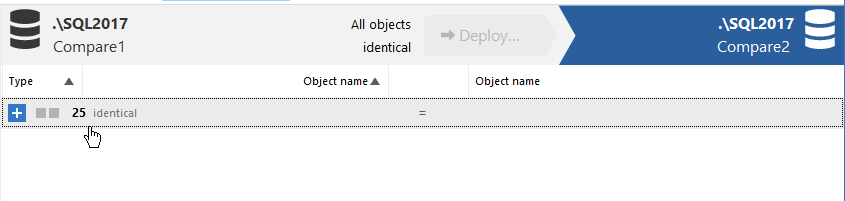
    I’ll click that, click Compare Now, which then refreshes my project. Now I all objects shown as identical. However, if I expand the stored procedure object, I can still see the difference. The difference is just ignored by SQL Compare.

    2020-11-30 15_09_36-SQL Compare - E__Documents_SQL Compare_SharedProjects_(local)_SQL2017.SimpleTalk

    This lets me track the differences, see them, but not have the project flag them for deployment. If I’m using any of the Redgate automation tools, the command line option for this is IgnoreComments, or icm. You can pass this into any of the tools to prevent comments from causing a deployment by themselves.

    This also works with inline comments. I’ll alter the procedure in Compare1 with this code:


    CREATE OR ALTER PROCEDURE GetMyTable @MyKey INT = NULL
    AS
    IF @MyKey IS NOT NULL
         SELECT
               @MyKey AS MyKey, mt.MyVal
         FROM  dbo.MyTable AS mt
         WHERE mt.MyKey = @MyKey;  -- parameter value filter
    ELSE
         SELECT mt.MyKey, mt.MyVal
         FROM dbo.MyTable AS mt;
    SELECT 1 AS One;   -- second result set.
    RETURN;
    GO

    The refreshed project sees the differences, but this is still seen as an identical object for the purposes of deployment.

    2020-11-30 15_17_15-SQL Compare - E__Documents_SQL Compare_SharedProjects_(local)_SQL2017.SimpleTalk

    If you are refactoring code, perhaps by just adding comments or clarifying something, you often may not want a deployment triggered just from changing the notes you leave for other developers. SQL Compare can help here, as can all the Redgate tools.

    I would recommend this option always be set, unless you have a good reason to allow comments to trigger a deployment.

    Give SQL Compare a try today if you’ve never used it, and if you have it, enable this in your projects.
  • Completely Encrypted Data

    I remember reading about, and doing some message exchange, with PGP, in the 90s. At the time I worked in a utility company and my boss and I were interested in whether encryption might be something we should implement. At the time, the integration with mail clients, and the relatively unsophisticated users limited our options, and we never moved forward, but I’ve always been interested in encryption and how it fits into our digital world.

    The technical bits have gotten easier, with https encryption automatically enabling for most of us, though perhaps only preventing limited attacks. We’ve gotten more options in the data platform, some that work well, some that require a decent coding effort, but they do work to some extent. At least, they make auditors happy and prevent silly leakage from something like a lost disk drive.

    One of the main areas where encryption has been controversial is in real time communications. Governments and law enforcement want to be able to eavesdrop on criminal activity, or maybe other activity, and individuals want privacy. This seems to be an ongoing battle between technical companies and lawmakers as to how to implement features and what limitations should be enabled. I noticed a story recently where Google is rolling out end to end encryption in its messaging apps.

    That got me to thinking. We capture and store data, and we may have some sort of communications in our system. If users demanded, or application developers built, end to end encryption, do we care as data professionals? Certainly we would need to allow for binary storage, and we’d lack insight or indexing into the actual data, but certainly could work with metadata like user, time, etc.

    There are also other considerations for us. If we store encrypted data, is this more of a hassle in dealing with legal requirements? Do we want to have another sort of PII in a key or have to constantly explain to management or legal staff that we can’t read the data because we don’t store the key? There are non-technical burdens that we might not want to shoulder.

    I do think that more systems ought to allow end-to-end encryption for communications, and user-managed keys are a capability that plenty of us might want in a world where no one physically sees the database server or disks. While I do like the idea of secure enclaves, which are catching on in computing, I also think that key management, especially for users, needs to improve. Perhaps we need a password manager for certificates, with backup included, to ensure our end users can properly manage their certificates across devices and in the event of any personal disasters.

    Steve Jones

    Listen to the podcast at Libsyn, Stitcher or iTunes.

  • Daily Coping 2 Dec 2020

    I started to add a daily coping tip to the SQLServerCentral newsletter and to the Community Circle, which is helping me deal with the issues in the world. I’m adding my responses for each day here.

    Today’s tip is to tune in to a different radio station or TV channel.

    I enjoy sports radio. For years while I commuted, I caught up on what was happening with the local teams in the Denver area. With the pandemic, I go fewer places, and I more rarely listen to the station.

    I miss that a bit, but when I tuned in online, I found some different hosts. One that I used to really enjoy listening to is Alfred Williams. He played for the Broncos, and after retirement, I enjoyed hearing him on the radio.

    I looked around, and found him on 850KOA. I’ve made it a point to periodically listen in the afternoon, hear something different, and enjoy Alfred’s opinions and thoughts again.