I wish I was surfing, but no, just traveling for work. You get Surfing.
Author: way0utwest
-
Restoring an Expired Certificate–#SQLNewBlogger
Another post for me that is simple and hopefully serves as an example for people trying to get blogging as #SQLNewBloggers.
One common task that you might need to handle if you work with encryption is dealing with a certificate. Whether this is for TDE, SSL, or something else, you will want to ensure that you know how to restore a certificate.
I’ve written about this before (restoring a certificate), but what about restoring an expired certificate? If you forget to replace one in TDE, does it still work?
Tl;dr yes.
Validating a Restore
I backed up an certificate from one instance that had expired. I used this in a customer demo a few years ago, and it was on my system. Here’s what I saw.
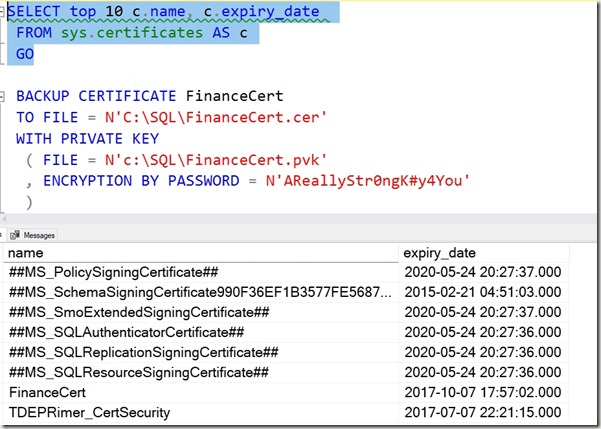
I ran the backup script shown to get the expired backup of the cert.
Next, I connected to a new instance and ran this.
CREATE CERTIFICATE FinanceCert

FROM FILE = N'C:\SQL\FinanceCert.cer'

WITH PRIVATE KEY

(
     FILE = N'c:\SQL\FinanceCert.pvk',
     DECRYPTION BY PASSWORD = N'AReallyStr0ngK#y4You'

);
This completed, but I get the warning that this cert is expired. It’s a warning. SQL Server will still use the certificate to decrypt anything necessary, like a DEK for TDE.
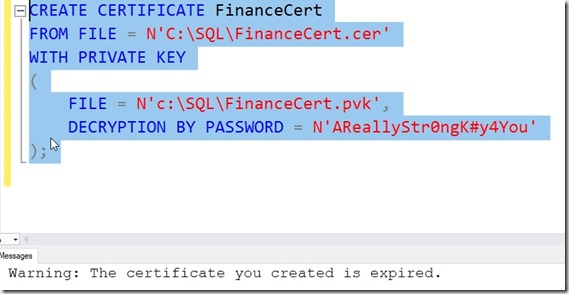
This is a good reason to keep an eye on certificates, as someone might be worried about expired certs. They work, but some people (auditors) do not like to see these in use.
To change the certificate used, see Key Rotation in TDE.
SQLNewBlogger
Anything DR related is a good skill to showcase. Blog about your practicing different skills. The writing will cement the skills further in your mind and employers will appreciate you showing the way you handle things.
-
Always Check on the Basics
I’ve been working with SQL Server for a long time, and one of the things I’ve learned is to not assume others view the platform and its administration needs in the same way that I do. I have usually started examining new instances with the same skepticism I’d use if my Mom told me she’d installed the software. I’m sure she could do it, and likely use some wizard and Google to get some backup scheme implemented, but I don’t know that it would be the schema I’d want to use.
This week I noticed a piece from Lori Brown, of SQLRx, which talked about a few basic settings that I’d always want running on my systems. One of these is the CHECKSUM setting. It’s a checkbox in the SSMS dialog, and an option in T-SQL. Most third party tools, like SQL Backup Pro, include similar settings. To me, this ought not to be a setting, but rather a default that always runs. NO_CHECKSUM is the default, which is silly in 2019.
In any case, I’ve seen more than a few presentations on the backup process in SQL Server. They always seem to be beginner sessions, always have more people than I expect, and remind me that this process, which is solid and stable, still has a lot that people don’t think about. There are certainly nuances to performing backups, and restores, in a manner that doesn’t generate any RGEs.
I don’t usually use the VERIFYONLY option, as to me the file isn’t really tested until it’s restore. This is one reason I recommend having a process to regularly restore your backup files on a test system. Not for use, though you can certainly use them, but more just to ensure your file system, your storage network, all the hardware involved hasn’t caused any issues with the backup file. If you build a server for this process, make sure you add enough RAM, as someone recently learned.
My feeling is that backup and restore is the most critical aspect of managing your SQL Server instances. This is the first thing I get working, and the number one ongoing concern I have to ensuring data is available. Second would be security, and everything else follows from there, but having a solid backup and restore process is the foundation of all other system administration.
There are lots of ways you can learn more. We have articles, a free ebook, and more at SQLServerCentral. The best way, however, is what Lori has done. Do some testing. Run through some scenarios, check how long things take in your environment, and ensure that your backups are capable of meeting the RTO and RPO needs of your organization.
Steve Jones
-
Do You Deal with UTF-8?
Microsoft is adding UTF-8 support in Azure SQL Database, and it will be coming in SQL Server 2019. If you don’t know what this is, perhaps you want to read a bit about it, as it can save space if you have the need to use Unicode characters. This format uses a variable number of bytes to encode characters, and this is often used on the web and email. My question today is:
Are you looking to store data in UTF-8?
The way this works with SQL Server can be complex. In fact, not everyone thinks this is really done well, as there are some bugs in the initial versions. As I’ve watched some people try to work with this, it is a very confusing and complex topic. I thought this might be a simple “SQL Server handles everything” collation, but it doesn’t appear that this will be the case. Calculating space needed for data isn’t as simple as I might expect. Not having to prefix strings with N is nice, but I’m not sure that this will actually work in practice.
I’ve seen some discussions of how to work with this, and it’s complicated. In fact, it’s not easy to tell how much storage you might need for characters. The storage differences can be confusing, depending on the code range you work with. Since most of us know that our users will try to add data we would never expect to our database, and we might run into issues with not enough space. For those of us specifying the size for our columns, we now need to know how many bytes are in use, not characters.
Likely this is easy for those of us that work in the English world and stick with varchar, but maybe not. I’m curious today how many of you will attempt to work with UTF-8 (or are waiting for it). It would also be good to know about any challenges or issues you’ve had working with the encoding in other systems or languages.
Steve Jones
Listen to the podcast at Libsyn, Stitcher or iTunes.


