Author: way0utwest

  • IT Staffer Fired

    In the early 2000s, it seemed that many companies were hit with a rash of virus attacks on their networks. Certainly the SQL Slammer worm affected many of us, and it was a memorable week for me. I returned from vacation to get a call late on Sunday night informing me of issues. I spent a long work working with network people and Microsoft to rid our (shut down) network of the worm, a difficult process with a wide deployment of MSDE instances installed in non-standard locations.

    Not long after this, we had another virus invade our network and shut down systems. This was due to a high level manager clicking on an attachment in email, which spread issues to (far too) many others inside the company. Another long night for me patching and cleaning systems, and one where I questioned how someone could be fooled.

    In the last year, a similar rash of incidents have spread around various organizations, this time with ransomware instead of viruses. One Florida city government was hit, with an IT worker being at fault for opening a document they received in email. The result? The city paid a ransom and the employee was fired.

    Is this fair? I’ve seen the Twitter mobs and rapid comment trolls condemning and praising both sides. It appears many people rightly think someone clicking on unknown attachments should be fired, while there is no shortage of others that understand that humans get fooled and termination is too harsh.

    Personally, I don’t know what to think. While most phishing and spam is poorly written, and I often check headers and easily see these notes for what they are. I have seen some very sophisticated and incredibly deceitful emails that might fool most of us.

    If you have a privileged account, you better be really careful about opening any attachments from email. You shouldn’t download pictures by default except from whitelisted senders, and you might even want to stop doing that. Who knows if your co-worker or business partner got fooled.

    It’s disconcerting though not unexpected. Perhaps this person was at fault, perhaps it was  mistake. Being fired is never fun, and all of us should be a little worried about this if we’re not careful.

    Steve Jones

    Listen to the podcast at Libsyn, Stitcher or iTunes.
  • Actual Kubernetes

    This post continues looking at my process of learning more about Kubernetes. I’ve been working through the 50 days of Kubernetes (K8s). I completed the first 3 sections (Days 1-15). This starts the look at Days 16-20

    Disclosure: I actually ran a kubenetes cluster in Azure Kubernetes Services (AKS), but just using scripts from Andrew Pruski.

    Starting to work with Kubernetes

    Setting up Kubernetes is cumbersome. The setup and configuration is a little daunting but this look gives you a quick start. Microsoft is working with Katacoda here to run some things in the browser. I’m guessing they have some virtual environment you can use to get things running here.

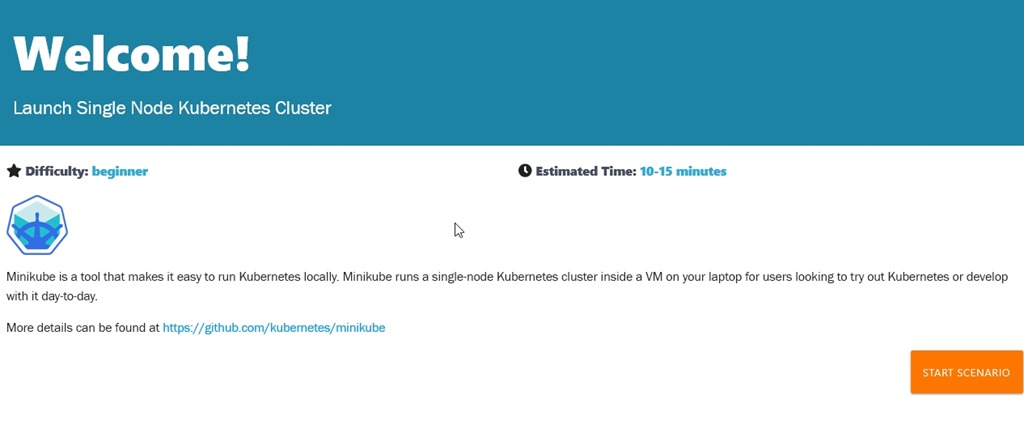
    When clicking the Day 16, we start with the welcome course that launches a single node Kubernetes Cluster.

    2019-07-09 15_21_53-Microsoft Edge

    When you start the scenario, you get the course on the left and a terminal on the right. If you click a section of code (like minicube version), it will run this in the terminal.

    2019-07-09 15_22_42-Microsoft Edge

    I typed most of the commands to get a feeling for the work. It’s definitely some work here, and lots of commands. I think I’d prefer to let Azure or AWS run this for me, but I guess I’ll still admin some of it.

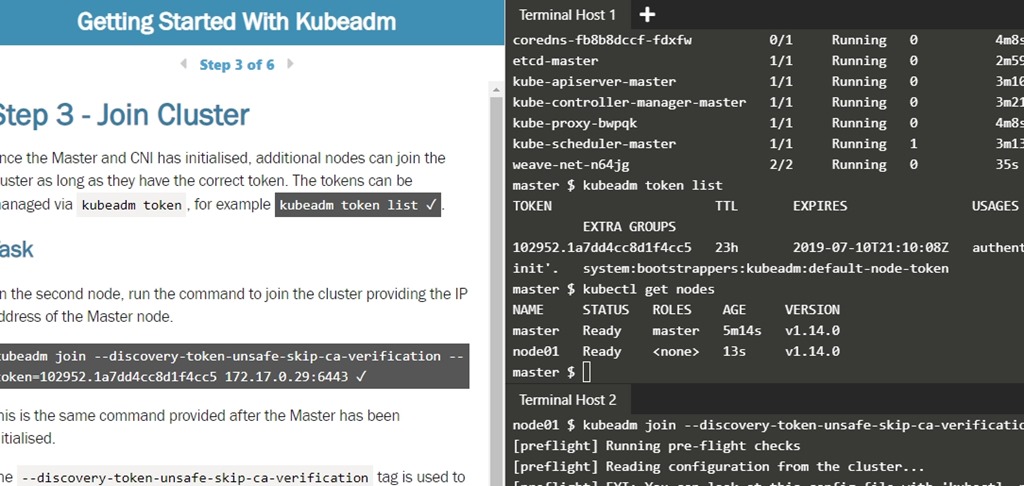
    The first course gets you a cluster with minikube. The second course lets you set up a two node cluster, which is a little more interesting. After all, the idea here is that you want a whole series of machines to act as a cluster of nodes. The process to join nodes is with a token, at least here it is. There can be other authentication if you really do this.

    2019-07-09 15_16_26-Getting Started With Kubeadm _ Kubernetes _ Katacoda

    Continuing through the course across a few days, I got a feeling for how to join new nodes and change the configuration of the Kubernetes cluster. For the most part, I have a general idea of how to set up new nodes, access tokens, etc. While I don’t really know how or why to make changes, I do at least understand what changes are possible.

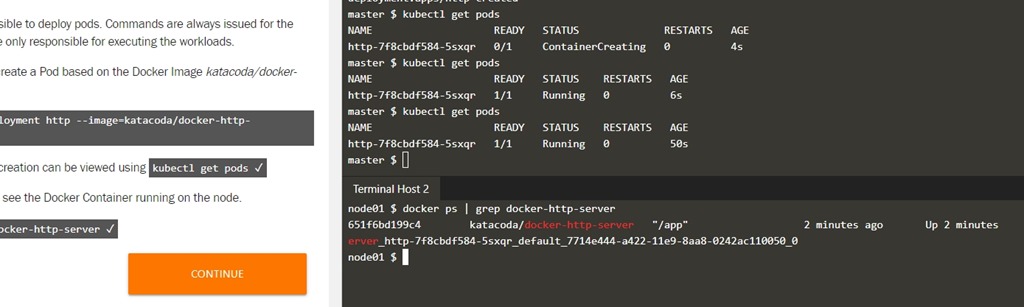
    I did run the “get nodes” or “get pods” a few times, seeing the different messages as new containers/pods were being created, noting the delays as things are deployed. I also learned that the containers distributed on the nodes are shown under the Docker command CLI. That is interesting and unexpected to me, though it shouldn’t have been.

    2019-07-11 15_28_05-Getting Started With Kubeadm _ Kubernetes _ Katacoda

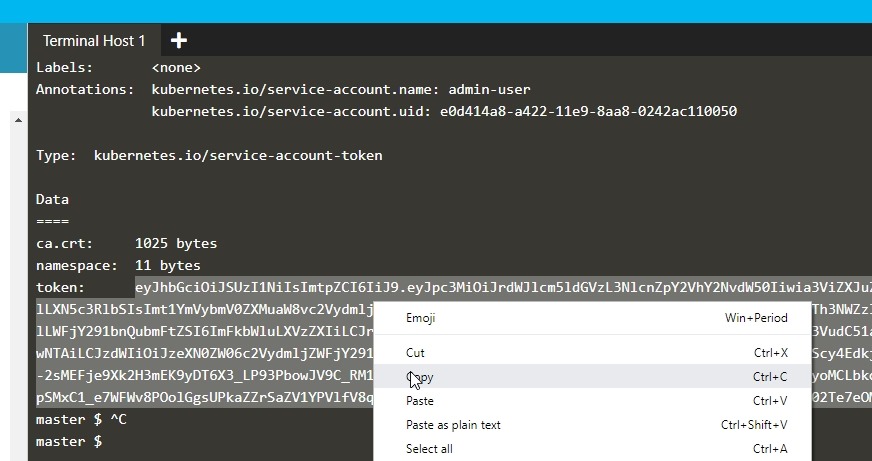
    One thing to be aware of when trying to access the dashboard is that the token copy needs to be with a right click. At least for me, CTRL+C didn’t work.

    2019-07-11 15_30_25-Getting Started With Kubeadm _ Kubernetes _ Katacoda

    I even re-ran a few deployments, adding new pods and web servers to the deployment, which was interesting to me.

    Working through scenarios

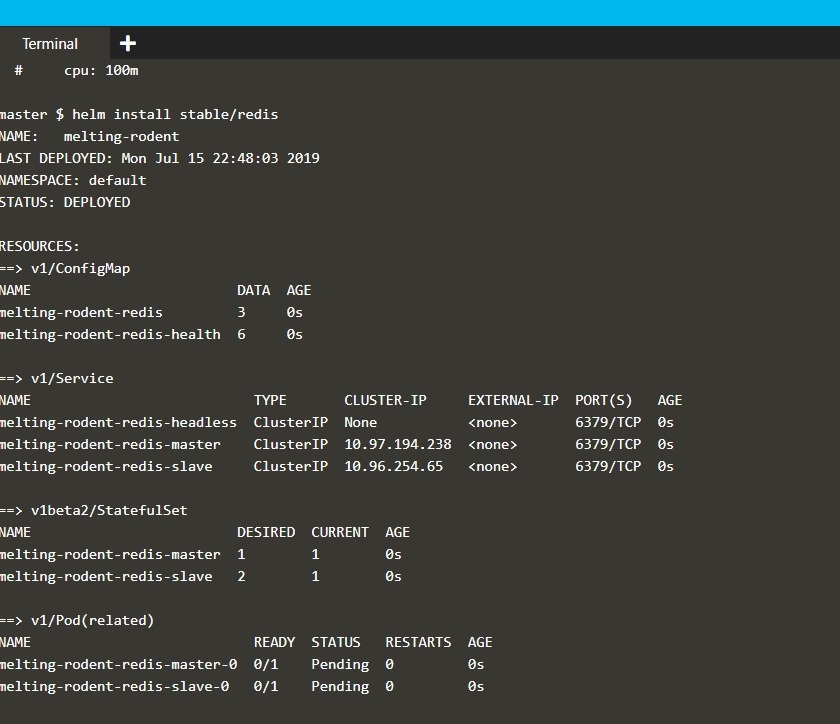
    In this course, there were 17 different scenarios. Adding volumes, networking, stateful services, building deployments, etc. Even using Helm.

    2019-07-15 16_48_21-Helm Package Manager _ Kubernetes _ Katacoda

    For most of these, I’d click the code to run it, and read through the results, seeing how this works. The actual details of creating a secret and retrieving is aren’t likely things I’ll remember, More, I’m just trying to understand how things work.

    The different scenarios do give you an idea of the breadth of Kubernetes capabilities. Certainly if you need to do these things, it would to go through the course, maybe even changing around some parameters. I’d suggest you go through this if you’ll be deploying systems and applications.

  • Phishing Defenses

    I wrote recently about an attack on utility companies by crafting a clever email aimed at specific engineers. That could easily happen with software developers and IT pros, which is why I think it pays to be extra cautious when dealing with any communications that come from others. Whether emails appear to be from internal or external users, phishing is a real concern for those of us that have privileged access to systems, and it should continue to be a concern for the foreseeable future.

    I ran across an article that talks about some of the defenses that you can implement. Certainly education is key as one person noted in a comment on my previous article. They said their security department sends around pictures of phishing emails. That’s a good idea, but the volume might be overwhelming in today’s heavily probed environments. I think it would be easy for me to make a mistake after seeing too many examples and when I’m expecting some communication from someone and I get a phishing email on that topic. Still, educating users with privileged accounts know this is a regular occurrence is a good idea.

    I know in larger companies, there ought to be some group that knows about phishing issues in depth and centralizes information. Having a support channel (email, Slack, whatever) for people to contact when they have questions is a great idea. I know I do sometimes contact my IT group if I’ve gotten something that seems suspicious. Letting some central group manage reports and provide information also allows that group to help keep a list of sites that should be blocked more up to date. If someone is clicking through but there are blocks to prevent access to links, or even communication from trojans, this can mitigate some of the issues.

    Perhaps the best idea, however, is to ensure that backups are taking place and restores can be performed. We know this is critical for databases, but other types of data you use might be valuable as well. While I know that my Drop Box and One Drive folders might get hit with ransomware, I also know my subscription allows me to restore older versions, which hopefully would be un-encrypted.

    Security is a constant battle, and the criminals continue to come up with new attack techniques, often with success. Ensure you remain vigilant, educated, and help others in your organization to do so as well.

    Steve Jones

    Listen to the podcast at Libsyn, Stitcher or iTunes.
  • Lots of data in RAM

    I remember buying my first computer after college. At the time I was working part time and in graduate studies part time. My aging high school era Apple II wasn’t capable of handling the load, not to mention its 300baud modem wasn’t a lot of fun. I could likely have gotten a faster modem with a serial connection, but most of the modern Internet providers wanted Windows or a Macintosh OS.

    I decided to just spend the money and get a computer. Being a bit of a geek, I wanted to customize things a bit and get the most bang for my buck. At that time, I paged through Computer Shopper, looking for deals on parts and trying to find the cheapest 486 CPU I could. I made various choices, one of which was the RAM. I remember thinking hard at that time about whether I could get by with 2 1MB modules or did I need to go ahead and max out the motherboard and get 4. These days I think about GB, not MB, and 2 or 4 isn’t a good number.

    One of the first servers I built at one job was with 8MB chips, getting 32MB into a machine, which felt like a lot. Certainly more than I’d ever had in a computer before. I also remember helping write a PO for a Netware server that cost US$250,000, one with 256MB of RAM. It was the size of a washing machine and filled with 32MB HDDs, making it by far the largest machine I’d seen to date.

    That’s a nostalgic view back to 1992, when I was working on my CNE certification. I always think about that large, very expensive machine when I see some leap of hardware. This past week, it was a DD4 Gen-Z memory module that has 256GB of RAM in a stick. That’s not only a larger scalar value than the RAM sticks I started working with, but it’s an order of magnitude more memory. Imagine 4 of these sticks giving you a terabyte of RAM in a desktop. Who among us wouldn’t want this for our desktop SQL Server development?

    This level of tech isn’t ready for most of us, but it’s not that far off. 32GB laptops aren’t common, but they are easy to find. You can even get 64GB of RAM now if you want to. How long before we see 128GB+ desktop and laptop machines? I have no idea, as we seem to be in a bit of a hardware lull. Most developers run 8GB or 16GB, and it seems like this has been the standard for quite a few years.

    I don’t know if we’ll start to see some vendors pushing to add more RAM. Certainly the cloud has changed things with lots of processing and storage occurring off the local system. At this point I’d expect that three years after buying my last laptop, I’d be able to get 32GB in the same form factor for the price I paid a few years ago, but that’s not the case. The machine supports 32GB, but it’s pricey, the same price it was 3 years ago.

    I wonder how many of you are still power hungry, wanting more powerful machines. Or has the level of performance you get from your i7 on Windows or OSX been good enough the last few years? I think this machine works great for me, whether running VMs or containers. 16GB does the job well, and I’d look to get the same level of hardware when I replace this laptop.

    Steve Jones