Author: way0utwest

  • Keynoting at SQL Saturday #831–Christchurch

    After our SQL in the City Summit in Brisbane last week, Hamish Watson () asked me if I’d do a short version of my keynote talk at the upcoming SQL Saturday in Christchurch this week. I was happy to do so and I’m excited to get the chance to welcome you to the South Island 2019 event.

    If you haven’t registered, and you can come, do so now. Tell your friends, colleagues, family, kids. Bring your kids and let them get some exposure to a SQL Saturday and the exciting Data Platform.

    There’s an exciting schedule, with lots of great sessions. I’m looking forward to a few myself, and if you are interested in Always Encrypted, I’ll give you an overview and demo of this in my session.

    Lots of core database sessions, BI, even a predictive session from Greg Low on technologies to watch.

    Register for SQL Saturday #831 – Christchurch and I’ll see you Saturday.

  • High Prices for High Security

    I was excited to see the new Secure Enclave technology come to Always Encrypted (AE) in SQL Server 2019. I’ve thought that the way Microsoft implemented the AE technology in SQL Server 2016 was a start and a good step forward, but it had too many restrictions. Kind of like Availability Groups in 2012 and In-Memory technology in 2014. A good idea, but not really ready for most of us to use.

    One of the biggest restrictions in SQL Server 2016, in my opinion, was the inability to run range queries on encrypted data. These are the greater than, less than, and LIKE items that many of us need to use in applications. This made sense, since the server doesn’t know how to decrypt the data, but many applications need these queries.

    That goes away in SQL Server 2019 with Secure Enclaves. I’m looking forward to testing and working with this, but there’s one interesting limitation for me. The SQL Server computer that runs the secure enclave must meet one of these requirements. It has to run on Windows 10 or Windows 2019 Server – Datacenter Edition. There also has to be an HGS server for attestation, but this can be a WS2019 Standard Edition.

    Is it a big deal? I don’t know. Windows Server 2019 lists  with Datacenter at $6155 and Standard at $972. That means it will cost me $5,183 for Always Encrypted on my SQL Server. Not a bad price for the encryption and additional security. An HSM appliance goes for quite a bit. One in Azure is $5k + $4.85/hour and most of the enterprise appliances I’ve priced at $10k+. And you need two.

    In some sense, maybe this doesn’t matter. The cost of $5k isn’t much, especially when you consider the downside of not using encryption and having a data breech. You don’t need this on all SQL Servers, just those that need AE, and even then you can run SQL Server Standard Edition. The cost of core licensing is likely going to already be quite a bit and this is just like having to pay for a few more cores. Is this an impediment for your organization?

    At first this seemed like a burden, but the more I look at it, $5k isn’t a lot for encryption on your server. I hope this doesn’t deter organizations from adopting AE, and more importantly, I hope Microsoft continues to invest in this technology. I’d like to see multi-certificate support and the ability to easily revoke access for a compromised system while I deal with any security issues. There are other things, and we’ll see how this evolves in the future.

    Steve Jones

    Listen to the podcast at Libsyn.

  • High Security Prices–Always Encrypted 2019 needs Datacenter Edition

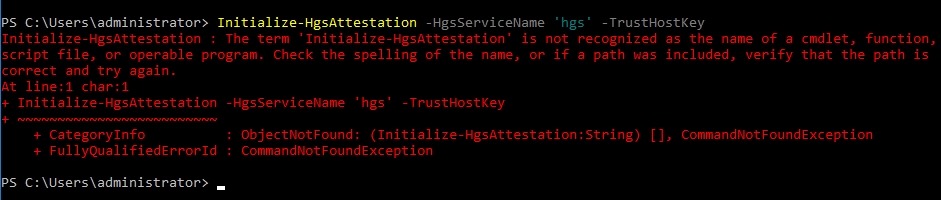
    I was recently doing some work on Always Encrypted in SQL Server 2019 and needed to set up an HGS server. I went through most of the setup, and then encountered this issue:

    2019-04-24 07_52_51-Window

    After embarrassing myself to other MVPs and Microsoft, I realized I hadn’t read the requirements for the secure enclaves. I need 2 machines, but the SQL Server has to run on Windows 10 or Windows 2019 Server – Datacenter Edition.

    Grrr, I had built a machine for this and need to tear it down and restart the process. It’s not that hard, but it’s annoying.

    I should learn to read more carefully.

  • Long Live All Passwords

    I remember the first time I had to create a password for a system. It was an application that a friend and I wrote, and we wanted to separate the ways that we stored data, so we added a login routine to the system. It stored a (plain text) password, but hey, this was 1983. We loaded the password and made a string comparison with the entry by the user.

    Since that time, most organizations I’ve worked in have had password policies in place on the network. These passwords often had expiration dates, with short warnings for users to change their passwords. The requirement to change never seemed to come at a good time, and with the requirement to not reuse one of the last 5 or 10 passwords, this resulted in users often adding a 1, 2, 3, etc. to the same password. As an IT pro, I often tried to get users to choose new passwords, which fell on deaf ears.

    Microsoft is rethinking the idea of passwords expiring. There’s a piece that explains how they feel this requirement is not helping security. This is similar to a piece at SANS that notes the practice is not helpful. Changing passwords has a cost to your organization in extra tickets for a help desk, lost productivity from dealing with expiration, and frustration from users. What’s worse, far too many users just “update” a password with a number or year. Neither of which is effective.

    The current advice is MFA (multi-factor authentication), passphrases, and password managers. Personally I try to use all of these where I can, and choose long passwords. It does seem that many companies are updating apps to allow longer passwords and 2FA. I’d like to see this embedded into more frameworks, making it easier for developers to implement secure authentication systems. That, or use existing systems out there, like oAuth, though there is an argument how secure this is. Even if there are issues, it’s likely better than what most developers would build.

    In SQL Server, we have group Managed Service Accounts (gMSA), which are a good way to avoid password management, and ensure complex passwords. We should disable, and set a complex password for, the sa account. While I wouldn’t advocate changing this regularly, I would have alerts if the account is enabled.

    Like most people, I try to avoid changing passwords unnecessarily, especially these days where I have accounts at dozens (or hundreds) of places. I do, however, ensure that all are different and unrelated. At least then if a password is compromised, I don’t worry about someone logging into a different service I use with the same credentials.

    Steve Jones

    Listen to the podcast at Libsyn